
vuex 的使用
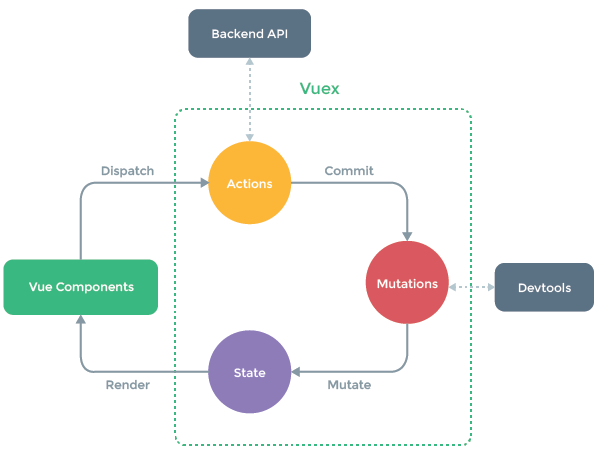
用于多组件共享状态,如果不打算开发大型单页应用,使用 Vuex 可能是繁琐冗余的。确实是如此——如果应用够简单,您最好不要使用 Vuex。可使用简单Bus总线的方式来管理共享的数据详见(http://www.cnblogs.com/fanlinqiang/p/7756566.html)。但是,如果您需要构建是一个中大型单页应用,vuex可以更好地在组件外部管理状态
引入:
src/store/index.js
import Vue from 'vue'

import Vuex from 'vuex'

import createLogger from 'vuex/dist/logger'

Vue.use(Vuex)

const store = new Vuex.Store({

      plugins: [createLogger()],

      state: {

        count: 0,

        todos: [

          { id: 1, text: '...', done: true },

          { id: 2, text: '...', done: false }

        ]

      },

      getters: {

        doneTodos: state => {

          return state.todos.filter(todo => todo.done)

        },

        doneTodosCount: (state, getters) => { //注:Getter 也可以接受其他 getter 作为第二个参数

            return getters.doneTodos.length

        },

        getTodoById: (state) => (id) => { //getter 返回一个函数来实现给 getter 传参

            return state.todos.find(todo => todo.id === id)

        }

      },

      mutations: { //mutation 必须同步执行,为解决这个问题我们引入了action

       increment (state, payload) { //store.commit 传入额外的参数,即 mutation 的 载荷(payload)

             state.count += payload.amount

          }

      },

      actions: {

        //Action 函数接受一个与 store 实例具有相同方法和属性的 context 对象,

        //因此你可以调用 context.commit 提交一个 mutation,或者通过 context.state 和 context.getters 来获取 state 和 getters。

        increment (context) {

          context.commit('increment')

        },

        increment ({ commit }) { //es6解构

            commit('increment')

        },

        incrementAsync ({ commit }) {

            setTimeout(() => {

              commit('increment')

            }, 1000)

        },

        //store.dispatch 可以处理被触发的 action 的处理函数返回的 Promise,并且 store.dispatch 仍旧返回 Promise

        actionA ({ commit }) {

            return new Promise((resolve, reject) => {

              setTimeout(() => {

                commit('someMutation')

                resolve()

              }, 1000)

            })

          },

        actionB ({ dispatch, commit }) {

            return dispatch('actionA').then(() => {

              commit('someOtherMutation')

            })

          }

        // 假设 getData() 和 getOtherData() 返回的是 Promise

        async actionA ({ commit }) {

            commit('gotData', await getData())

          },

        async actionB ({ dispatch, commit }) {

            await dispatch('actionA') // 等待 actionA 完成

            commit('gotOtherData', await getOtherData())

         }

      }

})

export default store
最好提前在你的 store 中初始化好所有所需属性。当需要在对象上添加新属性时,你应该使用 Vue.set(obj, 'newProp', 123), 或者
以新对象替换老对象。例如,利用 stage-3 的对象展开运算符我们可以这样写:
state.obj = { ...state.obj, newProp: 123 }
组件a:
import { mapState, mapActions, mapMutations } from 'vuex'

export default {

    data() {

        return {
      localCount: 2
    }

    },

    methods:{

        getTodoById(id) {

            return  this.$store.getters.getTodoById(id)

        },

        increment(payload){ //payload可以为对象,如:{ amount: 10}

            this.$store.commit('increment', payload)

            //对象风格的提交方式

            //this.$store.commit({type: 'increment',amount: 10})

        },

        ...mapMutations([

            //mutation 都是同步事务,store.commit('increment'), 任何由 "increment" 导致的状态变更都应该在此刻完成。

            //为解决异步问题我们引入action

            'increment', // 将 `this.increment()` 映射为 `this.$store.commit('increment')`

            //add: 'increment' // 将 `this.add()` 映射为 `this.$store.commit('increment')`

            // `mapMutations` 也支持载荷:

            'incrementBy' // 将 `this.incrementBy(amount)` 映射为 `this.$store.commit('incrementBy', amount)`

        ]),

        ...mapActions([

          'increment', // 将 `this.increment()` 映射为 `this.$store.dispatch('increment')`

          //add: 'increment' // 将 `this.add()` 映射为 `this.$store.dispatch('increment')`

          // `mapActions` 也支持载荷:

          'incrementBy' // 将 `this.incrementBy(amount)` 映射为 `this.$store.dispatch('incrementBy', amount)`

        ]),

        actionA() {

            store.dispatch('actionA').then(() => {

              // ...

            })

        }

    },

    computed:{

        //count () {

        //  return this.$store.state.count

        //}

        ...mapState({ // 使用对象展开运算符将此对象混入到外部对象中

            // 箭头函数可使代码更简练

            count: state => state.count,

            // 传字符串参数 'count' 等同于 `state => state.count`

            countAlias: 'count',

            // 为了能够使用 `this` 获取局部状态,必须使用常规函数

            countPlusLocalState (state) {

              return state.count + this.localCount

            }

          }),

        doneTodosCount () {

            return this.$store.state.todos.filter(todo => todo.done).length

          },

        DoneTodos(){

            return this.$store.getters.doneTodos

        },

        getDoneTodosCount () {

            return this.$store.getters.doneTodosCount

        },

        // 使用对象展开运算符将 getter 混入 computed 对象中

        ...mapGetters([

          'doneTodosCount',

            //映射 `this.doneCount` 为 `store.getters.doneTodosCount`

            doneCount: 'doneTodosCount'

        ])

    }

}
main.js
import Vue from 'vue'

import store from './store/'

new Vue({

  store

}).$mount('#app')
使用常量替代 Mutation 事件类型
使用常量替代 mutation 事件类型在各种 Flux 实现中是很常见的模式。这样可以使 linter 之类的工具发挥作用,同时把这些常量放在单独的文件中可以让你的代码合作者对整个 app 包含的 mutation 一目了然:
// mutation-types.js

export const SOME_MUTATION = 'SOME_MUTATION'

// store.js

import Vuex from 'vuex'

import { SOME_MUTATION } from './mutation-types'

const store = new Vuex.Store({

  state: { ... },

  mutations: {

    // 我们可以使用 ES2015 风格的计算属性命名功能来使用一个常量作为函数名

    [SOME_MUTATION] (state) {

      // mutate state

    }

  }

})
Mutation 必须是同步函数
一条重要的原则就是要记住 mutation 必须是同步函数。为什么?请参考下面的例子:
mutations: {

  someMutation (state) {

    api.callAsyncMethod(() => {

      state.count++

    })

  }

}
现在想象,我们正在 debug 一个 app 并且观察 devtool 中的 mutation 日志。每一条 mutation 被记录,devtools 都需要捕捉到前一状态和后一状态的快照。然而,在上面的例子中 mutation 中的异步函数中的回调让这不可能完成:因为当 mutation 触发的时候,回调函数还没有被调用,devtools 不知道什么时候回调函数实际上被调用——实质上任何在回调函数中进行的的状态的改变都是不可追踪的。
Vuex 并不限制你的代码结构。但是,它规定了一些需要遵守的规则:
应用层级的状态应该集中到单个 store 对象中。
提交 mutation 是更改状态的唯一方法,并且这个过程是同步的。
异步逻辑都应该封装到 action 里面。
只要你遵守以上规则,如何组织代码随你便。如果你的 store 文件太大,只需将 action、mutation 和 getter 分割到单独的文件。
对于大型应用,我们会希望把 Vuex 相关代码分割到模块中。下面是项目结构示例:
├── index.html

├── main.js

├── api

│   └── ... # 抽取出API请求

├── components

│   ├── App.vue

│   └── ...

└── store

    ├── index.js          # 我们组装模块并导出 store 的地方

    ├── actions.js        # 根级别的 action

    ├── mutations.js      # 根级别的 mutation

    └── modules

        ├── cart.js       # 购物车模块

        └── products.js   # 产品模块
modules:
const moduleA = {

  state: { ... },

  mutations: { ... },

  actions: { ... },

  getters: { ... }

}

const moduleB = {

  state: { ... },

  mutations: { ... },

  actions: { ... }

}

const store = new Vuex.Store({

  modules: {

    a: moduleA,

    b: moduleB

  }

})

store.state.a // -> moduleA 的状态

store.state.b // -> moduleB 的状态
为什么使用getters来访问数据?
访问state中数据直接使用this.$store.state.elements是可以的,但根据业务的需求往往还要做一些业务上的处理,如:state中goods存放的是用户购买的清单,但此时我们只需要商品的数量,我们不需要拿到所有的物品清单,此时我们就可以在获得state的过程中在加上一层逻辑,也就是getters来获得物品数量
vuex存取的数据,在刷新页面时丢失?
将数据存入cookie,webstorage,当刷新页面时判断是否有数据,没有再去取
vuex 的使用的更多相关文章
- 关于Vue.js 2.0 的 Vuex 2.0,你需要更新的知识库
应用结构 实际上,Vuex 在怎么组织你的代码结构上面没有任何限制,相反,它强制规定了一系列高级的原则: 应用级的状态集中放在 store 中. 改变状态的唯一方式是提交mutations,这是个同步 ...
- vuex复习方案
这次复习vuex,发现官方vuex2.0的文档写得太简略了,有些看不懂了.然后看了看1.0的文档,感觉很不错.那以后需要复习的话,还是先看1.0的文档吧.
- vuex 初体验
vuex是vue的状态管理工具,vue进阶从es6和npm开始,es6推荐阮一峰大神的教程. vuex学习从官方文档和一个记忆小游戏开始.本着兴趣为先的原则,我先去试玩了一把-->. Vuex ...
- vuex(1.0版本写法)
Vuex 是一个专门为 Vue.js 应用所设计的集中式状态管理架构. 官方文档:http://vuex.vuejs.org/zh-cn/ 2.0和1.0都能在此找到 每一个 Vuex 应用的核心就 ...
- 关于Vue vuex vux 文档
01. vue 链接 http://vuejs.org.cn/guide/ 02. vuex ----->>状态管理模块儿<<------- https://vuex.vue ...
- vuex
英文:(Introduction)中文:https://github.com/vuejs/vuex/issues/176(贡献者努力中)
- Vue 2.0 + Vue Router + Vuex
用 Vue.js 2.x 与相配套的 Vue Router.Vuex 搭建了一个最基本的后台管理系统的骨架. 当然先要安装 node.js(包括了 npm).vue-cli 项目结构如图所示: ass ...
- Vue2.X的状态管理vuex记录
记住上述的顺序情况:想要改变state,只能通过Mutation,虽然action可以直接改变state,这样会使每个状态可以方便的跟踪和记录(用Devtools跟踪) vue Method -- ...
- 在vue1.0遇到vuex和v-model的坑
事情是这样的,在开发项目的过程中我使用了vuex并且在store中定义了一个保存用户信息的对象 userInfo : { 'nickName' : '', // 昵称 'password' :'', ...
- vuex 笔记
Vuex 笔记 一个简单的状态管理 单一数据源: const sourceOfTruth = {} const vmA = new Vue({ data: sourceOfTruth }) const ...
随机推荐
- CSS文字过多显示省略号
CSS文字过多显示省略号 /*-webkit-line-clamp用来限制在一个块元素显示的文本的行数*/ .dot1{ width: 100%; display: -webkit-box; -web ...
- iOS程序执行顺序 AppDelegate及 UIViewController 的生命周期
iOS程序的启动执行顺序 AppDelegate 及 UIViewController 的生命周期 iOS应用程序的状态切换很重要,而UIViewControler对于iOS这种MVC模式来说尤为重要 ...
- [代码]--WinForm 窗体之间相互嵌套
public FrmScan() { InitializeComponent(); Form1 frm = new Form1(); frm.Dock = DockStyle.Fill; frm.Fo ...
- 2017-12 CDQZ集训(已完结)
从联赛活了下来(虽然分数倒一……),接下来要去CDQZ集训啦…… DAY -2 2017-12-16 被老师安排负责一部分同学的住宿以及安排…… 抓紧时间继续学习,LCT真好玩啊真好玩…… 晚上放假了 ...
- 【刷题】LOJ 6011 「网络流 24 题」运输问题
题目描述 W 公司有 \(m\) 个仓库和 \(n\) 个零售商店.第 \(i\) 个仓库有 \(a_i\) 个单位的货物:第 \(j\) 个零售商店需要 \(b_j\) 个单位的货物.货物供需平衡, ...
- 【题解】 [SCOI2011]糖果 (差分约束)
懒得复制,戳我戳我 Solution: 首先考虑\(X=1\)的情况,我们其实只用用一下并查集把相等的点合为一个点 然后后面的四个式子我们就可以用差分约束了,就拿\(X=2\)的情况来说吧,我们用\( ...
- 论如何优雅的用bitset来求四维偏序
四维偏序.. 就是给你一个四维集合.再给你一些询问,请你求出a[i].x1<=ask.x1&&a[i].x2<=ask.x2&&a[i].x3<=as ...
- C# 分析 IIS 日志(Log)
由于最近又要对 IIS日志 (Log) 分析,以便得出各个搜索引擎每日抓取的频率,所以这两天一直在尝试各个办法来分析 IIS 日志 (Log),其中尝试过:导入数据库.Log parser.Powse ...
- 20145215《网络对抗》shellcode注入&Return-to-libc攻击深入
20145215<网络对抗>shellcode注入&Return-to-libc攻击深入 Shellcode注入 基础知识 Shellcode实际是一段代码,但却作为数据发送给受攻 ...
- zabbix agent安装(三)
转载于https://mp.weixin.qq.com/s/33ab-JLoRfMkeI4aZDciJQ 前一篇文章介绍了zabbix server安装,这篇文章主要讲解zabbix agent安装以 ...