
elasticSearch6源码分析(8)RepositoriesModule模块
1.RepositoriesModule概述
Sets up classes for Snapshot/Restore
1.1 snapshot概述
A snapshot is a backup taken from a running Elasticsearch cluster. You can take a snapshot of individual indices or of the entire cluster and store it in a repository on a shared filesystem, and there are plugins that support remote repositories on S3, HDFS, Azure, Google Cloud Storage and more.

Snapshots are taken incrementally. This means that when creating a snapshot of an index Elasticsearch will avoid copying any data that is already stored in the repository as part of an earlier snapshot of the same index. Therefore it can be efficient to take snapshots of your cluster quite frequently.

Snapshots can be restored into a running cluster via the restore API. When restoring an index it is possible to alter the name of the restored index as well as some of its settings, allowing a great deal of flexibility in how the snapshot and restore functionality can be used.
1.2 repository
You must register a snapshot repository before you can perform snapshot and restore operations. We recommend creating a new snapshot repository for each major version. The valid repository settings depend on the repository type.

If you register same snapshot repository with multiple clusters, only one cluster should have write access to the repository. All other clusters connected to that repository should set the repository to readonly mode.
实例:备份
PUT /_snapshot/my_backup

{

  "type": "fs",

  "settings": {

    "location": "my_backup_location"

  }

}
恢复
POST /_snapshot/my_backup/snapshot_1/_restore
删除
DELETE /_snapshot/my_backup/snapshot_1
监控
GET /_snapshot/my_backup/snapshot_1/_status
2.配置类BlobStoreRepository
    protected BlobStoreRepository(RepositoryMetaData metadata, Settings globalSettings, NamedXContentRegistry namedXContentRegistry) {

        super(globalSettings);

        this.metadata = metadata;

        this.namedXContentRegistry = namedXContentRegistry;

        snapshotRateLimiter = getRateLimiter(metadata.settings(), "max_snapshot_bytes_per_sec", new ByteSizeValue(40, ByteSizeUnit.MB));

        restoreRateLimiter = getRateLimiter(metadata.settings(), "max_restore_bytes_per_sec", new ByteSizeValue(40, ByteSizeUnit.MB));

        readOnly = metadata.settings().getAsBoolean("readonly", false);

        indexShardSnapshotFormat = new ChecksumBlobStoreFormat<>(SNAPSHOT_CODEC, SNAPSHOT_NAME_FORMAT,

            BlobStoreIndexShardSnapshot::fromXContent, namedXContentRegistry, isCompress());

        indexShardSnapshotsFormat = new ChecksumBlobStoreFormat<>(SNAPSHOT_INDEX_CODEC, SNAPSHOT_INDEX_NAME_FORMAT,

            BlobStoreIndexShardSnapshots::fromXContent, namedXContentRegistry, isCompress());

        ByteSizeValue chunkSize = chunkSize();

        if (chunkSize != null && chunkSize.getBytes() <= 0) {

            throw new IllegalArgumentException("the chunk size cannot be negative: [" + chunkSize + "]");

        }

    }
配置类的实现
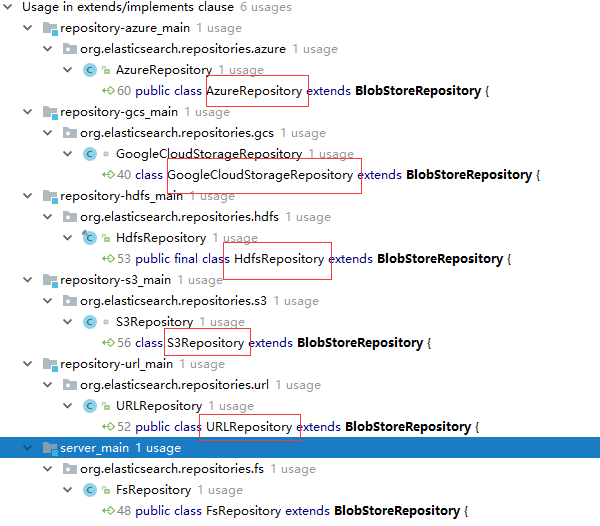
3.重点类
3.1 SnapshotsService
创建snapshot
/**

 * Service responsible for creating snapshots

 * <p>

 * A typical snapshot creating process looks like this:

 * <ul>

 * <li>On the master node the {@link #createSnapshot(SnapshotRequest, CreateSnapshotListener)} is called and makes sure that no snapshots is currently running

 * and registers the new snapshot in cluster state</li>

 * <li>When cluster state is updated the {@link #beginSnapshot(ClusterState, SnapshotsInProgress.Entry, boolean, CreateSnapshotListener)} method

 * kicks in and initializes the snapshot in the repository and then populates list of shards that needs to be snapshotted in cluster state</li>

 * <li>Each data node is watching for these shards and when new shards scheduled for snapshotting appear in the cluster state, data nodes

 * start processing them through {@link SnapshotShardsService#processIndexShardSnapshots(ClusterChangedEvent)} method</li>

 * <li>Once shard snapshot is created data node updates state of the shard in the cluster state using the {@link SnapshotShardsService#sendSnapshotShardUpdate(Snapshot, ShardId, ShardSnapshotStatus)} method</li>

 * <li>When last shard is completed master node in {@link SnapshotShardsService#innerUpdateSnapshotState} method marks the snapshot as completed</li>

 * <li>After cluster state is updated, the {@link #endSnapshot(SnapshotsInProgress.Entry)} finalizes snapshot in the repository,

 * notifies all {@link #snapshotCompletionListeners} that snapshot is completed, and finally calls {@link #removeSnapshotFromClusterState(Snapshot, SnapshotInfo, Exception)} to remove snapshot from cluster state</li>

 * </ul>

 */
3.2 RestoreService
/**

 * Service responsible for restoring snapshots

 * <p>

 * Restore operation is performed in several stages.

 * <p>

 * First {@link #restoreSnapshot(RestoreRequest, org.elasticsearch.action.ActionListener)}

 * method reads information about snapshot and metadata from repository. In update cluster state task it checks restore

 * preconditions, restores global state if needed, creates {@link RestoreInProgress} record with list of shards that needs

 * to be restored and adds this shard to the routing table using {@link RoutingTable.Builder#addAsRestore(IndexMetaData, SnapshotRecoverySource)}

 * method.

 * <p>

 * Individual shards are getting restored as part of normal recovery process in

 * {@link IndexShard#restoreFromRepository(Repository)} )}

 * method, which detects that shard should be restored from snapshot rather than recovered from gateway by looking

 * at the {@link ShardRouting#recoverySource()} property.

 * <p>

 * At the end of the successful restore process {@code RestoreService} calls {@link #cleanupRestoreState(ClusterChangedEvent)},

 * which removes {@link RestoreInProgress} when all shards are completed. In case of

 * restore failure a normal recovery fail-over process kicks in.

 */
elasticSearch6源码分析(8)RepositoriesModule模块的更多相关文章
- elasticSearch6源码分析(5)gateway模块
1.gateway概述 The local gateway module stores the cluster state and shard data across full cluster res ...
- elasticSearch6源码分析(4)indices模块
1.indices概述 The indices module controls index-related settings that are globally managed for all ind ...
- elasticSearch6源码分析(3)cluster模块
1. cluser概述 One of the main roles of the master is to decide which shards to allocate to which nodes ...
- 【转】Spark源码分析之-deploy模块
原文地址:http://jerryshao.me/architecture/2013/04/30/Spark%E6%BA%90%E7%A0%81%E5%88%86%E6%9E%90%E4%B9%8B- ...
- ADB 源码分析(一) ——ADB模块简述【转】
ADB源码分析(一)——ADB模块简述 1.Adb 源码路径(system/core/adb). 2.要想很快的了解一个模块的基本情况,最直接的就是查看该模块的Android.mk文件,下面就来看看a ...
- 使用react全家桶制作博客后台管理系统 网站PWA升级 移动端常见问题处理 循序渐进学.Net Core Web Api开发系列【4】:前端访问WebApi [Abp 源码分析]四、模块配置 [Abp 源码分析]三、依赖注入
使用react全家桶制作博客后台管理系统 前面的话 笔者在做一个完整的博客上线项目,包括前台.后台.后端接口和服务器配置.本文将详细介绍使用react全家桶制作的博客后台管理系统 概述 该项目是基 ...
- elasticsearch源码分析之search模块(server端)
elasticsearch源码分析之search模块(server端) 继续接着上一篇的来说啊,当client端将search的请求发送到某一个node之后,剩下的事情就是server端来处理了,具体 ...
- elasticsearch源码分析之search模块(client端)
elasticsearch源码分析之search模块(client端) 注意,我这里所说的都是通过rest api来做的搜索,所以对于接收到请求的节点,我姑且将之称之为client端,其主要的功能我们 ...
- (一) Mybatis源码分析-解析器模块
Mybatis源码分析-解析器模块 原创-转载请说明出处 1. 解析器模块的作用 对XPath进行封装,为mybatis-config.xml配置文件以及映射文件提供支持 为处理动态 SQL 语句中的 ...
随机推荐
- ACE Editor在线代码编辑器简介及使用引导
转自博客:https://www.cnblogs.com/cz-xjw/p/6476179.html ACE 是一个开源的.独立的.基于浏览器的代码编辑器,可以嵌入到任何web页面或JavaScrip ...
- UITableView横向滚动
UITableView 设置 CGRect tableViewRect = CGRectMake(0.0, 0.0, 50.0, 320.0); self.tableView = [[UITableV ...
- BAE上部署Ghost 0.5.1注意事项
BAE上部署Ghost可参考基本安装上述安装使用的是ghost0.4.7版本 在ghost 0.5 中为了解决测试时事件侦听器过多引发的警告,在注册single事件时,将代码由原先的 process. ...
- 用一个应用场景理解ASP.NET Core Identity是什么?
目录 前言 基于声明的认证(Claims-based Authentication) 应用场景一 在ASP.NET Core 中Identity是如何实现的 类ClaimsPrincipal 考察另外 ...
- owa2013配置HTTPS
- 【转】PowerDesigner快捷键
一般快捷键 快捷键 说明 F4 打开检查模型窗口,检查模型 F5 如果图窗口内的图改变过大小,恢复为原有大小即正常大小 F6 放大图窗口内的图 F7 缩小图窗口内的图 F8 在图窗口内中查看全部图内容 ...
- Lerning Entity Framework 6 ------ Using a commandInterceptor
Sometimes, We want to check the original sql statements. creating a commandInterceptor is a good way ...
- 【BZOJ3709】 [PA2014]Bohater(贪心)
传送门 BZOJ Solution 考虑如果可以回血肯定要打,那么就是按照伤害值从小到大排个序能打就打,不能打就\(NIE\). 接着看不能够回血的,emmm,把这个过程反着看一下就是打一个怪扣\(a ...
- Python大黑阔—url采集+exp验证,带你批量测试
i春秋作家:大木瓜 前言: 最近几天在整理从各处收集来的各种工具包,大大小小的塞满了十几个G的硬盘,无意间发现了一个好几年前的0day.心血来潮就拿去试了一下,没想到真的还可以用,不过那些站点都已经老 ...
- [Element-UI] 使用Element-UI的DateTimePicker组件报错:Cannot read property 'getHours' of undefined
使用Element-UI组件的DateTimePicker,如下: <template> <div class="block"> <span clas ...