
Android 前台服务
Android 前台服务
学习自
https://blog.csdn.net/guolin_blog/article/details/11952435#t3
前台服务漫谈
我们之前学习的Service都是运行与后台的,自然相对优先级会比较低一点,当内存不足的时候很容易被杀死。但是谁又希望自家的Service被杀死呢。那自然是想办法将自家的服务的优先级提高了,如果提高Service的优先级那当然是用---前台服务,也就是我们本章的主题。
常见的前台服务
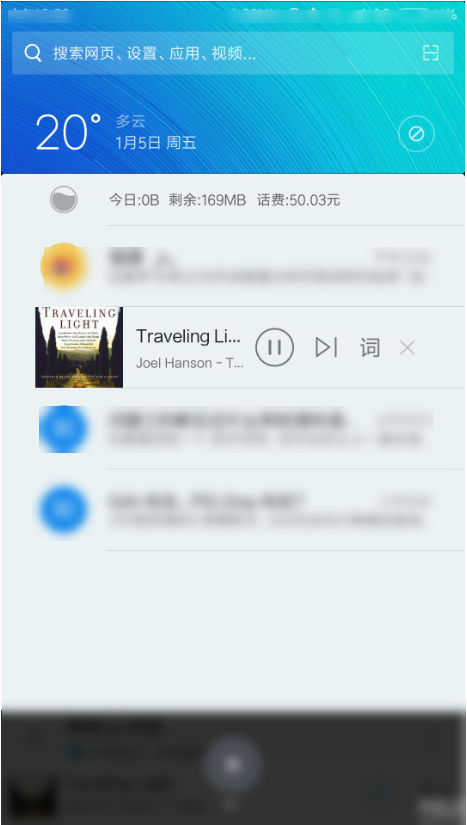
各种音乐播放APP中的前台服务是最常见的了,比如我最喜欢的网易云音乐,在播放音乐的时候,在通知栏都会,存在一个类似通知的视图,这其实就是一个前台Service,也是Service+RemoteView+Notification的结合体。网易云音乐通过前台服务不仅可以保证Service的运行,还实时地显式了音乐的播放信息,并且也非常方便我们来切换音乐。
因为手头没有手机,图片来源于网络。
实现前台服务
前台服务的布局
<?xml version="1.0" encoding="utf-8"?>

<RelativeLayout xmlns:android="http://schemas.android.com/apk/res/android"

    android:layout_width="match_parent"

    android:layout_height="100dp">

    <ImageView

        android:id="@+id/posterIV"

        android:layout_width="wrap_content"

        android:layout_height="match_parent"

        android:src="@mipmap/ic_launcher" />

    <TextView

        android:id="@+id/singNameTV"

        android:layout_width="wrap_content"

        android:layout_height="wrap_content"

        android:layout_marginLeft="8dp"

        android:layout_marginTop="10dp"

        android:layout_toRightOf="@id/posterIV"

        android:text="Sing Name"

        android:textColor="#2b2b2b"

        android:textSize="18sp" />

    <TextView

        android:id="@+id/singerNameTV"

        android:layout_width="wrap_content"

        android:layout_height="wrap_content"

        android:layout_below="@id/singNameTV"

        android:layout_marginLeft="8dp"

        android:layout_marginTop="3dp"

        android:layout_toRightOf="@id/posterIV"

        android:text="Sing Name"

        android:textColor="#2b2b2b"

        android:textSize="12sp" />

    <ImageView

        android:id="@+id/previousIV"

        android:layout_width="20dp"

        android:layout_height="20dp"

        android:layout_below="@id/singerNameTV"

        android:layout_marginLeft="8dp"

        android:layout_marginTop="5dp"

        android:layout_toRightOf="@id/posterIV"

        android:src="@drawable/previous" />

    <ImageView

        android:id="@+id/pauseIV"

        android:layout_width="20dp"

        android:layout_height="20dp"

        android:layout_below="@id/singerNameTV"

        android:layout_marginLeft="8dp"

        android:layout_marginTop="5dp"

        android:layout_toRightOf="@id/previousIV"

        android:src="@drawable/pause" />

    <ImageView

        android:id="@+id/nextIV"

        android:layout_width="20dp"

        android:layout_height="20dp"

        android:layout_below="@id/singerNameTV"

        android:layout_marginLeft="8dp"

        android:layout_marginTop="5dp"

        android:layout_toRightOf="@id/pauseIV"

        android:src="@drawable/next" />

</RelativeLayout>
Service
class MusicService : Service() {

    override fun onBind(intent: Intent?): IBinder {

        TODO("not implemented") //To change body of created functions use File | Settings | File Templates.

    }

    override fun onCreate() {

        super.onCreate()

        val remoteViews = RemoteViews(this.packageName, R.layout.music_remote)

        remoteViews.setOnClickPendingIntent(R.id.previousIV, createIntent("top.littledavid.studyservice.PREVIOUS"))

        remoteViews.setOnClickPendingIntent(R.id.pauseIV, createIntent("top.littledavid.studyservice.PAUSE"))

        remoteViews.setOnClickPendingIntent(R.id.nextIV, createIntent("top.littledavid.studyservice.NEXT"))

        val notification = Notification.Builder(this).apply {

            setSmallIcon(R.mipmap.ic_launcher)

            setCustomContentView(remoteViews)

        }.build()

        //开启前台服务

        startForeground(1, notification)

    }

    override fun onStartCommand(intent: Intent?, flags: Int, startId: Int): Int {

        when (intent!!.action) {

            "top.littledavid.studyservice.PREVIOUS" -> "Previous".logE()

            "top.littledavid.studyservice.PAUSE" -> "PAUSE".logE()

            "top.littledavid.studyservice.NEXT" -> "NEXT".logE()

            "top.littledavid.studyservice.START" -> "Start playing music".logE()

            else -> "UNKOW Operation".logE()

        }

        return super.onStartCommand(intent, flags, startId)

    }

    override fun onDestroy() {

        super.onDestroy()

    }

    private fun createIntent(action: String): PendingIntent {

        val intent = Intent(this, MusicService::class.java)

        intent.action = action

        return PendingIntent.getService(this, 0, intent, 0)

    }

}
Manifest文件中配置服务
<service android:name=".MusicService">

    <intent-filter>

        <action android:name="top.littledavid.studyservice.PREVIOUS" />

        <action android:name="top.littledavid.studyservice.PAUSE" />

        <action android:name="top.littledavid.studyservice.NEXT" />

        <action android:name="top.littledavid.studyservice.START" />

    </intent-filter>

</service>
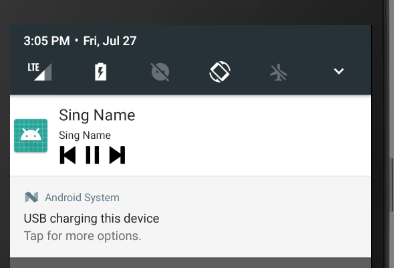
效果如下
Android 前台服务的更多相关文章
- android 前台服务不显示通知
原因可以在哪里写了执行完成后就自动结束的吧 导致前台服务没有出现 如我 @Override public int onStartCommand(Intent intent, int flags, in ...
- Android开发之如何保证Service不被杀掉(前台服务)
序言 最近项目要实现这样一个效果:运行后,要有一个service始终保持在后台运行,不管用户作出什么操作,都要保证service不被kill.参考了现今各种定制版的系统和安全厂商牛虻软件,如何能保证自 ...
- Android Foreground Service (前台服务)
一.如何保活后台服务 在Android Services (后台服务) 里面,我们了解了Android四大组件之一的Service,知道如何使用后台服务进行来完成一些特定的任务.但是后台服务在系统内存 ...
- Android通知栏前台服务
一.前台服务的简单介绍 前台服务是那些被认为用户知道且在系统内存不足的时候不允许系统杀死的服务.前台服务必须给状态栏提供一个通知,它被放到正在运行(Ongoing)标题之下--这就意味着通知只有在这个 ...
- android: 使用前台服务
9.5.1 使用前台服务 服务几乎都是在后台运行的,一直以来它都是默默地做着辛苦的工作.但是服务的系统 优先级还是比较低的,当系统出现内存不足的情况时,就有可能会回收掉正在后台运行的服 务.如果 ...
- 服务 IntentService 前台服务 定时后台服务
Activity public class MainActivity extends ListActivity { private int intentNumber = 0; @Ove ...
- [Android] Service服务详解以及如何使service服务不被杀死
排版上的细节有些不好看,主要是我用的MarkDown编辑器预览和这里的不一样,在那个上面的样式很舒服.这里要改的地方太多就不想改了,将就看吧.下次写的时候注意.还有看到错误给我提啊. 本文链接:htt ...
- 适配 通知 Notification 通知渠道 前台服务 MD
Markdown版本笔记 我的GitHub首页 我的博客 我的微信 我的邮箱 MyAndroidBlogs baiqiantao baiqiantao bqt20094 baiqiantao@sina ...
- 3D语音天气球(源码分享)——在Unity中使用Android语音服务
转载请注明本文出自大苞米的博客(http://blog.csdn.net/a396901990),谢谢支持! 开篇废话: 这个项目准备分四部分介绍: 一:创建可旋转的"3D球":3 ...
随机推荐
- TensorFlow分布式实践
大数据时代,基于单机的建模很难满足企业不断增长的数据量级的需求,开发者需要使用分布式的开发方式,在集群上进行建模.而单机和分布式的开发代码有一定的区别,本文就将为开发者们介绍,基于TensorFlow ...
- sql语句解析顺序和执行顺序
sql语句执行顺序1.from子句组装来自不同数据源的数据2.where子句基于指定的条件对记录行进行筛选3.group by子句将数据划分为多个分组4.使用聚集函数进行计算5.使用having子句筛 ...
- bzoj千题计划180:bzoj4411: [Usaco2016 Feb]Load balancing
http://www.lydsy.com/JudgeOnline/problem.php?id=4411 用树状数组维护扫描线 一个树状数组维护扫描线之上的y<=i点,另一个维护扫描线之下y&l ...
- Codeforces Round #477 (rated, Div. 2, based on VK Cup 2018 Round 3) F 构造
http://codeforces.com/contest/967/problem/F 题目大意: 有n个点,n*(n-1)/2条边的无向图,其中有m条路目前开启(即能走),剩下的都是关闭状态 定义: ...
- 【学习笔记】Spring AOP注解使用总结
Spring AOP基本概念 是一种动态编译期增强性AOP的实现 与IOC进行整合,不是全面的切面框架 与动态代理相辅相成 有两种实现:基于jdk动态代理.cglib Spring AOP与Aspec ...
- Mac安装WineHQ
下载: (链接: https://pan.baidu.com/s/1o7NPhNk 密码: 5227) 安装: 先决条件: XQuartz>=2.7.7 系统设置允许未签名的包. 在https: ...
- [转载]ASP.NET Error – Adding the specified count to the semaphore would cause it to exceed its maximum count
http://jwcooney.com/2012/08/13/asp-net-error-adding-the-specified-count-to-the-semaphore-would-cause ...
- es6笔记(6) Iterator 和 for...of循环
概要 js中的数组.对象,加上ES6中增加的Map.Set四种数据集合. Iterator提供了一种机制,为各种不同的数据结构提供统一的访问机制.任何数据结构只要部署Iterator接口,就可以完成遍 ...
- Android利用LocalSocket实现Java端进程与C端进程之间的IPC
Android是建立在Linux之上的OS,在涉及到安全.网络协议.文件加密等功能时,往往需要通过C语言调用底层API来实现,而如何发出指令让C端执行我们想要的功能,并且在执行之后有返回结果呢,这就需 ...
- HDU 2073 无限的路 (模拟)
题目链接 Problem Description 甜甜从小就喜欢画图画,最近他买了一支智能画笔,由于刚刚接触,所以甜甜只会用它来画直线,于是他就在平面直角坐标系中画出如下的图形: 甜甜的好朋友蜜蜜发现 ...