
Zabbix监控Tengine
title: Zabbix监控Tengine
tags: zabbix,nginx,tengine
author: Chinge Yang
date: 2016-12-29
Zabbix监控Tengine
@(学习)[nginx, zabbix, tengine]
Tengine是由淘宝网发起的Web服务器项目。它在Nginx的基础上,针对大访问量网站的需求,添加了很多高级功能和特性。Tengine的性能和稳定性已经在大型的网站如淘宝网,天猫商城等得到了很好的检验。现在作为一个开源项目,也越来越多的人使用它代替nginx。
1.添加Tengine配置
tengine配置文件添加如下server
    server {

        listen       80 ;

        server_name  127.0.0.1 ;

        location /nginx-status {

                stub_status on;

                allow 127.0.0.1;

                deny all;

                access_log off;

        }

        location /check-status {

                check_status;

                allow 127.0.0.1;

                deny all;

                access_log off;

        }

    }
重载Tengine后,本机查看结果:
# curl 127.0.0.1/nginx-status
Active connections: 1
server accepts handled requests
1805146 1805146 1805167
Reading: 0 Writing: 1 Waiting: 0
以上为正常显示结果。
2.添加nginx监控源脚本
cat /usr/local/zabbix/shell/nginx_status.sh
#!/bin/bash

HOST="127.0.0.1"

PORT="80"

# Functions to return nginx stats

function active {

    /usr/bin/curl "http://$HOST:$PORT/nginx-status" 2>/dev/null| grep 'Active' | awk '{print $NF}'

    }

function reading {

    /usr/bin/curl "http://$HOST:$PORT/nginx-status" 2>/dev/null| grep 'Reading' | awk '{print $2}'

    }

function writing {

    /usr/bin/curl "http://$HOST:$PORT/nginx-status" 2>/dev/null| grep 'Writing' | awk '{print $4}'

    }

function waiting {

    /usr/bin/curl "http://$HOST:$PORT/nginx-status" 2>/dev/null| grep 'Waiting' | awk '{print $6}'

    }

function accepts {

    /usr/bin/curl "http://$HOST:$PORT/nginx-status" 2>/dev/null| awk NR==3 | awk '{print $1}'

    }

function handled {

    /usr/bin/curl "http://$HOST:$PORT/nginx-status" 2>/dev/null| awk NR==3 | awk '{print $2}'

    }

function requests {

    /usr/bin/curl "http://$HOST:$PORT/nginx-status" 2>/dev/null| awk NR==3 | awk '{print $3}'

    }

# Run the requested function

$1
3.编辑zabbix agentd配置文件
修改如下:
vim /usr/local/zabbix/etc/zabbix_agentd.conf
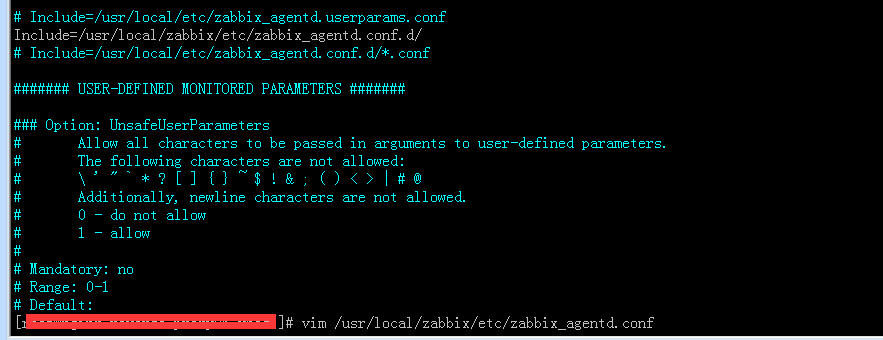
添加zabbix自定义key,重启zabbix agentd
vim /usr/local/zabbix/etc/zabbix_agentd.conf.d/nginx_status_key
#nginx_status_key

UserParameter=nginx.accepts,/usr/local/zabbix/shell/nginx_status.sh accepts

UserParameter=nginx.handled,/usr/local/zabbix/shell/nginx_status.sh handled

UserParameter=nginx.requests,/usr/local/zabbix/shell/nginx_status.sh requests

UserParameter=nginx.connections.active,/usr/local/zabbix/shell/nginx_status.sh active

UserParameter=nginx.connections.reading,/usr/local/zabbix/shell/nginx_status.sh reading

UserParameter=nginx.connections.writing,/usr/local/zabbix/shell/nginx_status.sh writing

UserParameter=nginx.connections.waiting,/usr/local/zabbix/shell/nginx_status.sh waiting
从zabbix server端获取监控数据,结果如下为正常:

4.导入zabbix监控Tengine模板

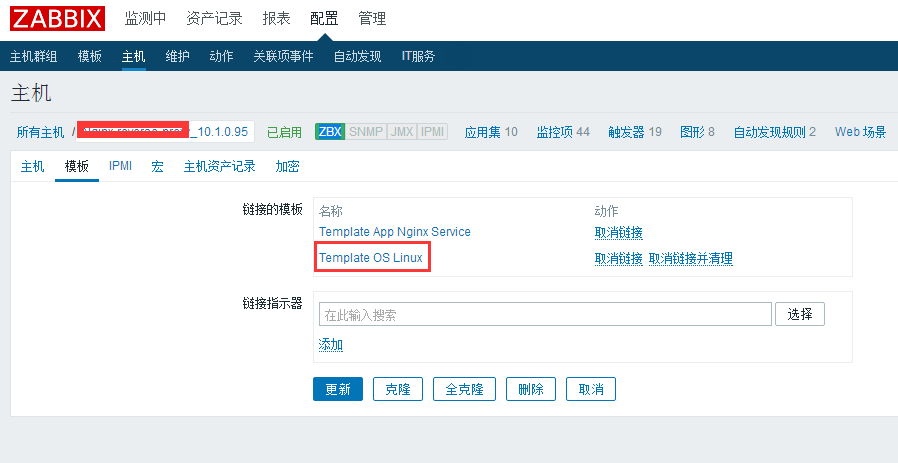
5.Zabbix主机链接模板
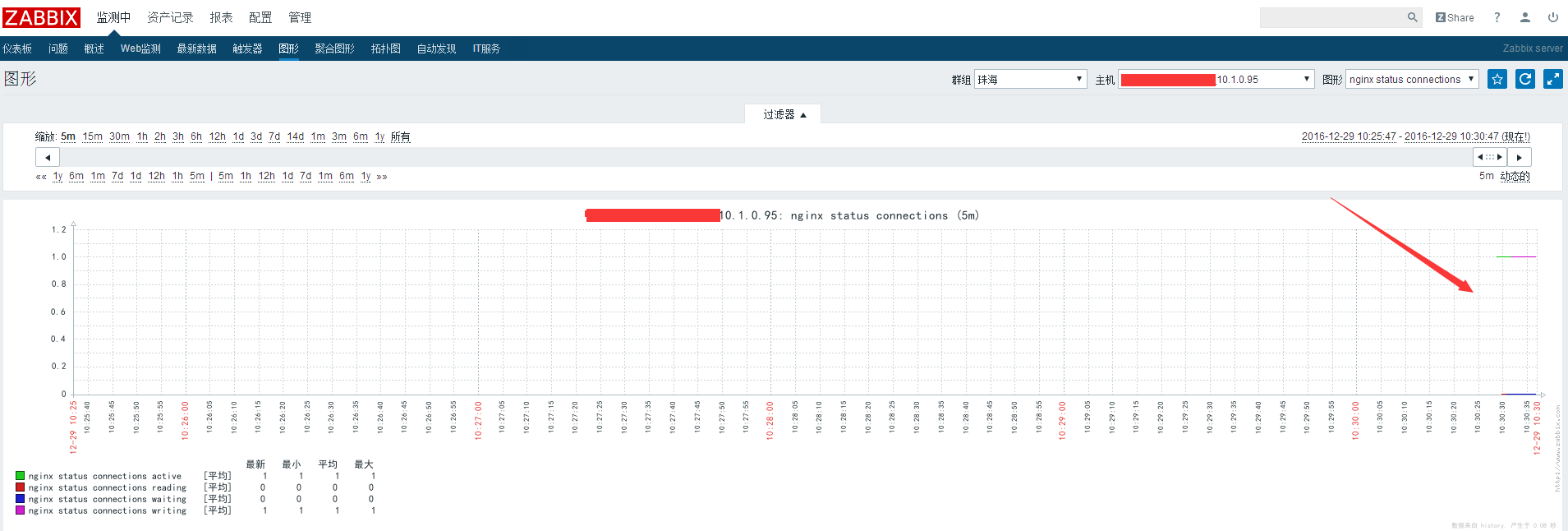
6.监控成功
总结
从上文看到,Zabbix添加自定义监控数据,需要做到:
Zabbix agentd添加自定义key;
自定义key调用的是获取监控数据源脚本等;
添加Zabbix主机数据源模板,主机链接模板。
Zabbix监控Tengine的更多相关文章
- Tengine zabbix 监控
Tengine 配置 在http 段下新增以下配置 req_status_zone server_stat "$host" 3M; server { listen 9008; lo ...
- 使用Zabbix监控Oracle数据库
Orabbix介绍 监控Oracle数据库我们需要安装第三方提供的Zabbix插件,我们先测试比较有名的Orabbix,http://www.smartmarmot.com/product/orabb ...
- Zabbix监控nginx-rtmp status(json版)
与前面的文章 zabbix监控nginx-rtmp status(html版)区别只在于取值的页面不一样 http://127.0.0.1:81/control/get/all_streams sta ...
- Zabbix监控mysql performance
介绍 zabbix监控mysql性能,使用zabbix自带的mysql监控模板,可以监控以下内容OPS(增删改查).mysql慢查询数量.mysql请求\响应流量带宽 配置 新建mysql监控用户 G ...
- zabbix监控Java 8080端口
linux下端口和服务是对应的,Java进程启动时默认监听8080端口,如果服务挂掉则8080端口就没有了. lsof -i:8080 端口,如果没有任何的输出,说明该端口不在工作. 想在zabbix ...
- zabbix监控报错zabbix server is not running解决方法
问题描述: 布置好zabbix监控,正常运行.但是重启了虚拟机服务器之后,页面出现如下的报错,而且设置的报信息也是失效的:
- zabbix 监控web网站性能
一直在纠结用什么实例来给大家演示呢?想来想去还是官方的好,那我们怎么用zabbix监控web性能和可用性呢?我们这边分为几个步骤:打开网站.登陆.登陆验证.退出,一共4个小step,看实例. 检测流程 ...
- Zabbix监控disk performance
概述 zabbix获取/sys里面的磁盘信息并分析来监控disk performance sysfs是Linux内核中设计较新的一种虚拟的基于内存的文件系统,它的作用与 proc 有些类似(默认挂载在 ...
- Zabbix监控mysql主从复制状态
原理 mysql slave show slave status\G 在输出信息中查看I/O线程和SQL线程的状态值(YES为正常,NO为错误) Slave_IO_Running: Yes Slave ...
随机推荐
- jquery实现tab切换完整代码
代码如下,保存到html文件打开: <!DOCTYPE html PUBLIC "-//W3C//DTD XHTML 1.0 Transitional//EN" " ...
- CSS3橙色的星球绕轨道公转动画
效果:http://hovertree.com/texiao/css3/24/ 效果图: 代码如下: <!DOCTYPE html> <html lang="zh" ...
- 【开源】SoDiaoEditor 可能是目前最好用的开源电子病历编辑器(B/S架构)
此刻我的内心是忐忑的,这个标题给了我很大的压力,虽然很久以前我就在github上搜索一圈了,也没发现有其他更好的开源电子病历编辑器,如各位亲发现有更好的,烦请知会我一声. 该编辑器其实已经憋了很久了, ...
- CSS侧边栏,ng-click定义选中事件
本篇小随笔,记录下侧边栏的写法和ng-click点击选中事件.因为这个工程不让引用jQuery.所以ng-click选中事件用了一个比较笨的方法实现的. 下面是HTML页面 按 Ctrl+C 复制代码 ...
- FTP工具类开发
正所谓工欲善其事必先利其器,熟悉了下一套流程,以此铭记. 1.FTP服务搭建 由于本人使用wondiow系统,所以针对window的童鞋们可以查看.至于windowX这里配置类似,所以不要纠结于win ...
- 《C#微信开发系列(2)-自定义菜单管理》
2.0自定义菜单管理 ①接口说明 微信服务号聊天窗口下面的菜单项(有的公众号有启用有的则没有),这个可以在编辑模式简单配置,也可以在开发模式代码配置.微信公众平台开发者文档:微信公众号开发平台创建自定 ...
- Tomcat的下载和配置
目录结构: // contents structure [-] 下载Tomcat 配置Tomcat 运行Tomcat 参考文章 下载Tomcat 读者可以到apache官网下载Tomcat.笔者下载的 ...
- 接入统计Crash的工具Crashlytics-ios
1. 注册账户 登录网站 https://get.fabric.io/ 来注册新的账户 2. account confirmed之后就出现相应的设置页面,设置你的team的名称 3. 出现页面提示下载 ...
- jQuery - 全国省市县三级联动
最近有空用jquery做了一个全国省市县的三级联动,在以后或许可以用的到 ,遗憾的是我还没用封装,等有空看能不能封装成一个插件 废话不多说,贴上代码: <!doctype html> &l ...
- 征友记之---前端开发Partner
简单自述下: 本人前端开发者,深圳一公司在职员工,非出自前端科班,乃自学前端已近两年之久. 受前端 ...