
moviepy音视频剪辑:TextClip不支持中文字符以及OSError: magick.exe: unable to read font 仿宋_GB2312.ttf的解决办法
☞ ░ 前往老猿Python博文目录 ░
一、引言
moviepy对中文和多语言环境的支持做得并不好,包括中文文件名以及用于显示文字的TextClip就是典型的中文支持方面存在问题的。对于编解码的问题,可以通过修改解码语句中的编码类型为’asn’或‘cp936’等方式解决,对于文字显示的处理,则稍微麻烦点。
二、使用TextClip对中英文混合内容进行滚动显示
本案例为win7 64位中文操作系统+Python3.72+Moviepy2.0.0dev1环境实现,其他环境老猿没测试过。
2.1、案例代码
将指定混合中英文内容的文本转成TextClip后与一个视频合成后输出,具体代码如下:
if __name__=='__main__':

	#用一位老同学写的短诗的中英文作为TextClip显示内容,由于内容过长需要滚动显示

    inf = """致敬奋战在一线的巾帼女英雄

    你也是孩子的妈妈,

    你也是爸妈的孩子。

    但你说只要穿上白大褂,

    我就是一名医护人员,

    这就是我的职责。

    我看不清你的长相,

    在层层的防护服里,

    都是一颗颗金子般的心。

    “青山一道同云雨,明月何曾是两乡”

    引用自王昌龄的《送柴侍御》,

    为在抗击疫情一线的女性“逆行者”致敬。

    中国加油!武汉加油!

    武汉人民感谢所有白衣天使!

    Pay tribute to the heroine fighting in the front line

            Yao Junfeng, Wuhan University

    You are also the mother of the child,

    You're also a parent's child.

    But you said just put on the white coat,

    I'm a healthcare worker,

    This is my duty.

    I can't see what you look like,

    In layers of protective clothing,

    Every heart is like gold.

    "The green mountains are the same as the clouds and the rain. How could the bright moon be the two villages?"

    It is quoted from Wang Changling's "See  Mr. Chai Off",

    To pay tribute to the female "reverse" in the front line of fighting the epidemic.

    Go China! Come on, Wuhan!

    Wuhan people thank all angels in white!

    """

    clip = VideoFileClip(r"F:\video\WinBasedWorkHard_src.mp4", audio=False).crop(0, 300, 540, 840).subclip(0, 0.05)

    txtclip = TextClip(inf, font='仿宋_GB2312', fontsize=18, color='blue', bg_color='white', transparent=True).set_duration(30).resize((clip.size[0], clip.size[1] * 2)).set_fps(clip.fps).set_start(clip.end)

    w = None

    h = clip.size[1]

    x_speed = x_start = y_start 0

    y_speed = 20

    txtclip = txtclip.fx(vfx.scroll, w, h, x_speed, y_speed, x_start, y_start)  # .set_start(clip.end)

    newclip = CompositeVideoClip([txtclip, clip], bg_color=(255, 255, 255), ismask=False)

    newclip.write_videofile(r"F:\video\WinBasedWorkHard_scroll.mp4", threads=8)
2.2、输出剪辑播放截图

可以看到中文部分一个字符也没有,只有几个标点符号,下面的英文全部正常显示。
2.3、解决办法
找到对应中文字库,将其字库文件拷贝到代码所在目录,将TextClip的参数font不用字体名,而是用字体文件名。
2.3.1、找到字库文件名
通过资源管理器,打开C:\Windows\Fonts目录,可以看到所有字体名和对应文件,截图如下:
可以看到字体’仿宋_GB2312’ 对应字体文件为“仿宋_GB2312.ttf”。
2.3.3、将字库文件拷贝到代码工作目录
2.3.4、修改代码并执行
txtclip = TextClip(inf, font='仿宋_GB2312', fontsize=18, color='blue', bg_color='white', transparent=True).set_duration(30).resize((clip.size[0], clip.size[1] * 2)).set_fps(clip.fps)
这行代码的font参数内容替换为:
txtclip = TextClip(inf, font='仿宋_GB2312.ttf', fontsize=18, color='blue', bg_color='white', transparent=True).set_duration(30).resize((clip.size[0], clip.size[1] * 2)).set_fps(clip.fps)
执行后报错,报错信息信息如下:
Traceback (most recent call last):

  File "C:\Program Files\Python37\lib\site-packages\moviepy\video\VideoClip.py", line 1248, in __init__

    subprocess_call(cmd, logger=None)

  File "C:\Program Files\Python37\lib\site-packages\moviepy\tools.py", line 43, in subprocess_call

    raise IOError(err.decode("utf8"))

OSError: magick.exe: unable to read font `仿宋_GB2312.ttf' @ error/annotate.c/RenderFreetype/1382.

During handling of the above exception, another exception occurred:

Traceback (most recent call last):

  File "F:/study/python/project/moviepyTest/moviepyTest.py", line 64, in <module>

    txtclip = TextClip(inf, font='仿宋_GB2312.ttf', fontsize=18, color='blue', bg_color='white', transparent=True).set_duration(30).resize((clip.size[0], clip.size[1] * 2)).set_fps(clip.fps)

  File "<decorator-gen-85>", line 2, in __init__

  File "C:\Program Files\Python37\lib\site-packages\moviepy\decorators.py", line 89, in wrapper

    return f(*new_a, **new_kw)

  File "C:\Program Files\Python37\lib\site-packages\moviepy\video\VideoClip.py", line 1258, in __init__

    raise IOError(error)

OSError: MoviePy Error: creation of None failed because of the following error:

magick.exe: unable to read font `仿宋_GB2312.ttf' @ error/annotate.c/RenderFreetype/1382.

.

.This error can be due to the fact that ImageMagick is not installed on your computer, or (for Windows users) that you didn't specify the path to the ImageMagick binary. Check the documentation.

Process finished with exit code 1
这是因为字体文件名为中文名导致的,很简单将拷贝过去的字体文件改一下名即可,老猿将其改为:fs_GB2312.ttf,同时代码中font参数也修改为对应文件名即可。最后完整代码如下:
from  moviepy.editor import *

if __name__=='__main__':

    inf = """致敬奋战在一线的巾帼女英雄

    你也是孩子的妈妈,

    你也是爸妈的孩子。

    但你说只要穿上白大褂,

    我就是一名医护人员,

    这就是我的职责。

    我看不清你的长相,

    在层层的防护服里,

    都是一颗颗金子般的心。

    “青山一道同云雨,明月何曾是两乡”

    引用自王昌龄的《送柴侍御》,

    为在抗击疫情一线的女性“逆行者”致敬。

    中国加油!武汉加油!

    武汉人民感谢所有白衣天使!

    Pay tribute to the heroine fighting in the front line

    You are also the mother of the child,

    You're also a parent's child.

    But you said just put on the white coat,

    I'm a healthcare worker,

    This is my duty.

    I can't see what you look like,

    In layers of protective clothing,

    Every heart is like gold.

    "The green mountains are the same as the clouds and the rain. How could the bright moon be the two villages?"

    It is quoted from Wang Changling's "See  Mr. Chai Off",

    To pay tribute to the female "reverse" in the front line of fighting the epidemic.

    Go China! Come on, Wuhan!

    Wuhan people thank all angels in white!

    """

    ret =  TextClip.search('gb','font')

    print(ret)

    clip = VideoFileClip(r"F:\video\WinBasedWorkHard_src.mp4", audio=False).crop(0, 300, 540, 840).subclip(0, 0.5)

    txtclip = TextClip(inf, font='fs_GB2312.ttf', fontsize=18, color='blue', bg_color='white', transparent=True).set_duration(30).resize((clip.size[0], clip.size[1] * 2)).set_fps(clip.fps)

    w = None

    h = clip.size[1]

    x_speed = x_start = y_start = 0

    y_speed = 20

    txtclip = txtclip.fx(vfx.scroll, w, h, x_speed, y_speed, x_start, y_start).set_start(clip.end)

    newclip = CompositeVideoClip([txtclip, clip], bg_color=(255, 255, 255), ismask=False)

    newclip.write_videofile(r"F:\video\WinBasedWorkHard_scroll.mp4", threads=8)
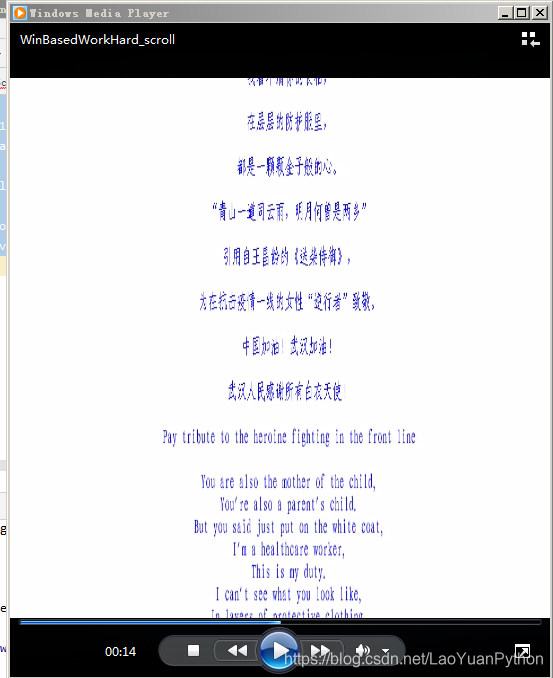
此时再播放文件可以看到中英文都正常显示:
更多moviepy的介绍请参考《PyQt+moviepy音视频剪辑实战文章目录》或《moviepy音视频开发专栏》。
关于收费专栏
老猿的付费专栏《使用PyQt开发图形界面Python应用》专门介绍基于Python的PyQt图形界面开发基础教程,付费专栏《moviepy音视频开发专栏》详细介绍moviepy音视频剪辑合成处理的类相关方法及使用相关方法进行相关剪辑合成场景的处理,两个专栏加起来只需要19.9元,都适合有一定Python基础但无相关专利知识的小白读者学习。这2个收费专栏都有对应免费专栏,只是收费专栏的文章介绍更具体、内容更深入、案例更多。
对于缺乏Python基础的同仁,可以通过老猿的免费专栏《专栏:Python基础教程目录》从零开始学习Python。
如果有兴趣也愿意支持老猿的读者,欢迎购买付费专栏。

跟老猿学Python、学5G!
☞ ░ 前往老猿Python博文目录 ░
moviepy音视频剪辑:TextClip不支持中文字符以及OSError: magick.exe: unable to read font 仿宋_GB2312.ttf的解决办法的更多相关文章
- PyQt+moviepy音视频剪辑实战文章目录
☞ ░ 前往老猿Python博文目录 ░ 本专栏为moviepy音视频剪辑合成相关内容介绍的免费专栏,对应的收费专栏为<moviepy音视频开发专栏>. 一.moviepy基础能力系统介绍 ...
- moviepy音视频剪辑:TextClip.list(font)和search搜索字体报错UnicodeDecodeError:utf-8 codec cannott decode byte 问题
☞ ░ 前往老猿Python博文目录 ░ 在moviepy2.0.0.Dev版本中,执行如下语句: from moviepy.editor import * TextClip.search('gb', ...
- moviepy音视频剪辑:视频基类VideoClip子类DataVideoClip、UpdatedVideoClip、ImageClip、ColorClip、TextClip类详解
☞ ░ 前往老猿Python博文目录 ░ 一.概述 在<moviepy音视频剪辑:moviepy中的剪辑相关类及关系>介绍了剪辑相关类及关系,其中VideoClip有多个直接子类和间接子类 ...
- moviepy音视频剪辑:headblur的参数r_blur卷积核以及fx、fy、r_zone的功能作用及用途
☞ ░ 前往老猿Python博文目录 ░ 在moviepy1.03版本中,headblur的调用语法为:headblurbak(clip,fx,fy,r_zone,r_blur=None) 其中参数f ...
- moviepy音视频剪辑:视频基类VideoClip子类VideoFileClip、CompositeVideoClip、ImageSequenceClip介绍
☞ ░ 前往老猿Python博文目录 ░ 一.引言 在<moviepy音视频剪辑:moviepy中的剪辑相关类及关系>介绍了VideoClip主要有六个直接子类(VideoFileClip ...
- moviepy音视频剪辑:视频剪辑基类VideoClip的属性及方法详解
☞ ░ 前往老猿Python博文目录 ░ 一.概述 在<moviepy音视频剪辑:moviepy中的剪辑基类Clip详解>和<moviepy音视频剪辑:moviepy中的剪辑基类Cl ...
- moviepy音视频剪辑:moviepy中的剪辑基类Clip的属性和方法详解
专栏:Python基础教程目录 专栏:使用PyQt开发图形界面Python应用 专栏:PyQt+moviepy音视频剪辑实战 专栏:PyQt入门学习 老猿Python博文目录 老猿学5G博文目录 一. ...
- moviepy音视频剪辑:AudioClip帧处理时报TypeError: only size-1 arrays can be converted to Python scalar错
☞ ░ 前往老猿Python博文目录 ░ 一.环境 操作系统:win7 64位 moviepy:1.0.3 numpy:1.19.0 Python:3.7.2 二.应用代码及报错信息 程序代码 if ...
- moviepy音视频剪辑:视频变换处理与内容相关的变换函数headblur、mask_and/or、mirror_x/y、rotate、painting、scroll介绍
一.引言 在<moviepy音视频剪辑:moviepy中的剪辑基类Clip详解>介绍了剪辑基类的fl.fl_time.fx方法,在<moviepy音视频剪辑:视频剪辑基类VideoC ...
随机推荐
- 从比心APP源码的成功,分析陪玩系统源码应该如何开发
提起游戏陪玩系统,相信大家都不陌生.作为一名骨灰级的手游玩家,小编对于陪玩系统源码也有些了解.在互联网络发展愈发迅速的今天,游戏产业在一中领域中脱颖而出,据统计,手机游戏用户已经达到5.29亿,较20 ...
- 转载:Pycharm的常用快捷键
一直想着找一下pycharm的快捷键,但是每次都忘记找了,这次刚好碰到一个很全的,就直接借用别人的来当作自己的笔记ba 转载来源:https://www.cnblogs.com/liangmingsh ...
- -bash: bash_profile: command not found问题
这个问题一般就是.bash_profile 文件内容错误,里面内容没加注释之内的,vi .bash_profile打开文件检查一下,然后:wq!保存退出 我的错误就是红圈处没有注释造成的
- Docker + Jenkins + Gitlab + Pytest + Allure 接口自动化测试之持续集成实战终极教程
实战教程篇 前言 这边就不教大家怎么用 pytest 写项目了哦,下面有系列文章能帮助你快速入门 Pytest + Allure 这一篇教程主要是教如何从 0 到 1 搭建自动化测试的持续集成环境 后 ...
- Java 架构学习图谱
- windows 无法启动 SQL Server (MSSQLSERVER) 服务(位于本地计算机上)。错误 1069由于登入失败而无法启动 。
windows 无法启动 SQL Server (MSSQLSERVER) 服务(位于本地计算机上).错误 1069由于登入失败而无法启动. 今天登录测试服务器突然出现无法登录的情况,经排查发现,SQ ...
- 动态导航栏和JavaScript箭头函数
动态导航栏和JavaScript箭头函数 今天我们来写一下动态的导航栏,并且学一下JavaScript的箭头函数等相关问题. 样式如下所示: html中执行代码如下所示: <!DOCTYPE h ...
- [原题复现][2020i春秋抗疫赛] WEB blanklist(SQL堆叠注入、handler绕过)
简介 今天参加i春秋新春抗疫赛 一道web没整出来 啊啊啊 好垃圾啊啊啊啊啊啊啊 晚上看群里赵师傅的buuoj平台太屌了分分钟上线 然后赵师傅还分享了思路用handler语句绕过select过滤.. ...
- 2020阿里Java面试题目大汇总,看看你离阿里还有多远,附答案!
前言 首先说一下情况,我大概我是从去年12月份开始看书学习,到今年的6月份,一直学到看大家的面经基本上百分之90以上都会,我就在5月份开始投简历,边面试边补充基础知识等.也是有些辛苦.终于是在前不久拿 ...
- 新鲜出炉!2020年最新java面试题大全,面试突击必备!
前言 发现网上很多Java面试题都没有答案,所以花了很长时间搜集整理出来了一套Java面试题,希望对大家有帮助哈~ 打算这几天每天更新15~20题.(这样有助于你们阅读和理解!)我们先从简单的开始 1 ...