
注解在Spring中的运用(对象获取、对象单例/多例、值的注入、初始化/销毁方法、获取容器)
1、注解的方式获取对象
(1)导包:

(2)书写配置文件(要保证已经导入了约束):
<?xml version="1.0" encoding="UTF-8"?>

<beans xmlns:xsi="http://www.w3.org/2001/XMLSchema-instance"

       xmlns="http://www.springframework.org/schema/beans" xmlns:util="http://www.springframework.org/schema/util"

       xmlns:context="http://www.springframework.org/schema/context"

       xsi:schemaLocation="http://www.springframework.org/schema/beans http://www.springframework.org/schema/beans/spring-beans-4.2.xsd http://www.springframework.org/schema/util http://www.springframework.org/schema/util/spring-util.xsd http://www.springframework.org/schema/context http://www.springframework.org/schema/context/spring-context.xsd">

<context:component-scan base-package="pers.zhb.domain"></context:component-scan>

</beans>
配置文件的核心就一句话,它的作用是:扫描pers.zhb.domain包下的所有类的注解。
(3)创建Student对象,并在里面添加注解:
import org.springframework.stereotype.Component;

@Component("student")

public class Student {

    private String snum;

    private String sname;

    private String sex;

    private Course course;

    public Student(String snum, String sname, String sex, Course course) {

        this.snum = snum;

        this.sname = sname;

        this.sex = sex;

        this.course = course;

    }

    public Course getCourse() {

        return course;

    }

    public void setCourse(Course course) {

        this.course = course;

    }

    public Student(){

        System.out.println("Student对象创建了!");

    }

    public String getSnum() {

        return snum;

    }

    public void setSnum(String snum) {

        this.snum = snum;

    }

    public String getSname() {

        return sname;

    }

    public void setSname(String sname) {

        this.sname = sname;

    }

    public String getSex() {

        return sex;

    }

    public void setSex(String sex) {

        this.sex = sex;

    }

    @Override

    public String toString() {

        return "Student{" +

                "snum='" + snum + '\'' +

                ", sname='" + sname + '\'' +

                ", sex='" + sex + '\'' +

                ", course=" + course +

                '}';

    }

}
该注解中的参数student相当于<bean>里面的name,通过student可以获取到Student对象。
(4)创建测试类:
public class Test {

    public void test1(){

        ApplicationContext applicationContext=new

                ClassPathXmlApplicationContext("applicationContext.xml");//创建容器对象

        Student student  =(Student)applicationContext.getBean("student");

        student.setSname("zhai");

        System.out.println(student);

    }

    public static void main(String[] args){

        Test test=new Test();

        test.test1();

    }

}

(5)注解的四种方式:

第二个可以用于Service层对象的创建,第三个web层,第四个dao层。这四个注解只是名字不同而已,功能是相同的。
2、对象的单例 / 多例
(1)单例对象

测试:
Student student1  =(Student)applicationContext.getBean("student");

        Student student2  =(Student)applicationContext.getBean("student");

        System.out.println(student1==student2);
返回结果为true,说明创建的是同一个对象。在spring容器中只存在一个bean的实例,bean以单里的形式存在
(2)多例对象

测试:
Student student1  =(Student)applicationContext.getBean("student");

        Student student2  =(Student)applicationContext.getBean("student");

        System.out.println(student1==student2);
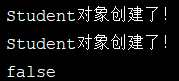
返回的结果为false,创建的是两个不同的对象。每次调用getBean()的时候都会返回一个新的实例
3、值的注入
(1)在属性处赋值:
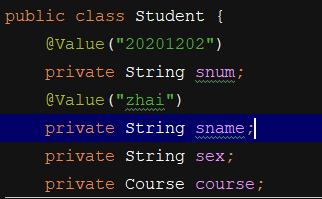
此种方式破坏了封装性,不推荐,因此set方式更优。
(2)在set方法处赋值:

(3)注入引用数据类型的数据:
方式一:
创建Course对象,并将对象引入到容器:

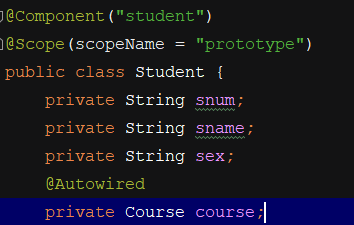
但是,这种方式有一个弊端,就是在有多个对象的情况下,将无法选择具体选择哪一个。
方式二:
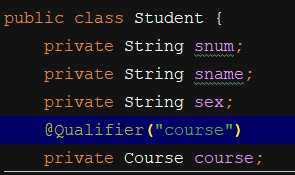
指定注入哪一个对象。

4、引入配置文件创建Spring容器
用此方法需要导入jar包:

ApplicationContext applicationContext=new

                ClassPathXmlApplicationContext("applicationContext.xml");//创建容器对象
创建容器的代码可以用注解代替:
@RunWith(SpringJUnit4ClassRunner.class)

@ContextConfiguration("classpath:applicationContext.xml")
采用这种方式只需要在类中写一次,因此,不需要在每一个方法中都写获取容器的代码,可以减少代码量。
注解在Spring中的运用(对象获取、对象单例/多例、值的注入、初始化/销毁方法、获取容器)的更多相关文章
- Jquery获取下拉选择节点名称值赋给textbox文本框 获取 父节点的栏目名称编号
<label for="parentNode" style="float:left" >父级栏目:</label> <select ...
- request.getParameterMap() 获取表单提交的键值对 并且 也能获取动态表单的key
Map<String,String[]> map = request.getParameterMap();Set<String> keys = map.keySet(); 获取 ...
- iframe中使用模态框提交表单后,iframe加载父页面的解决方法
在iframe中使用模态框提交表单后,会出现iframe加载整个父页面的问题,如下图: 解决方法: 在form表单中添加target属性 _parent 这个属性会使目标文档载入父窗口或者包含来超链接 ...
- jQuery—获取表单标签的数据值
获取设置input标签的值 <input class="form-control" type="text" id="username" ...
- spring中配置quartz调用两次及项目日志log4j不能每天生成日志解决方法
在quartz中配置了一个方法运行时会连续调用两次,是因为加载两次,只需在tomcat的server.xml中修改配置 <Host name="www.xx.cn" appB ...
- jQuery获取表单各元素的值
radio值获取 $("input[type='radio']:checked").val(); 2,设置指定的项为当前选中项 $("input[type='radio' ...
- asp.net 获取表单中控件的值
原文:https://blog.csdn.net/happymagic/article/details/8480235 C# 后台获取前台 input 文本框值.(都是以控件的Name来获取) s ...
- HTMLFormElement获取表单里面所有的值然后以json形式返回
function HTMLFormElement(){ this.init(); return this.json; } HTMLFormElement.prototype.init = functi ...
- Spring 中的事务操作、注解、以及 XML 配置
事务 事务全称叫数据库事务,是数据库并发控制时的基本单位,它是一个操作集合,这些操作要么不执行,要么都执行,不可分割.例如我们的转账这个业务,就需要进行数据库事务的处理. 转账中至少会涉及到两条 SQ ...
随机推荐
- spss如何把多个指标合并成一个变量?
把多个指标合并成一个变量,通常有两种做法: 一.计算平均值 针对问卷量表数据,同时几个题表示一个维度.比如想要将“我在工作中能获得成就感”.“我可以在工作中发挥个人的才能”这两题合并成一个维度(影响因 ...
- 仓库ERP管理系统(springboot)
查看更多系统:系统大全,课程设计.毕业设计,请点击这里查看 01 系统概述 基于SpringBoot框架和SaaS模式,非常好用的ERP软件,目前专注进销存+财务功能.主要模块有零售管理.采购管理.销 ...
- JavaScript中pipe实战
JavaScript中pipe原理 代码示例 const pipe = (...fns) => x => fns.reduce((y, f) => f(y), x); 原理 一行代码 ...
- e3mall商城总结12之购物车的实现、以及购物车小计问题、json406报错
说在前面的话 1.本节主要讲了e3mall购物车的实现方法,我搭建的项目和系统购物车有一些区别,因此这里需要说一下.系统搭建的项目在未登陆的情况下也可以通过cookie进行加入购物车,当用户要下单的时 ...
- PJSIP 机器人
摘要: 最近再研究PJSIP,有一个需求,再适当的时候,需要给远程客户端放音,比如:播放一段广告.或者一段音乐.需要采用API来实现. 正文: 最近想用PJSIP做一个机器人,想法比较简单就是获取客户 ...
- 前端模块化IIFE,commonjs,AMD,UMD,ES6 Module规范超详细讲解
目录 为什么前端需要模块化 什么是模块 是什么IIFE 举个栗子 模块化标准 Commonjs 特征 IIFE中的例子用commonjs实现 AMD和RequireJS 如何定义一个模块 如何在入口文 ...
- Python面向对象中的self到底是什么?
初次接触类的概念,在学习的网页上,对self的解释是self是方法的一个参数,在方法调用的时候,这个参数是默认传参数的我们看一个例子 很多人学习python,不知道从何学起.很多人学习python,掌 ...
- PHP to .NET Compiler
官网 https://github.com/peachpiecompiler/peachpie 非官方简介 https://blog.csdn.net/sD7O95O/article/details/ ...
- pie 饼图
1最简单的饼图 // 定制饼图box4饼形图-年龄分布 (function () { const box4 = document.getElementById('box4') const mychar ...
- 10 router
https://router.vuejs.org/zh/guide/advanced/navigation-guards.html 1.路由守卫beforeEach router.beforeEach ...