
CentOS 7使用PuppeteerSharp无头浏览器注意事项
环境:
CentOS 7.6.1810
.net core 3.1
PuppeteerSharp 2.0.0
1.如网络部稳定可以提前下载需要的chromium
下载地址:https://storage.googleapis.com/chromium-browser-snapshots/Linux_x64/706915/chrome-linux.zip
各个系统下载地址可以查看PuppeteerSharp源码中设置的,或者用国内镜像
将压缩包解压到当前程序目录下,文件夹路径:.local-chromium/Linux-706915/chrome-linux/

如运行报错:加载libX11.so.6库错误,则先装该库
Unhandled exception. System.AggregateException: One or more errors occurred. (Failed to launch Chromium! /PuppeteerTest/PuppeteerTest/.local-chromium/Linux-/chrome-linux/chrome: error while loading shared libraries: libX11.so.: cannot open shared object file: No such file or directory

)

 ---> PuppeteerSharp.ChromiumProcessException: Failed to launch Chromium! /PuppeteerTest/PuppeteerTest/.local-chromium/Linux-/chrome-linux/chrome: error while loading shared libraries: libX11.so.: cannot open shared object file: No such file or directory

   at PuppeteerSharp.ChromiumProcess.State.StartingState.StartCoreAsync(ChromiumProcess p)

   at PuppeteerSharp.ChromiumProcess.State.StartingState.StartCoreAsync(ChromiumProcess p)

   at PuppeteerSharp.Launcher.LaunchAsync(LaunchOptions options)

   at PuppeteerSharp.Launcher.LaunchAsync(LaunchOptions options)

   --- End of inner exception stack trace ---
从pkgs网站找到该库 https://pkgs.org/download/libX11.so.6
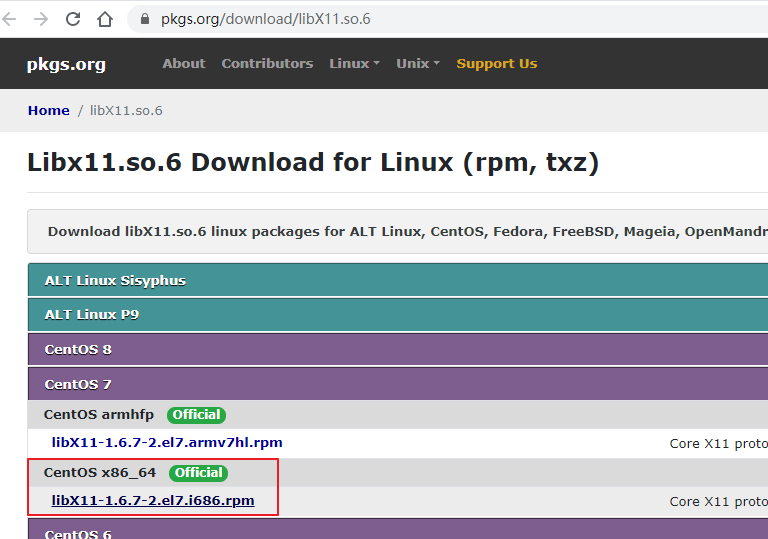
进入该库
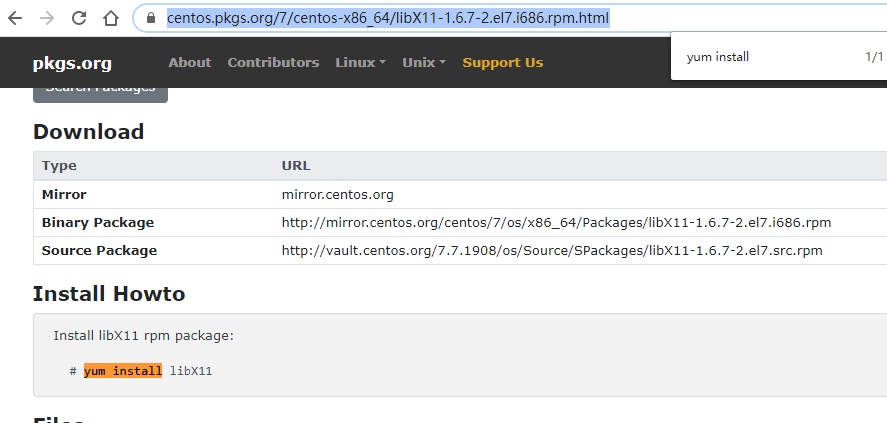
https://centos.pkgs.org/7/centos-x86_64/libX11-1.6.7-2.el7.i686.rpm.html
找到yum安装命令:
Install libX11 rpm package:

# yum install libX11
在Xshell执行该命令
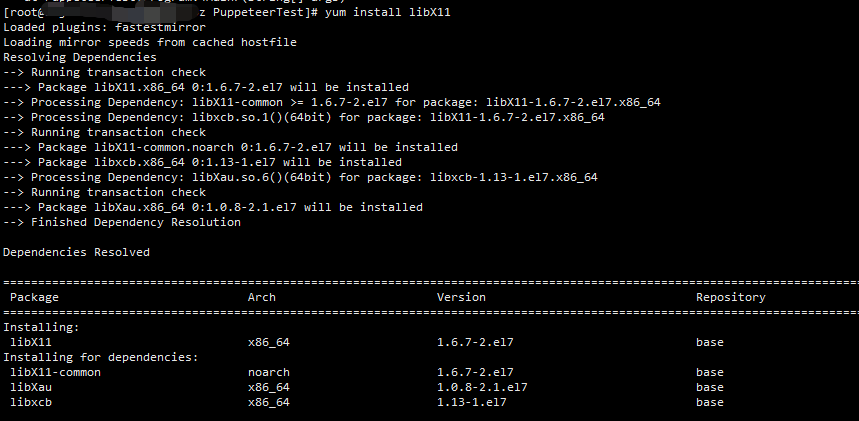
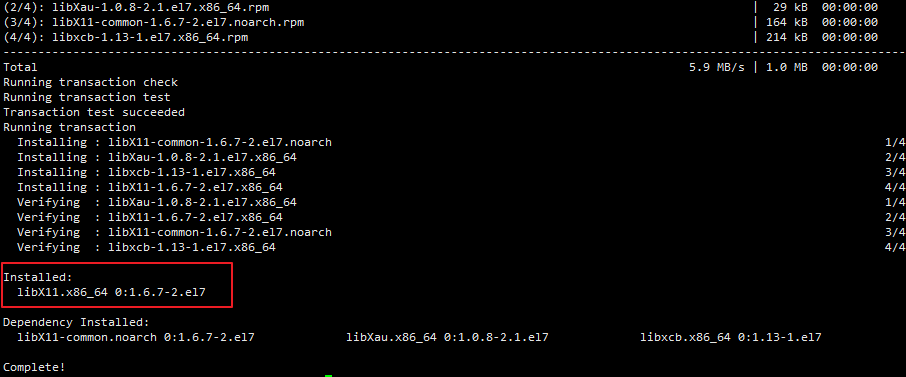
其他库报错,如libXcomposite库,则一样到pkgs网站查找库和安装命令
Unhandled exception. System.AggregateException: One or more errors occurred. (Failed to launch Chromium! /PuppeteerTest/PuppeteerTest/bin/Debug/netcoreapp3./.local-chromium/Linux-/chrome-linux/chrome: error while loading shared libraries: libXcomposite.so.: cannot open shared object file: No such file or directory

)

 ---> PuppeteerSharp.ChromiumProcessException: Failed to launch Chromium! /PuppeteerTest/PuppeteerTest/bin/Debug/netcoreapp3./.local-chromium/Linux-/chrome-linux/chrome: error while loading shared libraries: libXcomposite.so.: cannot open shared object file: No such file or directory

   at PuppeteerSharp.ChromiumProcess.State.StartingState.StartCoreAsync(ChromiumProcess p)

   at PuppeteerSharp.ChromiumProcess.State.StartingState.StartCoreAsync(ChromiumProcess p)

   at PuppeteerSharp.Launcher.LaunchAsync(LaunchOptions options)

   at PuppeteerSharp.Launcher.LaunchAsync(LaunchOptions options)

   --- End of inner exception stack trace ---
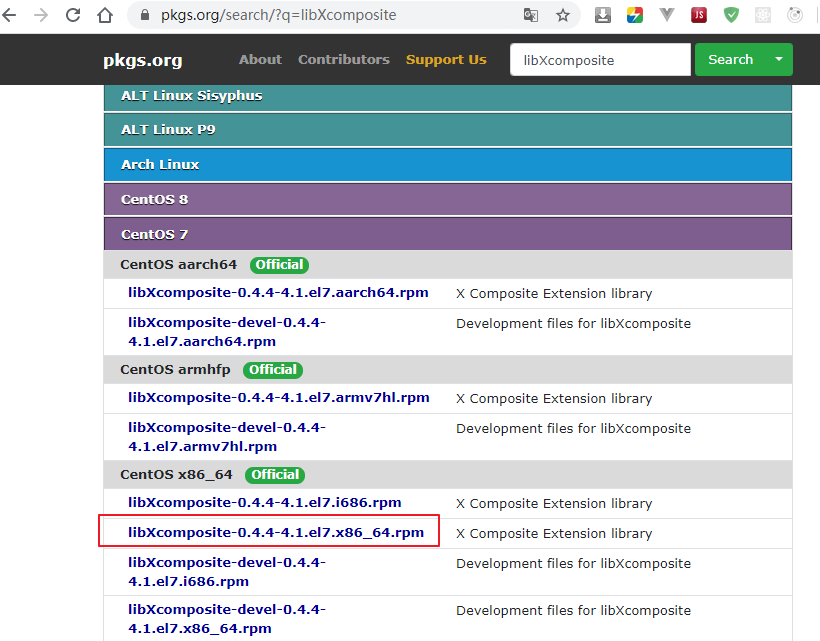
其他库报错安装方法一样。
报libXss.so.1这个库错误的时候,运行命令:
yum install libXss* -y
报libatk-1.0.so库错误运行命令:
yum install atk
报libatk-bridge-2.0.so库错误运行命令:
yum install at-spi2-atk-devel
报libpangocairo-1.0.so库错误运行命令:
yum install pango-devel
报libgtk-3.so库错误运行命令:
yum install gtk3-devel
Pupperteer官网可以查到CentOS的相关依赖
https://github.com/puppeteer/puppeteer/blob/master/docs/troubleshooting.md

全部依赖都安装好后,运行还是报错:--no-sandbox
Unhandled exception. System.AggregateException: One or more errors occurred. (Failed to launch Chromium! [/165456.543755:ERROR:zygote_host_impl_linux.cc()] Running as root without --no-sandbox is not supported. See https://crbug.com/638180.

)

 ---> PuppeteerSharp.ChromiumProcessException: Failed to launch Chromium! [/165456.543755:ERROR:zygote_host_impl_linux.cc()] Running as root without --no-sandbox is not supported. See https://crbug.com/638180.

   at PuppeteerSharp.ChromiumProcess.State.StartingState.StartCoreAsync(ChromiumProcess p)

   at PuppeteerSharp.ChromiumProcess.State.StartingState.StartCoreAsync(ChromiumProcess p)

   at PuppeteerSharp.Launcher.LaunchAsync(LaunchOptions options)

   at PuppeteerSharp.Launcher.LaunchAsync(LaunchOptions options)

   --- End of inner exception stack trace ---
根据网上的一篇文章,启动的时候需要加上--no-sandbox参数
https://segmentfault.com/a/1190000018553178
var launchOptions = new LaunchOptions

                {

                    Headless = true

                };

                launchOptions.Args = new string[] {

                    "--no-sandbox"

                };

                var    browser = Puppeteer.LaunchAsync(launchOptions).Result;
重新启动下程序,已经可以抓取网页了。
CentOS 7使用PuppeteerSharp无头浏览器注意事项的更多相关文章
- selenium+谷歌无头浏览器爬取网易新闻国内板块
网页分析 首先来看下要爬取的网站的页面 查看网页源代码:你会发现它是由js动态加载显示的 所以采用selenium+谷歌无头浏览器来爬取它 1 加载网站,并拖动到底,发现其还有个加载更多 2 模拟点击 ...
- 无头浏览器phantomJS
selenium: 有头浏览器的代表(selenium+python也可实现静默运行 引入python的一个包,包叫:虚拟屏幕pyvirtualdisplay) PhantomJS : 无头浏览器的代 ...
- 基于Python, Selenium, Phantomjs无头浏览器访问页面
引言: 在自动化测试以及爬虫领域,无头浏览器的应用场景非常广泛,本文将梳理其中的若干概念和思路,并基于代码示例其中的若干使用技巧. 1. 无头浏览器 通常大家在在打开网页的工具就是浏览器,通过界面上输 ...
- PhantomJS框架(初识无头浏览器)
博主今天看到大神聊起 headless,首先我去了解了下这个概念 无头浏览器 selenium框架是有头浏览器的代表,即可看得见的浏览器 而headless browser无头浏览器,即看不见的浏览 ...
- Python对Selenium调用浏览器进行封装包括启用无头浏览器,及对应的浏览器配置文件
""" 获取浏览器 打开本地浏览器 打开远程浏览器 关闭浏览器 打开网址 最大化 最小化 标题 url 刷新 Python对Selenium封装浏览器调用 ------b ...
- 爬虫之 图片懒加载, selenium , phantomJs, 谷歌无头浏览器
一.图片懒加载 懒加载 : JS 代码 是页面自然滚动 window.scrollTo(0,document.body.scrollHeight) (重点) bro.execute_ ...
- Selenium 启动无头浏览器,只有chrome 和 firefox的,没有IE
使用无头浏览器,可以避免掉不确定的弹出框对脚本稳定性的影响,还能在脚本执行过程中省略掉了css 加载的时间. 以下是Selenium 启动无头浏览器的方法,只有chrome 和 firefox的. p ...
- 浏览器控制之 selenium,phantomJs谷无头浏览器
目录 浏览器控制之 selenium,phantomJs谷无头浏览器 selenium phantomJs 需求是尽可能多的爬取豆瓣网中的电影信息 谷歌无头浏览器 浏览器控制之 selenium,ph ...
- 07-selenium、PhantomJS(无头浏览器)
selenium(自动化测试工具可用于在爬虫中解决js动态加载问题) 简介(本质就是模仿浏览器工作) Selenium 是什么?一句话,自动化测试工具.它支持各种浏览器,包括 Chrome,Safar ...
随机推荐
- 精讲RestTemplate第7篇-自定义请求失败异常处理
本文是精讲RestTemplate第7篇,前篇的blog访问地址如下: 精讲RestTemplate第1篇-在Spring或非Spring环境下如何使用 精讲RestTemplate第2篇-多种底层H ...
- 关于Spark RDD 的认识
一.基本认识 RDD 是Spark大数据计算引擎中,抽象的一种数据结构. RDD(Resilient Distributed Dataset),中文意思是弹性分布式数据集,它是Spark中的基本抽象. ...
- mysql查看死锁及解锁方法
解除正在死锁的状态有两种方法: 第一种: 1.查询是否锁表 show OPEN TABLES where In_use > 0; 2.查询进程(如果您有SUPER权限,您可以看到所有线程.否则, ...
- linux 查找删除
find -name "*.php" -exec rm -f '{}' \;
- ImportError: No module named git
问题:ImportError: No module named git 解决:yum install GitPython
- dpkg:处理 xxx (--configure)时出错解决办法
1.$ sudo mv /var/lib/dpkg/info /var/lib/dpkg/info_old //现将info文件夹更名2.$ sudo mkdir /var/lib/dpkg/info ...
- ubuntu 构建 deb 安装包
源码包下载:http://mirrors.163.com/ubuntu/ 编译工具安装: apt-get install dpkg-dev 以openvswitch为例: wget http://mi ...
- MySQL数据库下统计记录数小于指定数值的数据
楼主在做一个智慧工地的产品,需要对工人进行一些数据统计,比如要统计导入人员数量小于30的工地,SQL应该怎么写呢? 首先了解一下数据结构,工地分三张表,四级层级关系,Organization表存储区域 ...
- 《Java从入门到失业》第三章:基础语法及基本程序结构(四):基本数据类型(字符编码和char型)
3.6.4字符编码 咦?怎么好像有东西乱入了?不是讲基本数据类型么?哈哈,因为还剩下最后一个char型了,因为char型会牵涉到Unicode编码相关,因此我决定先科普一下字符集编码. 我儿子现在上小 ...
- 华为云服务器安装hadoop2.7.5
1. 安装环境 1.1硬件环境 1.1.1 NameNode 配置项 详细参数 主机 k8s-master CPU Intel(R) Xeon(R) Gold 6278C CPU @ 2.60GHz ...