
VSCode 自定义Vue snippets, 快速生成Vue模板
命令行
Ctrl+Shift+P

# 选择 Configure User Snippets

# 选择 Vue.json
原始的Vue.json
{

	// Place your snippets for vue here. Each snippet is defined under a snippet name and has a prefix, body and

	// description. The prefix is what is used to trigger the snippet and the body will be expanded and inserted. Possible variables are:

	// $1, $2 for tab stops, $0 for the final cursor position, and ${1:label}, ${2:another} for placeholders. Placeholders with the

	// same ids are connected.

	// Example:

	// "Print to console": {

	// 	"prefix": "log",

	// 	"body": [

	// 		"console.log('$1');",

	// 		"$2"

	// 	],

	// 	"description": "Log output to console"

	// }

}
修改后的Vue.json
prefix: vuebody修改为希望的内容
{

	// Example:

	"Print to console": {

		"prefix": "vue",

		"body": [

			"<template>",

			"  <div class=\"wrapper\">$0</div>",

			"</template>",

			"",

			"<script>",

			"export default {",

			"  components: {},",

			"  props: {},",

			"  data() {",

			"    return {",

			"    };",

			"  },",

			"  watch: {},",

			"  computed: {},",

			"  methods: {},",

			"  created() {},",

			"  mounted() {}",

			"};",

			"</script>",

			"<style lang=\"scss\" scoped>",

			".wrapper{}",

			"</style>"

		],

		"description": "A vue file template"

	}

}
Try
- 新建一个.vue文件,然后输入vue,然后回车
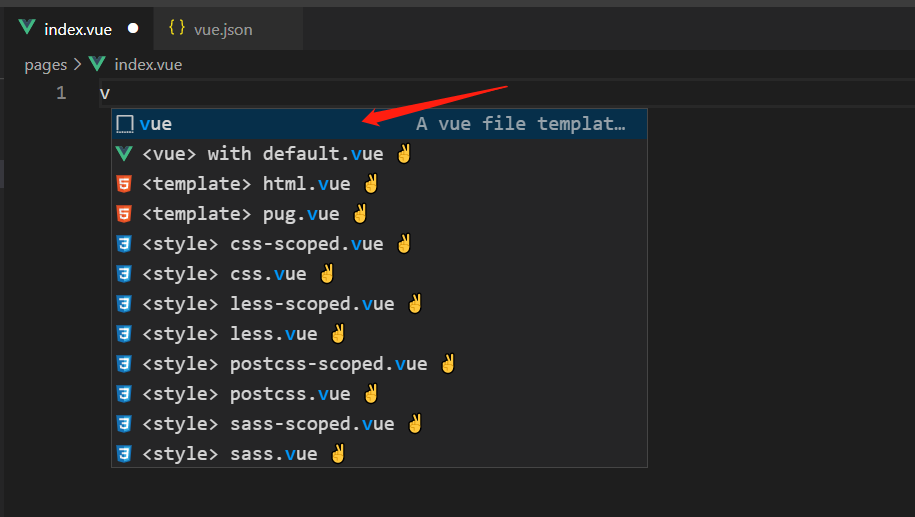
<template>

  <div class="wrapper"></div>

</template>

<script>

export default {

  components: {},

  props: {},

  data() {

    return {

    };

  },

  watch: {},

  computed: {},

  methods: {},

  created() { },

  mounted() { }

};

</script>

<style lang="scss" scoped>

.wrapper {

}

</style>
VSCode 自定义Vue snippets, 快速生成Vue模板的更多相关文章
- VSCode 快速生成 .vue 模版
VSCode 快速生成 .vue 模版 安装vscode 官网:https://code.visualstudio.com/ 安装 Vetur 插件,识别 vue 文件 插件库中搜索Vetur,点击安 ...
- vs code 快速生成vue 模板
vs code 快速生成vue 模板 1.使用快捷Ctrl + Shift + P唤出控制台,然后输入snippets并选择.(或 文件>首选项>用户代码片断里面,输入 vue.json ...
- vscode快速生成html模板(vscode快捷键"!"生成html模板)
问题: 在vscode中新建test.html, 内容是空白的,输入"!",然后按tap键 ,没有生成常见的html模板,也就是如下: 输入! html html:5 DOCTYP ...
- 无需编译、快速生成 Vue 风格的文档网站
无需编译.快速生成 Vue 风格的文档网站 https://docsify.js.org/#/#coverpage https://github.com/QingWei-Li/docsify/
- VSCode 快速生成.vue基本模板、发送http请求模板
安装vscode 官网:https://code.visualstudio.com/ 安装 Vetur 插件,识别 vue 文件 插件库中搜索Vetur,点击安装,安装完成之后点击重新加载 新建代码片 ...
- 在vscode中快速生成vue模板
点击文件-->首选项-->用户代码片段-->输入vue,此时会打开vue.json文件,将下列代码复制进文件保存即可,新建一个vue文件,输入vue回车即可生成模板,$0表示生成模板 ...
- vscode之快速生成vue模板
文件-首选项-用户代码片段-搜索“vue”点击进入vue.json 复制这个片段 { "Vue component": { "prefix": "vu ...
- 关于vs code 快速生成vue 模板
在 文件>首选项>用户代码片断里面,打开vue.json 添加以下代码: "Print to console": { "prefix": " ...
- vscode编写代码快速生成html模板
!(英文)+tab 自动生成HTML模板
随机推荐
- css导航菜单二级显示的问题
m项目中出现了二级菜单的标签是在导航的里面,用css ul>li:hover ul>li>ul>li 这样子实现不了鼠标经过时导航里二级菜单的显示,这里个人感觉是冲突了.最后通 ...
- OSCP Learning Notes - Information Gathering
Common Tools Google Exploit-DB/Google Hacking DB WHOIS Netcraft theharvester Example: Google search: ...
- 【揭秘】C语言类型转换时发生了什么?
ID:技术让梦想更伟大 作者:李肖遥 链接:https://mp.weixin.qq.com/s/ZFf3imVaJgeesuhl1Kn9sQ 在C语言中,数据类型指的是用于声明不同类型的变量或函数的 ...
- 设计模式:decade模式
目的:为系统中的一组联动接口提供一个高层次的接口,从而降低系统的复杂性 优点:使用窗口模式可以使得接口变少 继承关系图: 例子: class Subsystem1 { public: void Ope ...
- [spring] -- MVC篇
流程: 客户端(浏览器)发送请求,直接请求到 DispatcherServlet. DispatcherServlet 根据请求信息调用 HandlerMapping,解析请求对应的 Handler. ...
- nginx 日志功能详解
nginx 日志功能 在 nginx 中有两种日志: access_log:访问日志,通过访问日志可以获取用户的IP.请求处理的时间.浏览器信息等 error_log:错误日志,记录了访问出错的信息, ...
- 面试时谈得很好,为什么就是拿不到offer?
招聘行业有个共识,那就是如果没有给通知一般就是没有通过, 有的学员会问,为什么不打电话通知一下呢? 我猜测,有一方面的原因是怕尴尬,虽然你不觉得尴尬,但是难保有的应聘者会情绪激动,问东问西. 比如你告 ...
- 01 shell编程之变量定义
一.SHELL介绍 ㈠ 什么是shell脚本? 简单来说就是将需要执行的命令保存到文本中,按照顺序执行.它是解释型的,意味着不需要编译. 若干命令 + 脚本的基本格式 + 脚本特定语法 + 思想= s ...
- SpringBoot环境下使用测试类注入Mapper接口报错解决
当我们在进行开发中难免会要用到测试类,而且测试类要注入Mapper接口,如果测试运行的时候包空指针异常,看看测试类上面的注解是否用对! 正常测试我们需要用到的注解有这些: @SpringBootTes ...
- PHP NULL 合并运算符
HP 7 新增加的 NULL 合并运算符(??)是用于执行isset()检测的三元运算的快捷方式. NULL 合并运算符会判断变量是否存在且值不为NULL,如果是,它就会返回自身的值,否则返回它的第二 ...