
GUI编程学习笔记——day01
GUI编程
前言:告诉大家应该怎么学?
- 这是什么?
- 它怎么玩?
- 该如何在我们平时运用?
组件
- 窗口
- 弹窗
- 面板
- 文本框
- 列表框
- 按钮
- 图片
- 监听事件
- 鼠标
- 键盘事件
- 破解工具
一、是什么
GUI是图形界面编程
GUI的核心技术:Swing AWT
GUI缺点:界面不美观;需要jar环境
二、为什么
为什么我们要学习
可以写出自己心中想要的一些小工具
工作的时候,也可能需要维护到swing界面,(概率极小!)
了解MVC架构,了解监听!
三、怎么做
1、AWT
1.1 AWT介绍
- 包含了很多类和接口!
- 元素:窗口、按钮、文本框
1.2 组件和容器
1.2.1. Frame(容器)
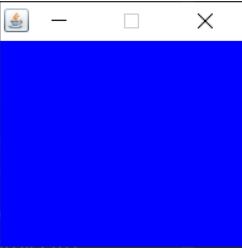
package com.gui;

import java.awt.*;

public class TestFrame {

    public static void main(String[] args) {

        Frame frame =new Frame("我的第一个JAVA图像界面窗");

        frame.setVisible(true);

        frame.setSize(200,200);

        frame.setBackground(Color.BLUE);

        frame.setLocation(200,200);

        frame.setResizable(false);

    }

}
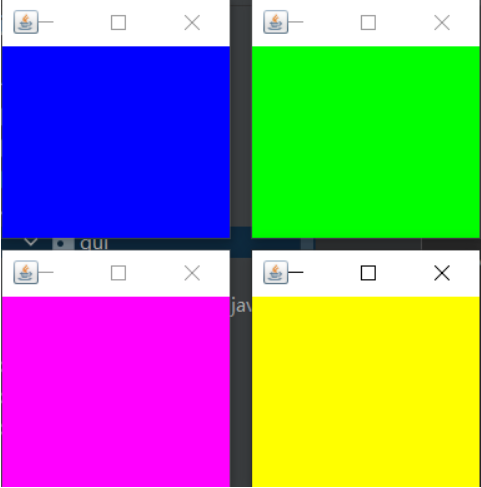
展示多个窗口
package com.gui;

import java.awt.*;

public class TestFrame02 {

    //展示多个窗口

    public static void main(String[] args) {

        MyFrame myFrame1 = new MyFrame(100,100,200,200,Color.BLUE);

        MyFrame myFrame2 = new MyFrame(300,100,200,200,Color.GREEN);

        MyFrame myFrame3 = new MyFrame(100,300,200,200,Color.MAGENTA);

        MyFrame myFrame4 = new MyFrame(300,300,200,200,Color.YELLOW);

    }

}

class MyFrame extends Frame{

    static int id = 0;//可能存在多个窗口,我们需要一个计数器

    public MyFrame(int x,int y,int w,int h,Color color){

        super("Myframe"+(++id));

        setBackground(color);

        setBounds(x,y,w,h);

        setVisible(true);

    }

}
1.2.2. Panel(面板)
package com.gui;

import java.awt.*;

import java.awt.event.WindowAdapter;

import java.awt.event.WindowEvent;

public class TestPanel {

    public static void main(String[] args) {

        Frame frame = new Frame();

        Panel panel = new Panel();

        //对窗口设置布局

        frame.setLayout(null);

        //窗口的坐标

        frame.setBounds(300,300,500,500);

        frame.setBackground(Color.GREEN);

        //相对于frame的面板坐标

        panel.setBounds(50,50,400,400);

        panel.setBackground(Color.BLUE);

        //将面板添加到窗口

        frame.add(panel);

        //设置可见性

        frame.setVisible(true);

        //监听事件,监听窗口关闭事件 System.exit(0)

        //适配器模式

        frame.addWindowListener(new WindowAdapter() {

            @Override

            public void windowClosing(WindowEvent e) {

                System.exit(0);//结束程序

            }

        });

    }

}

1.2.3. 布局管理器
流式布局
package com.gui;

import com.sun.media.jfxmedia.events.NewFrameEvent;

import java.awt.*;

public class TestLayout {

    public static void main(String[] args) {

        Frame frame = new Frame();

        //添加组件-按钮

        Button button1 = new Button("button1");

        Button button2 = new Button("button2");

        Button button3 = new Button("button3");

        Button button4 = new Button("button4");

        //设置为流式布局

        frame.setLayout(new FlowLayout(FlowLayout.LEFT));

        frame.setVisible(true);

        frame.setSize(200,200);

        frame.add(button1);

        frame.add(button2);

        frame.add(button3);

        frame.add(button4);

    }

}

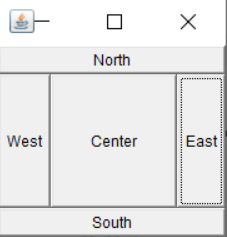
东西南北中
package com.gui;

import java.awt.*;

public class TestLayoutBorder {

    public static void main(String[] args) {

        Frame frame = new Frame();

        Button East = new Button("East");

        Button West = new Button("West");

        Button South = new Button("South");

        Button North = new Button("North");

        Button Center = new Button("Center");

        frame.add(East,BorderLayout.EAST);

        frame.add(West,BorderLayout.WEST);

        frame.add(South,BorderLayout.SOUTH);

        frame.add(North,BorderLayout.NORTH);

        frame.add(Center,BorderLayout.CENTER);

        frame.setSize(200,200);

        frame.setVisible(true);

    }

}
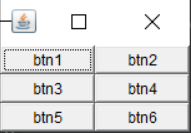
表格布局
package com.gui;

import java.awt.*;

public class TestLayoutGrid {

    public static void main(String[] args) {

        Frame frame = new Frame();

        Button btn1 = new Button("btn1");

        Button btn2 = new Button("btn2");

        Button btn3 = new Button("btn3");

        Button btn4 = new Button("btn4");

        Button btn5 = new Button("btn5");

        Button btn6 = new Button("btn6");

        //设置表格布局 3*2

        frame.setLayout(new GridLayout(3,2));

        //依次添加

        frame.add(btn1);

        frame.add(btn2);

        frame.add(btn3);

        frame.add(btn4);

        frame.add(btn5);

        frame.add(btn6);

        //将表格自动填充于窗口

        frame.pack();

        frame.setVisible(true);

    }

}
GUI编程学习笔记——day01的更多相关文章
- JAVA GUI编程学习笔记目录
2014年暑假JAVA GUI编程学习笔记目录 1.JAVA之GUI编程概述 2.JAVA之GUI编程布局 3.JAVA之GUI编程Frame窗口 4.JAVA之GUI编程事件监听机制 5.JAVA之 ...
- 多线程编程学习笔记——async和await(一)
接上文 多线程编程学习笔记——任务并行库(一) 接上文 多线程编程学习笔记——任务并行库(二) 接上文 多线程编程学习笔记——任务并行库(三) 接上文 多线程编程学习笔记——任务并行库(四) 通过前面 ...
- C++ GUI Qt4学习笔记03
C++ GUI Qt4学习笔记03 qtc++spreadsheet文档工具resources 本章介绍创建Spreadsheet应用程序的主窗口 1.子类化QMainWindow 通过子类化QM ...
- Linux Shell编程学习笔记——目录(附笔记资源下载)
LinuxShell编程学习笔记目录附笔记资源下载 目录(?)[-] 写在前面 第一部分 Shell基础编程 第二部分 Linux Shell高级编程技巧 资源下载 写在前面 最近花了些时间学习She ...
- DirectX 11游戏编程学习笔记之8: 第6章Drawing in Direct3D(在Direct3D中绘制)(习题解答)
本文由哈利_蜘蛛侠原创,转载请注明出处.有问题欢迎联系2024958085@qq.com 注:我给的电子版是700多页,而实体书是800多页,所以我在提到相关概念的时候 ...
- 多线程编程学习笔记——async和await(二)
接上文 多线程编程学习笔记——async和await(一) 三. 对连续的异步任务使用await操作符 本示例学习如何阅读有多个await方法方法时,程序的实际流程是怎么样的,理解await的异步 ...
- 多线程编程学习笔记——async和await(三)
接上文 多线程编程学习笔记——async和await(一) 接上文 多线程编程学习笔记——async和await(二) 五. 处理异步操作中的异常 本示例学习如何在异步函数中处理异常,学习如何对多 ...
- 多线程编程学习笔记——使用异步IO(一)
接上文 多线程编程学习笔记——使用并发集合(一) 接上文 多线程编程学习笔记——使用并发集合(二) 接上文 多线程编程学习笔记——使用并发集合(三) 假设以下场景,如果在客户端运行程序,最的事情之一是 ...
- 多线程编程学习笔记——编写一个异步的HTTP服务器和客户端
接上文 多线程编程学习笔记——使用异步IO 二. 编写一个异步的HTTP服务器和客户端 本节展示了如何编写一个简单的异步HTTP服务器. 1.程序代码如下. using System; using ...
随机推荐
- 深入理解JavaScript中的类继承
由于写本文时全部是在编辑器中边写代码边写感想的,所以,全部思想都写在代码注释里面了 // 类继承 //todo.1 extends 关键字 class Animal { constructor(nam ...
- 如何在 VSCODE 中高效使用 R 语言
VSCODE 配置 R 一.功能特性展示 之前一直在用 Rstudio 来编写 R,也尝试用过 Pycharm 配置 R 环境. 但是由于现在需求要同时满足 Python,R 和网站要同时开发,为了避 ...
- Linux directory tree
Linux directory tree https://en.wikipedia.org/wiki/Filesystem_Hierarchy_Standard https://en.wikipedi ...
- eyes protect app
eyes protect app https://awaremac.com/
- 用Qt写了个将视频设置为壁纸的软件
软件功能很简单,使用时占用的资源和播放的视频有关: 依赖于FFplay,Github源码 效果图:
- nodejs 创建tcp/udp服务器和客户端
TCP server // https://nodejs.org/api/net.html const net = require("net"); // https://nodej ...
- 在浏览器上播放m3u8视频
在edge上有效 <video width="600" controls> <source src="https://www.gentaji.com/2 ...
- 主打开放式金融的Baccarat项目如何开疆拓土?
DeFi在这个夏天迎来了大爆发,像无托管交易.流动性挖矿.保险协议.NFT代币都在今年看到了有别于以往的应用.随着比特币走入主流,DeFi热度下降,不少人都觉得DeFi热潮已死.但事实是,DeFi的总 ...
- Python数据结构与算法_删除排序数组中的重复项(06)
给定一个排序数组,你需要在 原地 删除重复出现的元素,使得每个元素只出现一次,返回移除后数组的新长度. 不要使用额外的数组空间,你必须在 原地 修改输入数组 并在使用 O(1) 额外空间的条件下完成. ...
- [C#] (原创)一步一步教你自定义控件——06,MaskLayer(遮罩层)
一.前言 技术没有先进与落后,只有合适与不合适. 本篇的自定义控件是:遮罩层(MaskLayer). 遮罩层对软件的美观与易用性上的提高是很大的,在日常使用过程中也会经常看到各种遮罩层,虽然WinFo ...