
ansible-playbook通过github拉取部署Lnmp环境
1. 配置服务器初始化
1.1) 关闭防火墙和selinux
1 [root@test-1 ~]# /bin/systemctl stop firewalld

2 [root@test-1 ~]# /bin/systemctl disable firewalld

3 [root@test-1 ~]# getenforce                 #查看selinux是否开启

4 Enforcing                                         #enforcing表示selinux开启的,

5 [root@test-1 ~]# sed -i 's/SELINUX=enforcing/SELINUX=disabled/g'  /etc/selinux/config      #修改配置文件,需要重启才后永久关闭

6 [root@test-1 ~]# setenforce 0      #临时关闭selinx

7 [root@test-1 ~]# getenforce      #查看是否关闭

8 Disabled
1.2) 安装epel源
1 [root@test-1 ~]# rpm -ivh http://mirrors.ustc.edu.cn/epel/7/x86_64/Packages/e/epel-release-7-11.noarch.rpm

2 Retrieving http://mirrors.ustc.edu.cn/epel/7/x86_64/Packages/e/epel-release-7-11.noarch.rpm

3 Preparing...                          ################################# [100%]

4 Updating / installing...

5    1:epel-release-7-11                ################################# [100%]
1.3) 安装ansible
 1 [root@test-1 ~]# yum install ansible -y

 2 Loaded plugins: fastestmirror

 3 Determining fastest mirrors

 4 epel/x86_64/metalink                                                                                                                              | 4.7 kB  00:00:00

 5  * base: mirror.den1.denvercolo.net

 6  * epel: mirrors.aliyun.com

 7  * extras: mirrors.aliyun.com

 8  * updates: mirrors.aliyun.com

 9 base                                                                                                                                              | 3.6 kB  00:00:00

10 epel                                                                                                                                              | 5.3 kB  00:00:00

11 extras                                                                                                                                            | 3.4 kB  00:00:00

12 updates                                                                                                                                           | 3.4 kB  00:00:00

13 epel/x86_64/primary_db         FAILED

14 http://fedora.cs.nctu.edu.tw/epel/7/x86_64/repodata/4eaf3073c0c7e6790fe6fc3e69cb1ba4567533af7a2251793344217a67b703b9-primary.sqlite.bz2: [Errno 14] HTTP Error 404 - Not Found

15 Trying other mirror.

16 To address this issue please refer to the below wiki article

17

18 https://wiki.centos.org/yum-errors

19

20 If above article doesn't help to resolve this issue please use https://bugs.centos.org/.

21

22 (1/2): epel/x86_64/updateinfo                                                                                                                     | 1.0 MB  00:00:03

23 epel/x86_64/primary_db         FAILED

24 http://ftp.jaist.ac.jp/pub/Linux/Fedora/epel/7/x86_64/repodata/4eaf3073c0c7e6790fe6fc3e69cb1ba4567533af7a2251793344217a67b703b9-primary.sqlite.bz2: [Errno 14] curl#7 - "Failed connect to ftp.jaist.ac.jp:80; Network is unreachable"

25 Trying other mirror.

26 (2/2): epel/x86_64/primary_db                                                                                                                     | 6.8 MB  00:00:17

27 Resolving Dependencies

28 --> Running transaction check

29 ---> Package ansible.noarch 0:2.8.4-1.el7 will be installed

30 --> Finished Dependency Resolution

31

32 Dependencies Resolved

33

34 =========================================================================================================================================================================

35  Package                                 Arch                                   Version                                       Repository                            Size

36 =========================================================================================================================================================================

37 Installing:

38  ansible                                 noarch                                 2.8.4-1.el7                                   epel                                  15 M

39

40 Transaction Summary

41 =========================================================================================================================================================================

42 Install  1 Package

43

44 Total download size: 15 M

45 Installed size: 84 M

46 Downloading packages:

47 ansible-2.8.4-1.el7.noarch.rpm                                                                                                                    |  15 MB  00:00:41

48 Running transaction check

49 Running transaction test

50 Transaction test succeeded

51 Running transaction

52   Installing : ansible-2.8.4-1.el7.noarch                                                                                                                            1/1

53   Verifying  : ansible-2.8.4-1.el7.noarch                                                                                                                            1/1

54

55 Installed:

56   ansible.noarch 0:2.8.4-1.el7

57

58 Complete!
2. 配置ansible配置文件修改
2.1) 配置ansible配置文件
  1 [root@test-1 ~]# vim /etc/ansible/ansible.cfg

  2 [root@test-1 ~]# cat /etc/ansible/ansible.cfg

  3 # config file for ansible -- https://ansible.com/

  4 # ===============================================

  5

  6 # nearly all parameters can be overridden in ansible-playbook

  7 # or with command line flags. ansible will read ANSIBLE_CONFIG,

  8 # ansible.cfg in the current working directory, .ansible.cfg in

  9 # the home directory or /etc/ansible/ansible.cfg, whichever it

 10 # finds first

 11

 12 [defaults]

 13

 14 # some basic default values...

 15

 16 inventory      = /etc/ansible/hosts

 17 library        = /usr/share/ansible

 18 #module_utils   = /usr/share/my_module_utils/

 19 #remote_tmp     = ~/.ansible/tmp

 20 #local_tmp      = ~/.ansible/tmp

 21 #plugin_filters_cfg = /etc/ansible/plugin_filters.yml

 22 forks          = 5

 23 #poll_interval  = 15

 24 sudo_user      = root

 25 #ask_sudo_pass = True

 26 #ask_pass      = True

 27 #transport      = smart

 28 remote_port    = 22

 29 #module_lang    = C

 30 #module_set_locale = False

 31

 32 # plays will gather facts by default, which contain information about

 33 # the remote system.

 34 #

 35 # smart - gather by default, but don't regather if already gathered

 36 # implicit - gather by default, turn off with gather_facts: False

 37 # explicit - do not gather by default, must say gather_facts: True

 38 #gathering = implicit

 39

 40 # This only affects the gathering done by a play's gather_facts directive,

 41 # by default gathering retrieves all facts subsets

 42 # all - gather all subsets

 43 # network - gather min and network facts

 44 # hardware - gather hardware facts (longest facts to retrieve)

 45 # virtual - gather min and virtual facts

 46 # facter - import facts from facter

 47 # ohai - import facts from ohai

 48 # You can combine them using comma (ex: network,virtual)

 49 # You can negate them using ! (ex: !hardware,!facter,!ohai)

 50 # A minimal set of facts is always gathered.

 51 #gather_subset = all

 52

 53 # some hardware related facts are collected

 54 # with a maximum timeout of 10 seconds. This

 55 # option lets you increase or decrease that

 56 # timeout to something more suitable for the

 57 # environment.

 58 # gather_timeout = 10

 59

 60 # Ansible facts are available inside the ansible_facts.* dictionary

 61 # namespace. This setting maintains the behaviour which was the default prior

 62 # to 2.5, duplicating these variables into the main namespace, each with a

 63 # prefix of 'ansible_'.

 64 # This variable is set to True by default for backwards compatibility. It

 65 # will be changed to a default of 'False' in a future release.

 66 # ansible_facts.

 67 # inject_facts_as_vars = True

 68

 69 # additional paths to search for roles in, colon separated

 70 #roles_path    = /etc/ansible/roles

 71

 72 # uncomment this to disable SSH key host checking

 73 host_key_checking = False

 74

 75 # change the default callback, you can only have one 'stdout' type  enabled at a time.

 76 #stdout_callback = skippy

 77

 78

 79 ## Ansible ships with some plugins that require whitelisting,

 80 ## this is done to avoid running all of a type by default.

 81 ## These setting lists those that you want enabled for your system.

 82 ## Custom plugins should not need this unless plugin author specifies it.

 83

 84 # enable callback plugins, they can output to stdout but cannot be 'stdout' type.

 85 #callback_whitelist = timer, mail

 86

 87 # Determine whether includes in tasks and handlers are "static" by

 88 # default. As of 2.0, includes are dynamic by default. Setting these

 89 # values to True will make includes behave more like they did in the

 90 # 1.x versions.

 91 #task_includes_static = False

 92 #handler_includes_static = False

 93

 94 # Controls if a missing handler for a notification event is an error or a warning

 95 #error_on_missing_handler = True

 96

 97 # change this for alternative sudo implementations

 98 #sudo_exe = sudo

 99

100 # What flags to pass to sudo

101 # WARNING: leaving out the defaults might create unexpected behaviours

102 #sudo_flags = -H -S -n

103

104 # SSH timeout

105 timeout = 20

106

107 # default user to use for playbooks if user is not specified

108 # (/usr/bin/ansible will use current user as default)

109 #remote_user = root

110

111 # logging is off by default unless this path is defined

112 # if so defined, consider logrotate

113 log_path = /var/log/ansible/ansible.log

114

115 # default module name for /usr/bin/ansible

116 #module_name = command

117

118 # use this shell for commands executed under sudo

119 # you may need to change this to bin/bash in rare instances

120 # if sudo is constrained

121 #executable = /bin/sh

122

123 # if inventory variables overlap, does the higher precedence one win

124 # or are hash values merged together?  The default is 'replace' but

125 # this can also be set to 'merge'.

126 #hash_behaviour = replace

127

128 # by default, variables from roles will be visible in the global variable

129 # scope. To prevent this, the following option can be enabled, and only

130 # tasks and handlers within the role will see the variables there

131 #private_role_vars = yes

132

133 # list any Jinja2 extensions to enable here:

134 #jinja2_extensions = jinja2.ext.do,jinja2.ext.i18n

135

136 # if set, always use this private key file for authentication, same as

137 # if passing --private-key to ansible or ansible-playbook

138 private_key_file = /root/.ssh/id_rsa

139

140 # If set, configures the path to the Vault password file as an alternative to

141 # specifying --vault-password-file on the command line.

142 #vault_password_file = /path/to/vault_password_file

143

144 # format of string {{ ansible_managed }} available within Jinja2

145 # templates indicates to users editing templates files will be replaced.

146 # replacing {file}, {host} and {uid} and strftime codes with proper values.

147 #ansible_managed = Ansible managed: {file} modified on %Y-%m-%d %H:%M:%S by {uid} on {host}

148 # {file}, {host}, {uid}, and the timestamp can all interfere with idempotence

149 # in some situations so the default is a static string:

150 #ansible_managed = Ansible managed

151

152 # by default, ansible-playbook will display "Skipping [host]" if it determines a task

153 # should not be run on a host.  Set this to "False" if you don't want to see these "Skipping"

154 # messages. NOTE: the task header will still be shown regardless of whether or not the

155 # task is skipped.

156 #display_skipped_hosts = True

157

158 # by default, if a task in a playbook does not include a name: field then

159 # ansible-playbook will construct a header that includes the task's action but

160 # not the task's args.  This is a security feature because ansible cannot know

161 # if the *module* considers an argument to be no_log at the time that the

162 # header is printed.  If your environment doesn't have a problem securing

163 # stdout from ansible-playbook (or you have manually specified no_log in your

164 # playbook on all of the tasks where you have secret information) then you can

165 # safely set this to True to get more informative messages.

166 #display_args_to_stdout = False

167

168 # by default (as of 1.3), Ansible will raise errors when attempting to dereference

169 # Jinja2 variables that are not set in templates or action lines. Uncomment this line

170 # to revert the behavior to pre-1.3.

171 #error_on_undefined_vars = False

172

173 # by default (as of 1.6), Ansible may display warnings based on the configuration of the

174 # system running ansible itself. This may include warnings about 3rd party packages or

175 # other conditions that should be resolved if possible.

176 # to disable these warnings, set the following value to False:

177 #system_warnings = True

178

179 # by default (as of 1.4), Ansible may display deprecation warnings for language

180 # features that should no longer be used and will be removed in future versions.

181 # to disable these warnings, set the following value to False:

182 deprecation_warnings = False

183

184 # (as of 1.8), Ansible can optionally warn when usage of the shell and

185 # command module appear to be simplified by using a default Ansible module

186 # instead.  These warnings can be silenced by adjusting the following

187 # setting or adding warn=yes or warn=no to the end of the command line

188 # parameter string.  This will for example suggest using the git module

189 # instead of shelling out to the git command.

190 # command_warnings = False

191

192

193 # set plugin path directories here, separate with colons

194 #action_plugins     = /usr/share/ansible/plugins/action

195 #become_plugins     = /usr/share/ansible/plugins/become

196 #cache_plugins      = /usr/share/ansible/plugins/cache

197 #callback_plugins   = /usr/share/ansible/plugins/callback

198 #connection_plugins = /usr/share/ansible/plugins/connection

199 #lookup_plugins     = /usr/share/ansible/plugins/lookup

200 #inventory_plugins  = /usr/share/ansible/plugins/inventory

201 #vars_plugins       = /usr/share/ansible/plugins/vars

202 #filter_plugins     = /usr/share/ansible/plugins/filter

203 #test_plugins       = /usr/share/ansible/plugins/test

204 #terminal_plugins   = /usr/share/ansible/plugins/terminal

205 #strategy_plugins   = /usr/share/ansible/plugins/strategy

206

207

208 # by default, ansible will use the 'linear' strategy but you may want to try

209 # another one

210 #strategy = free

211

212 # by default callbacks are not loaded for /bin/ansible, enable this if you

213 # want, for example, a notification or logging callback to also apply to

214 # /bin/ansible runs

215 #bin_ansible_callbacks = False

216

217

218 # don't like cows?  that's unfortunate.

219 # set to 1 if you don't want cowsay support or export ANSIBLE_NOCOWS=1

220 #nocows = 1

221

222 # set which cowsay stencil you'd like to use by default. When set to 'random',

223 # a random stencil will be selected for each task. The selection will be filtered

224 # against the `cow_whitelist` option below.

225 #cow_selection = default

226 #cow_selection = random

227

228 # when using the 'random' option for cowsay, stencils will be restricted to this list.

229 # it should be formatted as a comma-separated list with no spaces between names.

230 # NOTE: line continuations here are for formatting purposes only, as the INI parser

231 #       in python does not support them.

232 #cow_whitelist=bud-frogs,bunny,cheese,daemon,default,dragon,elephant-in-snake,elephant,eyes,\

233 #              hellokitty,kitty,luke-koala,meow,milk,moofasa,moose,ren,sheep,small,stegosaurus,\

234 #              stimpy,supermilker,three-eyes,turkey,turtle,tux,udder,vader-koala,vader,www

235

236 # don't like colors either?

237 # set to 1 if you don't want colors, or export ANSIBLE_NOCOLOR=1

238 #nocolor = 1

239

240 # if set to a persistent type (not 'memory', for example 'redis') fact values

241 # from previous runs in Ansible will be stored.  This may be useful when

242 # wanting to use, for example, IP information from one group of servers

243 # without having to talk to them in the same playbook run to get their

244 # current IP information.

245 #fact_caching = memory

246

247 #This option tells Ansible where to cache facts. The value is plugin dependent.

248 #For the jsonfile plugin, it should be a path to a local directory.

249 #For the redis plugin, the value is a host:port:database triplet: fact_caching_connection = localhost:6379:0

250

251 #fact_caching_connection=/tmp

252

253

254

255 # retry files

256 # When a playbook fails a .retry file can be created that will be placed in ~/

257 # You can enable this feature by setting retry_files_enabled to True

258 # and you can change the location of the files by setting retry_files_save_path

259

260 #retry_files_enabled = False

261 #retry_files_save_path = ~/.ansible-retry

262

263 # squash actions

264 # Ansible can optimise actions that call modules with list parameters

265 # when looping. Instead of calling the module once per with_ item, the

266 # module is called once with all items at once. Currently this only works

267 # under limited circumstances, and only with parameters named 'name'.

268 #squash_actions = apk,apt,dnf,homebrew,pacman,pkgng,yum,zypper

269

270 # prevents logging of task data, off by default

271 #no_log = False

272

273 # prevents logging of tasks, but only on the targets, data is still logged on the master/controller

274 #no_target_syslog = False

275

276 # controls whether Ansible will raise an error or warning if a task has no

277 # choice but to create world readable temporary files to execute a module on

278 # the remote machine.  This option is False by default for security.  Users may

279 # turn this on to have behaviour more like Ansible prior to 2.1.x.  See

280 # https://docs.ansible.com/ansible/become.html#becoming-an-unprivileged-user

281 # for more secure ways to fix this than enabling this option.

282 #allow_world_readable_tmpfiles = False

283

284 # controls the compression level of variables sent to

285 # worker processes. At the default of 0, no compression

286 # is used. This value must be an integer from 0 to 9.

287 #var_compression_level = 9

288

289 # controls what compression method is used for new-style ansible modules when

290 # they are sent to the remote system.  The compression types depend on having

291 # support compiled into both the controller's python and the client's python.

292 # The names should match with the python Zipfile compression types:

293 # * ZIP_STORED (no compression. available everywhere)

294 # * ZIP_DEFLATED (uses zlib, the default)

295 # These values may be set per host via the ansible_module_compression inventory

296 # variable

297 #module_compression = 'ZIP_DEFLATED'

298

299 # This controls the cutoff point (in bytes) on --diff for files

300 # set to 0 for unlimited (RAM may suffer!).

301 #max_diff_size = 1048576

302

303 # This controls how ansible handles multiple --tags and --skip-tags arguments

304 # on the CLI.  If this is True then multiple arguments are merged together.  If

305 # it is False, then the last specified argument is used and the others are ignored.

306 # This option will be removed in 2.8.

307 #merge_multiple_cli_flags = True

308

309 # Controls showing custom stats at the end, off by default

310 #show_custom_stats = True

311

312 # Controls which files to ignore when using a directory as inventory with

313 # possibly multiple sources (both static and dynamic)

314 #inventory_ignore_extensions = ~, .orig, .bak, .ini, .cfg, .retry, .pyc, .pyo

315

316 # This family of modules use an alternative execution path optimized for network appliances

317 # only update this setting if you know how this works, otherwise it can break module execution

318 #network_group_modules=eos, nxos, ios, iosxr, junos, vyos

319

320 # When enabled, this option allows lookups (via variables like {{lookup('foo')}} or when used as

321 # a loop with `with_foo`) to return data that is not marked "unsafe". This means the data may contain

322 # jinja2 templating language which will be run through the templating engine.

323 # ENABLING THIS COULD BE A SECURITY RISK

324 #allow_unsafe_lookups = False

325

326 # set default errors for all plays

327 #any_errors_fatal = False

328

329 [inventory]

330 # enable inventory plugins, default: 'host_list', 'script', 'auto', 'yaml', 'ini', 'toml'

331 #enable_plugins = host_list, virtualbox, yaml, constructed

332

333 # ignore these extensions when parsing a directory as inventory source

334 #ignore_extensions = .pyc, .pyo, .swp, .bak, ~, .rpm, .md, .txt, ~, .orig, .ini, .cfg, .retry

335

336 # ignore files matching these patterns when parsing a directory as inventory source

337 #ignore_patterns=

338

339 # If 'true' unparsed inventory sources become fatal errors, they are warnings otherwise.

340 #unparsed_is_failed=False

341

342 [privilege_escalation]

343 #become=True

344 #become_method=sudo

345 #become_user=root

346 #become_ask_pass=False

347

348 [paramiko_connection]

349

350 # uncomment this line to cause the paramiko connection plugin to not record new host

351 # keys encountered.  Increases performance on new host additions.  Setting works independently of the

352 # host key checking setting above.

353 #record_host_keys=False

354

355 # by default, Ansible requests a pseudo-terminal for commands executed under sudo. Uncomment this

356 # line to disable this behaviour.

357 #pty=False

358

359 # paramiko will default to looking for SSH keys initially when trying to

360 # authenticate to remote devices.  This is a problem for some network devices

361 # that close the connection after a key failure.  Uncomment this line to

362 # disable the Paramiko look for keys function

363 #look_for_keys = False

364

365 # When using persistent connections with Paramiko, the connection runs in a

366 # background process.  If the host doesn't already have a valid SSH key, by

367 # default Ansible will prompt to add the host key.  This will cause connections

368 # running in background processes to fail.  Uncomment this line to have

369 # Paramiko automatically add host keys.

370 #host_key_auto_add = True

371

372 [ssh_connection]

373

374 # ssh arguments to use

375 # Leaving off ControlPersist will result in poor performance, so use

376 # paramiko on older platforms rather than removing it, -C controls compression use

377 #ssh_args = -C -o ControlMaster=auto -o ControlPersist=60s

378

379 # The base directory for the ControlPath sockets.

380 # This is the "%(directory)s" in the control_path option

381 #

382 # Example:

383 # control_path_dir = /tmp/.ansible/cp

384 #control_path_dir = ~/.ansible/cp

385

386 # The path to use for the ControlPath sockets. This defaults to a hashed string of the hostname,

387 # port and username (empty string in the config). The hash mitigates a common problem users

388 # found with long hostnames and the conventional %(directory)s/ansible-ssh-%%h-%%p-%%r format.

389 # In those cases, a "too long for Unix domain socket" ssh error would occur.

390 #

391 # Example:

392 # control_path = %(directory)s/%%h-%%r

393 #control_path =

394

395 # Enabling pipelining reduces the number of SSH operations required to

396 # execute a module on the remote server. This can result in a significant

397 # performance improvement when enabled, however when using "sudo:" you must

398 # first disable 'requiretty' in /etc/sudoers

399 #

400 # By default, this option is disabled to preserve compatibility with

401 # sudoers configurations that have requiretty (the default on many distros).

402 #

403 #pipelining = False

404

405 # Control the mechanism for transferring files (old)

406 #   * smart = try sftp and then try scp [default]

407 #   * True = use scp only

408 #   * False = use sftp only

409 #scp_if_ssh = smart

410

411 # Control the mechanism for transferring files (new)

412 # If set, this will override the scp_if_ssh option

413 #   * sftp  = use sftp to transfer files

414 #   * scp   = use scp to transfer files

415 #   * piped = use 'dd' over SSH to transfer files

416 #   * smart = try sftp, scp, and piped, in that order [default]

417 #transfer_method = smart

418

419 # if False, sftp will not use batch mode to transfer files. This may cause some

420 # types of file transfer failures impossible to catch however, and should

421 # only be disabled if your sftp version has problems with batch mode

422 #sftp_batch_mode = False

423

424 # The -tt argument is passed to ssh when pipelining is not enabled because sudo

425 # requires a tty by default.

426 #usetty = True

427

428 # Number of times to retry an SSH connection to a host, in case of UNREACHABLE.

429 # For each retry attempt, there is an exponential backoff,

430 # so after the first attempt there is 1s wait, then 2s, 4s etc. up to 30s (max).

431 #retries = 3

432

433 [persistent_connection]

434

435 # Configures the persistent connection timeout value in seconds.  This value is

436 # how long the persistent connection will remain idle before it is destroyed.

437 # If the connection doesn't receive a request before the timeout value

438 # expires, the connection is shutdown. The default value is 30 seconds.

439 #connect_timeout = 30

440

441 # The command timeout value defines the amount of time to wait for a command

442 # or RPC call before timing out. The value for the command timeout must

443 # be less than the value of the persistent connection idle timeout (connect_timeout)

444 # The default value is 30 second.

445 #command_timeout = 30

446

447 [accelerate]

448 #accelerate_port = 5099

449 #accelerate_timeout = 30

450 #accelerate_connect_timeout = 5.0

451

452 # The daemon timeout is measured in minutes. This time is measured

453 # from the last activity to the accelerate daemon.

454 #accelerate_daemon_timeout = 30

455

456 # If set to yes, accelerate_multi_key will allow multiple

457 # private keys to be uploaded to it, though each user must

458 # have access to the system via SSH to add a new key. The default

459 # is "no".

460 #accelerate_multi_key = yes

461

462 [selinux]

463 # file systems that require special treatment when dealing with security context

464 # the default behaviour that copies the existing context or uses the user default

465 # needs to be changed to use the file system dependent context.

466 #special_context_filesystems=nfs,vboxsf,fuse,ramfs,9p

467

468 # Set this to yes to allow libvirt_lxc connections to work without SELinux.

469 #libvirt_lxc_noseclabel = yes

470

471 [colors]

472 #highlight = white

473 #verbose = blue

474 #warn = bright purple

475 #error = red

476 #debug = dark gray

477 #deprecate = purple

478 #skip = cyan

479 #unreachable = red

480 #ok = green

481 #changed = yellow

482 #diff_add = green

483 #diff_remove = red

484 #diff_lines = cyan

485

486

487 [diff]

488 # Always print diff when running ( same as always running with -D/--diff )

489 # always = no

490

491 # Set how many context lines to show in diff

492 # context = 3
修改黄色标记位置,修改为一样
2.2) 配置ansible的hosts文件
提示:注意以下的配置的hosts文件的IP要根据自己的环境IP配置
 1 [root@test-1 ~]# vim /etc/ansible/hosts

 2 [root@test-1 ~]# cat /etc/ansible/hosts

 3 # This is the default ansible 'hosts' file.

 4 #

 5 # It should live in /etc/ansible/hosts

 6 #

 7 #   - Comments begin with the '#' character

 8 #   - Blank lines are ignored

 9 #   - Groups of hosts are delimited by [header] elements

10 #   - You can enter hostnames or ip addresses

11 #   - A hostname/ip can be a member of multiple groups

12 #

13 # Ex 1: Ungrouped hosts, specify before any group headers.

14 [localhost]

15 192.168.200.131    ansible_host_pass='123456'

16 [web1]

17 192.168.200.132    ansible_host_pass='123456'

18 192.168.200.133    ansible_host_pass='123456'

19

20 [tomcat1]

21 192.168.200.134    ansible_host_pass='123456'

22

23

24 [mysql]

25 192.168.200.135   ansible_host_pass='123456'

26

27 [redis]

28 192.168.200.136   ansible_host_pass='123456'

29

30 # green.example.com

31 # blue.example.com

32 # 192.168.100.1

33 # 192.168.100.10

34 #

35 # Ex 2: A collection of hosts belonging to the 'webservers' group

36 #

37 # [webservers]

38 # alpha.example.org

39 # beta.example.org

40 # 192.168.1.100

41 # 192.168.1.110

42 #

43 # If you have multiple hosts following a pattern you can specify

44 # them like this:

45 #

46 # www[001:006].example.com

47 #

48 # Ex 3: A collection of database servers in the 'dbservers' group
3. 配置服务器免之间密钥通信
3.1) 创建免密钥
 1 [root@test-1 ~]# ssh-keygen -t rsa

 2 Generating public/private rsa key pair.

 3 Enter file in which to save the key (/root/.ssh/id_rsa):

 4 Enter passphrase (empty for no passphrase):

 5 Enter same passphrase again:

 6 Your identification has been saved in /root/.ssh/id_rsa.

 7 Your public key has been saved in /root/.ssh/id_rsa.pub.

 8 The key fingerprint is:

 9 SHA256:lhTKHMoe5UjsWvb3xRHKeQVposFktqZnUONEtq3OEV8 root@test-1

10 The key's randomart image is:

11 +---[RSA 2048]----+

12 |   .. o+@   .o   |

13 |   o.B Xo*. + .  |

14 |   .= * B+.=Eo   |

15 |   .+. =.=+.o    |

16 |   +... S .o .   |

17 |  .   .*..  o    |

18 |       .o. .     |

19 |          .      |

20 |                 |

21 +----[SHA256]-----+
提示:
ssh-keygen -t rsa需要在每台的测试服务器上运行
3.2) 拷贝密钥到其他服务器上
 1 [root@test-1 ~]# ssh-copy-id 192.168.200.132

 2 /usr/bin/ssh-copy-id: INFO: Source of key(s) to be installed: "/root/.ssh/id_rsa.pub"

 3 /usr/bin/ssh-copy-id: INFO: attempting to log in with the new key(s), to filter out any that are already installed

 4 /usr/bin/ssh-copy-id: INFO: 1 key(s) remain to be installed -- if you are prompted now it is to install the new keys

 5 root@192.168.200.132's password:

 6 Permission denied, please try again.

 7 root@192.168.200.132's password:

 8

 9 Number of key(s) added: 1

10

11 Now try logging into the machine, with:   "ssh '192.168.200.132'"

12 and check to make sure that only the key(s) you wanted were added.

13

14 [root@test-1 ~]# ssh-copy-id 192.168.200.133

15 /usr/bin/ssh-copy-id: INFO: Source of key(s) to be installed: "/root/.ssh/id_rsa.pub"

16 /usr/bin/ssh-copy-id: INFO: attempting to log in with the new key(s), to filter out any that are already installed

17 /usr/bin/ssh-copy-id: INFO: 1 key(s) remain to be installed -- if you are prompted now it is to install the new keys

18 root@192.168.200.133's password:

19

20 Number of key(s) added: 1

21

22 Now try logging into the machine, with:   "ssh '192.168.200.133'"

23 and check to make sure that only the key(s) you wanted were added.

24

25 [root@test-1 ~]# ssh-copy-id 192.168.200.134

26 /usr/bin/ssh-copy-id: INFO: Source of key(s) to be installed: "/root/.ssh/id_rsa.pub"

27 The authenticity of host '192.168.200.134 (192.168.200.134)' can't be established.

28 ECDSA key fingerprint is SHA256:tLhcv0ggEH8CXLX8raKfSu4pUHrHVL/3eWjACu9GbWo.

29 ECDSA key fingerprint is MD5:9b:f7:cf:6d:c1:dc:49:fb:fa:5b:6a:43:8d:9a:1b:91.

30 Are you sure you want to continue connecting (yes/no)? yes

31 /usr/bin/ssh-copy-id: INFO: attempting to log in with the new key(s), to filter out any that are already installed

32 /usr/bin/ssh-copy-id: INFO: 1 key(s) remain to be installed -- if you are prompted now it is to install the new keys

33 root@192.168.200.134's password:

34

35 Number of key(s) added: 1

36

37 Now try logging into the machine, with:   "ssh '192.168.200.134'"

38 and check to make sure that only the key(s) you wanted were added.

39

40 [root@test-1 ~]# ssh-copy-id 192.168.200.135

41 /usr/bin/ssh-copy-id: INFO: Source of key(s) to be installed: "/root/.ssh/id_rsa.pub"

42 The authenticity of host '192.168.200.135 (192.168.200.135)' can't be established.

43 ECDSA key fingerprint is SHA256:tLhcv0ggEH8CXLX8raKfSu4pUHrHVL/3eWjACu9GbWo.

44 ECDSA key fingerprint is MD5:9b:f7:cf:6d:c1:dc:49:fb:fa:5b:6a:43:8d:9a:1b:91.

45 Are you sure you want to continue connecting (yes/no)? yes

46 /usr/bin/ssh-copy-id: INFO: attempting to log in with the new key(s), to filter out any that are already installed

47 /usr/bin/ssh-copy-id: INFO: 1 key(s) remain to be installed -- if you are prompted now it is to install the new keys

48 root@192.168.200.135's password:

49

50 Number of key(s) added: 1

51

52 Now try logging into the machine, with:   "ssh '192.168.200.135'"

53 and check to make sure that only the key(s) you wanted were added.
3.3) 验证是否可以从ansible主服务器连接到其他管理服务端服务器
 1 [root@test-1 ~]# ssh 192.168.200.132

 2 Last failed login: Thu Sep 19 12:17:05 EDT 2019 from 192.168.200.131 on ssh:notty

 3 There was 1 failed login attempt since the last successful login.

 4 Last login: Thu Sep 19 12:14:13 2019 from 192.168.200.1

 5

 6 [root@test-2 ~]# logout

 7 Connection to 192.168.200.132 closed.

 8 [root@test-1 ~]# ssh 192.168.200.133

 9 Last login: Thu Sep 19 12:14:17 2019 from 192.168.200.1

10

11 [root@test-3 ~]# logout

12 Connection to 192.168.200.133 closed.

13 [root@test-1 ~]# ssh 192.168.200.134

14 Last login: Thu Sep 19 12:14:18 2019 from 192.168.200.1

15

16 [root@test-4 ~]# logout

17 Connection to 192.168.200.134 closed.

18 [root@test-1 ~]# ssh 192.168.200.135

19 Last login: Thu Sep 19 12:14:25 2019 from 192.168.200.1

20

21 [root@test-5 ~]# logout

22 Connection to 192.168.200.135 closed.
提示:
验证没问题,都可以连接
4. ansible连接是否ping是正常的
4.1) ansible使用ping,看主机是否正常
 1 [root@test-1 ~]# ansible web1 -m ping

 2 192.168.200.133 | SUCCESS => {

 3     "ansible_facts": {

 4         "discovered_interpreter_python": "/usr/bin/python"

 5     },

 6     "changed": false,

 7     "ping": "pong"

 8 }

 9 192.168.200.132 | SUCCESS => {

10     "ansible_facts": {

11         "discovered_interpreter_python": "/usr/bin/python"

12     },

13     "changed": false,

14     "ping": "pong"

15 }

16 [root@test-1 ~]# ansible mysql -m ping

17 192.168.200.135 | SUCCESS => {

18     "ansible_facts": {

19         "discovered_interpreter_python": "/usr/bin/python"

20     },

21     "changed": false,

22     "ping": "pong"

23 }
5. ansible-playbook通常github拉取部署
5.1) 创建ansible目录
1 [root@test-1 ~]# mkdir -p /ansible
5.2) 创建github目录拉取代码
1 [root@test-1 ~]# mkdir -p /github

2 [root@test-1 ~]# cd /github/

3 [root@test-1 github]# ll

4 total 0
5.3) 安装git拉取工具
 1 [root@test-1 github]# yum install git -y

 2 [root@test-1 github]# git clone https://github.com/tiaotiaodan/ansible.git

 3 Cloning into 'ansible'...

 4 remote: Enumerating objects: 58, done.

 5 remote: Counting objects: 100% (58/58), done.

 6 remote: Compressing objects: 100% (40/40), done.

 7 remote: Total 58 (delta 5), reused 58 (delta 5), pack-reused 0

 8 Unpacking objects: 100% (58/58), done.

 9 [root@test-1 github]# ll

10 total 0

11 drwxr-xr-x 5 root root 79 Sep 19 13:28 ansible
5.4) 拷贝ansible-playbook配置文件到/ansible下
 1 [root@test-1 github]# cd ansible/

 2 [root@test-1 ansible]# ll

 3 total 8

 4 drwxr-xr-x 2 root root  17 Sep 19 13:28 group_vars

 5 -rw-r--r-- 1 root root 326 Sep 19 13:28 hosts

 6 drwxr-xr-x 7 root root  68 Sep 19 13:28 roles

 7 -rw-r--r-- 1 root root 323 Sep 19 13:28 site.yaml

 8 [root@test-1 ansible]# cp -a * /ansible/

 9 [root@test-1 ansible]# cd /ansible/

10 [root@test-1 ansible]# ll

11 total 8

12 drwxr-xr-x 2 root root  17 Sep 19 13:28 group_vars

13 -rw-r--r-- 1 root root 326 Sep 19 13:28 hosts

14 drwxr-xr-x 7 root root  68 Sep 19 13:28 roles

15 -rw-r--r-- 1 root root 323 Sep 19 13:28 site.yaml
6. 部署ansible-playbook的lnmp环境
6.1) 进入ansible目录
1 [root@test-1 ansible]# cd /ansible/

2 [root@test-1 ansible]# ll

3 total 8

4 drwxr-xr-x 2 root root  17 Sep 19 13:28 group_vars

5 -rw-r--r-- 1 root root 326 Sep 19 13:28 hosts

6 drwxr-xr-x 7 root root  68 Sep 19 13:28 roles

7 -rw-r--r-- 1 root root 323 Sep 19 13:28 site.yaml
6.2) 检查配置文件
1 [root@test-1 ansible]# ansible-playbook --syntax-check site.yaml

2

3 playbook: site.yaml
6.3) 执行配置文件
  1 [root@test-1 ansible]# ansible-playbook site.yaml

  2

  3 PLAY [install nginx, php and www] ***************************************************************************************************************************************

  4

  5 TASK [Gathering Facts] **************************************************************************************************************************************************

  6 ok: [192.168.200.133]

  7 ok: [192.168.200.132]

  8

  9 TASK [common : install yum centos 7 epel] *******************************************************************************************************************************

 10 ok: [192.168.200.133]

 11 ok: [192.168.200.132]

 12

 13 TASK [common : Install deps] ********************************************************************************************************************************************

 14 changed: [192.168.200.132] => (item=[u'gcc', u'gcc-c++', u'gd', u'cmake', u'patch', u'autoconf', u'libjpeg', u'libjpeg-devel', u'libpng', u'libpng-devel', u'freetype', u'libxml2-devel', u'zlib', u'zlib-devel', u'glibc', u'glibc-devel', u'glib2', u'glib2-devel', u'ncurses', u'ncurses-devel', u'curl', u'curl-devel', u'e2fsprogs', u'krb5-devel', u'libidn', u'libidn-devel', u'openssl', u'openldap-devel', u'nss_ldap', u'openldap-clients', u'openldap-servers', u'pcre-devel', u'libmcrypt-devel'])

 15 changed: [192.168.200.133] => (item=[u'gcc', u'gcc-c++', u'gd', u'cmake', u'patch', u'autoconf', u'libjpeg', u'libjpeg-devel', u'libpng', u'libpng-devel', u'freetype', u'libxml2-devel', u'zlib', u'zlib-devel', u'glibc', u'glibc-devel', u'glib2', u'glib2-devel', u'ncurses', u'ncurses-devel', u'curl', u'curl-devel', u'e2fsprogs', u'krb5-devel', u'libidn', u'libidn-devel', u'openssl', u'openldap-devel', u'nss_ldap', u'openldap-clients', u'openldap-servers', u'pcre-devel', u'libmcrypt-devel'])

 16

 17 TASK [nginx : mkdir /tools] *********************************************************************************************************************************************

 18 ok: [192.168.200.133]

 19 ok: [192.168.200.132]

 20

 21 TASK [nginx : mkdir nginx log] ******************************************************************************************************************************************

 22 changed: [192.168.200.132]

 23 changed: [192.168.200.133]

 24

 25 TASK [nginx : Copy nginx source pkg] ************************************************************************************************************************************

 26 changed: [192.168.200.133]

 27 changed: [192.168.200.132]

 28

 29 TASK [nginx : Install nginx] ********************************************************************************************************************************************

 30 changed: [192.168.200.133]

 31 changed: [192.168.200.132]

 32

 33 TASK [nginx : Creating Users Group] *************************************************************************************************************************************

 34 changed: [192.168.200.133]

 35 changed: [192.168.200.132]

 36

 37 TASK [nginx : Creating Users] *******************************************************************************************************************************************

 38 changed: [192.168.200.132]

 39 changed: [192.168.200.133]

 40

 41 TASK [nginx : mkdir  /usr/local/nginx/conf/conf.d] **********************************************************************************************************************

 42 changed: [192.168.200.132]

 43 changed: [192.168.200.133]

 44

 45 TASK [nginx : Copy nginx config file] ***********************************************************************************************************************************

 46 changed: [192.168.200.132]

 47 changed: [192.168.200.133]

 48

 49 TASK [nginx : Copy nginx www.conf] **************************************************************************************************************************************

 50 changed: [192.168.200.132]

 51 changed: [192.168.200.133]

 52

 53 TASK [nginx : Change ownership of nginx installation] *******************************************************************************************************************

 54 changed: [192.168.200.132]

 55 changed: [192.168.200.133]

 56

 57 TASK [nginx : Copy nginx systemctl service] *****************************************************************************************************************************

 58 changed: [192.168.200.132]

 59 changed: [192.168.200.133]

 60

 61 TASK [nginx : system reload file nginx] *********************************************************************************************************************************

 62 changed: [192.168.200.132]

 63 changed: [192.168.200.133]

 64

 65 TASK [nginx : systemctl start  nginx service] ***************************************************************************************************************************

 66 changed: [192.168.200.132]

 67 changed: [192.168.200.133]

 68

 69 TASK [php : Install php deps] *******************************************************************************************************************************************

 70 changed: [192.168.200.133] => (item=[u'libmcrypt', u'libmcrypt-devel', u'autoconf', u'freetype', u'gd', u'libmcrypt', u'libpng', u'libpng-devel', u'libjpeg', u'libxml2', u'libxml2-devel', u'zlib', u'curl', u'curl-devel', u'net-snmp-devel', u'libjpeg-devel', u'php-ldap', u'openldap-devel', u'openldap-servers', u'openldap-clients', u'freetype-devel', u'gmp-devel'])

 71 changed: [192.168.200.132] => (item=[u'libmcrypt', u'libmcrypt-devel', u'autoconf', u'freetype', u'gd', u'libmcrypt', u'libpng', u'libpng-devel', u'libjpeg', u'libxml2', u'libxml2-devel', u'zlib', u'curl', u'curl-devel', u'net-snmp-devel', u'libjpeg-devel', u'php-ldap', u'openldap-devel', u'openldap-servers', u'openldap-clients', u'freetype-devel', u'gmp-devel'])

 72

 73 TASK [php : mkdir /tools] ***********************************************************************************************************************************************

 74 ok: [192.168.200.132]

 75 ok: [192.168.200.133]

 76

 77 TASK [php : Copy php source pkg] ****************************************************************************************************************************************

 78 changed: [192.168.200.133]

 79 changed: [192.168.200.132]

 80

 81 TASK [php : Install php] ************************************************************************************************************************************************

 82 changed: [192.168.200.133]

 83 changed: [192.168.200.132]

 84

 85 TASK [php : Copy php config file php-ini] *******************************************************************************************************************************

 86 changed: [192.168.200.132]

 87 changed: [192.168.200.133]

 88

 89 TASK [php : Copy php config file php-fpm] *******************************************************************************************************************************

 90 changed: [192.168.200.132]

 91 changed: [192.168.200.133]

 92

 93 TASK [php : Copy php php-fpm servers] ***********************************************************************************************************************************

 94 changed: [192.168.200.132]

 95 changed: [192.168.200.133]

 96

 97 TASK [php : systemctl start php service] ********************************************************************************************************************************

 98 changed: [192.168.200.133]

 99 changed: [192.168.200.132]

100

101 TASK [www : mkdir www] **************************************************************************************************************************************************

102 changed: [192.168.200.132]

103 changed: [192.168.200.133]

104

105 TASK [www : unarchive nginx source pkg] *********************************************************************************************************************************

106 changed: [192.168.200.132]

107 changed: [192.168.200.133]

108

109 TASK [www : Change ownership of mysql installation] *********************************************************************************************************************

110 changed: [192.168.200.132]

111 changed: [192.168.200.133]

112

113 RUNNING HANDLER [nginx : reload nginx] **********************************************************************************************************************************

114 changed: [192.168.200.133]

115 changed: [192.168.200.132]

116

117 RUNNING HANDLER [php : restart php-fpm] *********************************************************************************************************************************

118 changed: [192.168.200.132]

119 changed: [192.168.200.133]

120

121 PLAY [install mysql] ****************************************************************************************************************************************************

122

123 TASK [Gathering Facts] **************************************************************************************************************************************************

124 ok: [192.168.200.135]

125

126 TASK [mysql : Remove shell yum] *****************************************************************************************************************************************

127 changed: [192.168.200.135] => (item=[u'mariadb-libs', u'boost-thread', u'boost-system', u'boost-date-time'])

128

129 TASK [mysql : Install mysql deps] ***************************************************************************************************************************************

130 changed: [192.168.200.135] => (item=[u'cmake', u'make', u'gcc', u'gcc-c++', u'bison', u'ncurses', u'ncurses-devel'])

131

132 TASK [mysql : mkdir /tools] *********************************************************************************************************************************************

133 ok: [192.168.200.135]

134

135 TASK [mysql : mkdir -p /usr/local/mysql/] *******************************************************************************************************************************

136 changed: [192.168.200.135]

137

138 TASK [mysql : mkdir -p /data/mysql/] ************************************************************************************************************************************

139 changed: [192.168.200.135]

140

141 TASK [mysql : mkdir -p /usr/local/boost] ********************************************************************************************************************************

142 changed: [192.168.200.135]

143

144 TASK [mysql : Copy boost source pkg] ************************************************************************************************************************************

145 changed: [192.168.200.135]

146

147 TASK [mysql : Copy mysql source pkg] ************************************************************************************************************************************

148 changed: [192.168.200.135]

149

150 TASK [mysql : Creating Users Group] *************************************************************************************************************************************

151 changed: [192.168.200.135]

152

153 TASK [mysql : Creating Users] *******************************************************************************************************************************************

154 changed: [192.168.200.135]

155

156 TASK [mysql : Install boost] ********************************************************************************************************************************************

157 changed: [192.168.200.135]

158

159 TASK [mysql : Install mysql] ********************************************************************************************************************************************

160 changed: [192.168.200.135]

161

162 TASK [mysql : Initialization mysql] *************************************************************************************************************************************

163 changed: [192.168.200.135]

164

165 TASK [mysql : Change ownership of mysql installation] *******************************************************************************************************************

166 changed: [192.168.200.135]

167

168 TASK [mysql : Change ownership of mysql data installation] **************************************************************************************************************

169 changed: [192.168.200.135]

170

171 TASK [mysql : Copy mysql config  file   My.cnf] *************************************************************************************************************************

172 changed: [192.168.200.135]

173

174 TASK [mysql : Copy mysql config file mysql] *****************************************************************************************************************************

175 changed: [192.168.200.135]

176

177 TASK [mysql : Copy mysql config file mysql.server] **********************************************************************************************************************

178 changed: [192.168.200.135]

179

180 TASK [mysql : Increase MySQL execution privileges] **********************************************************************************************************************

181  [WARNING]: Consider using the file module with mode rather than running 'chmod'.  If you need to use command because file is insufficient you can add 'warn: false' to

182 this command task or set 'command_warnings=False' in ansible.cfg to get rid of this message.

183

184 changed: [192.168.200.135]

185

186 TASK [mysql : system reload file mysql] *********************************************************************************************************************************

187 changed: [192.168.200.135]

188

189 TASK [mysql : echo mysql bin file] **************************************************************************************************************************************

190 changed: [192.168.200.135]

191

192 TASK [mysql : systemctl start mysql  service] ***************************************************************************************************************************

193 changed: [192.168.200.135]

194

195 RUNNING HANDLER [mysql : restart mysql] *********************************************************************************************************************************

196 changed: [192.168.200.135]

197

198 PLAY RECAP **************************************************************************************************************************************************************

199 192.168.200.132            : ok=29   changed=25   unreachable=0    failed=0    skipped=0    rescued=0    ignored=0

200 192.168.200.133            : ok=29   changed=25   unreachable=0    failed=0    skipped=0    rescued=0    ignored=0

201 192.168.200.135            : ok=24   changed=22   unreachable=0    failed=0    skipped=0    rescued=0    ignored=0
6.4) 验证服务是否安装成功
 1 [root@test-1 ansible]# ansible web1 -m shell -a "ps -ef |grep nginx"

 2 192.168.200.133 | CHANGED | rc=0 >>

 3 www      11642 16456  0 11:04 ?        00:00:00 nginx: worker process

 4 root     14028 14023 64 13:19 pts/1    00:00:00 /bin/sh -c ps -ef |grep nginx

 5 root     14030 14028  0 13:19 pts/1    00:00:00 grep nginx

 6 root     16456     1  0 10:44 ?        00:00:00 nginx: master process /usr/local/nginx/sbin/nginx

 7

 8 192.168.200.132 | CHANGED | rc=0 >>

 9 www      11648 16457  0 11:03 ?        00:00:00 nginx: worker process

10 root     14015 14010  0 13:19 pts/1    00:00:00 /bin/sh -c ps -ef |grep nginx

11 root     14017 14015  0 13:19 pts/1    00:00:00 grep nginx

12 root     16457     1  0 10:44 ?        00:00:00 nginx: master process /usr/local/nginx/sbin/nginx

13

14 [root@test-1 ansible]# ansible web1 -m shell -a "netstat -lntup |grep  nginx"

15 192.168.200.133 | CHANGED | rc=0 >>

16 tcp        0      0 0.0.0.0:80              0.0.0.0:*               LISTEN      11642/nginx: worker

17

18 192.168.200.132 | CHANGED | rc=0 >>

19 tcp        0      0 0.0.0.0:80              0.0.0.0:*               LISTEN      11648/nginx: worker

20

21

22 [root@test-1 ansible]# ansible web1 -m shell -a "ps -ef |grep php"

23 192.168.200.132 | CHANGED | rc=0 >>

24 root     11714     1  0 11:03 ?        00:00:00 php-fpm: master process (/usr/local/php/etc/php-fpm.conf)

25 www      11716 11714  0 11:03 ?        00:00:00 php-fpm: pool www

26 www      11717 11714  0 11:03 ?        00:00:00 php-fpm: pool www

27 root     14084 14079 65 13:19 pts/1    00:00:00 /bin/sh -c ps -ef |grep php

28 root     14086 14084  0 13:19 pts/1    00:00:00 grep php

29

30 192.168.200.133 | CHANGED | rc=0 >>

31 root     11708     1  0 11:04 ?        00:00:00 php-fpm: master process (/usr/local/php/etc/php-fpm.conf)

32 www      11710 11708  0 11:04 ?        00:00:00 php-fpm: pool www

33 www      11711 11708  0 11:04 ?        00:00:00 php-fpm: pool www

34 root     14097 14092 67 13:19 pts/1    00:00:00 /bin/sh -c ps -ef |grep php

35 root     14099 14097  0 13:19 pts/1    00:00:00 grep php

36

37 [root@test-1 ansible]# ansible web1 -m shell -a "netstat -lntup |grep  php"

38 192.168.200.132 | CHANGED | rc=0 >>

39 tcp        0      0 127.0.0.1:9000          0.0.0.0:*               LISTEN      11714/php-fpm: mast

40

41 192.168.200.133 | CHANGED | rc=0 >>

42 tcp        0      0 127.0.0.1:9000          0.0.0.0:*               LISTEN      11708/php-fpm: mast
6.5) 验证数据库安装是否成功
 1 [root@test-1 ansible]# ansible mysql -m shell -a "ps -ef |grep mysql"

 2 192.168.200.135 | CHANGED | rc=0 >>

 3 root      2495  2490 69 13:22 pts/1    00:00:00 /bin/sh -c ps -ef |grep mysql

 4 root      2497  2495  0 13:22 pts/1    00:00:00 grep mysql

 5 root     32178     1  0 11:19 ?        00:00:00 /bin/sh /usr/local/mysql/bin/mysqld_safe --datadir=/data/mysql --pid-file=/data/mysql/mysql.pid

 6 mysql    32342 32178  0 11:19 ?        00:00:02 /usr/local/mysql/bin/mysqld --basedir=/usr/local/mysql --datadir=/data/mysql --plugin-dir=/usr/local/mysql/lib/plugin --user=mysql --log-error=/data/mysql/mysql.log --pid-file=/data/mysql/mysql.pid --socket=/data/mysql/mysql.sock

 7

 8 [root@test-1 ansible]# ansible mysql -m shell -a "netstat -lntup|grep mysql"

 9 192.168.200.135 | CHANGED | rc=0 >>

10 tcp6       0      0 :::3306                 :::*                    LISTEN      32342/mysqld
7. 配置数据库连接
7.1) 创建数据库和连接
 1 mysql> show databases;

 2 +--------------------+

 3 | Database           |

 4 +--------------------+

 5 | information_schema |

 6 | mysql              |

 7 | performance_schema |

 8 | sys                |

 9 +--------------------+

10 4 rows in set (0.00 sec)

11

12 mysql> create database www  DEFAULT CHARACTER SET utf8 COLLATE utf8_general_ci;

13 Query OK, 1 row affected (0.01 sec)

14

15 mysql> show databases;

16 +--------------------+

17 | Database           |

18 +--------------------+

19 | information_schema |

20 | mysql              |

21 | performance_schema |

22 | sys                |

23 | www                |

24 +--------------------+

25 5 rows in set (0.00 sec)

26

27 mysql> grant all on www.* to 'www'@'%' IDENTIFIED BY '123456';

28 Query OK, 0 rows affected, 1 warning (0.01 sec)

29

30 mysql>  select user,host from mysql.user;

31 +---------------+-----------+

32 | user          | host      |

33 +---------------+-----------+

34 | www           | %         |

35 | mysql.session | localhost |

36 | mysql.sys     | localhost |

37 | root          | localhost |

38 +---------------+-----------+

39 4 rows in set (0.00 sec)

40

41 mysql> flush privileges;

42 Query OK, 0 rows affected (0.00 sec)
8. 浏览器验证是否正常
8.1) 浏览器请求
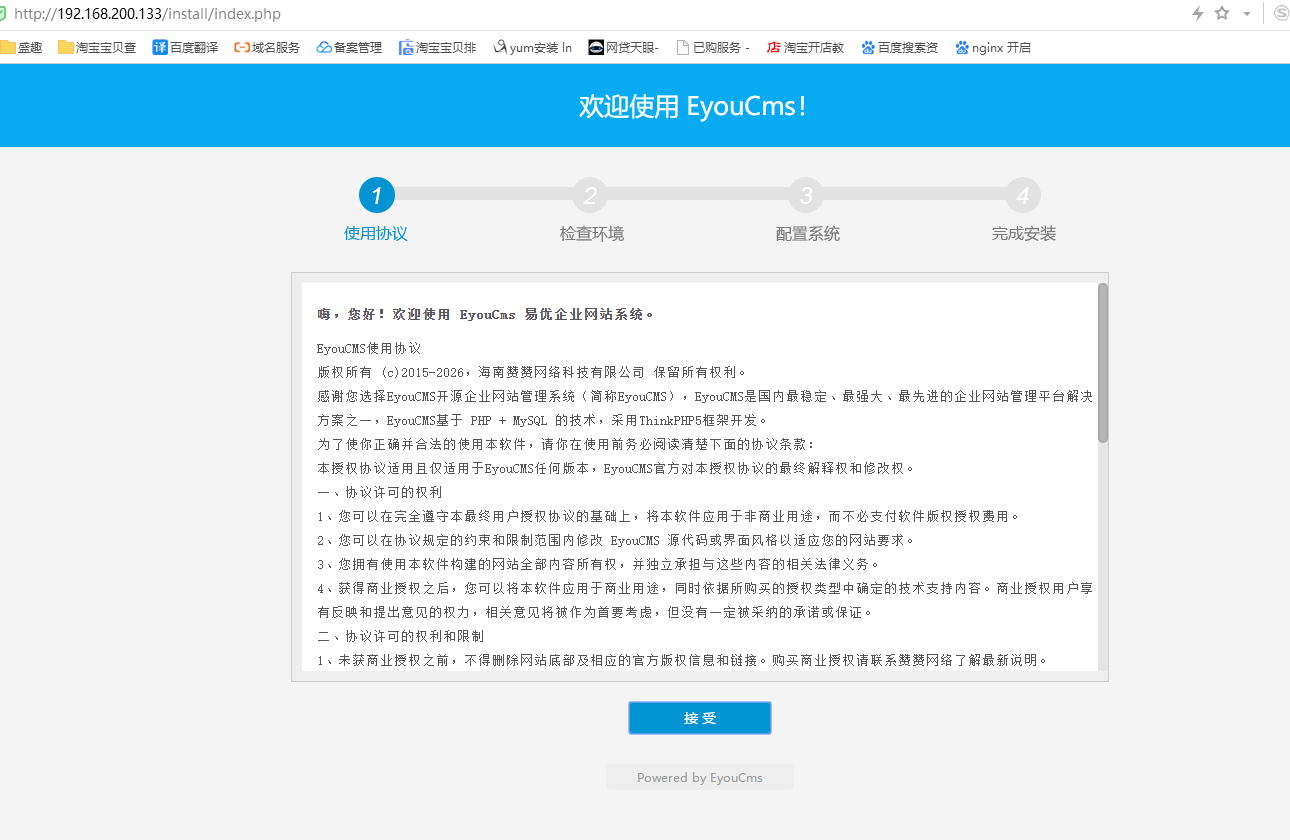
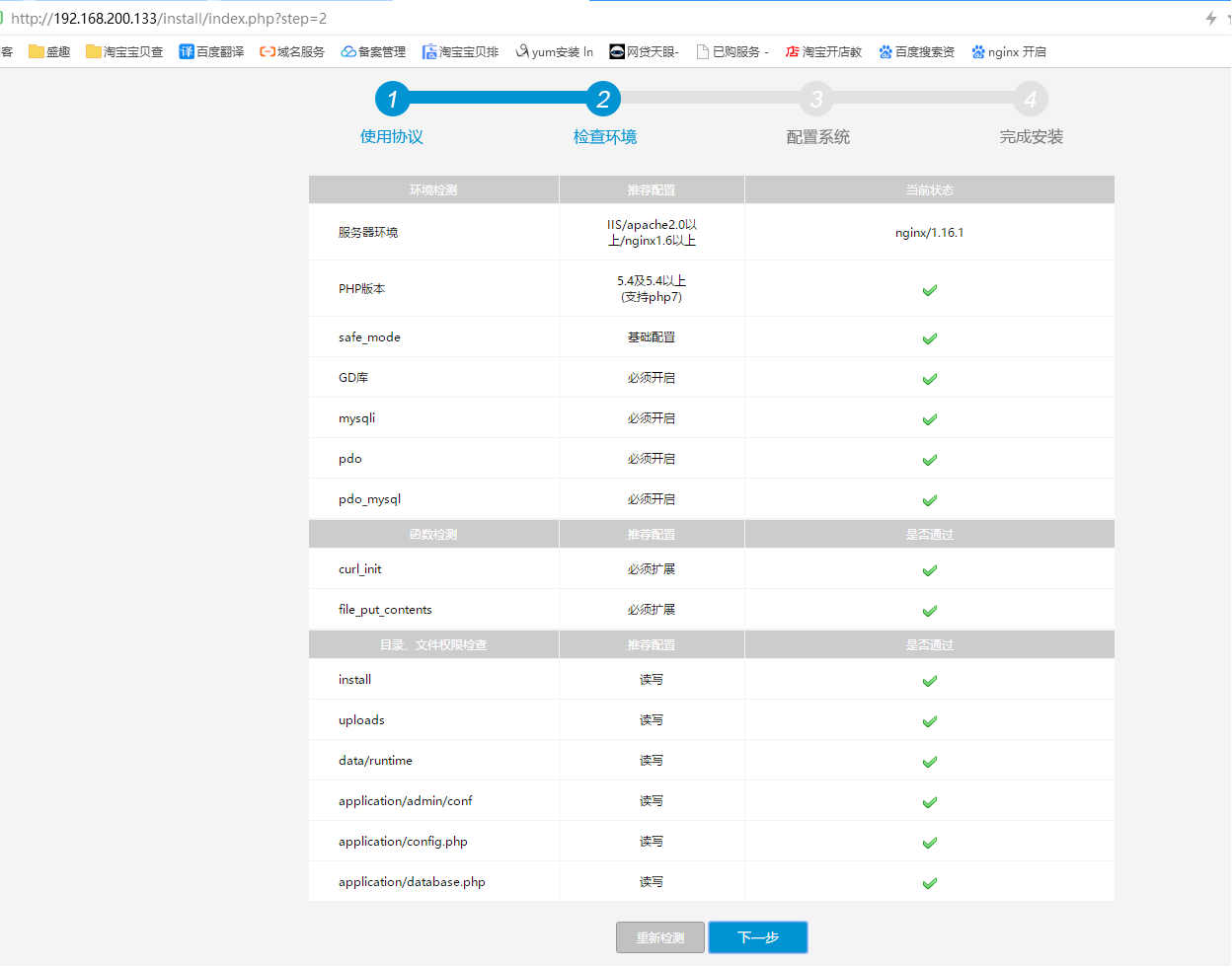
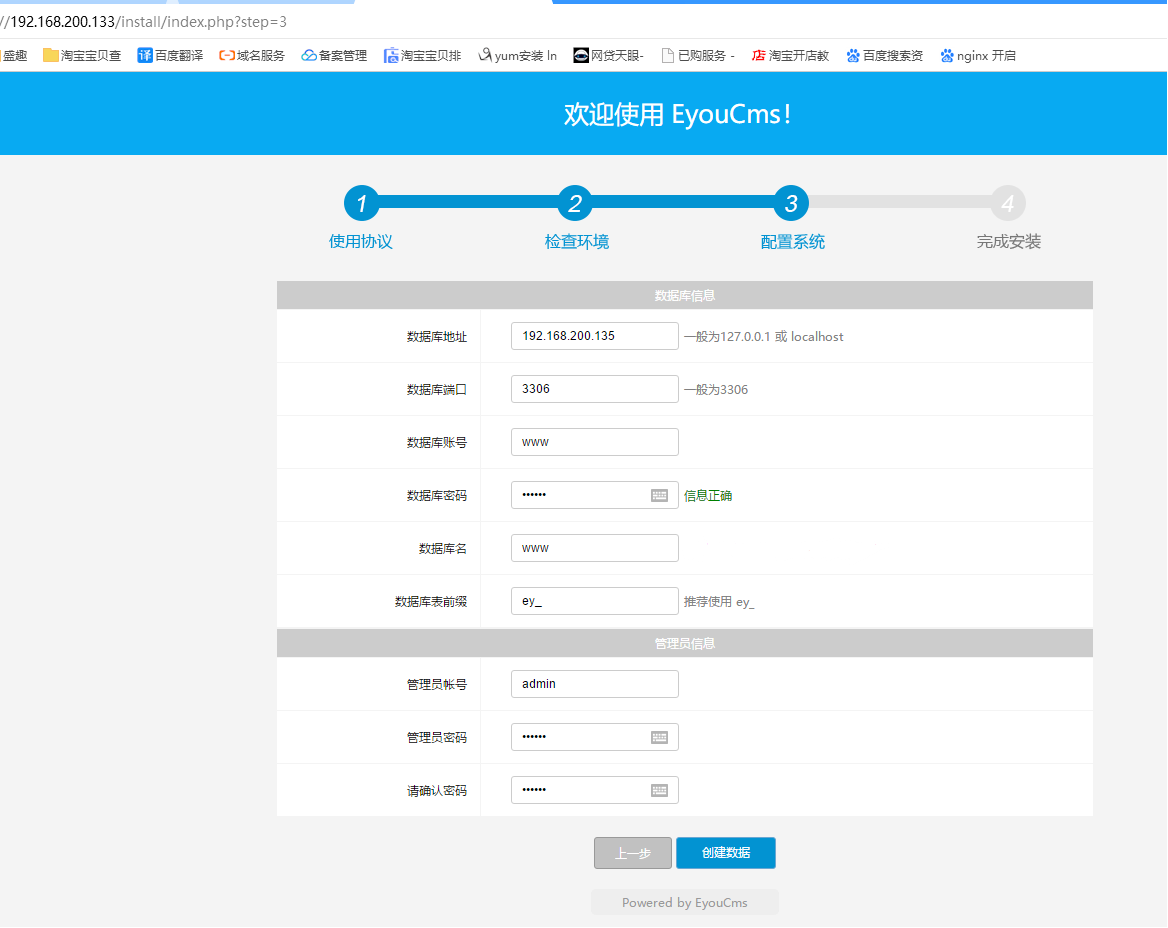
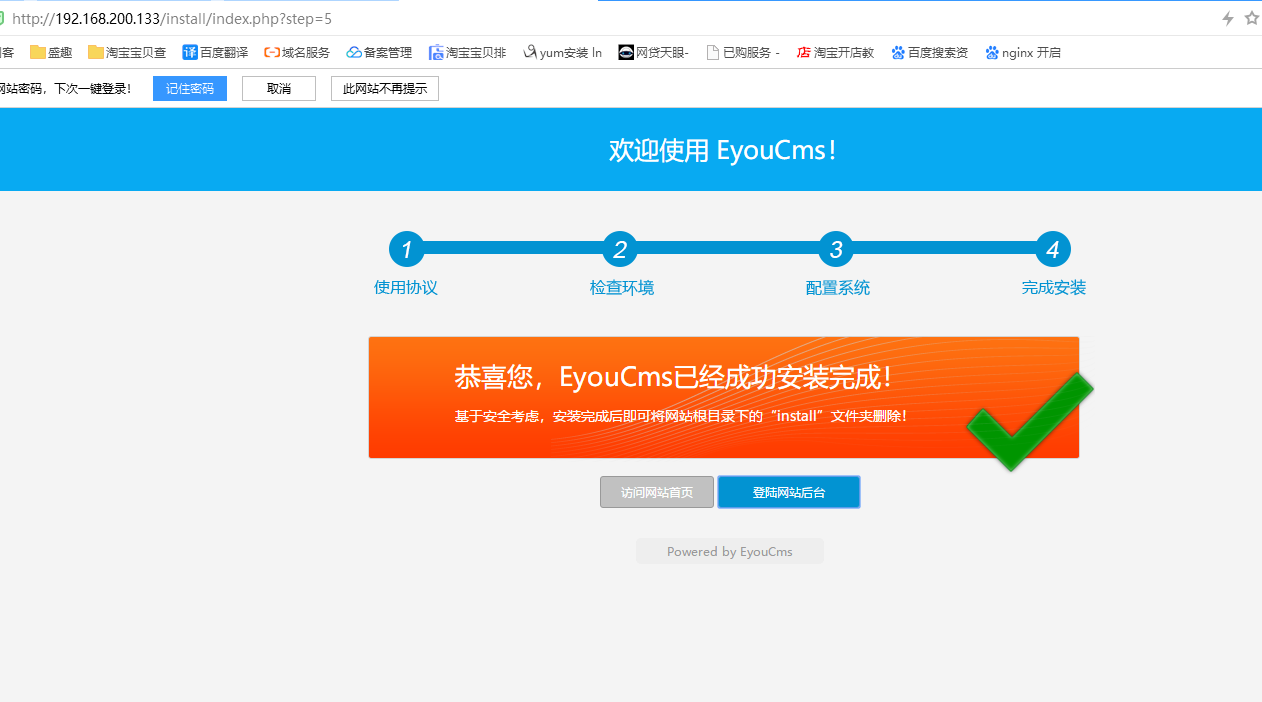

提示:
1、本次用了一台服务器进行验证测试,
2、在生产环境应该是用域名请求,负载均衡到随机每台服务器。
ansible-playbook通过github拉取部署Lnmp环境的更多相关文章
- docker中基于centos镜像部署lnmp环境 php7.3 mysql8.0 最新版
Docker是一个开源的应用容器引擎,基于Go语言并遵从Apache2.0协议开源. Docker可以让开发者打包他们的应用以及依赖包到一个轻量级.可移植的容器中,然后发布到任何流行的Linux机器上 ...
- 【转载】Centos系统快速部署LNMP环境
PHP语言在Linux系统上运行的时候,需要在Linux系统上部署相应的Nginx.MySQL.PHP等环境,只有将这些环境参数都设置好,PHP相关应用程序才可正常运行,部署环境的方法有很多种,可手动 ...
- 手动部署LNMP环境(CentOS 7)
手动部署LNMP环境(CentOS 7) 一.修改 yum 源 [root@localhost ~]# rpm -Uvh https://dl.fedoraproject.org/pub/epel/e ...
- 十九.部署LNMP环境、构建LNMP平台、地址重写
proxy client web1 web2 1.部署LNMP环境 1.1 部署nginx(前面已部署过) 1.2 部署mariadb ]# yum -y install mariadb mari ...
- 高级运维(三):部署Lnmp环境、构建Lnmp平台、地址重写
一.部署LNMP环境 目标: 安装部署Nginx.MariaDB.PHP环境 1> 安装部署Nginx.MariaDB.PHP.PHP-FPM: 2> 启动Nginx.MariaDB.FP ...
- 手动编译部署LNMP环境(CentOS7.5+Nginx-1.18.0+MySQL-5.7.30+PHP-7.4.14)
在平时运维工作中,经常需要用到LNMP应用框架.LNMP环境是指在Linux系统下,由Nginx + MySQL + PHP组成的网站服务器架构. 可参考前面的文章: 如何在CentOS 7上搭建LA ...
- github拉取和推送
登入github 创建一个开源项目 然后打开安装好的git 首先进入一个指定的文件夹 例如: 1)E:\>cd miaov/testGit 回车 进入E盘的testGit文件夹 2)E:\mia ...
- vsCode如何从github拉取项目
最近刚使用vscode,有些操作还不太会,所以记录下. 1.开vscode使用CTRL+`或者点击查看到集成终端打开控制终端. 2.在终端中cd到存放文件夹下面,然后git clone https:/ ...
- 使用VSCode如何从github拉取项目
转载自:https://blog.csdn.net/sunqy1995/article/details/81517159 1.开vscode使用CTRL+`或者点击查看到集成终端打开控制终端 2. 在 ...
随机推荐
- node中间件
npm i body-parser post 请求主题中间件 const bodyParser = require('body-parser') const bodyParser = requir ...
- window下dos命令
引用 Windows下DOS命令 显示当前目录所有文件 dir 创建文件夹 md test 创建文件 cd>a.txt 删除文件 del a.txt 删除文件夹 rd test 在某磁盘打开不同 ...
- Linux curl携带cookie测试接口
问题: 休息在家,被告知要启动测试环境的一个定时任务,但是服务器在内网,连上vpn只能访问内网的开发环境,无法访问测试环境,于是进开发环境服务器,ping测试环境的ip,发现是通的,于是想到通过开发环 ...
- xss的变形--如何绕过xss过滤
我们可以通过构造xss代码进行各种变形,以绕过xss过滤器的检测 1.大小写检测 将payload进行大小写转化 如<Img SRC='#' Onerror="alert(/xss/ ...
- JS将数字转换为中文
<!DOCTYPE html> <html> <head> <meta charset="UTF-8"> <title> ...
- 三年之久的 etcd3 数据不一致 bug 分析
问题背景 诡异的 K8S 滚动更新异常 笔者某天收到同事反馈,测试环境中 K8S 集群进行滚动更新发布时未生效.通过 kube-apiserver 查看发现,对应的 Deployment 版本已经是最 ...
- 在 Flutter 中使用 TensorFlow Lite 插件实现文字分类
如果您希望能有一种简单.高效且灵活的方式把 TensorFlow 模型集成到 Flutter 应用里,那请您一定不要错过我们今天介绍的这个全新插件 tflite_flutter.这个插件的开发者是 G ...
- Magicodes.IE 2.3重磅发布——.NET Core开源导入导出库
在2.3这一版本的更新中,我们迎来了众多的使用者.贡献者,在这个里程碑中我们也添加并修复了一些功能.对于新特点的功能我将在下面进行详细的描述,当然也欢迎更多的人可以加入进来,再或者也很期待大家来提is ...
- 对vue的初步学习
vue: vue:一个mvvm框架(库),和angular类似 比较容易上手 指令以v=xxx 一片html代码配合接送,在new一个vue实例 适合:移动端,小巧 vue基本雏形 v-model 一 ...
- CSS常用布局技巧 实例
末尾用省略号! white-space: nowrap; overflow: hidden; text-overflow: ellipsis; ######################## 两个i ...