
Docker学习笔记:Alpine镜像+Python3安装+http服务器
- 编写Dockerfile文件使用最新的Alpine镜像并安装Python3环境,如下:
因为python高于3.4则不会默认安装pip,需要手动安装。
试了很多其他办法都没安装上,唯有下载get-pip.py进行安装。
这里说一下cherrypy版本不能高于9.0.0,负责等下import wsgiserver会出错,因为wsgiserver后面移出cherrypy了。
FROM alpine

RUN mkdir /install

COPY get-pip.py /install

RUN apk update

RUN apk add bash

RUN apk add python3

RUN python3 /install/get-pip.py

RUN pip install bottle

#RUN pip3 install cherrypy

RUN pip3 install "cherrypy>=3.0.8,<9.0.0"

ADD server.py /root/server.py

EXPOSE 8080:8080

CMD /usr/bin/python3 /root/server.py
- 在Dockerfile文件目录下执行下面命令可以创建基于python3的镜像:
$ docker build -t test_python38_http .
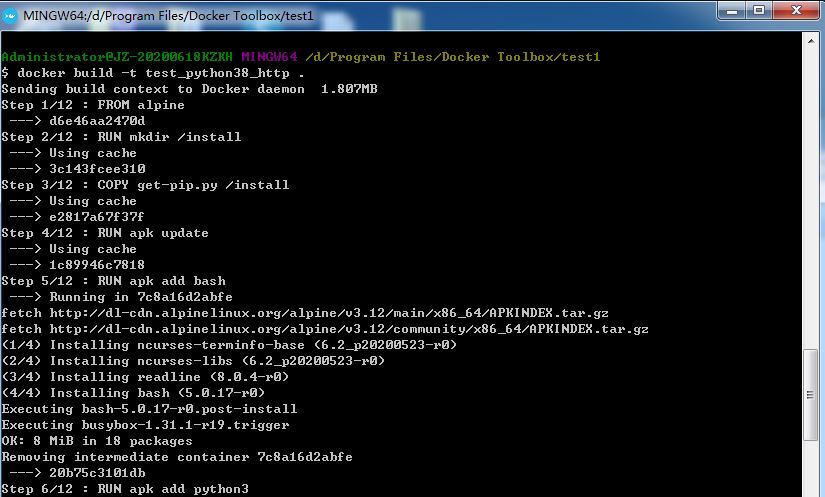
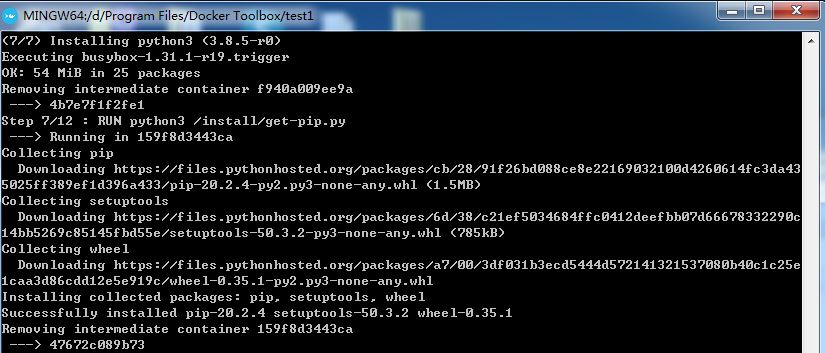
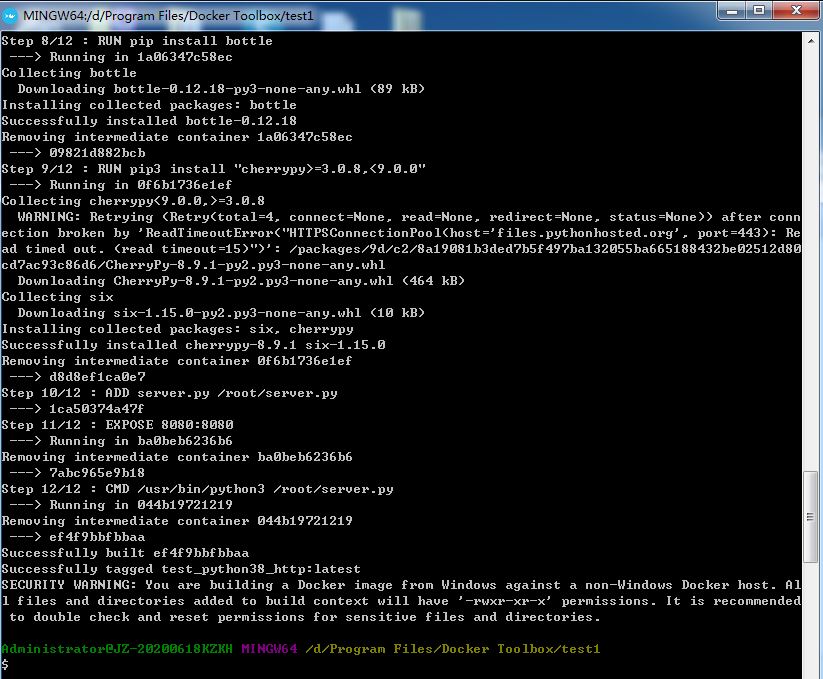
- 这样基于alpine的python3镜像创建成功了,用下面命令可以查看:
$ docker images

- 镜像创建成功后输入命令则可以启动镜像服务了
$ docker run -p 8080:8080 -it test_python38_http

- 最后打开浏览器,输入url测试:
http://192.168.99.100:8080/HTTP_SET_COOKIE_LIST_3
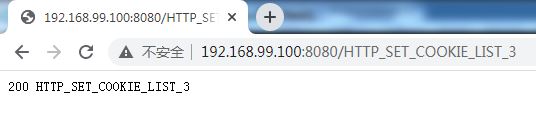
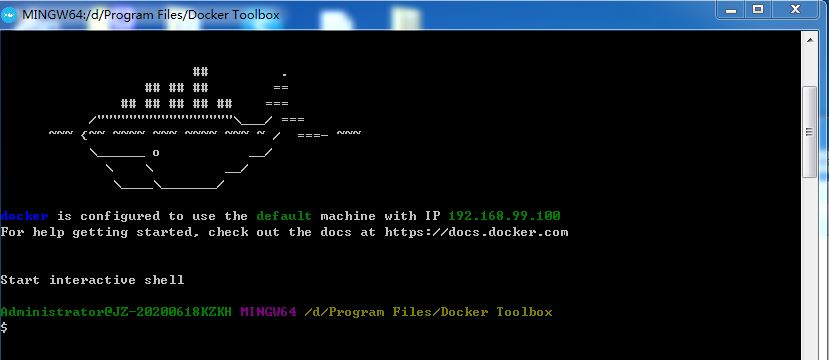
关于这个IP也是一个坑,大家可以在启动Docker时看到一个default IP,并不是其他的哦。
- 最后贴上http代码
import bottle

from bottle import post, get, delete, route, request

from cherrypy import wsgiserver

import time

import signal

@route('/HTTP_SET_COOKIE_LIST_3')

def set_cookie():

    print("VA_HTTP HTTP_SET_COOKIE_LIST_3")

    count = int( bottle.request.cookies.get('counter', '0') )

    count += 1

    bottle.response.set_cookie('counter', str(count))

    bottle.response.status = 200

    bottle.response.content_type = 'text/plain; charset=utf-8'

    return "200 HTTP_SET_COOKIE_LIST_3"

@route('/HTTP_SET_COOKIE_LIST_4')

def verify_cookie():

    count = int( bottle.request.cookies.get('counter', '0') )

    if count == 0 :

        bottle.response.status = 400

        bottle.response.content_type = 'text/plain; charset=utf-8'

        return "400 HTTP_SET_COOKIE_LIST_4"

    else :

        bottle.response.status = 200

        bottle.response.content_type = 'text/plain; charset=utf-8'

        return "200 HTTP_SET_COOKIE_LIST_4"

@route('/<id>')

def HttpRoute_handle(id):

    bottle.response.status = 200

    bottle.response.content_type = 'text/plain; charset=utf-8'

    return "200 "+ id

@route('/HTTP_TIMEOUT')

def HttpTime_handle():

    time.sleep(30)

    bottle.response.status = 200

    bottle.response.content_type = 'text/plain; charset=utf-8'

    return "200 TIME"

#Get for Test HTTP_DO_REQUEST_1, HTTP_SET_POST_DATA_5, HTTP_SET_METHOD_3

@get('/<id>')

def HttpGet_handler(id):

    if id == "HTTP_SET_METHOD_3":

        bottle.response.status = 200

        bottle.response.content_type = 'text/plain; charset=utf-8'

        return "200 GET"

    elif (id == "HTTP_SET_HEADER_2_0") or (id == "HTTP_SET_HEADER_2_1") or (id == "HTTP_SET_HEADER_2_2"):

        if(request.headers.get('FirstHeader') == 'value') and not(request.headers.get('SecondHeader')) and (id == "HTTP_SET_HEADER_2_0"):

            bottle.response.status = 200

            bottle.response.content_type = 'text/plain; charset=utf-8'

            return "200 HTTP_SET_HEADER_2 " + "FirstHeader"

        elif (request.headers.get('FirstHeader') == 'value') and (request.headers.get('SecondHeader') == 'value') and (id == "HTTP_SET_HEADER_2_1"):

            bottle.response.status = 200

            bottle.response.content_type = 'text/plain; charset=utf-8'

            return "200 HTTP_SET_HEADER_2 " + "FirstHeader" + "SecondHeader"

        elif not(request.headers.get('FirstHeader')) and not(request.headers.get('SecondHeader')) and( id == "HTTP_SET_HEADER_2_2"):

            bottle.response.status = 200

            bottle.response.content_type = 'text/plain; charset=utf-8'

            return "200 HTTP_SET_HEADER_2 "

        else:

            bottle.response.status = 400

            bottle.response.content_type = 'text/plain; charset=utf-8'

            return "400 HTTP_SET_HEADER_2"

    else:

        bottle.response.status = 200

        bottle.response.content_type = 'text/plain; charset=utf-8'

        return "200 "+ id

#Post for Test : HTTP_SET_POST_DATA_3, HTTP_SET_POST_DATA_4, HTTP_SET_POST_DATA_5, HTTP_SET_METHOD_3

@post('/<id>')

def HttpSetPostData_handler(id):

    if id == "HTTP_SET_POST_DATA_5" :

        bottle.response.status = 400

        bottle.response.content_type = 'text/plain; charset=utf-8'

        return "400 " + id

    elif id == "HTTP_SET_METHOD_3":

        Data = bottle.request.forms.get('data')

        Cata = bottle.request.forms.get('cata')

        if Data:

            bottle.response.status = 200

            bottle.response.content_type = 'text/plain; charset=utf-8'

            return "200 POST " + "data=" + Data

        elif Cata:

            bottle.response.status = 200

            bottle.response.content_type = 'text/plain; charset=utf-8'

            return "200 POST " + "cata=" + Cata

        else:

            bottle.response.status = 400

            bottle.response.content_type = 'text/plain; charset=utf-8'

            return "400 " + id

    else:

        testName = bottle.request.forms.get('testname')

        if testName == "HTTP_SET_POST_DATA_4":

            bottle.response.status = 200

            bottle.response.content_type = 'text/plain; charset=utf-8'

            return "200 " + id

        elif testName == id:

            #HTTP_SET_POST_DATA_3

            bottle.response.status = 200

            bottle.response.content_type = 'text/plain; charset=utf-8'

            return "200 " + testName

        else :

            bottle.response.status = 400

            bottle.response.content_type = 'text/plain; charset=utf-8'

            return "400 " + id

def stop_server(*args, **kwargs):

    server.stop()

app = bottle.default_app()

server = wsgiserver.CherryPyWSGIServer(("0.0.0.0", 8080), app)

signal.signal(signal.SIGINT, stop_server)

signal.signal(signal.SIGTERM, stop_server)

signal.signal(signal.SIGHUP, stop_server)

print("VA_HTTP TestSuite Server Started")

server.start()
Docker学习笔记:Alpine镜像+Python3安装+http服务器的更多相关文章
- Docker学习笔记一 概念、安装、镜像加速
本文地址:https://www.cnblogs.com/veinyin/p/10406378.html Docker 是一个容器,可以想象成一个轻便的虚拟机,但不虚拟硬件和操作系统. 优点:启动快 ...
- Docker学习笔记【三】安装Redis
项目中使用到Redis,平常都是别人搭建的,今天试着在Google Cloud Platform 上搭建一个学习环境. 1.使用 docker pull redis 从docker hub中下载镜像 ...
- Docker学习笔记:镜像、容器、数据卷
核心概念 镜像:一个只读的模板,类似虚拟机的镜像. 容器:可以理解为镜像的一个运行实例.运行时类似于沙箱,多个容器互相独立. 仓库:存放镜像文件的地方. 镜像 命令表格 命令 解释 选项 docker ...
- Docker学习笔记之镜像与容器
0x00 概述 镜像和容器作为 Docker 里最基础的概念,我们很有必要了解 Docker 对它们的很多定义以及其他与它们有关的知识.在这一小节里,我们就专门针对镜像与容器两个概念展开,细致的梳理与 ...
- docker学习笔记2--对镜像/容器的命令操作
Docker启动一个Centos镜像 我们下载完成一个Centos镜像之后,开始启动 docker run -d -i -t <imageID> /bin/bash 这样就能启动一个一直停 ...
- docker学习笔记-常用镜像相关命令
docker images # 1.使用 [root@iZbp13qr3mm4ucsjumrlgqZ ~]# docker images REPOSITORY TAG IMAGE ID CREATED ...
- docker学习笔记一:基本安装和设置容器静态ip
docker是一个lxc升级版的容器类虚拟环境,具有快速部署,灵活,易迁移的虚拟机模式,现在各大公司已经开始广泛使用为了自己方便学习linux,需要多台虚拟机环境,但是vmware开启多台虚拟机时需要 ...
- Docker学习笔记--2 镜像的创建
如果我们需要在Docker环境下部署tomcat.redis.mysql.nginx.php等应用服务环境,有下面三种方法: 1,根据系统镜像创建Docker容器,这时容器就相当于是一个虚拟机,进入容 ...
- Docker学习笔记-CentOS7镜像
前言: 环境:centos7.5 64 位 正文: 第一步:下载centos7镜像 docker pull centos 第二步:建立centos7的容器 sudo docker run --priv ...
随机推荐
- PHP的学习(提前学习了,业余爱好) (一)
一个函数一个函数地堆 strstr()函数 在本地测试的时候,代码与显示如下 1.代码: <?php echo strstr("I love Shanghai!123",&q ...
- win10 home安装docker快速攻略
本文适用于win10 Home用户,专业版和企业版直接见官网.win7版本见Docker Toolbox. 安装清单 软件 说明 Docker Desktop Installer 步骤介绍页:http ...
- Docker(Docker Toolbox)配置镜像加速更换国内源
自己当时装的是Win10专业工作室版本,不知道为什么不支持window for docker, 所以选择了Docker Toolbox 的方式,主要是为了学习,虽然这种方式是不建议安装的,但是基础的学 ...
- javascript里面的this指向问题
1:一般情况下this最终指向调用它的那个对象. 2:全局作用域或者普通函数中的this都会指向window. 例1:console.log(this); // 在控制台输出的是BOM顶级对象 wi ...
- 多测师讲解pthon_re模块_高级讲师肖sir
#import re 一.我们就re模块(也叫正则模块)介绍: 实现一个编译查找,一般在日志处理或者文件处理时用的比较多 正则表达式主要用于模式匹配和替换工作. 预定义字符集匹配: \d: ...
- pytest文档58-随机执行测试用例(pytest-random-order)
前言 通常我们认为每个测试用例都是相互独立的,因此需要保证测试结果不依赖于测试顺序,以不同的顺序运行测试用例,可以得到相同的结果. pytest默认运行用例的顺序是按模块和用例命名的 ASCII 编码 ...
- 【C语言入门学习笔记】如何把C语言程序变成可执行文件!
环境 在ANSI的任何一种实现中,存在两种不同的环境. 翻译环境:在这个环境里,源代码被转换为可执行的机器指令. 执行环境:用于实际执行代码. 翻译环境 组成一个程序的每个源文件通过编译过程分别转成目 ...
- logstash-配置文件详解
kafka 将 kafka topic 中的数据读取为事件 kafka{ bootstrap_servers=> "kafka01:9092,kafka02:9092,kaf ...
- spring boot:spring security用mysql数据库实现RBAC权限管理(spring boot 2.3.1)
一,用数据库实现权限管理要注意哪些环节? 1,需要生成spring security中user类的派生类,用来保存用户id和昵称等信息, 避免页面上显示用户昵称时需要查数据库 2,如果需要在页面上显示 ...
- tamcat7.0(安装文件下载)
安装包:http://files.cnblogs.com/files/chenghu/apache-tomcat-7.0.27.rar http://files.cnblogs.com/files/c ...