
[笔记]Python的调试器pudb简易教程
Linux下运行python脚本,pudb是一个不错的调试器。
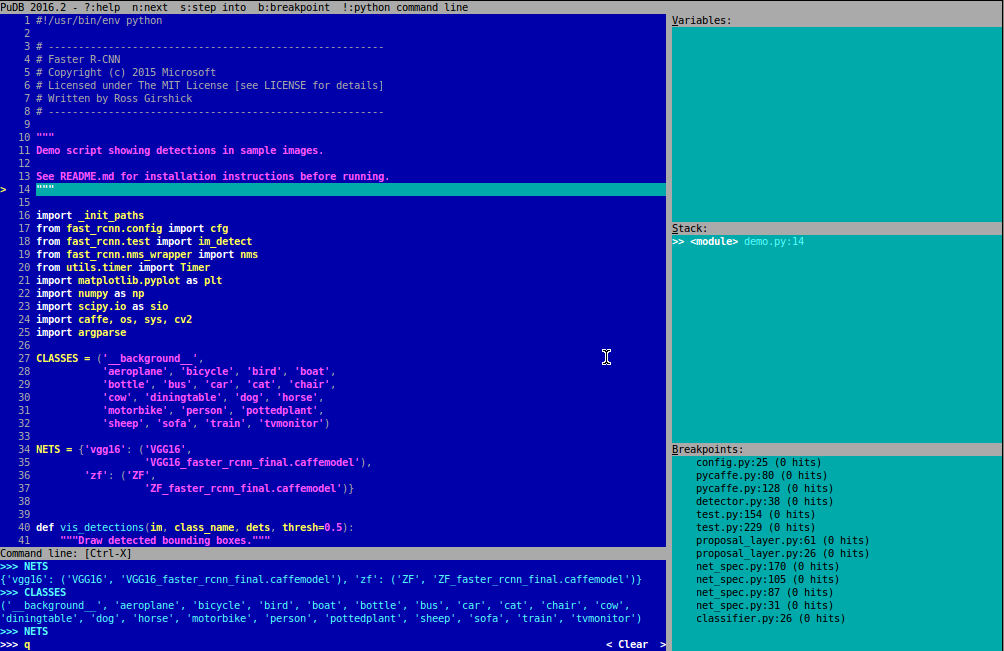
语法高亮,断点,调用栈,命令行,都有了,如下图。
[安装]
pip install pudb
[使用]
pudb xxx.py
[快捷键]
最常用的快捷键,应该是如下几个:
- n - step over ("next") # 运行到下一行
- s - step into # 运行进函数
- c - continue # 继续运行
- r/f - finish current function # 结束当前函数
- b - toggle breakpoint # 打断点/取消断点
- V - focus variables # 聚焦在变量窗口
- f1/?/H - show this help screen # 显示帮助窗口
- Ctrl-n/p - browse command line history # 浏览命令行历史
- t/r/s/c - show type/repr/str/custom for this variable # 切换type/repr/str/custom
界面下按?就能出来快捷键列表,如下:
Welcome to PuDB, the Python Urwid debugger.

-------------------------------------------

(This help screen is scrollable. Hit Page Down to see more.)

Keys:                                                          # 快捷键相关

    Ctrl-p - edit preferences                                  # 编辑配置

    n - step over ("next")                                     # 运行到下一行

    s - step into                                              # 运行进函数

    c - continue                                               # 继续运行

    r/f - finish current function                              # 结束当前函数

    t - run to cursor                                          # 运行到光标处

    e - show traceback [post-mortem or in exception state]     # 显示traceback

    H - move to current line (bottom of stack)                 # 移动到当前行(栈底)

    u - move up one stack frame                                # 移动到栈的上一行

    d - move down one stack frame                              # 移动到栈的下一行

    o - show console/output screen                             # 显示命令行屏幕(回车返回pudb)

    b - toggle breakpoint                                      # 打断点/取消断点

    m - open module                                            # 打开python模块

    j/k - up/down                                              # 上/下

    Ctrl-u/d - page up/down                                    # 上一页/下一页

    h/l - scroll left/right                                    # 左滚动/右滚动

    g/G - start/end                                            # 跳转到首行/末行

    L - show (file/line) location / go to line                 # 跳到指定行

    / - search                                                 # 查找

    ,/. - search next/previous                                 # 查找下一个/上一个

    V - focus variables                                        # 聚焦在变量窗口

    S - focus stack                                            # 聚焦在栈窗口

    B - focus breakpoint list                                  # 聚焦在断点列表窗口

    C - focus code                                             # 聚焦在代码窗口

    f1/?/H - show this help screen                             # 显示帮助窗口

    q - quit                                                   # 退出

    Ctrl-c - when in continue mode, break back to PuDB         # 当处于连续模式时,返回pudb

    Ctrl-l - redraw screen                                     # 重绘窗口

Command line-related:                                          # 命令行相关

    ! - invoke configured python command line in current environment            # 进入命令行窗口

    Ctrl-x - toggle inline command line focus                                   # 切换命令行窗口和代码窗口

    +/- - grow/shrink inline command line (active in command line history)      # 增长/缩减命令行(命令行历史下激活)

    _/= - minimize/maximize inline command line (active in command line history)# 最小化/最大化命令行(命令行历史下激活)

    Ctrl-v - insert newline                                    # 插入新行

    Ctrl-n/p - browse command line history                     # 浏览命令行历史

    Tab - yes, there is (simple) tab completion                # 快速补齐

Sidebar-related (active in sidebar):                           # 工具栏相关(工具栏激活时有效)

    +/- - grow/shrink sidebar                                  # 扩大/缩减工具栏(指的是工具栏宽度)

    _/= - minimize/maximize sidebar                            # 最小化/最大化工具栏

    [/] - grow/shrink relative size of active sidebar box      # 扩大/缩减激活工具栏相对大小(指的是窗口高度)

Keys in variables list:                                        # 变量列表窗口的快捷键

    \ - expand/collapse                                        # 展开/收缩

    t/r/s/c - show type/repr/str/custom for this variable      # 切换type/repr/str/custom

    h - toggle highlighting                                    # 切换高亮

    @ - toggle repetition at top                               # 切换顶部重复

    * - cycle attribute visibility: public/_private/__dunder__ # 属性的循环可视化

    m - toggle method visibility                               # 切换方法的可见性

    w - toggle line wrapping                                   # 切换换行

    n/insert - add new watch expression                        # 添加新的watch表达式

    enter - edit options (also to delete)                      # 编辑选项

Keys in stack list:                                            # 栈列表窗口的快捷键

    enter - jump to frame                                      # 跳到某帧

Keys in breakpoints view:                                      # 断点列表窗口的快捷键

    enter - edit breakpoint                                    # 编辑断点

    d - delete breakpoint                                      # 删除断点

    e - enable/disable breakpoint                              # 启用/禁用断点
当你不知道如何点中OK键时,试试移动上下左右的箭头键,Enjoy it :)
[笔记]Python的调试器pudb简易教程的更多相关文章
- Pdb— Python的调试器
参考:Pdb- Python的调试器 pdb 模块定义了一个交互式源代码调试器,用于 Python 程序.它支持在源码行间设置(有条件的)断点和单步执行,检视堆栈帧,列出源码列表,以及在任何堆栈帧的上 ...
- 用python开发调试器——起始篇
首先,你得准备一套python开发环境,正常情况下,一般是在windows下开发的,因为win系统应用广泛,再则就是要有个IDE,这里我选择我熟悉的Eclipse.环境搭建,网上都有,比如:http: ...
- Visual Studio图形调试器详细使用教程(基于DirectX11)
前言 对于DirectX程序开发者来说,学会使用Visual Studio Graphics Debugger(图形调试器)可以帮助你全面了解渲染管线绑定的资源和运行状态,从而确认问题所在.现在就以我 ...
- RenderDoc图形调试器详细使用教程(基于DirectX11)
前言 由于最近Visual Studio的图形调试器老是抽风,不得不寻找一个替代品了. 对于图形程序开发者来说,学会使用RenderDoc图形调试器可以帮助你全面了解渲染管线绑定的资源和运行状态,从而 ...
- python基础——调试
python基础——调试 程序能一次写完并正常运行的概率很小,基本不超过1%.总会有各种各样的bug需要修正.有的bug很简单,看看错误信息就知道,有的bug很复杂,我们需要知道出错时,哪些变量的值是 ...
- python的调试
调试 程序能一次写完并正常执行的概率很小.总会有各种各样的bug需要修正. 有的bug很简单,看看错误信息就知道,有的bug很复杂,我们需要知道出错时 哪些变量的值是正确的,哪些变量的值是错误的,因此 ...
- python错误调试print、assert、logging、pdb、pdb.set_trace()
世界人都知道,程序总会有bug存在.复杂点的bug一般人不能一眼看出,这就一要一套调试程序的手段. 方法一:使用print()函数直接打印: >>> def foo(s): ... ...
- 《python灰帽子》学习笔记:写一个windos 调试器(一)
一.开发内容介绍 为了对一个进程进行调试,你首先必须用一些方法把调试器和进程连接起来.所以, 我们的调试器要不然就是装载一个可执行程序然后运行它, 要不然就是动态的附加到一个运行的进程.Windows ...
- 《python灰帽子》学习笔记:调试器设置
一.构造 C 数据类型 C Type | Python Type | ctypes Type ____________________________________________________ ...
随机推荐
- 爬虫 (5)- Scrapy 框架简介与入门
Scrapy 框架 Scrapy是用纯Python实现一个为了爬取网站数据.提取结构性数据而编写的应用框架,用途非常广泛. 框架的力量,用户只需要定制开发几个模块就可以轻松的实现一个爬虫,用来抓取网页 ...
- C# mvc中动态压缩文件发送给前端
前言 帮朋友解决一个C#中发送压缩文件的的问题,因为感觉解释起来更麻烦,就直接用几分钟时间写了个小Demo.本着"走过路过"不错过的原则,也给记录一下. 1.前端代码 非常简单的一 ...
- [转]jna模拟指针开辟空间,数组首地址获取值
http://blog.csdn.net/zhuzhichao0201/article/details/5817819 不是很明白,先记在这里 ———————————————————————————— ...
- char类型能否存储一个中文字符?为什么
char类型能否存储一个中文字符?为什么 解答:可以.一个char是两个字节,而一个中文也是两个字节.
- 【翻译自mos文章】使用asm来部署 超大数据库(10TB到PB 范围)--针对oracle 10G
使用asm来部署 超大数据库(10TB到PB 范围) 參考原文: Deployment of very large databases (10TB to PB range) with Automati ...
- jQuery实现的浮动层div浏览器居中显示效果
本文实例讲述了jQuery实现的浮动层div浏览器居中显示效果.分享给大家供大家参考,具体如下: 1.在页面的head中引入jQuery <script type="text/java ...
- java . -- IDEA运行最简单的Java程序Hello World
以下内容基于IDEA, JAVA EE已经安装好的情况. 如果没有安装好,网上的安装教程非常多的. 下面开始,18个图解 点击Finish 运行的代码如下: public class HelloWor ...
- c/c++中内存对齐完全理解
一,什么是内存对齐?内存对齐用来做什么? 所谓内存对齐,是为了让内存存取更有效率而采用的一种编译阶段优化内存存取的手段. 比如对于int x;(这里假设sizeof(int)==4),因为cpu对内存 ...
- Android开发:《Gradle Recipes for Android》阅读笔记(翻译)5.3——使用Robotium进行功能测试
问题: 你想要使用Robotium库测试activity. 解决方案: 增加Robotium依赖,编写自己的测试脚本. 讨论: Android Test Support Library提供类可以操作a ...
- Castle.MVC框架介绍
Castle.MVC目前还在Castle的Sandbox中,只是在源代码管理中有,还没有向外发布版本,这里介绍多时Web的MVC,和Castle的MonoRail相比较,这个MVC可以Asp.Net的 ...