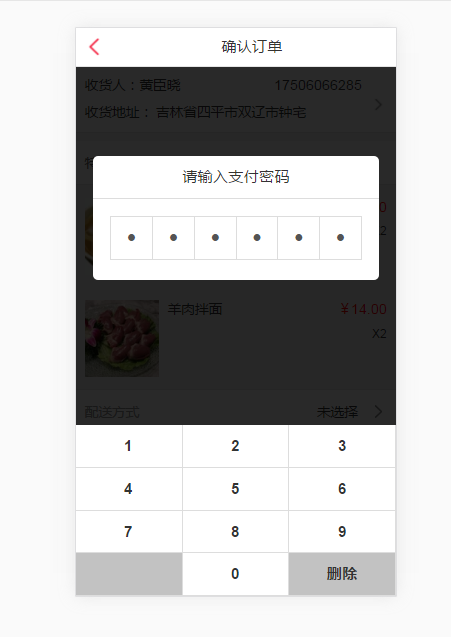
从网上搜索了好多都很麻烦,花了点事件自己做了个,简单轻便,老少皆宜
<template>
<section class="pay-mask" @click="close_mask" v-show="payshow">
<div class="container">
<div class="pay_title">请输入支付密码
</div>
<div class="flex f-d-r pay_content">
<div class="ipt_pay">
<input type="password" maxlength="1" disabled>
</div>
<div class="ipt_pay">
<input type="password" maxlength="1" disabled>
</div>
<div class="ipt_pay">
<input type="password" maxlength="1" disabled>
</div>
<div class="ipt_pay">
<input type="password" maxlength="1" disabled>
</div>
<div class="ipt_pay">
<input type="password" maxlength="1" disabled>
</div>
<div class="ipt_pay">
<input type="password" maxlength="1" disabled>
</div>
</div>
</div>
<footer>
<ul class="pay_btn">
<li @click="btnpassword($event)">1</li>
<li @click="btnpassword($event)">2</li>
<li @click="btnpassword($event)">3</li>
<li @click="btnpassword($event)">4</li>
<li @click="btnpassword($event)">5</li>
<li @click="btnpassword($event)">6</li>
<li @click="btnpassword($event)">7</li>
<li @click="btnpassword($event)">8</li>
<li @click="btnpassword($event)">9</li>
<li class="b9"></li>
<li @click="btnpassword($event)">0</li>
<li class="b9" @click="btndelete">删除</li>
</ul>
</footer>
</section>
</template>
<script>
export default {
props: {
payshow: {
type: Boolean,
default: false
}
},
data() {
return {
index: -1
}
},
created() {},
mounted() {
$(".ipt_pay input:first").focus();
},
methods: {
btnpassword(e) {
var obj = e.currentTarget;
var payinput = $(".ipt_pay input");
if (this.index < 5) {
this.index++;
$(payinput[this.index]).val($(obj).text());
}
if (this.index == 5) {
var pay_pwd = '';
var payinput = $(".ipt_pay input");
for (var i = 0; i < payinput.length; i++) {
pay_pwd += $(payinput[i]).val();
}
console.log(pay_pwd);
}
},
btndelete() {
var payinput = $(".ipt_pay input");
if (this.index >= 0) {
$(payinput[this.index]).val('');
this.index--;
}
},
close_mask() {
this.payshow = false;
}
}
}
</script>
<style scoped>
img {
width: 100%;
height: 100%;
}
section {
position: fixed;
top: 0;
width: 100%;
height: 100%;
z-index: 998;
background: rgba(0, 0, 0, .6)
}
.container {
position: absolute;
top: 4rem;
background: #fff;
border-radius: 5px;
margin: 0 .533333rem;
padding-bottom: .266667rem;
}
.pay_title {
position: relative;
font-size: .48rem;
text-align: center;
color: #333;
height: 1.333333rem;
line-height: 1.333333rem;
border-bottom: 1px solid #ddd;
}
.close {
position: absolute;
right: .2rem;
top: .2rem;
width: .72rem;
height: .72rem;
}
.pay_content {
border-bottom: 1px solid #ddd;
border-top: 1px solid #ddd;
border-right: 1px solid #ddd;
margin: .533333rem .533333rem .333333rem .533333rem;
}
.ipt_pay {
width: 100%;
height: 1.333333rem;
border-left: 1px solid #ddd;
}
.ipt_pay input {
border: 0;
height: 100%;
width: 100%;
text-align: center;
font-size: .88rem;
background: #fff;
}
footer {
position: absolute;
bottom: 0;
width: 100%;
font-weight: 600;
}
.pay_btn {}
.pay_btn li {
width: 33.3333%;
float: left;
height: 1.333333rem;
line-height: 1.333333rem;
text-align: center;
background: #fff;
font-size: .48rem;
border-right: 1px solid #ddd;
border-bottom: 1px solid #ddd;
}
.pay_btn li:active {
background: #C2C2C2;
}
.b9:active {
background: #fff !important;
}
.b9 {
background: #C2C2C2 !important;
}
</style>
- Android 高仿微信支付密码输入控件
像微信支付密码控件,在app中是一个多么司空见惯的功能.最近,项目需要这个功能,于是乎就实现这个功能. 老样子,投篮需要找准角度,变成需要理清思路.对于这个"小而美"的控件,我们思 ...
- 移动端键盘密码输入框插件(jquery用于支付密码)
最后生成样子: 配置值: * back {function} 回调函数 * msghtml {html} 自定义的html * title {string|object} 标题 * {txt:标题,b ...
- 微信小程序之支付密码输入demo
在小程序中实现支付密码的输入,要解决几个问题: 1.小程序要想唤起键盘,必须要借助input控件.通过input控件和其属性focus来唤起和隐藏输入键盘. 2.要让input控件不可见.让光标和输入 ...
- js模拟输入支付密码
html <div class="content"> <!--<div class="title">支付宝支付密码:</di ...
- vue,一路走来(14)--短信验证码框的实现(类似支付密码框)
由于项目的扩展,新增了很多功能,今天谈一下短信验证码框的实现. 思路:每个小方框其实就是单独的每一个input标签(叫假input标签),每个长度为1,然后上面再写一个大的input标签(叫真实inp ...
- vue确认密码
rules: { pwd:[{ required:true, message:'创建密码',trigger:'blur' }], cpwd:[{ required:true,message:'确认密码 ...
- vue记住密码功能
话不多说,直接上代码. html部分: <el-form :model="ruleForm2" :rules="rules2" ref="rul ...
- 支付宝cookie 是支付密码 不是登录密码
开发文档/ 手机网站支付 / 产品介绍 开放平台文档中心 https://docs.open.alipay.com/203/105288
- Vue — 微信公众号内置h5支付相关
首先,在公众号后台配置h5页面地址 开发流程 1.通过配置h5地址,获取code.再通过code,获取openid getOpenid(){ let url = 'https://open.weixi ...
随机推荐
- HTML-制作图片的自动播放和手动切换
思路:将想要播放的图片放入集合中,设置一个div,将图片依次从集合中定时取出放到div中展示:设置一个变量,通过变量与集合元素索引联系起来,点击改变时,获取当前图片的索引以切换图片 整体代码: < ...
- oracle for update for update nowait
对数据进行查询操作后,或提示ORA-00054错误,这时选定行的资源被占用,资源正忙.其他程序或者用户在占用着此行数据或者此表. 直接查询. select * from A1 t ; 此时取到的数据 ...
- 主流服务器虚拟化技术简单使用——Xen(二)
管理多台Xen主机可以使用GUI工具virt-manager和xm.xl等命令行工具. Tips:hypervisor一定要选到Xen web管理工具 Xen也有一个简易web管理工具叫xenwebm ...
- 达人篇:3.1.3)FAI 首件检验
本章目的:了解FAI. 1)定义: FAI: First Article Inspection Report . 汉语译作:首件全尺寸检验报告. 2)目的 制作FAI报告是为了检查成型后的产品尺寸是否 ...
- 「BZOJ3998」[TJOI2015] 弦论(第K小子串)
https://www.lydsy.com/JudgeOnline/problem.php?id=3998 Description 对于一个给定长度为N的字符串,求它的第K小子串是什么. Input ...
- python函数参数类型及其顺序
根据inspect模块官文文档中关于函数参数类型的相关说明,python函数参数共有五种类型,按顺序分别为:POSITIONAL_ONLY.POSITIONAL_OR_KEYWORD.VAR_POSI ...
- border.css(解决移动端1px问题)
由于某些机型分辨率过高,会导致1px变成2-多px像素的问题,引用bordercss解决 @charset "utf-8"; .border, .border-top, .bord ...
- Angular 例子
前提 angular-cli 是过时的 @angular/cli 用是主流 通讯录 Angular 从零到一 别人是在安装包的时候全程FQ,用蓝灯,每月700M的免费流量 nice fish A ...
- Hive中 使用 Round() 的坑
有个算法如下: SELECT MEMBERNUMBER, ROUND(SUM(SumPointAmount)) AS VALUE FROM BSUM_CRMPOINT WHERE UPPER(POIN ...
- centos 7编译安装php7
0.下载php源代码 http://www.php.net/releases/ 1.配置编译环境 yum install -y gcc gcc++ libxml2-devel openssl open ...