
solr 自聚类实现
参考官网:https://lucene.apache.org/solr/guide/6_6/result-clustering.html
最近用到solr自聚类的,先简单介绍如下:
1、配置文件
主要配置文件必须配置如下内容:
<lib dir="${solr.install.dir:../../..}/contrib/clustering/lib/" regex=".*\.jar" />

<lib dir="${solr.install.dir:../../..}/dist/" regex="solr-clustering-\d.*\.jar" />
<searchComponent name="clustering" enable="${solr.clustering.enabled:true}" class="solr.clustering.ClusteringComponent">

    <!-- Lingo clustering algorithm -->

    <lst name="engine">

      <str name="name">lingo</str>

      <!--<bool name="optional">true</bool>-->

      <str name="carrot.algorithm">org.carrot2.clustering.lingo.LingoClusteringAlgorithm</str>

      <str name="carrot.resourcesDir">clustering/carrot2</str>

    </lst>

    <!-- An example definition for the STC clustering algorithm. -->

    <lst name="engine">

      <str name="name">stc</str>

      <bool name="optional">true</bool>

      <str name="carrot.algorithm">org.carrot2.clustering.stc.STCClusteringAlgorithm</str>

      <str name="carrot.resourcesDir">clustering/carrot2</str>

    </lst>

    <lst name="engine">

      <str name="name">kmeans</str>

      <!--<bool name="optional">true</bool>-->

      <str name="carrot.algorithm">org.carrot2.clustering.kmeans.BisectingKMeansClusteringAlgorithm</str>

      <str name="carrot.resourcesDir">clustering/carrot2</str>

    </lst>

  </searchComponent>
下面的配置文件根据自己的实际情况进行修改:
 <requestHandler name="/clustering"

                  startup="lazy"

                  class="solr.SearchHandler">

    <lst name="defaults">

      <bool name="clustering">true</bool>

      <bool name="clustering.results">true</bool>

      <!-- Field name with the logical "title" of a each document (optional) -->

      <str name="carrot.title">keyword</str>

      <!-- Logical field to physical field mapping. -->

      <str name="carrot.url">id</str>

      <!-- Field name with the logical "content" of a each document (optional) -->

      <str name="carrot.snippet">summary</str>

      <!-- Apply highlighter to the title/ content and use this for clustering. -->

      <bool name="carrot.produceSummary">true</bool>

      <!-- the maximum number of labels per cluster -->

      <!--<int name="carrot.numDescriptions">5</int>-->

      <!-- produce sub clusters -->

      <bool name="carrot.outputSubClusters">false</bool>

      <!-- Configure any other request handler parameters. We will cluster the

         top 100 search results so bump up the 'rows' parameter. -->

      <!--<str name="defType">edismax</str>

      <str name="qf">

        text^0.5 features^1.0 name^1.2 sku^1.5 id^10.0 manu^1.1 cat^1.4

      </str>

      <str name="q.alt">*:*</str>-->

      <str name="defType">edismax</str>

      <!--<str name="qf">

        summary^0.5 category^1.2  id^10.0

      </str>-->

      <str name="qf">keyword^0.5 title^1.2  id^10.0</str>

      <str name="rows">100</str>

      <str name="fl">*,score</str>

    </lst>

    <!-- Append clustering at the end of the list of search components. -->

    <arr name="last-components">

      <str>clustering</str>

    </arr>

  </requestHandler>
managed-schema配置文件包含以下内:
 <fieldType name="text_ik" class="solr.TextField">

    <analyzer type="index" class="org.wltea.analyzer.lucene.IKAnalyzer"/>

    <analyzer type="query" class="org.wltea.analyzer.lucene.IKAnalyzer"/>

  </fieldType>

  <field name="id" type="string" multiValued="false" indexed="true" required="true" stored="true"/>

  <field name="text" type="text_ik" multiValued="false" indexed="true" stored="true" termVectors ="true"/>

  <field name="title" type="text_ik" multiValued="false" indexed="true" stored="true" />

  <field name="snippet" type="text_ik" multiValued="false" indexed="true" stored="true" />

  <field name="keyword" type="text_ik" multiValued="false" indexed="true" stored="true" />

  <field name="category" type="text_ik" multiValued="false" indexed="true" stored="true" />

  <field name="summary" type="text_ik" multiValued="false" indexed="true" stored="true"/>

  <field name="path" type="string" multiValued="false" indexed="true" stored="true"/>
注意:text_ik对应的分词组件,要引用对应的jar包,具体参见:http://www.cnblogs.com/shaosks/p/8204615.html
2、测试索引的文件
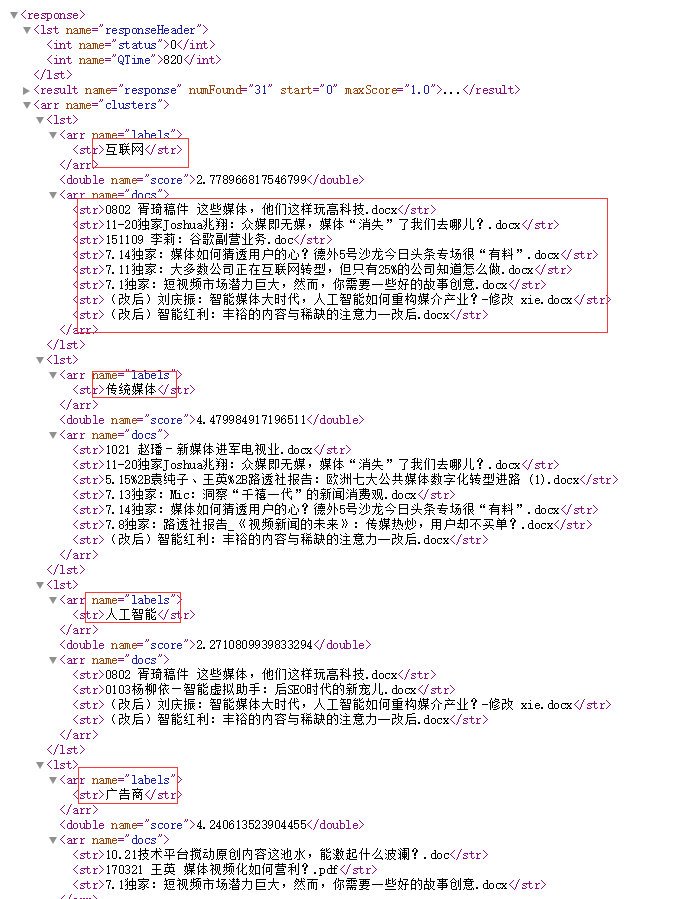
启动solr服务,在浏览器输入:http://localhost:8983/solr/mycore/clustering?q=*:*&rows=10
结果如下:
3、java查询代码
import org.apache.solr.client.solrj.SolrClient;

import org.apache.solr.client.solrj.SolrQuery;

import org.apache.solr.client.solrj.SolrServerException;

import org.apache.solr.client.solrj.impl.HttpSolrClient;

import org.apache.solr.client.solrj.response.Cluster;

import org.apache.solr.client.solrj.response.QueryResponse;

import org.apache.solr.client.solrj.response.ClusteringResponse;

import org.apache.solr.common.SolrDocument;

import java.io.IOException;

import java.util.List;

/**

 * @Author:sks

 * @Description:

 * @Date:Created in 9:41 2018/1/18

 * @Modified by:

 **/

public class AutoCluster {

    private static SolrClient solr;

    /**

     * @Author:sks

     * @Description:初始化solr客户端

     * @Date:

     */

    public static void Init(String urlString){

        solr = new HttpSolrClient.Builder(urlString).build();

    }

    public static void main(String[] args) throws SolrServerException,IOException {

        String urlString = "http://localhost:8983/solr/mycore";

        String path = "D:/work/Solr/ImportData";

        Init(urlString);

        getAutoClusterInfo();

        System.exit(0);

    }

    /**

     * @Author:sks

     * @Description:获取聚类数据

     * @Date:

     */

    private static void getAutoClusterInfo() throws SolrServerException,IOException {

        //使用这个对象做查询

        SolrQuery params = new SolrQuery();

        //查询所有数据

        params.set("qt", "/clustering");

        params.setQuery("*:*");

        params.setStart(0);

        params.setRows(30);

        QueryResponse queryResponse = solr.query(params);

        ClusteringResponse clr = queryResponse.getClusteringResponse();

        List<Cluster> list = clr.getClusters();

        //拿到聚类数据集合,返回查询结果

        String  txt = "";

        for(Cluster c :list){

            //类别标签

            List<String> lblist = c.getLabels();

            for(String lb:lblist){

                System.out.println(lb);

            }

            //聚类文档ID

            List<String> doclist  = c.getDocs();

            for(String doc:doclist){

                System.out.println("        " + doc);

            }

        }

    }

}
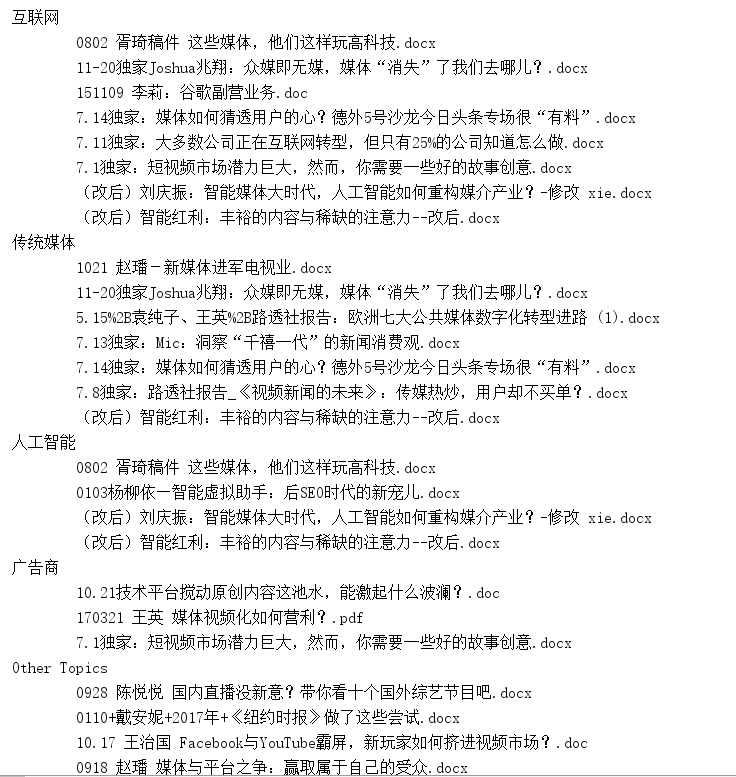
查询结果如下:
solr 自聚类实现的更多相关文章
- Solr调研总结
http://wiki.apache.org/solr/ Solr调研总结 开发类型 全文检索相关开发 Solr版本 4.2 文件内容 本文介绍solr的功能使用及相关注意事项;主要包括以下内容:环境 ...
- solr教程,值得刚接触搜索开发人员一看
http://blog.csdn.net/awj3584/article/details/16963525 Solr调研总结 开发类型 全文检索相关开发 Solr版本 4.2 文件内容 本文介绍sol ...
- Solr总结
http://www.cnblogs.com/guozk/p/3498831.html Solr调研总结 开发类型 全文检索相关开发 Solr版本 4.2 文件内容 本文介绍solr的功能使用及相关注 ...
- 【转载】solr教程,值得刚接触搜索开发人员一看
转载:http://blog.csdn.net/awj3584/article/details/16963525 Solr调研总结 开发类型 全文检索相关开发 Solr版本 4.2 文件内容 本文介绍 ...
- Solr调研总结(转)
Solr调研总结 开发类型 全文检索相关开发 Solr版本 4.2 文件内容 本文介绍solr的功能使用及相关注意事项;主要包括以下内容:环境搭建及调试.两个核心配置文件介绍.中文分词器配置.维护索引 ...
- Solr调研总结(很详细很全面)
Solr调研总结 开发类型 全文检索相关开发 Solr版本 4.2 文件内容 本文介绍solr的功能使用及相关注意事项;主要包括以下内容:环境搭建及调试;两个核心配置文件介绍;维护索引;查询索引,和在 ...
- solr入门教程-较详细
Solr调研总结 开发类型 全文检索相关开发 Solr版本 4.2 文件内容 本文介绍solr的功能使用及相关注意事项;主要包括以下内容:环境搭建及调试;两个核心配置文件介绍;维护索引;查询索引,和在 ...
- Lucene/Solr搜索引擎开发笔记 - 第1章 Solr安装与部署(Jetty篇)
一.为何开博客写<Lucene/Solr搜索引擎开发笔记> 本人毕业于2011年,2011-2014的三年时间里,在深圳前50强企业工作,从事工业控制领域的机器视觉方向,主要使用语言为C/ ...
- 1.7.1 solr Searching概述
1. Overview of Searching in Solr 在用户运行一个solr搜索时,搜索查询会被request handler处理.一个request handler就是一个请求处理插件, ...
随机推荐
- Windows下上传项目到github
首先,一定要有耐心.看到一大堆的命令行(其实并没有一大堆)不要觉得枯燥,最后当你成功把你的项目上传上去之后那种胜利的成果,还是挺有意思的.本人第一次写博客,勿喷. 我写的是主要的流程,详细内容还请移步 ...
- 595. Big Countries
There is a table World +-----------------+------------+------------+--------------+---------------+ ...
- android studio 入门比较好的书籍
http://blog.csdn.NET/aqi00/article/details/50012511 http://blog.csdn.net/aqi00/article/details/73065 ...
- Larazrus 快捷键 总结。
delphi+cnpack 用惯了,转移到 lazarus 有点难受是不是!其实, lazaurs 的编辑器也是蛮强 大的,支持代码补全,自动完成,模板编辑,多行缩进注释,选定代码后批量更改里面的单 ...
- Codeforces 1099 C. Postcard-字符串处理(Codeforces Round #530 (Div. 2))
C. Postcard time limit per test 1 second memory limit per test 256 megabytes input standard input ou ...
- 203. Remove Linked List Elements【Easy】【未排序链表删除其中的给定值】
Remove all elements from a linked list of integers that have value val. Example: Input: 1->2-> ...
- 初见Python<4>:字典
序列是python中的一种数据结构,映射是另一种.映射(mapping)通过名字来引用值.python内建的唯一一种映射结构是字典.字典中的值没有特殊的顺序,但都存储在一个特定的键中.键可以是数字.字 ...
- Topcoder Srm 673 Div2 1000 BearPermutations2
\(>Topcoder \space Srm \space 673 \space Div2 \space 1000 \space BearPermutations2<\) 题目大意 : 对 ...
- BZOJ 4810 [Ynoi2017]由乃的玉米田(莫队+bitset)
[题目链接] http://www.lydsy.com/JudgeOnline/problem.php?id=4810 [题目大意] 给出一个数列,有三种区间查询, 分别查询区间是否存在两个数乘积为x ...
- [xsy1232]Magic
题意:一个无向图,每个点有$a_i,b_i$,对任意点$i$你都可以花费$b_i$的费用将$a_i$变为$0$,最后你还要付出$\sum\limits_{i=1}^n\max\limits_{(i,j ...