
【Python学习笔记】Coursera课程《Using Python to Access Web Data》 密歇根大学 Charles Severance——Week6 JSON and the REST Architecture课堂笔记
Coursera课程《Using Python to Access Web Data》 密歇根大学
Week6 JSON and the REST Architecture
13.5 JavaScript Object Notation(JSON)
JSON是一种相比于XML更简单的格式,而且现在在互联网上非常普遍。XML是很强大,但是很多时候我们并不需要使用这么强大的格式,我们就能完成我们的任务。
import json

data = '''{

  "name": "Chuck",

  "phone": {

    "type": "intl",

    "number": "+1 734 303 4456"

  },

  "email": {

    "hide": "yes"

  }

}'''

info = json.loads(data)

print('Name:',info["name"])

print('Hide:',info["email"]["hide"])
JSON表示数据是用一种list与dictionary的组合的结构。
13.6 Service Oriented
有一些小应用需要使用其他网页提供的一些服务的时候,就会需要使用这些网页发布的“规则”来进行获取服务,这种我们叫做API(Application Program Interface)。
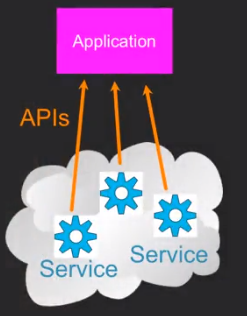
13.7 Using Application Programming Interfaces
以下是使用Google的geocoding API的代码。
import urllib.request, urllib.parse, urllib.error

import json

# Note that Google is increasingly requiring keys

# for this API

serviceurl = 'http://maps.googleapis.com/maps/api/geocode/json?'

while True:

    address = input('Enter location: ')

    if len(address) < 1: break

    url = serviceurl + urllib.parse.urlencode(

        {'address': address})

    print('Retrieving', url)

    uh = urllib.request.urlopen(url)

    data = uh.read().decode()

    print('Retrieved', len(data), 'characters')

    try:

        js = json.loads(data)

    except:

        js = None

    if not js or 'status' not in js or js['status'] != 'OK':

        print('==== Failure To Retrieve ====')

        print(data)

        continue

    print(json.dumps(js, indent=4))

    lat = js["results"][0]["geometry"]["location"]["lat"]

    lng = js["results"][0]["geometry"]["location"]["lng"]

    print('lat', lat, 'lng', lng)

    location = js['results'][0]['formatted_address']

    print(location)
使用这个API,Google可以给我们返回我们输入的地点的经纬度之类的信息。
需要说明的是,json.dumps()用于将dict类型的数据转成str,因为如果直接将dict类型的数据写入json文件中会发生报错,因此在将数据写入时需要用到该函数。而它带的那个参数indent可以使json显示为树形结构,更加方便阅读。
13.8 Securing API Requests
这里我们讲的Twitter的API和之前的Google Map APIs不同,它需要我们去注册,获得他们的API Key。
import urllib.request, urllib.parse, urllib.error

import twurl

import json

import ssl

# https://apps.twitter.com/

# Create App and get the four strings, put them in hidden.py

TWITTER_URL = 'https://api.twitter.com/1.1/friends/list.json'

# Ignore SSL certificate errors

ctx = ssl.create_default_context()

ctx.check_hostname = False

ctx.verify_mode = ssl.CERT_NONE

while True:

    print('')

    acct = input('Enter Twitter Account:')

    if (len(acct) < 1): break

    url = twurl.augment(TWITTER_URL,

                        {'screen_name': acct, 'count': '5'})

    print('Retrieving', url)

    connection = urllib.request.urlopen(url, context=ctx)

    data = connection.read().decode()

    js = json.loads(data)

    print(json.dumps(js, indent=2))

    headers = dict(connection.getheaders())

    print('Remaining', headers['x-rate-limit-remaining'])

    for u in js['users']:

        print(u['screen_name'])

        if 'status' not in u:

            print('   * No status found')

            continue

        s = u['status']['text']

        print('  ', s[:50])
注意,headers = dict(connection.getheaders())这行代码是来获取headers的。
而print('Remaining', headers['x-rate-limit-remaining'])是获取限速的剩余次数的,是写在header里的。(好像只有Twitter API配置了这个?)
而我们要在Twitter的网页上获取下面代码里的这些东西。不然,我们是没法访问Twitter的服务的。
def oauth():

    return {"consumer_key": "h7Lu...Ng",

            "consumer_secret": "dNKenAC3New...mmn7Q",

            "token_key": "10185562-eibxCp9n2...P4GEQQOSGI",

            "token_secret": "H0ycCFemmC4wyf1...qoIpBo"}
以下是使用叫作OAuth的一种协议来获取访问Twitter的URL的。
import urllib.request, urllib.parse, urllib.error

import oauth

import hidden

# https://apps.twitter.com/

# Create App and get the four strings, put them in hidden.py

def augment(url, parameters):

    secrets = hidden.oauth()

    consumer = oauth.OAuthConsumer(secrets['consumer_key'],

                                   secrets['consumer_secret'])

    token = oauth.OAuthToken(secrets['token_key'], secrets['token_secret'])

    oauth_request = oauth.OAuthRequest.from_consumer_and_token(consumer,

                    token=token, http_method='GET', http_url=url,

                    parameters=parameters)

    oauth_request.sign_request(oauth.OAuthSignatureMethod_HMAC_SHA1(),

                               consumer, token)

    return oauth_request.to_url()

def test_me():

    print('* Calling Twitter...')

    url = augment('https://api.twitter.com/1.1/statuses/user_timeline.json',

                  {'screen_name': 'drchuck', 'count': '2'})

    print(url)

    connection = urllib.request.urlopen(url)

    data = connection.read()

    print(data)

    headers = dict(connection.getheaders())

    print(headers)
作业代码1
import urllib.request, urllib.parse, urllib.error

import json

url=input('Enter location: ')

print('Retrieving ',url)

uh = urllib.request.urlopen(url)

data = uh.read().decode()

print('Retrieved', len(data), 'characters')

info = json.loads(data)

sum = 0

count = 0

for item in info["comments"]:

    sum = sum + item["count"]

    count+=1

print('Count: ', count)

print('Sum: ',sum)
作业代码2
import urllib.request, urllib.parse, urllib.error

import json

# Note that Google is increasingly requiring keys

# for this API

serviceurl = 'http://py4e-data.dr-chuck.net/geojson?'

while True:

    address = input('Enter location: ')

    if len(address) < 1: break

    url = serviceurl + urllib.parse.urlencode({'address': address})

    print('Retrieving', url)

    uh = urllib.request.urlopen(url)

    data = uh.read().decode()

    print('Retrieved', len(data), 'characters')

    try:

        js = json.loads(data)

    except:

        js = None

    if not js or 'status' not in js or js['status'] != 'OK':

        print('==== Failure To Retrieve ====')

        print(data)

        continue

    place_id = js["results"][0]["place_id"]

    print('Place id ',place_id)
【Python学习笔记】Coursera课程《Using Python to Access Web Data》 密歇根大学 Charles Severance——Week6 JSON and the REST Architecture课堂笔记的更多相关文章
- 【Python学习笔记】Coursera课程《Python Data Structures》 密歇根大学 Charles Severance——Week6 Tuple课堂笔记
Coursera课程<Python Data Structures> 密歇根大学 Charles Severance Week6 Tuple 10 Tuples 10.1 Tuples A ...
- 【Python学习笔记】Coursera课程《Using Python to Access Web Data 》 密歇根大学 Charles Severance——Week2 Regular Expressions课堂笔记
Coursera课程<Using Python to Access Web Data > 密歇根大学 Charles Severance Week2 Regular Expressions ...
- 【Python学习笔记】Coursera课程《Using Databases with Python》 密歇根大学 Charles Severance——Week4 Many-to-Many Relationships in SQL课堂笔记
Coursera课程<Using Databases with Python> 密歇根大学 Week4 Many-to-Many Relationships in SQL 15.8 Man ...
- Coursera课程《Python数据结构》中课程目录
Python Data Structures Python Data Structures is the second course in the specialization Python for ...
- 《Using Python to Access Web Data》Week4 Programs that Surf the Web 课堂笔记
Coursera课程<Using Python to Access Web Data> 密歇根大学 Week4 Programs that Surf the Web 12.3 Unicod ...
- 《Using Python to Access Web Data》 Week5 Web Services and XML 课堂笔记
Coursera课程<Using Python to Access Web Data> 密歇根大学 Week5 Web Services and XML 13.1 Data on the ...
- 《Using Python to Access Web Data》 Week3 Networks and Sockets 课堂笔记
Coursera课程<Using Python to Access Web Data> 密歇根大学 Week3 Networks and Sockets 12.1 Networked Te ...
- Python学习入门基础教程(learning Python)--5.6 Python读文件操作高级
前文5.2节和5.4节分别就Python下读文件操作做了基础性讲述和提升性介绍,但是仍有些问题,比如在5.4节里涉及到一个多次读文件的问题,实际上我们还没有完全阐述完毕,下面这个图片的问题在哪呢? 问 ...
- Python学习系列(四)Python 入门语法规则2
Python学习系列(四)Python 入门语法规则2 2017-4-3 09:18:04 编码和解码 Unicode.gbk,utf8之间的关系 2.对于py2.7, 如果utf8>gbk, ...
随机推荐
- WPF比较两个随机数大小写,利用MVVM思想实现
MVVM模式是把表现层和业务层完全分离,所以这里就使用MVVM制作一个极其简单的WPF的例子: 先看看最终图:
- 【EF】EF扩展库(批量操作)
EF删除和修改数据只能先从数据库取出,然后再进行删除 delete from Table1 where Id>5; update Table1 set Age=10; 我们需要这样操作 //删除 ...
- 1040: [ZJOI2008]骑士
首先是因为想学仙人掌图才来先拿这题热热身,结果&……竟然调了一个晚上我的傻叉!(其中一大半的时候是在郁闷hzwer和Greens的代码画风不一样,后来才发现一个用拓扑一个用树dp23333,以 ...
- 【BZOJ5288】[HNOI2018]游戏(乱搞?)
[BZOJ5288][HNOI2018]游戏(乱搞?) 题面 BZOJ 洛谷 题面自己到洛谷上看把 题解 考场上乱搞拿到了\(90\)分,简直不敢相信. 回家把代码再交了一份直接就\(AC\)了??? ...
- BZOJ3196 & 洛谷3380:二逼平衡树——题解
https://www.lydsy.com/JudgeOnline/problem.php?id=3196 https://www.luogu.org/problemnew/show/P3380 (题 ...
- BZOJ1023:[SHOI2008]仙人掌图——题解
http://www.lydsy.com/JudgeOnline/problem.php?id=1023 Description 如果某个无向连通图的任意一条边至多只出现在一条简单回路(simple ...
- Communications link failure
针对数据库Communications link failure的错误,可以理解为有两种策略解决: 策略1(推荐): 数据池配置 <property name="minEvic ...
- SRM13 T3 花六游鸟小(结论题)
哇这题是真的喵,HR智商太高辣 这题的难点就是看了题解之后怎么证明题解里的结论... 结论①:深度大于logm的点肯定能达到最大值 证明:显然一个西瓜的属性里0数量一半1数量一半我们取到的1数量最少, ...
- HDU 5538 (水不水?)
House Building Time Limit: 2000/1000 MS (Java/Others) Memory Limit: 262144/262144 K (Java/Others) ...
- NYOJ 745 dp
蚂蚁的难题(二) 时间限制:1000 ms | 内存限制:65535 KB 难度:3 描述 下雨了,下雨了,蚂蚁搬家了. 已知有n种食材需要搬走,这些食材从1到n依次排成了一个圈.小蚂蚁对每种 ...