
Spring Framework5.0 学习(3)—— spring配置文件的三种形式
Spring Framework 是 IOC (Inversion of Control 控制反转)原则的实践。 IoC is also known as dependency injection (DI 依赖注入)。
org.springframework.beans 和 org.springframework.context 两个包实现了Ioc 容器。 BeanFactory接口的子接口 ApplicationContext 定义了容器的基本功能。如果是web app 使用的是 WebApplicationContext 。
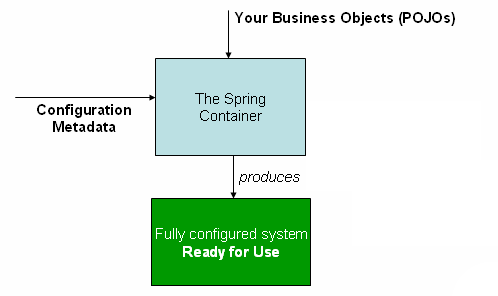
这个容器的作用正如上图, 把定义在配置文件中的 POJO的关系解析并实例化,应用业务系统。
POJO: Plain Old Java Object 。
spring配置文件有以下三种形式:
- 传统的XML
- Spring 2.5 以后新增注解配置
- Spring 3.0 以后新增 JavaConfig
1.0 传统xml配置:
build.gradle
apply plugin: 'java'

apply plugin: 'idea'

// mainClassName 是 application的一个属性,否则会报错

apply plugin: 'application'

mainClassName = 'xmlConfig.HelloWorld'

sourceCompatibility = 1.8

targetCompatibility = 1.8

repositories {

    mavenCentral()

}

dependencies {

    compile "joda-time:joda-time:2.2"

    compile 'org.springframework:spring-context:5.0.0.RELEASE'

}

// 该项目生成的jar包的名字和版本,如 gs-gradle-0.1.0.jar

jar {

    baseName = 'gs-gradle'

    version =  '0.1.0'

}
在src/main/resources目录下创建 helloWorld.xml,这个文件名字随意
<?xml version="1.0" encoding="UTF-8"?>

<beans xmlns="http://www.springframework.org/schema/beans"

       xmlns:xsi="http://www.w3.org/2001/XMLSchema-instance"

       xsi:schemaLocation="http://www.springframework.org/schema/beans http://www.springframework.org/schema/beans/spring-beans.xsd">

    <bean id="helloWorld" name="helloWorld2" class="xmlConfig.HelloWorld"/>

</beans>
HelloWorld.java
package xmlConfig;

import org.springframework.beans.factory.xml.XmlBeanDefinitionReader;

import org.springframework.context.ApplicationContext;

import org.springframework.context.support.ClassPathXmlApplicationContext;

import org.springframework.context.support.GenericApplicationContext;

/**

 * Created by sheting on 10/22/2017

 */

public class HelloWorld {

    public void sayHello() {

        System.out.println("Hello World");

    }

    public static void main(String[] args) {

        ApplicationContext context = new ClassPathXmlApplicationContext("helloWorld.xml");

        HelloWorld helloWorld2 = context.getBean("helloWorld2", HelloWorld.class);

        helloWorld2.sayHello();

        HelloWorld helloWorld = context.getBean("helloWorld", HelloWorld.class);

        helloWorld.sayHello();

        GenericApplicationContext context2 = new GenericApplicationContext();

        new XmlBeanDefinitionReader(context2).loadBeanDefinitions("helloWorld.xml");

        context2.refresh();

        HelloWorld context2Bean = context2.getBean("helloWorld", HelloWorld.class);

        context2Bean.sayHello();

    }

}
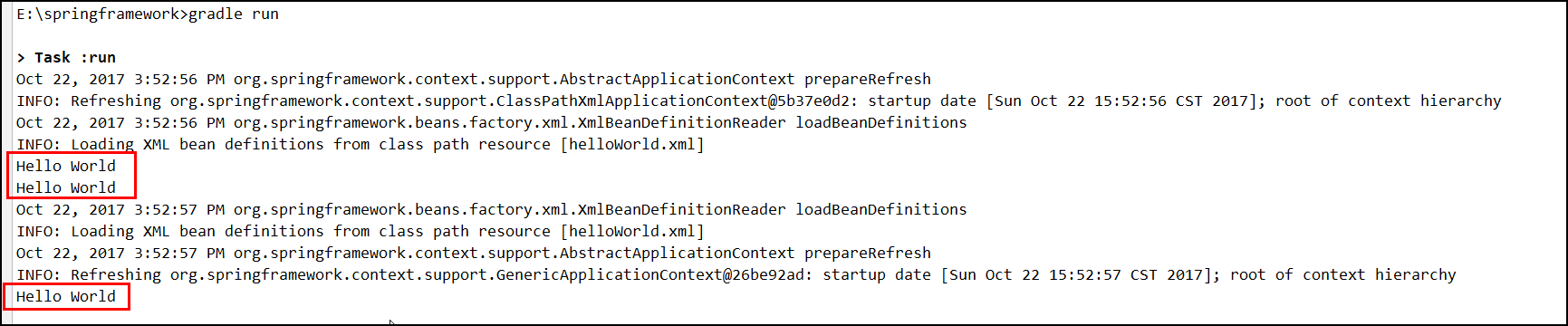
运行结果:
2.0 注解配置
gradle.build
apply plugin: 'java'

apply plugin: 'idea'

// mainClassName 是 application的一个属性,否则会报错

apply plugin: 'application'

mainClassName = 'annotationConfig.Test'

sourceCompatibility = 1.8

targetCompatibility = 1.8

repositories {

    mavenCentral()

}

dependencies {

    compile "joda-time:joda-time:2.2"

    compile 'org.springframework:spring-context:5.0.0.RELEASE'

}

// 该项目生成的jar包的名字和版本,如 gs-gradle-0.1.0.jar

jar {

    baseName = 'gs-gradle'

    version =  '0.1.0'

}
HelloWorld.java
package annotationConfig;

import org.springframework.stereotype.Component;

/**

 * Created by sheting on 10/22/2017

 */

/**

 * 如果属性名称是value,value可以省略。

 * 如果不指定value,默认值是类名首先字母变为小写。

 * @Component(value="beanId") 就是把当前类实例化。相当于<bean id="beanId">

 */

@Component

public class HelloWorld {

    public void sayHello() {

        System.out.println("Hello World");

    }

}
Test.java
package annotationConfig;

import org.springframework.context.ApplicationContext;

import org.springframework.context.support.ClassPathXmlApplicationContext;

/**

 * Created by sheting on 10/22/2017

 */

public class Test {

    public static void main(String[] args) {

        ApplicationContext context = new ClassPathXmlApplicationContext("helloWorld.xml");

        HelloWorld helloWorld = context.getBean("helloWorld", HelloWorld.class);

        helloWorld.sayHello();

    }

}
helloWorld.xml
<?xml version="1.0" encoding="UTF-8"?>

<beans xmlns="http://www.springframework.org/schema/beans"

       xmlns:xsi="http://www.w3.org/2001/XMLSchema-instance"

       xmlns:context="http://www.springframework.org/schema/context"

       xsi:schemaLocation="http://www.springframework.org/schema/beans

                http://www.springframework.org/schema/beans/spring-beans.xsd

                http://www.springframework.org/schema/context

                http://www.springframework.org/schema/context/spring-context.xsd">

  <!-- 开启注解扫描  -->

    <context:component-scan base-package="annotationConfig"/>

</beans>
运行结果:

3.0 java config
gradle.build
apply plugin: 'java'

apply plugin: 'idea'

// mainClassName 是 application的一个属性,否则会报错

apply plugin: 'application'

mainClassName = 'javaConfig.Test'

sourceCompatibility = 1.8

targetCompatibility = 1.8

repositories {

    mavenCentral()

}

dependencies {

    compile "joda-time:joda-time:2.2"

    compile 'org.springframework:spring-context:5.0.0.RELEASE'

}

// 该项目生成的jar包的名字和版本,如 gs-gradle-0.1.0.jar

jar {

    baseName = 'gs-gradle'

    version =  '0.1.0'

}
MyService.java
package javaConfig;

/**

 * Created by sheting on 10/22/2017

 */

public interface MyService {

    void sayHello();

}
MyServiceImpl.java
package javaConfig;

/**

 * Created by sheting on 10/22/2017

 */

public class MyServiceImpl implements MyService {

    public void sayHello() {

        System.out.println("Hello World");

    }

}
AppConfig.java
package javaConfig;

import org.springframework.context.annotation.Bean;

import org.springframework.context.annotation.Configuration;

/**

 * Created by sheting on 10/22/2017

 *

 * 这个类和下面的配置类似

 * <beans>

 *     <bean id="myService" class="com.acme.services.MyServiceImpl"/>

 * </beans>

 *

 *  Java配置是通过@Configuration和@Bean来实现的。

 *  @Configuartion 声明当前类是一个配置类,相当于一个spring配置的xml文件的<beans></beans>。

 *  @Bean 注解在方法上,声明当前方法的返回值为一个bean,bean的名称为方法名。

 *  @ComponentScan 自动扫描包名下所有的 @Service @Component @Repository @Controller的类,并注册为bean。

 *

 */

@Configuration

public class AppConfig {

    @Bean

    public MyService myService() {

        return new MyServiceImpl();

    }

}
Test.java
package javaConfig;

import org.springframework.context.ApplicationContext;

import org.springframework.context.annotation.AnnotationConfigApplicationContext;

/**

 * Created by sheting on 10/22/2017

 */

public class Test {

    public static void main(String[] args) {

        //加载配置

        ApplicationContext ctx = new AnnotationConfigApplicationContext(AppConfig.class);

        MyService myService = ctx.getBean(MyService.class);

        myService.sayHello();

    }

}
运行结果:

Spring Framework5.0 学习(3)—— spring配置文件的三种形式的更多相关文章
- Spring Framework5.0 学习(4)—— Bean的命名id和name区别
Spring中Bean的命名 1.每个Bean可以有一个id属性,并可以根据该id在IoC容器中查找该Bean,该id属性值必须在IoC容器中唯一: 2.可以不指定id属性,只指定全限定类名,如: & ...
- Spring Framework5.0 学习(4)—— 基本概念
1.0 控制反转(IOC)/依赖注入(DI) 通过依赖注入(DI),对象的依赖关系将由负责协调系统关系中各个对象的第三方组件在创建对象是设定.对象无需自行创建或管理它们的依赖关系——依赖关系将被自动 ...
- Spring Framework5.0 学习(2)-- Quick Start
官网:https://projects.spring.io/spring-framework/ Spring Framework 5.x 要求 JDK 1.8以上 1.0 在(1)的基础上,给bu ...
- Spring Framework5.0 学习(1)—— 用Gradle构建一个Java Project
1.0 安装Gradle,参考之前文章<Gradle入门实战(Windows版)> 2.0 使用gradle 快速生成一个Java project gradle init --type ...
- java 学习笔记 读取配置文件的三种方式
package com.itheima.servlet.cfg; import java.io.FileInputStream; import java.io.FileNotFoundExceptio ...
- Spring Boot 项目学习 (四) Spring Boot整合Swagger2自动生成API文档
0 引言 在做服务端开发的时候,难免会涉及到API 接口文档的编写,可以经历过手写API 文档的过程,就会发现,一个自动生成API文档可以提高多少的效率. 以下列举几个手写API 文档的痛点: 文档需 ...
- 第04项目:淘淘商城(SpringMvc+Spring+Mybatis) 的学习实践总结【第三天】
淘淘商城(SpringMVC+Spring+Mybatis) 是传智播客在2015年9月份录制的,几年过去了.由于视频里课上老师敲的代码和项目笔记有些细节上存在出入,只有根据日志报错信息作出适当的调 ...
- spring Bean配置的三种形式
Spring Bean配置有以下三种形式: 传统的xml配置 Spring 2.5 以后新增注解配置 Spring3.0以后新增JavaConfig 1. 传统的xml配置 <?xml vers ...
- spring对事务支持的三种形式
spring对事务支持的三种形式: 1.通过spring配置文件进行切面配置 <bean id="***Manager" class="org.springfram ...
随机推荐
- Java入门系列-12-成员方法
类的方法 无参方法 语法: public 返回值类型 方法名(参数列表){ //方法的主体 } 敲一敲:无返回值方法 public void sayHi(){ System.out.println(& ...
- 问题集录01--java对list列表进行排序
用Collections.sort方法对list排序有两种方法 第一种是list中的对象实现Comparable接口,如下: /** * 根据order对User排序 */ public class ...
- WPF binding<一> Data Binding在WPF中的地位
在代码中看到 <Image Source="{Binding ElementName=LBoxImages, Path=SelectedItem.Source}" /> ...
- asp get与post获取的区别
1.HTTP请求格式: <request line> <headers> <blank line> [<request-body>] 在HTTP请求中, ...
- window.open以post方式提交(转)
function openWindowWithPost(url,name,keys,values) { var newWindow = window.open(url, name); if (!new ...
- CORS跨域请求C#版
1.什么是跨域请求: 当从A网站使用AJAX请求B网站时,就会出现跨域请求. 此时B网站能够接收到A网站发来的请求并返回相应的结果,但是浏览器拿到B网站返回的数据时检测到与当前网站的域名不同,出于安 ...
- 使用Calendar加一天,减一天
public class Test { public static void main(String[] args) { Calendar c=Calendar.getInstance(); Simp ...
- 新手必需用!大道至简的前端编辑器Sublime Text
很多人在进入学习前端的时候(包括我自己),除了选择学习合适的技术,还需要一个得(自)心(己)应(喜)手(欢)的开发工具,一个得心应手的开发工具除了可以令你的效率大大提高,也可以令你在写代码的时候,心情 ...
- easyui window窗口 随body的滚动条 滚动
问题描述: 当easyui window窗口弹出的时候,依然可以滚动body 的滚动条,而且window窗口也会随它一起滚动 思路:bootstrap 模态框弹出的时候,给body 添加了 .moda ...
- Windows API 编程-----DLL编程之禁止加载自己
和可执行文件一样,动态链接库也有自己的入口地址,如果系统或者当前进程的某个线程调用LoadLibrary函数加载或者使用FreeLibrary卸载该动态链接库的时候,会自动使用3个特定的堆栈参数跳转到 ...