
Python入门 —— 06语音识别
Python 语音
实现语音操控的原理
语音操控分为语音识别和语音朗读两部分
我们使用speech模块实现语音模块(python 2.7)
SAPI是微软Speech API , 是微软公司推出的语音接口,而细心的人会发现从WINXP开始,系统上就已经有语音识别的功能了,可是用武之地相当之少,他并没有给出一些人性化的自定义方案,仅有的语音操控命令显得相当鸡胁。
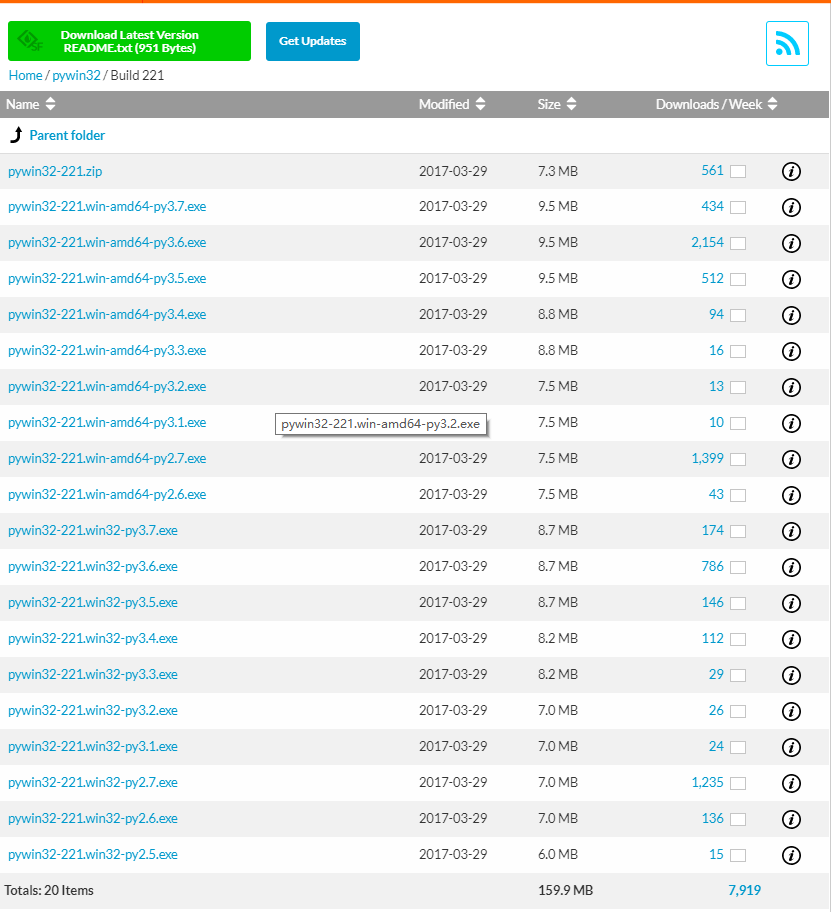
- Python pywin32,可以使Python调用WIN32COM接口,选择对应版本下载(区分32位/64位),直接双击运行即可
- 安装speech模块:
pip install speech
实现个简易的控制电脑做事情的小程序:
- 首先,来个测试文件
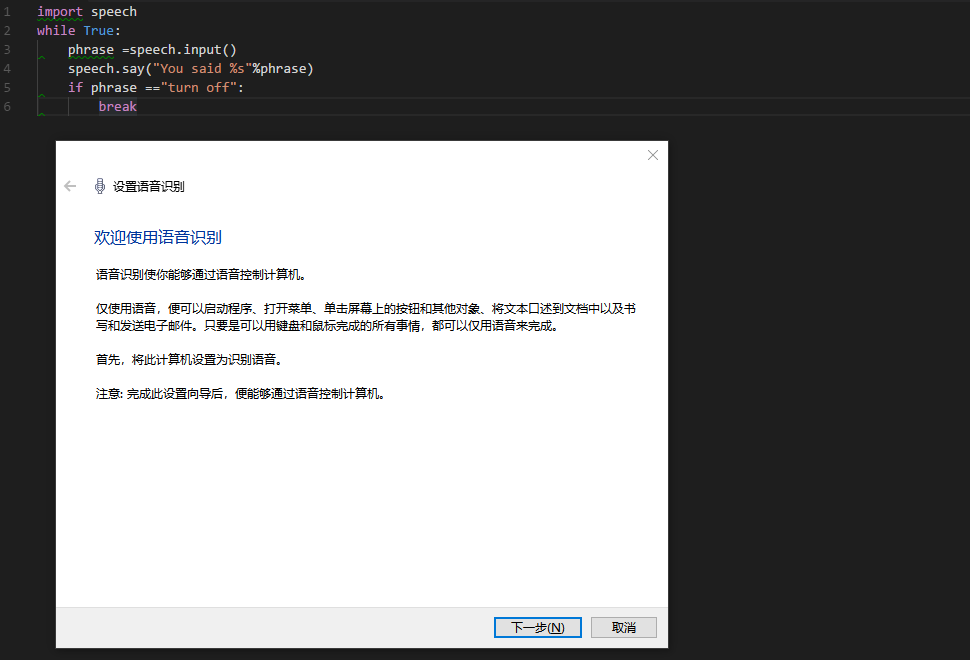
此处仅为启动和关闭语音系统
import speech

while True:

    phrase =speech.input()

    speech.say("You said %s"%phrase)

    if phrase =="turn off":

        break
- 自制个中文库
phrase = {"closeMainSystem" : "关闭人机交互"

        , "film" : "我要看电影"

        , "listenMusic" : "我好累啊"

        , "blog" : "看博客"

        , "cmd" : "cmd" }
- 设计语音对应的电脑操作
def callback(phr, phrase):

    if phr == phrase["closeMainSystem"]:

        speech.say("Goodbye. 人机交互即将关闭,谢谢使用")

        speech.stoplistening()

        sys.exit()

    elif phr == phrase["film"]:

        speech.say("正在为您打开优酷")

        webbrowser.open_new("http://www.youku.com/")

    elif phr == phrase["listenMusic"]:

        speech.say("即将为你启动豆瓣电台")

        webbrowser.open_new("http://douban.fm/")

    elif phr == phrase["blog"]:

        speech.say("即将进入Dreamforce.me")

        webbrowser.open_new("http://www.cnblogs.com/darksouls/")

    elif phr == phrase["cmd"]:

        speech.say("即将打开CMD")

        os.popen("C:\Windows\System32\cmd.exe")

    # 可以继续用 elif 写对应的自制中文库中的对应操作
- 主程序
while True:

    phr = speech.input()

    speech.say("You said %s" % phr)

    callback(phr, phrase)
- 完整代码
# _*_ coding:utf-8 _*_

import os

import sys

import speech

import webbrowser

phrase = {"closeMainSystem" : "关闭人机交互"

        , "film" : "我要看电影"

        , "listenMusic" : "我好累啊"

        , "blog" : "看博客"

        , "cmd" : "cmd" }

def callback(phr, phrase):

    if phr == phrase["closeMainSystem"]:

        speech.say("Goodbye. 人机交互即将关闭,谢谢使用")

        speech.stoplistening()

        sys.exit()

    elif phr == phrase["film"]:

        speech.say("正在为您打开优酷")

        webbrowser.open_new("http://www.youku.com/")

    elif phr == phrase["listenMusic"]:

        speech.say("即将为你启动豆瓣电台")

        webbrowser.open_new("http://douban.fm/")

    elif phr == phrase["blog"]:

        speech.say("即将进入Dreamforce.me")

        webbrowser.open_new("http://www.cnblogs.com/darksouls/")

    elif phr == phrase["cmd"]:

        speech.say("即将打开CMD")

        os.popen("C:\Windows\System32\cmd.exe")

    # 可以继续用 elif 写对应的自制中文库中的对应操作

while True:

    phr = speech.input()

    speech.say("You said %s" % phr)

    callback(phr, phrase)
发现网上有个语音识别框架:
# _*_ coding:utf-8 _*_

from win32com.client import constants

import os

import win32com.client

import pythoncom

speaker = win32com.client.Dispatch("SAPI.SPVOICE")

class SpeechRecognition:

    def __init__(self, wordsToAdd):

        self.speaker = win32com.client.Dispatch("SAPI.SpVoice")

        self.listener = win32com.client.Dispatch("SAPI.SpSharedRecognizer")

        self.context = self.listener.CreateRecoContext()

        self.grammar = self.context.CreateGrammar()

        self.grammar.DictationSetState(0)

        self.wordsRule = self.grammar.Rules.Add("wordsRule", constants.SRATopLevel + constants.SRADynamic, 0)

        self.wordsRule.Clear()[self.wordsRule.InitialState.AddWordTransition(None, word) for word in wordsToAdd]

        self.grammar.Rules.Commit()

        self.grammar.CmdSetRuleState("wordsRule", 1)

        self.grammar.Rules.Commit()

        self.eventHandler = ContextEvents(self.context)

        self.say("Started successfully")

    def say(self, phrase):

        self.speaker.Speak(phrase)

class ContextEvents(win32com.client.getevents("SAPI.SpSharedRecoContext")):

    def OnRecognition(self, StreamNumber, StreamPosition, RecognitionType, Result):

        newResult = win32com.client.Dispatch(Result)

        print("你在说 ", newResult.PhraseInfo.GetText())

        speechstr=newResult.PhraseInfo.GetText()

        # 下面即为语音识别信息对应

        if  speechstr=="张三":

            speaker.Speak("lisi")

        elif  speechstr=="你好":

            speaker.Speak("hello world")

        elif  speechstr=="国庆快乐":

            speaker.Speak("Happy   nationalday")

        elif  speechstr=="新年快乐":

            speaker.Speak("happy  New Year")

        elif  speechstr=="李四":

            speaker.Speak("a  beauty baby")

        elif  speechstr=="王五":

            speaker.Speak("a  little boy")

        elif  speechstr=="赵六":

            speaker.Speak("a  boy  can  coding")

        else:

            pass

if __name__ == '__main__':

    speaker.Speak("语音识别开启")

    wordsToAdd = ["张三",

                  "你好",

                  "国庆快乐",

                  "新年快乐",

                  "李四",

                  "王五",

                  "赵六",]

    speechReco = SpeechRecognition(wordsToAdd)

    while True:

        pythoncom.PumpWaitingMessages()
Python入门 —— 06语音识别的更多相关文章
- Python学习【第二篇】Python入门
Python入门 Hello World程序 在linux下创建一个叫hello.py,并输入 print("Hello World!") 然后执行命令:python hello. ...
- 老鸟的Python入门教程
转自老鸟的Python入门教程 重要说明 这不是给编程新手准备的教程,如果您入行编程不久,或者还没有使用过1到2门编程语言,请移步!这是有一定编程经验的人准备的.最好是熟知Java或C,懂得命令行,S ...
- [转][RabbitMQ+Python入门经典] 兔子和兔子窝
[转][RabbitMQ+Python入门经典] 兔子和兔子窝 http://blog.csdn.net/linvo/article/details/5750987 RabbitMQ作为一个工业级的消 ...
- Python入门篇-基础数据类型之整型(int),字符串(str),字节(bytes),列表(list)和切片(slice)
Python入门篇-基础数据类型之整型(int),字符串(str),字节(bytes),列表(list)和切片(slice) 作者:尹正杰 版权声明:原创作品,谢绝转载!否则将追究法律责任. 一.Py ...
- Python 入门之 内置模块 -- time模块
Python 入门之 内置模块 -- time模块 1.time模块 time翻译过来就是时间,这个模块是与时间相关的模块 import time # 内置模块 -- 标准库 (1)time.ti ...
- python入门简介
Python前世今生 python的创始人为吉多·范罗苏姆(Guido van Rossum).1989年的圣诞节期间,吉多·范罗苏姆为了在阿姆斯特丹打发时间,决心开发一个新的脚本解释程序,作为ABC ...
- python入门学习课程推荐
最近在学习自动化,学习过程中,越来越发现coding能力的重要性,不会coding,基本不能开展自动化测试(自动化工具只是辅助). 故:痛定思痛,先花2个星期将python基础知识学习后,再进入自动化 ...
- Python运算符,python入门到精通[五]
运算符用于执行程序代码运算,会针对一个以上操作数项目来进行运算.例如:2+3,其操作数是2和3,而运算符则是“+”.在计算器语言中运算符大致可以分为5种类型:算术运算符.连接运算符.关系运算符.赋值运 ...
- Python基本语法[二],python入门到精通[四]
在上一篇博客Python基本语法,python入门到精通[二]已经为大家简单介绍了一下python的基本语法,上一篇博客的基本语法只是一个预览版的,目的是让大家对python的基本语法有个大概的了解. ...
随机推荐
- DLL调用的两种方式(IDE:VC6.0,C++)
原文:http://www.cnblogs.com/Pickuper/articles/2050409.html DLL调用有两种方式,一种是静态调用,另外一种是动态调用 (一)静态调用 静态调用是一 ...
- lua中的weak table
weakTable = {} weakTable[] = function() print("i am the first element") end weakTable[] = ...
- RC4 加解密
加密解密都是这一个接口 int Rc4EncryptFile(std::string in_file_path, std::string out_file_path, const char *rc4_ ...
- arm汇编学习(三)
一.ndk编译android上运行的c程序 新建个hello目录,底下要有jni目录,下面就是Android.mk文件 1.Android.mk文件内容如下: LOCAL_PATH:= $(call ...
- mongodb远程连接
1.关闭防火墙 firewall-cmd --state 查看防火墙是否运行中 systemctl stop firewalld.service 关闭防火墙服务 2.使用bind_ip指定 ...
- mongodb 3.4 TAR包启动多个实例
1:解压压缩文件 tar .tgz mkdir /home/maxiangqian/ mv mongodb /home/maxiangqian/ 2:加入环境变量 export PATH/bin:$P ...
- css z-index层重叠顺序
一.z-index语法与结构 z-index 跟具体数字 如:div{z-index:100}注意:z-index的数值不跟单位. z-index的数字越高越靠前,并且值必须为整数和正数(正数的整数) ...
- Effective Java 第二版 Enum
/** * Effective Java 第二版 * 第30条:用enum代替int常量 */ import java.util.HashMap;import java.util.Map; publi ...
- 小知识积累-linux下一些简单开发配置
系统环境为 redhat enterprise 6.x,主要是针对初学者在linux下用gcc和vi简单测试开发的一些配置 1.vi 自动换行 在终端下敲入vi命令打开文件 : vi ~/.vimrc ...
- PHP中__get()和__set()的用法实例详
刚刚看到一个对我有用的文章,我就把它摘抄下来了. php面 ...