
SpringMVC 运行流程以及与Spring 整合
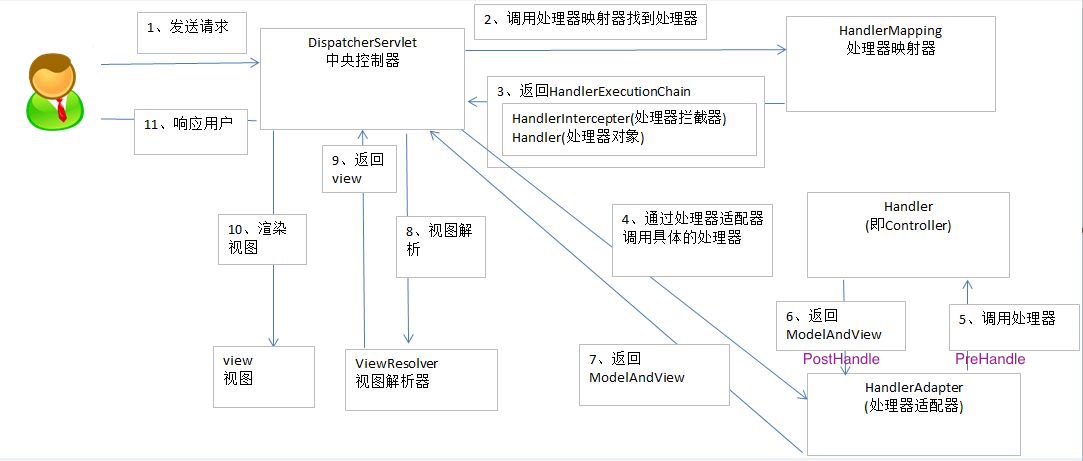
1. 运行流程
2. Spring 和 SpringMVC 整合
// 1. 导入 jar 包

// 2. 配置 web.xml

<!-- 配置 Spring 的核心监听器 -->

<listener>

    <listener-class>org.springframework.web.context.ContextLoaderListener</listener-class>

</listener>

<!-- 配置 Spring 配置文件 -->

<context-param>

    <param-name>contextConfigLocation</param-name>

    <param-value>classpath:applicationContext.xml</param-value>

</context-param>

    <!-- 配置SpringMVC配置文件路径 -->

    <init-param>

        <param-name>contextConfigLocation</param-name>

        <param-value>classpath:springmvc.xml</param-value>

    </init-param>

<!-- 配置过滤器,解决 POST 乱码问题 -->

<filter>

    <filter-name>encoding</filter-name>

    <filter-class>org.springframework.web.filter.CharacterEncodingFilter</filter-class>

    <init-param>

        <param-name>encoding</param-name>

        <param-value>UTF-8</param-value>

    </init-param>

</filter>

<filter-mapping>

    <filter-name>encoding</filter-name>

    <url-pattern>/*</url-pattern>

</filter-mapping>

<!-- 配置SpringMVC框架入口 -->

<servlet>

    <servlet-name>springDispatcherServlet</servlet-name>

    <servlet-class>org.springframework.web.servlet.DispatcherServlet</servlet-class>

    <!-- 配置SpringMVC 什么时候启动,参数必须为整数 -->

    <!-- 如果为0 或者 大于0, 则SpringMVC随着容器启动而启动 -->

    <!-- 如果小于0, 则在第一次请求进来的时候启动 -->

    <load-on-startup>1</load-on-startup>

</servlet>

<servlet-mapping>

    <servlet-name>springDispatcherServlet</servlet-name>

    <!--

          可用:  *.xxx,  /,  /xxx/*

          不可用: /*

    -->

    <url-pattern>/</url-pattern>

</servlet-mapping>

// 3. 在 src 目录下创建 springmvc.xml

<!-- 配置自动扫描包路径 -->

<context:component-scan base-package="cn.itcast.springmvc"></context:component-scan>

<!-- 配置通用的视图解析器 -->

<bean id="internalResourceViewResolver"

                        class="org.springframework.web.servlet.view.internalResourceViewResolver">

    <property name="prefix" value="/WEB-INF/views/"/>

    <property name="suffix" value=".jsp"/>

</bean>

<!-- 处理静态资源导入 -->

<mvc:default-servlet-handler/>

<!-- 如果只有 mvc:default-servlet-handler, 注解类失效, 还需要配置 annotation-driven -->

<mvc:annotation-driven></mvc:annotation-driven>

<!-- 对静态资源放行

        mapping: 只页面中url路径中包含的, /** 表示可以包含多级目录

    <mvc:resources location="/css/" mapping="/css/**"/>

    <mvc:resources location="/js/" mapping="/js/*"/>

    <mvc:resources location="/fonts/" mapping="/fonts/*"/>

-->

// 4. 在 src 目录下创建 applicationContext.xml

<!-- 配置自动扫描包路径 -->

<context:component-scan base-package="cn.itcast.springmvc"/>

// cn.itcast.springmvc.HelloController.java

@Controller

public class HelloController{

    // 无参构造函数

    public HelloController(){

        System.out.println("====HelloController");

    }

}

// cn.itcast.springmvc.UserService.java

@Service

public class UserService{

    // 无参构造函数

    public UserService(){

        System.out.println("====UserService");

    }

}
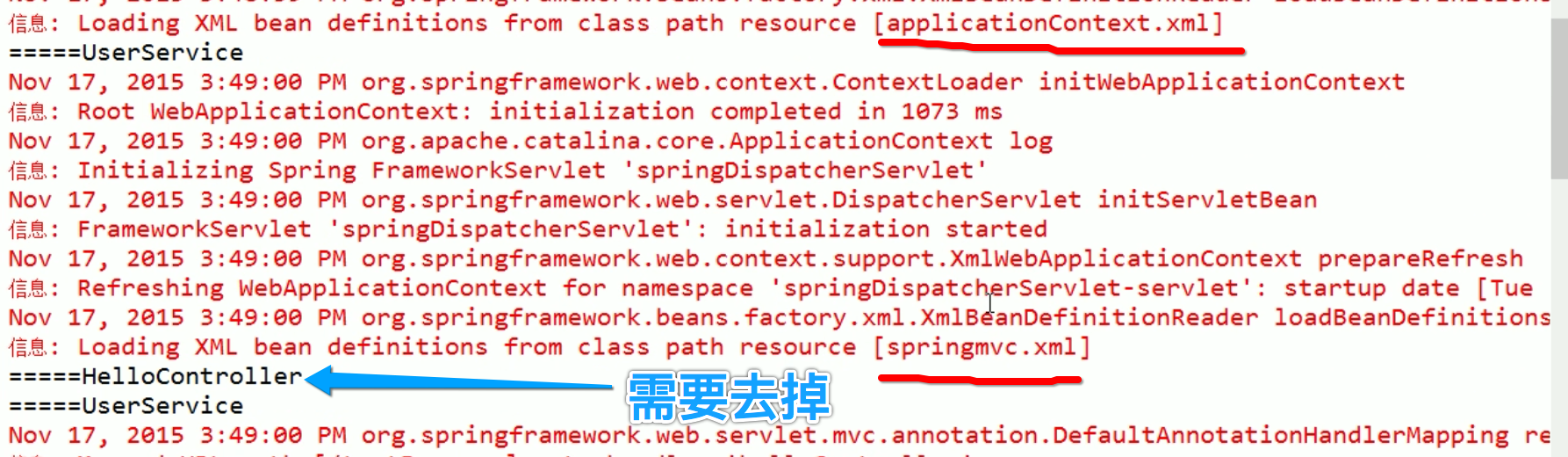
2.1 存在问题一: Bean 创建两次

// 改进方式:

// springmvc.xml

<context:component-scan base-package="cn.itcast.springmvc">

    <!-- 只扫描 @Controller 和 @ControllerAdvice 注解标注的类 -->

    <context:include-filter type="annotation" expression="org.springframework.stereotype.Controller"/>

    <context:include-filter type="annotation"

                                expression="org.springframework.web.bind.annotation.ControllerAdvice"/>

</context:component-scan>

// applicationContext.xml

<context:component-scan base-package="cn.itcast.springmvc">

    <!-- 不扫描 @Controller 和 @ControllerAdvice 注解标注的类 -->

    <context:exclude-filter type="annotation" expression="org.springframework.stereotype.Controller"/>

    <context:exclude-filter type="annotation"

                                expression="org.springframework.web.bind.annotation.ControllerAdvice"/>

</context:component-scan>
2.2 存在问题二:
// 改进方式: use-default-filters="false"

// springmvc.xml

<context:component-scan base-package="cn.itcast.springmvc" use-default-filters="false">

    <!-- 只扫描 @Controller 和 @ControllerAdvice 注解标注的类 -->

    <context:include-filter type="annotation" expression="org.springframework.stereotype.Controller"/>

    <context:include-filter type="annotation"

                                expression="org.springframework.web.bind.annotation.ControllerAdvice"/>

</context:component-scan>
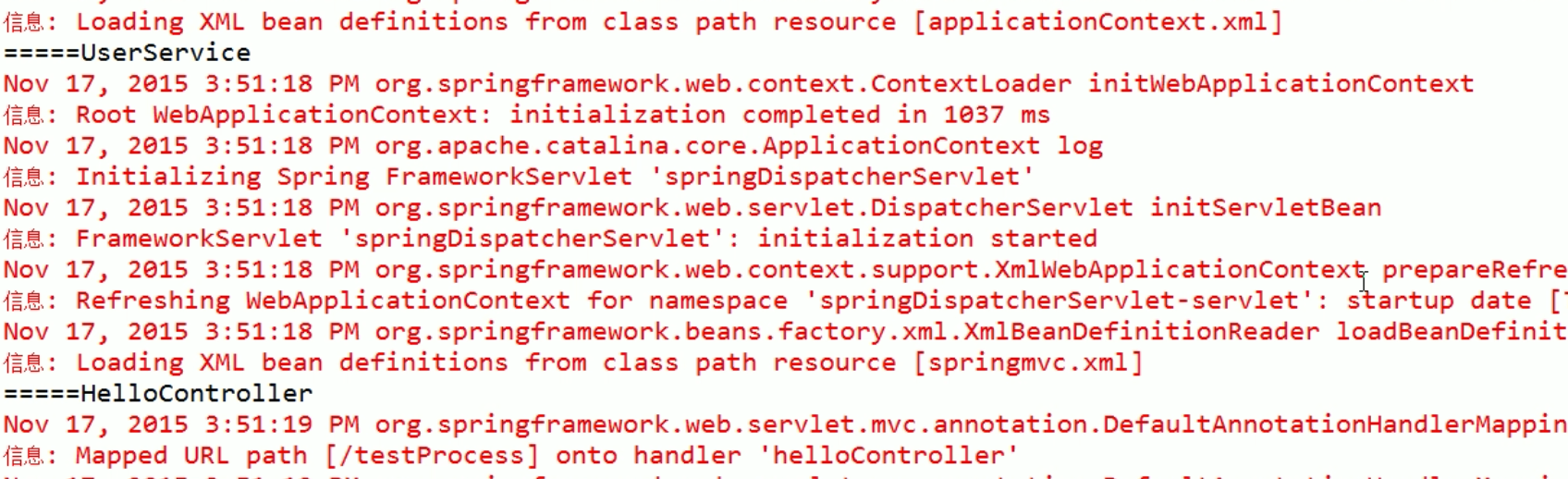
2.3 最终效果:
3. SpringMVC 配置文件中引用业务层的 Bean
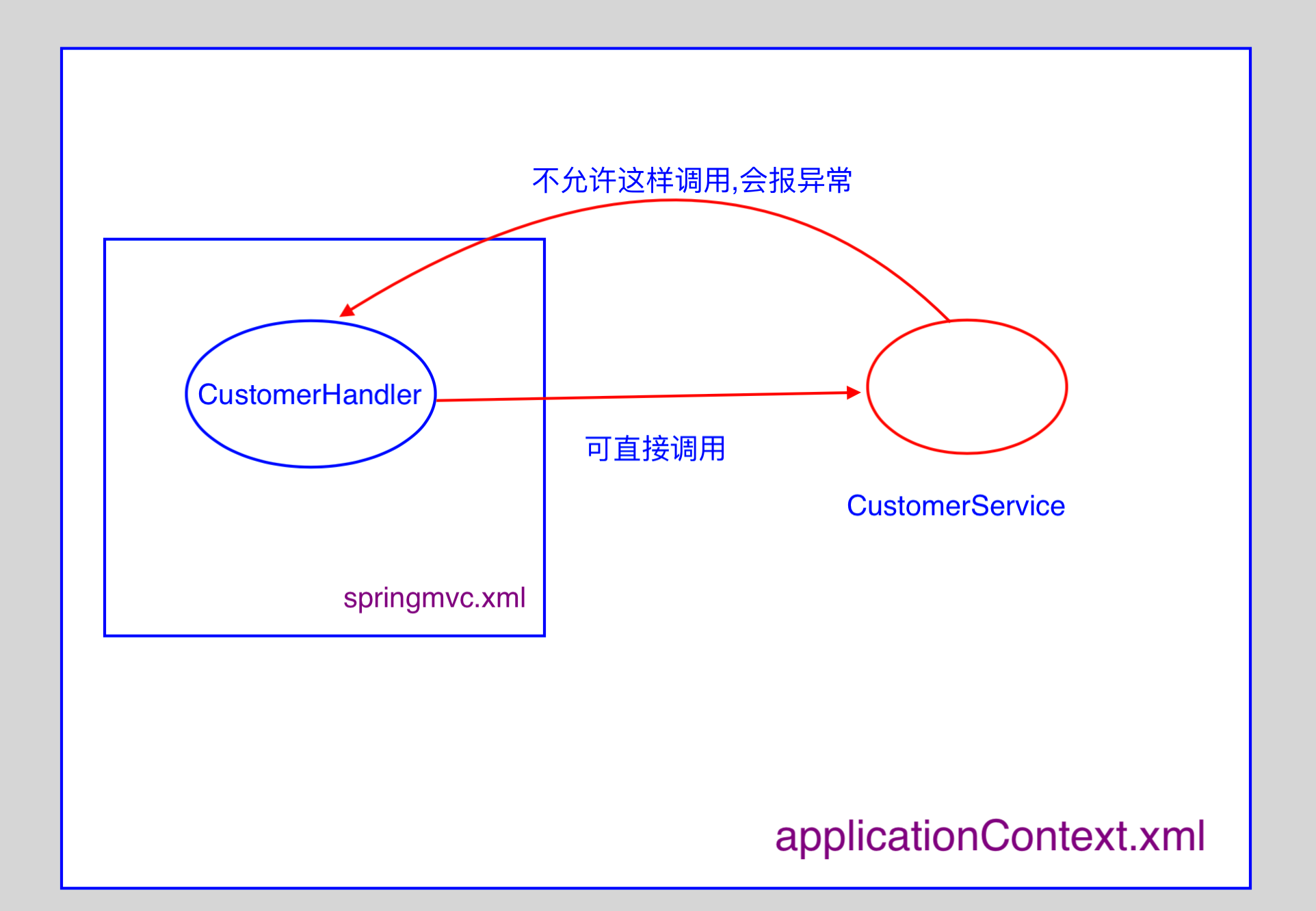
- 多个 SpringIOC 容器之间可以设置为父子关系,以实现更好的解耦;
- SpringMVC Web层容器可以作为"业务层"Spring容器的子容器:即 Web 层容器可以引用业务层容器的Bean,
而业务层容器却访问不到Web层容器;

// Web 层

@Controller

public class CustomerHandler{

    @Autowired

    public CustomerService customerService;

    @RequestMapping(value="/test",method=RequestMethod.GET)

    public String test(){

        // 可以这样调用

        System.out.println("=====test:  "+customerService.getClass().getName());

        return "ok";

    }

}

// 业务层

@Service

public class CustomerService{

    // 业务层不可以调用 Web 层

    // 这样,会出现异常

    @Autowired

    private CustomerHandler customerHandler;

    public CustomerService(){

        System.out.println("====CustomerService:"+customerHandler.test());

    }

}
3. SpringMVC 与 Struts2 比较
- SpringMVC 的入口是 Servlet, Struts2 是 Filter;
- SpringMVC 会稍微比 Struts2 快些, SpringMVC 是基于方法涉及的,而 Struts2 是基于类,每发一次请求
都会实例一个Action; - SpringMVC 使用更加简洁,开发效率高, 支持JSR303, 处理 ajax 的请求更方便;
- Struts2 的 OGNL 表达式使页面的开发效率相比 SpringMVC 更高些;
参考资料
SpringMVC 运行流程以及与Spring 整合的更多相关文章
- SpringMVC--从理解SpringMVC执行流程到SSM框架整合
前言 SpringMVC框架是SSM框架中继Spring另一个重要的框架,那么什么是SpringMVC,如何用SpringMVC来整合SSM框架呢?下面让我们详细的了解一下. 注:在学习SpringM ...
- SpringMVC运行流程
Spring工作流程描述 1. 用户向服务器发送请求,请求被Spring 前端控制Servelt DispatcherServlet捕获: 2. DispatcherServl ...
- springmvc运行流程简单解释(源码解析,文末附自己画的流程图)
首先看一下DispatcherServlet结构: 观察HandlerExecutionChain对象的创建与赋值,这个方法用来表示执行这个方法的整条链. 进入getHandler方法: 此时的变量h ...
- 【串线篇】SpringMVC运行流程
1.所有请求,前端控制器(DispatcherServlet)收到请求,调用doDispatch进行处理 2.根据HandlerMapping中保存的请求映射信息找到,处理当前请求的,处理器执行链(包 ...
- SpringMVC听课笔记(十五:SpringMVC 运行流程)
1. 图 一般的会按照红线标注的方向去行进,但是请求静态资源,或者出现异常等,会出现其他路径 2.
- springmvc 运行原理 Spring ioc的实现原理 Mybatis工作流程 spring AOP实现原理
SpringMVC的工作原理图: SpringMVC流程 . 用户发送请求至前端控制器DispatcherServlet. . DispatcherServlet收到请求调用HandlerMappin ...
- spring整合mybatis错误:class path resource [config/spring/springmvc.xml] cannot be opened because it does not exist
spring 整合Mybatis 运行环境:jdk1.7.0_17+tomcat 7 + spring:3.2.0 +mybatis:3.2.7+ eclipse 错误:class path reso ...
- springMVC框架介绍以及运行流程(图解)
1 Springmvc是什么? spring web mvc和struts2都属于表现层的框架,spring web mvc是spring框架的一部分(所以spring mvc与spring之间不需要 ...
- java面试记录二:spring加载流程、springmvc请求流程、spring事务失效、synchronized和volatile、JMM和JVM模型、二分查找的实现、垃圾收集器、控制台顺序打印ABC的三种线程实现
注:部分答案引用网络文章 简答题 1.Spring项目启动后的加载流程 (1)使用spring框架的web项目,在tomcat下,是根据web.xml来启动的.web.xml中负责配置启动spring ...
随机推荐
- NGUI中获取鼠标在控件内部坐标
在UIWidget 中添加以下函数.获得的坐标系是以右上角为原点坐标,x轴向左,一轴向下. public Vector2 GetTouchPoint() { Vector3 p0 = cachedT ...
- [svc][jk]监控jvm的一个坑
监控jvm的一个坑 1,遇到的问题 我按照以往文档,在catalina.sh里追加jvm的监控api,如下 紧接着我启动 tomcat. 未报任何错误. 发现 lsof –i:12000, 12000 ...
- 接口测试脚本之Jsoup解析HTML
第一次接触jsoup还是在处理收货地址的时候,当时在写一个下单流程,需要省市区id以及详细门牌号等等,因此同事介绍了jsoup,闲来无事,在此闲扯一番! 1.我们来看下,什么是jsoup,先来看看官方 ...
- 元器件封装标准IPC-7351
IPC-7351依赖久经考验的数学算法,综合考虑制造.组装和元件容差,从而精确计算焊盘图形.该标准以IPC-SM-782研发概念为基础进一步提高,对每一个元件都建立了三个焊盘图形几何形状,对每一系列元 ...
- 信号signal编号及意义及一般处理
SIGQUIT:停止 SIGILL:illegal instruction SIGABRT:Abort SIGFPE:Float point exception SIGPIPE:Broken pipe ...
- ffmpeg 和 x264的参数对照
ffmpeg 和 x264的参数对照 x264 ffmpeg 说明 命令行 字段 命令行 字段 qp qp_constant cqp cqp 固定量化因子.取值范围0到51. 经常取值在20-40 ...
- Unity3D避免代码被反编译
1.Unity编译后最终会将代码编译在dll里面,无论是ios还是Android解开包以后都可以拿到dll,路径在Data/Managed/Assembly-CSharp.dll 2.IOS其实不用做 ...
- 【揭秘】什么是不对称秘钥和CA证书
密钥交换简单的说就是利用非对称加密算法来加密对称密钥保证传输的安全性,之后用对称密钥来加密数据. ★方案1--单纯用"对称加密算法"的可行性 首先简单阐述一下,"单纯用对 ...
- python笔记7:mysql、redis操作
模块安装: 数据操作用到的模块pymysql,需要通过pip install pymysql进行安装. redis操作用的模块是redis,需要通过pip install redis进行安装. 检验是 ...
- 第二百三十五节,Bootstrap栅格系统
Bootstrap栅格系统 学习要点: 1.移动设备优先 2.布局容器 3.栅格系统 本节课我们主要学习一下 Bootstrap 的栅格系统,提供了一套响应式.移动设备优先的流 式栅格系统. 一.移动 ...