
spring-aop + memcached 的简单实现
一般情况下,java程序取一条数据是直接从数据库中去取,当数据库达到一定的连接数时,就会处于排队等待状态,某些在一定时间内不会发生变化的数据,完全没必要每次都从数据库中去取,使用spring-aop + memcached 技术,取数据时,先从缓存中去取,缓存中如果存在,直接返回结果,无需访问数据库;如果缓存中不存在,再访问数据库,并把这条数据保存到缓存中,当程序下次再访问时,就可以取到缓存中的值了。这样不但可以大大减少访问数据库的次数(减轻数据的负担),而且可以提高程序的运行效率,因为memecached 是采用key - value 方法存取数据的。但是缓存如果使用不当,不但容易造成数据混乱,而且容易导致意想不到的bug。当然除了使用spring-aop 实现缓存技术之外,也可以使用aspectj 实现。
使用memcached时特别需要注意的是:
1.当某条数据发生变化时,一定要更新cache中的这条记录;
2.设置key时一定要唯一,一般是通过prefix + uuid 保证唯一,prefix一般使用数据库的表名;
3.合理设置缓存的时间,即有效期。
下面来介绍一下spring-aop + memcached 技术的简单实现:

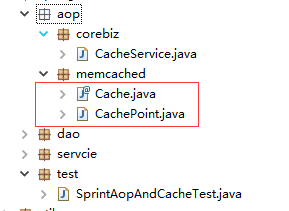
1.定义注解类 @Cache
@Target(ElementType.METHOD)

@Retention(RetentionPolicy.RUNTIME)

public @interface Cache {

    /**

     * key的前缀

     * @return

     */

    String prefix();

    /**

     * 指定哪个参数值做Key,与cacheKey两者选一,如果都有输入,默认使用indexKey

     * @return

     */

    int indexKey() default 0;

    /**

     * 缓存有效期 1000*60*60*2=2小时,下面代码暂时没有实现此功能

     * @return

     */

    long expiration() default 1000 * 60 * 60 * 2;

}
2.定义切入点类 CachePoint,这个类一定要与上面的注解类在同一包目录下
@Component

@Aspect

public class CachePoint {

    @Autowired

    private CacheService cacheService;

    /**

     * @Pointcut("@annotation(Cache)") 表示定义切入点所有带有@Cache注解的方法

     */

    @Pointcut("@annotation(Cache)")

    public void queryCache(){

        System.out.println("此输出将不会执行...");

    }

    @Around("queryCache()")

    public Object getByCache(ProceedingJoinPoint pjp) throws Throwable {

        // 1.查询缓存的值

        Object obj  = cacheService.getKey("test_1000123456");

        // 2.如果缓存中不存在,则查询mysql数据库

        if (null==obj) {

            obj = pjp.proceed();

            // 3.将obj的值写入缓存

            cacheService.setKey("test_1000123456", obj);

        }

        return obj;

    }

}
3.编写memcached 的业务类
@Component("cacheService")

public class CacheService {

    /**

     * 读取缓存的方法

     * @param key

     * @return

     */

    public Object getKey(String key) {

        System.out.println("query from memcached");

        return null;

    }

    /**

     * 写入缓存的方法

     * @param key

     * @param obj

     */

    public void setKey(String key, Object obj) {

    }

    /**

     * 删除缓存的方法

     * @param key

     */

    public void delete(String key) {

    }

}
4.Dao 的实现层添加注解
@Component("testDao")

public class TestDaoImpl implements TestDao {

    /**

     * 此处将使用 prefix + indexKey 作为缓存的key,即 test_ + uuid

     */

    @Cache(indexKey=1, prefix="test_")

    @Override

    public String query(String uuid) {

        System.out.println("query from mysql");

        return "caoxiaobo";

    }

}
配置文件spring-aop.xml:
<?xml version="1.0" encoding="UTF-8"?>

<beans xmlns="http://www.springframework.org/schema/beans"

    xmlns:aop="http://www.springframework.org/schema/aop"

    xmlns:xsi="http://www.w3.org/2001/XMLSchema-instance" xmlns:p="http://www.springframework.org/schema/p"

    xmlns:context="http://www.springframework.org/schema/context"

    xmlns:mvc="http://www.springframework.org/schema/mvc"

    xsi:schemaLocation="http://www.springframework.org/schema/beans

                        http://www.springframework.org/schema/beans/spring-beans-3.1.xsd

                        http://www.springframework.org/schema/aop

                        http://www.springframework.org/schema/aop/spring-aop-4.3.xsd

                        http://www.springframework.org/schema/context

                        http://www.springframework.org/schema/context/spring-context-3.1.xsd

                        http://www.springframework.org/schema/mvc

                        http://www.springframework.org/schema/mvc/spring-mvc-4.0.xsd">

    <!-- 自动扫描 -->

    <context:component-scan base-package="com.spring.*" />

    <!-- 开启注入注解扫描  -->

    <context:annotation-config/>

    <aop:aspectj-autoproxy/>

</beans>
测试:
@RunWith(SpringJUnit4ClassRunner.class)

@ContextConfiguration(locations = { "classpath:spring-aop.xml" })

public class SprintAopAndCacheTest {

    @Autowired

    TestService testService;

    @Test

    public void test() {

        String name = testService.query("1000123456");

        System.out.println(name);

    }

}
在执行测试代码的时候,除了第一次执行会输出 “query from mysql” 之外,后面都不会执行这条输出语句。
上述代码仅仅只是一个很简单的spring-aop的示例,下面继续修改CachePoint类,来实现 spring-aop + memcached
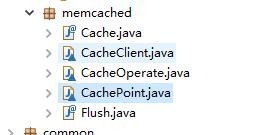
@Component("cachePoint")

@Aspect

class CachePoint {

    /**

     * @Pointcut("@annotation(Cache)") 表示定义切入点所有带有@Cache注解的方法

     */

    @Pointcut("@annotation(com.rose.aop.memcached.Cache)")

    public void cachePointcut(){

        System.out.println("此输出将不会执行...");

    }

    @Around(value="cachePointcut()")

    public Object cacheAround(ProceedingJoinPoint pjp) {

        return invoke(pjp);

    }

    /**

     * 1.查询

     * 2.

     * 3.

     * 4.删除

     * 5.删除并返回

     * @return

     * @throws Throwable

     */

    private Object invoke (ProceedingJoinPoint pjp) {

        Object object = null;

        Cache cache = this.getCache(pjp);

        int operation = cache.operation();

        switch (operation) {

        case 1:

            object = query(pjp, cache);

            break;
     // 待实现

        case 2:

            break;
     // 待实现

        case 3:

            break;

        case 4:

            delete1(pjp, cache);

            break;

        case 5:

            object = delete(pjp, cache);

            break;

        default:

            break;

        }

        return object;

    }

    /**

     * 通过反射获取cache的对象,包含很多参数

     * @param pjp

     *         Object[] getArgs:返回目标方法的参数

     *         Signature getSignature:返回目标方法的签名

     *         Object getTarget:返回被织入增强处理的目标对象

     *         Object getThis:返回AOP框架为目标对象生成的代理对象

     * @return

     */

    private Cache getCache(ProceedingJoinPoint pjp) {

        Cache cache = null;

        try {

            Signature signature = pjp.getSignature();

            Class<?> clazz = Class.forName(pjp.getTarget().getClass().getName());

            Class<?>[] paramTypes = ((MethodSignature) pjp.getSignature()).getMethod().getParameterTypes();

            Method method = clazz.getMethod(signature.getName(), paramTypes);

            Annotation annotation = method.getAnnotation(Cache.class);

            cache = (Cache) annotation;

        } catch (ClassNotFoundException e) {

            // TODO Auto-generated catch block

            e.printStackTrace();

        } catch (NoSuchMethodException e) {

            // TODO Auto-generated catch block

            e.printStackTrace();

        } catch (SecurityException e) {

            // TODO Auto-generated catch block

            e.printStackTrace();

        }

        return cache;

    }

    private Object query(ProceedingJoinPoint pjp, Cache cache) {

        // 方法传入的参数

        Object[] objs = pjp.getArgs();

        int indexKey = cache.indexKey();

        String prefix = cache.prefix();

        String key = prefix + objs[indexKey-1];

        System.out.println("key : " + key);

        // 1.查询缓存的值

        Object obj  = CacheOperate.getKey(key);

        // 2.如果缓存中不存在,则查询mysql数据库

        if (null==obj) {

            try {

                obj = pjp.proceed();

                // 3.将obj的值写入缓存

                CacheOperate.setKey(key, obj);

            } catch (Throwable e) {

                // TODO Auto-generated catch block

                e.printStackTrace();

            }

        }

        return obj;

    }

    private Object delete(ProceedingJoinPoint pjp, Cache cache) {

        System.out.println("删除缓存操作");

        Object[] objs = pjp.getArgs();

        int indexKey = cache.indexKey();

        String prefix = cache.prefix();

        String key = prefix + objs[indexKey-1];

        CacheOperate.delete(key);

        try {

            return pjp.proceed();

        } catch (Throwable e) {

            // TODO Auto-generated catch block

            e.printStackTrace();

        }

        return null;

    }

    private void delete1(ProceedingJoinPoint pjp, Cache cache) {

        delete(pjp, cache);

    }

}
class CacheOperate {

    private static CacheClient cacheClient = CacheClient.getInstance();

    /**

     * 读取缓存的方法

     * @param key

     * @return

     */

    public static Object getKey(String key) {

        System.out.println("查询缓存");

        return cacheClient.get(key);

    }

    /**

     * 写入缓存的方法

     * @param key

     * @param obj

     */

    public static void setKey(String key, Object value) {

        cacheClient.set(key, value);

    }

    /**

     * 删除缓存的方法

     * @param key

     */

    public static void delete(String key) {

        cacheClient.delete(key);

    }

}
memcached的连接及初始化 及增、删、改、查
class CacheClient {

    private CacheClient() {}

    private static CacheClient cacheClient = null;

    private static MemCachedClient client = new MemCachedClient();

    // 服务器列表和其权重

    private static String[] servers = { "127.0.0.1:11211" };

   /**
      * 项目启动时(类加载的过程中)连接及初始化
      */

    static {

        // 获取soket 连接池的实例对象

        SockIOPool pool = SockIOPool.getInstance();

        // 设置服务器信息

        pool.setServers(servers);

        pool.setFailover(true);

        //设置初始连接数、最小和最大连接数以及最大处理时间

        pool.setInitConn(10);

        pool.setMinConn(5);

        pool.setMaxConn(250);

        // 设置主线程的睡眠时间

        pool.setMaintSleep(30);

        // 设置TCP的参数和连接超时

        pool.setNagle(false);

        pool.setSocketTO(3000);

        pool.setAliveCheck(true);

        // 初始化连接池

        pool.initialize();

    }

    public static CacheClient getInstance() {

        if (null==cacheClient) {

            cacheClient = new CacheClient();

        }

        return cacheClient;

    }

    public Object get(String key) {

        return client.get(key);

    }

    public boolean set(String key, Object value) {

        return client.set(key, value);

    }

    public boolean set(String key, Object value, int expiry) {

        Calendar nowTime = Calendar.getInstance();

        nowTime.add(Calendar.SECOND, expiry);

        return client.set(key, value, nowTime.getTime());

    }

    public boolean add(String key, Object value) {

        return client.add(key, value);

    }

    public boolean add(String key, Object value, int expiry) {

        Calendar nowTime = Calendar.getInstance();

        nowTime.add(Calendar.SECOND, expiry);

        return client.add(key, value, expiry);

    }

    public boolean replace(String key, Object value) {

        return client.replace(key, value);

    }

    public boolean replace(String key, Object value, int expiry) {

        Calendar nowTime = Calendar.getInstance();

        nowTime.add(Calendar.SECOND, expiry);

        return client.replace(key, value, expiry);

    }

    public boolean delete(String key) {

        return client.delete(key);

    }

    public boolean flushAll() {

        return client.flushAll();

    }

}
spring-aop + memcached 的简单实现的更多相关文章
- Spring AOP就是这么简单啦
前言 只有光头才能变强 上一篇已经讲解了Spring IOC知识点一网打尽!,这篇主要是讲解Spring的AOP模块~ 之前我已经写过一篇关于AOP的文章了,那篇把比较重要的知识点都讲解过了一篇啦:S ...
- Spring AOP注解形式简单实现
实现步骤: 1:导入类扫描的注解解析器 命名空间:xmlns:context="http://www.springframework.org/schema/context" xsi ...
- Spring Boot -- Spring AOP原理及简单实现
一.AOP基本概念 什么是AOP,AOP英语全名就是Aspect oriented programming,字面意思就是面向切面编程.面向切面的编程是对面向对象编程的补充,面向对象的编程核心模块是类, ...
- Spring AOP的一个简单实现
针对学习笔记(六)中的购买以及退货代码,我们加入AOP框架,实现同样一个功能. 首先配置XML:service采用和之前一样的代码,只是没有通过实现接口来实现,而是直接一个实现类.transactio ...
- Spring AOP Aspect的简单实现(基于XML)
第一步:导包 第二步:实现类和切面类 Service("userService")public class IUserviceImpl implements IUserServic ...
- Spring AOP Aspect的简单实现(基于注解)
第1步:声明使用注解 <!-- 配置扫描注解--> 扫描包的位置<context:component-scan base-package="com.zz"/> ...
- 转载:Spring AOP (下)
昨天记录了Spring AOP学习的一部分(http://www.cnblogs.com/yanbincn/archive/2012/08/13/2635413.html),本来是想一口气梳理完的.但 ...
- Spring AOP (下)
4.方式二:schema配置 a.业务类: /** * 业务类 * * @author yanbin * */ public class AspectBusiness { /** * 切入点 */ p ...
- (转)spring aop(下)
昨天记录了Spring AOP学习的一部分(http://www.cnblogs.com/yanbincn/archive/2012/08/13/2635413.html),本来是想一口气梳理完的.但 ...
- Spring AOP中的JDK和CGLib动态代理哪个效率更高?
一.背景 今天有小伙伴面试的时候被问到:Spring AOP中JDK 和 CGLib动态代理哪个效率更高? 二.基本概念 首先,我们知道Spring AOP的底层实现有两种方式:一种是JDK动态代理, ...
随机推荐
- 单网卡安装neutron
devstack中机器只有一个物理网卡,如何设置neutron中的external网络? 方式是: 创建一个linux bridge和veth,把eth0和veth1加入到brige,用veth的另一 ...
- 一块网卡多个IP实现
////////////////////////////写在前面//////////////////////////////////////////// 需要注意,这里我们是一块网卡多个IP,而并非是 ...
- LeetCode第[14]题(Java): Longest Common Prefix
题目:最长公共前缀 难度:EASY 题目内容: Write a function to find the longest common prefix string amongst an array o ...
- ALS算法 (面试准备)
ALS算法描述: 1.ALS算法用来补全用户评分矩阵.由于用户评分矩阵比较稀疏,将用户评分矩阵进行分解,变成V和U的乘积.通过求得V和U两个小的矩阵来补全用户评分矩阵. 2.ALS算法使用交替最小二乘 ...
- 在数据库中添加数据以后,使用Mybatis进行查询结果为空
在数据库中添加数据以后,使用Mybatis进行查询结果为空,这是因为数据库中添加数据忘记commit的缘故.
- 使用命令行启动spring boot项目
1.找到项目路径 cd target 2.敲命令--------java -jar xxxx.jar ------------------------------------------------- ...
- django model_fields_validators 前端页面编辑自定义验证
# model_field_validators.py import re from django.core.exceptions import ValidationError from django ...
- falsh developer 快捷键
1.文件夹搜索是Ctrl+I2.注释// Ctrl+Q 3.注释/*...*/ Ctrl+Shift+Q4. 代码提示 Ctrl+Alt+space5. 复制一行 Ctrl+D ctrl+shift+ ...
- js 获取服务器当前时间
//获取服务器时间 function getNowDate(){ var xhr = null; if(window.XMLHttpRequest){ xhr = new window.XMLHttp ...
- 旧书重温:0day2【11】第6章 狙击windows的异常处理
昨晚经过一番努力,又把第六章的内容温习了一遍! 随手,做了一个实验!狙击windows的异常处理, 顺便也把过程记录了下来!省事!(有图) 今早,论坛一直无法打开! 就推迟到了现在! 哈哈 正题: 第 ...