
React-Native需要css和布局-20160902
import React, { Component } from 'react';

import {

  AppRegistry,

  StyleSheet,

  Text,

  View,

} from 'react-native';

class helloworld extends Component {

  render() {

    return (

        <View style={styles.style_0}>

            <View style = {styles.styleView}>

                <Text style={styles.style_text}>自由摆放</Text>

            </View>

            <View style={[styles.styleView ,styles.centerView]}>

                    <Text style={styles.style_text}>居中显示</Text>

            </View>

            <View style={[styles.styleView,styles.rightView]}>

                    <Text style={styles.style_text}>居右显示</Text>

            </View>

            <View style={[styles.styleView,styles.leftView]}>

                <Text style={styles.style_text}>居左显示</Text>

            </View>

           <View style={[styles.styleView,styles.autoView,{marginTop:20}]}>

                 <Text style={styles.style_text}>自动显示</Text>

           </View>

           <View style={[styles.styleView,styles.stretchView,{marginTop:20}]}>

                 <Text style={styles.style_text}>伸展显示</Text>

             </View>

          <View style={styles.vertical_centerView}>

                 <Text style={styles.style_text}>垂直居中显示显示</Text>

          </View>

        </View>

    );

  }

}

        const styles = StyleSheet.create({

            style_0:{

                flex:1,

                borderColor:'red',

                borderWidth:2,

            },

            styleView:{

                width:100,

                height:50,

                backgroundColor:'blue'

            },

            style_text:{

                color:'white',

                marginTop:18,

                textAlign:'center',

            },

            centerView:{

              alignSelf:'center',

            },

            rightView:{

                alignSelf:'flex-end',

            },

            leftView:{

                alignSelf:'flex-start'

            },

            autoView:{

                alignSelf:'auto'

            },

            stretchView:{

                alignSelf:'stretch'

            },

            vertical_centerView:{

                flex:1,

                borderColor:'red',

                borderWidth:2,

                justifyContent:'center',

                alignItems:'center',

            },

        });

AppRegistry.registerComponent('小棚', () => helloworld);
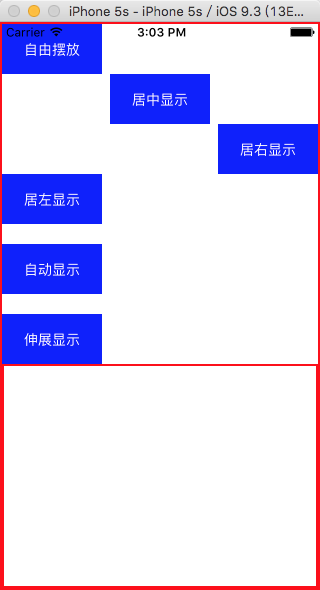
运行结果
React-Native需要css和布局-20160902的更多相关文章
- React Native 中 CSS 的使用
首先声明,此文原作者为黎 跃春 React Native中CSS 内联样式 对象样式 使用Stylesheet.Create 样式拼接 导出样式对象 下面的代码是index.ios.js中的代码: / ...
- 3、手把手教React Native实战之flexbox布局
flexbox是Flexible Box的缩写,弹性盒子布局 主流的浏览器都支持 flexbox布局是伸缩容器(container)和伸缩项目(item)组成 Flexbox布局的主体思想是元素可以 ...
- 4、手把手教React Native实战之flexbox布局(伸缩属性)
###伸缩项目的属性 1.order 定义项目的排列顺序,数值越小,排列越靠前,默认值为0,语法为:order:整数值 2.flex-grow 定义伸缩项目的放大比例,默认值为0,即表示如果存在剩余空 ...
- React Native入门 认识Flexbox布局
Flexbox布局是由W3C在09年提出的在Web端取代CSS盒子模型的一种布局方式. ReactNative实现了Flexbox布局的大部分功能. Flexbox布局所使用的属性,基本可以分为两大类 ...
- React Native的ListView的布局使用
1> ListView组件用于显示一个垂直的滚动列表,其中的元素之间结构近似而仅数据不同. ListView更适于长列表数据,且元素个数可以增删.和ScrollView不同的是,ListView ...
- 从web移动端布局到react native布局
在web移动端通常会有这样的需求,实现上中下三栏布局(上下导航栏位置固定,中间部分内容超出可滚动),如下图所示: 实现方法如下: HTML结构: <div class='container'&g ...
- React Native基础&入门教程:初步使用Flexbox布局
在上篇中,笔者分享了部分安装并调试React Native应用过程里的一点经验,如果还没有看过的同学请点击<React Native基础&入门教程:调试React Native应用的一小 ...
- React Native布局
一款好的APP离不了一个漂亮的布局,本文章将向大家分享React Native中的布局方式FlexBox. 在React Native中布局采用的是FleBox(弹性框)进行布局. FlexBox提供 ...
- React Native探索(四)Flexbox布局详解
相关文章 React Native探索系列 前言 在Android开发中我们有很多种布局,比如LinearLayout和RelativeLayout,同样在React Native也有它的布局,这个布 ...
随机推荐
- BZOJ 2160: 拉拉队排练
Description 问长度前 \(k\) 大的奇长度回文子串的乘积. Sol Manacher. 直接马拉车跑一边,统计一下答案,每次将长度-2就可以了. Code /************** ...
- 打印IP 来源
<% String userAgent = request.getHeader("User-Agent"); if (userAgent != null && ...
- Installing Selenium and ChromeDriver on Ubuntu
I recently got Selenium, Google Chrome, and ChromeDriver installed and working on a DigitalOcean ins ...
- Eclipse下载与安装
有很多小伙伴不知道eclipse在哪里下载以及怎么安装的,那我来给大家做个演示吧. 学习java比较常用的软件就是eclipse,而eclipse安装后并不能马上使用,还需要安装jdk并搭建环境.下面 ...
- Mac上搭建Nginx + rtmp
介绍 nginx是非常优秀的开源服务器,用它来做hls或者rtmp流媒体服务器是非常不错的选择,本人在网上整理了安装流程,分享给大家并且作备忘. 安装步骤 1.先安装brew: /usr/bin/ru ...
- 常用类string的用法
在Java中string是我们用的很多的一种类,下面就来说说string类中经常用到的一些方法. 1.string与数组相关的方法: 比如:string str = "fsafdsafdas ...
- 建表过程-列名&列类型&修改表B
怎么建表? 主键 名称 重量 价格 生产日期 保质期 产地 种类 分析:我们只要把第一行的表头建好后,这张表也就完成了. 术语:建表的过程就是声明字段过程 ...
- rem、px、em之间的区别以及网页响应式设计写法
个人收藏用,转载自:http://www.w3cplus.com/css3/define-font-size-with-css3-rem 在Web中使用什么单位来定义页面的字体大小,至今天为止都还在激 ...
- Mittag-Leffler定理,Weierstrass因子分解定理和插值定理
Mittag-Leffler定理 设$D\subset\mathbb C$为区域,而$\{a_{n}\}$为$D$中互不相同且无极限点的点列,那么对于任意给定的一列自然数$\{k_{n}\}$, ...
- python map()
map()函数接收两个参数,一个是函数,一个是序列,map将传入的函数依次作用到序列的每个元素,并把结果作为新的list返回. 举例说明,比如我们有一个函数f(x)=x%2,要把这个函数作用在一个li ...