
Python实现五子棋人机对战的二次开发
Python实现人机对战的二次开发
在网上找到了一个使用python实现五子棋游戏,其中通过加入一个简单的AI算法实现了人机对战的功能,我觉得这个人机对战还是蛮有意思的,下面我分析一下五子棋游戏的规则、棋盘表示方法、AI算法的实现原理以及代码实现过程。最后二次开发时引入新的模式从而增加游戏的趣味性。
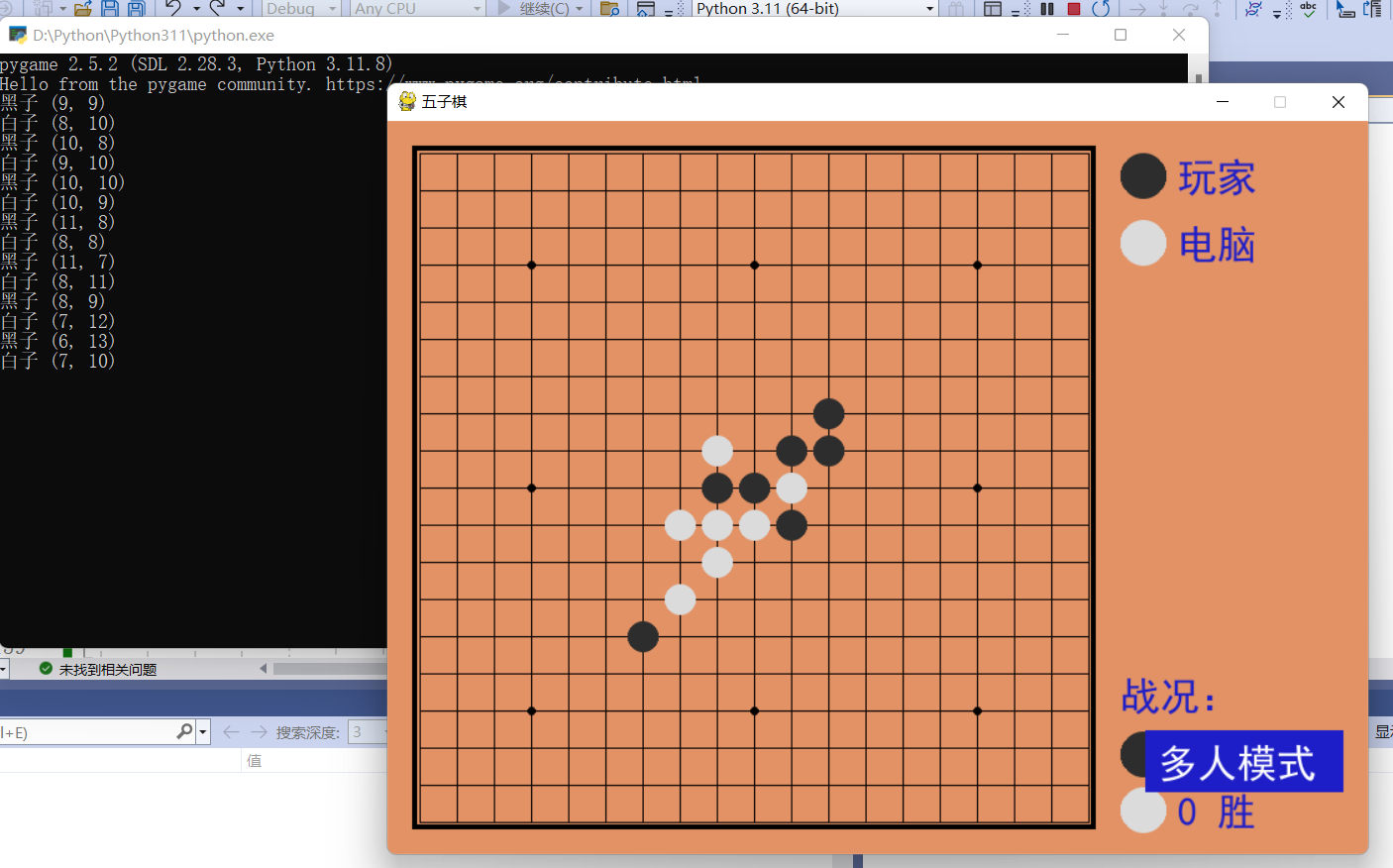
首先是定义棋盘棋子的数据结构以及游戏界面,同时还实现判断落子是否合规的功能,判断游戏是否胜利的功能。
定义了一个表示棋子的数据结构,包括棋子的名称、值和颜色。在游戏中,黑子的值为1,白子的值为2。
BLACK_CHESSMAN 和 WHITE_CHESSMAN: 使用 Chessman 命名元组创建了黑子和白子的实例,分别赋予了不同的名称、值和颜色。
Checkerboard 类: 实现了棋盘的表示和操作功能。其中,_get_checkerboard 方法返回了棋盘的状态,can_drop 方法判断指定位置是否可落子,drop 方法用于落子,并判断是否获胜,_win 方法用于判断是否获胜,_get_count_on_direction 方法用于计算指定方向上的连续子数。
点击查看代码
Chessman = namedtuple('Chessman', 'Name Value Color')

Point = namedtuple('Point', 'X Y')

BLACK_CHESSMAN = Chessman('黑子', 1, (45, 45, 45))

WHITE_CHESSMAN = Chessman('白子', 2, (219, 219, 219))

offset = [(1, 0), (0, 1), (1, 1), (1, -1)]

class Checkerboard:

    def __init__(self, line_points):

        self._line_points = line_points

        self._checkerboard = [[0] * line_points for _ in range(line_points)]

    def _get_checkerboard(self):

        return self._checkerboard

    checkerboard = property(_get_checkerboard)

    # 判断是否可落子

    def can_drop(self, point):

        return self._checkerboard[point.Y][point.X] == 0

    def drop(self, chessman, point):

        """

        落子

        :param chessman:

        :param point:落子位置

        :return:若该子落下之后即可获胜,则返回获胜方,否则返回 None

        """

        print(f'{chessman.Name} ({point.X}, {point.Y})')

        self._checkerboard[point.Y][point.X] = chessman.Value

        if self._win(point):

            print(f'{chessman.Name}获胜')

            return chessman

    # 判断是否赢了

    def _win(self, point):

        cur_value = self._checkerboard[point.Y][point.X]

        for os in offset:

            if self._get_count_on_direction(point, cur_value, os[0], os[1]):

                return True

    def _get_count_on_direction(self, point, value, x_offset, y_offset):

        count = 1

        for step in range(1, 5):

            x = point.X + step * x_offset

            y = point.Y + step * y_offset

            if 0 <= x < self._line_points and 0 <= y < self._line_points and self._checkerboard[y][x] == value:

                count += 1

            else:

                break

        for step in range(1, 5):

            x = point.X - step * x_offset

            y = point.Y - step * y_offset

            if 0 <= x < self._line_points and 0 <= y < self._line_points and self._checkerboard[y][x] == value:

                count += 1

            else:

                break

        return count >= 5
游戏界面参数定义
点击查看代码
SIZE = 30  # 棋盘每个点时间的间隔

Line_Points = 19  # 棋盘每行/每列点数

Outer_Width = 20  # 棋盘外宽度

Border_Width = 4  # 边框宽度

Inside_Width = 4  # 边框跟实际的棋盘之间的间隔

Border_Length = SIZE * (Line_Points - 1) + Inside_Width * 2 + Border_Width  # 边框线的长度

Start_X = Start_Y = Outer_Width + int(Border_Width / 2) + Inside_Width  # 网格线起点(左上角)坐标

SCREEN_HEIGHT = SIZE * (Line_Points - 1) + Outer_Width * 2 + Border_Width + Inside_Width * 2  # 游戏屏幕的高

SCREEN_WIDTH = SCREEN_HEIGHT + 200  # 游戏屏幕的宽

Stone_Radius = SIZE // 2 - 3  # 棋子半径

Stone_Radius2 = SIZE // 2 + 3

Checkerboard_Color = (0xE3, 0x92, 0x65)  # 棋盘颜色

BLACK_COLOR = (0, 0, 0)

WHITE_COLOR = (255, 255, 255)

RED_COLOR = (200, 30, 30)

BLUE_COLOR = (30, 30, 200)

RIGHT_INFO_POS_X = SCREEN_HEIGHT + Stone_Radius2 * 2 + 10
画棋盘,棋子
鼠标点击时返回坐标
点击查看代码
# 画棋盘

def _draw_checkerboard(screen):

    # 填充棋盘背景色

    screen.fill(Checkerboard_Color)

    # 画棋盘网格线外的边框

    pygame.draw.rect(screen, BLACK_COLOR, (Outer_Width, Outer_Width, Border_Length, Border_Length), Border_Width)

    # 画网格线

    for i in range(Line_Points):

        pygame.draw.line(screen, BLACK_COLOR,

                         (Start_Y, Start_Y + SIZE * i),

                         (Start_Y + SIZE * (Line_Points - 1), Start_Y + SIZE * i),

                         1)

    for j in range(Line_Points):

        pygame.draw.line(screen, BLACK_COLOR,

                         (Start_X + SIZE * j, Start_X),

                         (Start_X + SIZE * j, Start_X + SIZE * (Line_Points - 1)),

                         1)

    # 画星位和天元

    for i in (3, 9, 15):

        for j in (3, 9, 15):

            if i == j == 9:

                radius = 5

            else:

                radius = 3

            # pygame.draw.circle(screen, BLACK, (Start_X + SIZE * i, Start_Y + SIZE * j), radius)

            pygame.gfxdraw.aacircle(screen, Start_X + SIZE * i, Start_Y + SIZE * j, radius, BLACK_COLOR)

            pygame.gfxdraw.filled_circle(screen, Start_X + SIZE * i, Start_Y + SIZE * j, radius, BLACK_COLOR)

# 画棋子

def _draw_chessman(screen, point, stone_color):

    # pygame.draw.circle(screen, stone_color, (Start_X + SIZE * point.X, Start_Y + SIZE * point.Y), Stone_Radius)

    pygame.gfxdraw.aacircle(screen, Start_X + SIZE * point.X, Start_Y + SIZE * point.Y, Stone_Radius, stone_color)

    pygame.gfxdraw.filled_circle(screen, Start_X + SIZE * point.X, Start_Y + SIZE * point.Y, Stone_Radius, stone_color)

# 画左侧信息显示

def _draw_left_info(screen, font, cur_runner, black_win_count, white_win_count):

    _draw_chessman_pos(screen, (SCREEN_HEIGHT + Stone_Radius2, Start_X + Stone_Radius2), BLACK_CHESSMAN.Color)

    _draw_chessman_pos(screen, (SCREEN_HEIGHT + Stone_Radius2, Start_X + Stone_Radius2 * 4), WHITE_CHESSMAN.Color)

    print_text(screen, font, RIGHT_INFO_POS_X, Start_X + 3, '玩家', BLUE_COLOR)

    print_text(screen, font, RIGHT_INFO_POS_X, Start_X + Stone_Radius2 * 3 + 3, '电脑', BLUE_COLOR)

    print_text(screen, font, SCREEN_HEIGHT, SCREEN_HEIGHT - Stone_Radius2 * 8, '战况:', BLUE_COLOR)

    _draw_chessman_pos(screen, (SCREEN_HEIGHT + Stone_Radius2, SCREEN_HEIGHT - int(Stone_Radius2 * 4.5)), BLACK_CHESSMAN.Color)

    _draw_chessman_pos(screen, (SCREEN_HEIGHT + Stone_Radius2, SCREEN_HEIGHT - Stone_Radius2 * 2), WHITE_CHESSMAN.Color)

    print_text(screen, font, RIGHT_INFO_POS_X, SCREEN_HEIGHT - int(Stone_Radius2 * 5.5) + 3, f'{black_win_count} 胜', BLUE_COLOR)

    print_text(screen, font, RIGHT_INFO_POS_X, SCREEN_HEIGHT - Stone_Radius2 * 3 + 3, f'{white_win_count} 胜', BLUE_COLOR)

def _draw_chessman_pos(screen, pos, stone_color):

    pygame.gfxdraw.aacircle(screen, pos[0], pos[1], Stone_Radius2, stone_color)

    pygame.gfxdraw.filled_circle(screen, pos[0], pos[1], Stone_Radius2, stone_color)

# 根据鼠标点击位置,返回游戏区坐标

def _get_clickpoint(click_pos):

    pos_x = click_pos[0] - Start_X

    pos_y = click_pos[1] - Start_Y

    if pos_x < -Inside_Width or pos_y < -Inside_Width:

        return None

    x = pos_x // SIZE

    y = pos_y // SIZE

    if pos_x % SIZE > Stone_Radius:

        x += 1

    if pos_y % SIZE > Stone_Radius:

        y += 1

    if x >= Line_Points or y >= Line_Points:

        return None

    return Point(x, y)
AI在这个五子棋游戏中的实现可以分为几个主要部分:
评估棋局: AI需要评估当前棋局的局势,确定每个落子点的分数。这可以通过检查每个空闲位置附近的棋子来实现。通常,AI会根据每个位置的连子数、是否存在活三、活四等情况来评估分数。
选择最佳落子点: 在评估完棋局后,AI需要从所有可能的落子点中选择一个最佳的落子点。这可以通过遍历所有空闲位置,并根据评估棋局的结果选择一个分数最高的位置来实现。
落子: 选择好落子点后,AI就可以在该位置落子了。落子后,AI会更新棋盘状态,并将当前局势反馈给玩家。
在这个具体的代码中,AI实现了上述功能,通过评估每个落子点的分数,选择了一个最佳的落子点,并在该位置落子。评估棋局的函数 _get_point_score 计算了每个位置的分数,然后AI在 _get_direction_score 函数中遍历所有可能的方向,计算出每个方向上的分数,最终选择了一个分数最高的位置进行落子。
点击查看代码
class AI:

    def __init__(self, line_points, chessman):

        self._line_points = line_points

        self._my = chessman

        self._opponent = BLACK_CHESSMAN if chessman == WHITE_CHESSMAN else WHITE_CHESSMAN

        self._checkerboard = [[0] * line_points for _ in range(line_points)]

    def get_opponent_drop(self, point):

        self._checkerboard[point.Y][point.X] = self._opponent.Value

    def AI_drop(self):

        point = None

        score = 0

        for i in range(self._line_points):

            for j in range(self._line_points):

                if self._checkerboard[j][i] == 0:

                    _score = self._get_point_score(Point(i, j))

                    if _score > score:

                        score = _score

                        point = Point(i, j)

                    elif _score == score and _score > 0:

                        r = random.randint(0, 100)

                        if r % 2 == 0:

                            point = Point(i, j)

        self._checkerboard[point.Y][point.X] = self._my.Value

        return point

    def _get_point_score(self, point):

        score = 0

        for os in offset:

            score += self._get_direction_score(point, os[0], os[1])

        return score

    def _get_direction_score(self, point, x_offset, y_offset):

        count = 0   # 落子处我方连续子数

        _count = 0  # 落子处对方连续子数

        space = None   # 我方连续子中有无空格

        _space = None  # 对方连续子中有无空格

        both = 0    # 我方连续子两端有无阻挡

        _both = 0   # 对方连续子两端有无阻挡

        # 如果是 1 表示是边上是我方子,2 表示敌方子

        flag = self._get_stone_color(point, x_offset, y_offset, True)

        if flag != 0:

            for step in range(1, 6):

                x = point.X + step * x_offset

                y = point.Y + step * y_offset

                if 0 <= x < self._line_points and 0 <= y < self._line_points:

                    if flag == 1:

                        if self._checkerboard[y][x] == self._my.Value:

                            count += 1

                            if space is False:

                                space = True

                        elif self._checkerboard[y][x] == self._opponent.Value:

                            _both += 1

                            break

                        else:

                            if space is None:

                                space = False

                            else:

                                break   # 遇到第二个空格退出

                    elif flag == 2:

                        if self._checkerboard[y][x] == self._my.Value:

                            _both += 1

                            break

                        elif self._checkerboard[y][x] == self._opponent.Value:

                            _count += 1

                            if _space is False:

                                _space = True

                        else:

                            if _space is None:

                                _space = False

                            else:

                                break

                else:

                    # 遇到边也就是阻挡

                    if flag == 1:

                        both += 1

                    elif flag == 2:

                        _both += 1

        if space is False:

            space = None

        if _space is False:

            _space = None

        _flag = self._get_stone_color(point, -x_offset, -y_offset, True)

        if _flag != 0:

            for step in range(1, 6):

                x = point.X - step * x_offset

                y = point.Y - step * y_offset

                if 0 <= x < self._line_points and 0 <= y < self._line_points:

                    if _flag == 1:

                        if self._checkerboard[y][x] == self._my.Value:

                            count += 1

                            if space is False:

                                space = True

                        elif self._checkerboard[y][x] == self._opponent.Value:

                            _both += 1

                            break

                        else:

                            if space is None:

                                space = False

                            else:

                                break   # 遇到第二个空格退出

                    elif _flag == 2:

                        if self._checkerboard[y][x] == self._my.Value:

                            _both += 1

                            break

                        elif self._checkerboard[y][x] == self._opponent.Value:

                            _count += 1

                            if _space is False:

                                _space = True

                        else:

                            if _space is None:

                                _space = False

                            else:

                                break

                else:

                    # 遇到边也就是阻挡

                    if _flag == 1:

                        both += 1

                    elif _flag == 2:

                        _both += 1

        score = 0

        if count == 4:

            score = 10000

        elif _count == 4:

            score = 9000

        elif count == 3:

            if both == 0:

                score = 1000

            elif both == 1:

                score = 100

            else:

                score = 0

        elif _count == 3:

            if _both == 0:

                score = 900

            elif _both == 1:

                score = 90

            else:

                score = 0

        elif count == 2:

            if both == 0:

                score = 100

            elif both == 1:

                score = 10

            else:

                score = 0

        elif _count == 2:

            if _both == 0:

                score = 90

            elif _both == 1:

                score = 9

            else:

                score = 0

        elif count == 1:

            score = 10

        elif _count == 1:

            score = 9

        else:

            score = 0

        if space or _space:

            score /= 2

        return score

    # 判断指定位置处在指定方向上是我方子、对方子、空

    def _get_stone_color(self, point, x_offset, y_offset, next):

        x = point.X + x_offset

        y = point.Y + y_offset

        if 0 <= x < self._line_points and 0 <= y < self._line_points:

            if self._checkerboard[y][x] == self._my.Value:

                return 1

            elif self._checkerboard[y][x] == self._opponent.Value:

                return 2

            else:

                if next:

                    return self._get_stone_color(Point(x, y), x_offset, y_offset, False)

                else:

                    return 0

        else:

            return 0
main函数的定义
main函数是游戏的主函数,负责初始化游戏环境、处理用户输入、更新游戏状态并在屏幕上绘制游戏界面。初始化包括初始化pygame库,同时创建游戏窗口,字体与游戏对象的初始化来表示各种信息。之后是游戏循环:进入一个无限循环,直到游戏结束或玩家退出。使用 pygame.event.get() 获取事件列表,处理用户输入。如果用户点击关闭窗口按钮,则调用 sys.exit() 退出游戏。如果用户按下回车键并且有胜利者,则重置游戏状态。如果用户点击鼠标左键,且游戏没有胜利者,则获取鼠标点击位置,判断是否在棋盘范围内,如果是则落子。如果落子合法,则更新棋盘状态,并检查是否有胜利者。
如果没有胜利者,则轮到电脑落子,更新棋盘状态,并再次检查是否有胜利者。
点击查看代码
def main():

    pygame.init()

    screen = pygame.display.set_mode((SCREEN_WIDTH, SCREEN_HEIGHT))

    pygame.display.set_caption('五子棋')

    font1 = pygame.font.SysFont('SimHei', 32)

    font2 = pygame.font.SysFont('SimHei', 72)

    fwidth, fheight = font2.size('黑方获胜')

    checkerboard = Checkerboard(Line_Points)

    cur_runner = BLACK_CHESSMAN

    winner = None

    computer = AI(Line_Points, WHITE_CHESSMAN)

    black_win_count = 0

    white_win_count = 0

    while True:

        for event in pygame.event.get():

            if event.type == QUIT:

                sys.exit()

            elif event.type == KEYDOWN:

                if event.key == K_RETURN:

                    if winner is not None:

                        winner = None

                        cur_runner = BLACK_CHESSMAN

                        checkerboard = Checkerboard(Line_Points)

                        computer = AI(Line_Points, WHITE_CHESSMAN)

            elif event.type == MOUSEBUTTONDOWN:

                if winner is None:

                    pressed_array = pygame.mouse.get_pressed()

                    if pressed_array[0]:

                        mouse_pos = pygame.mouse.get_pos()

                        click_point = _get_clickpoint(mouse_pos)

                        if click_point is not None:

                            if checkerboard.can_drop(click_point):

                                winner = checkerboard.drop(cur_runner, click_point)

                                if winner is None:

                                    cur_runner = _get_next(cur_runner)

                                    computer.get_opponent_drop(click_point)

                                    AI_point = computer.AI_drop()

                                    winner = checkerboard.drop(cur_runner, AI_point)

                                    if winner is not None:

                                        white_win_count += 1

                                    cur_runner = _get_next(cur_runner)

                                else:

                                    black_win_count += 1

                        else:

                            print('超出棋盘区域')
总的来说我认为这个程序在逻辑结构和界面美化上都已经非常完美了,但是玩法有点单一,只能人机对战,万一我想和室友玩一场酣畅淋漓的五子棋还要去网上找别的项目,所以我基于这个需求,开发了新的多人模式,但是时间有限,我只写出了多人同一台设备的多人模式,也就是没有基于网络的模式,所以这个项目目前还有二次开发的可能,下面是全部代码
点击查看代码
"""五子棋之人机对战"""
import sys
import random
import pygame
from pygame.locals import *
import pygame.gfxdraw
from collections import namedtuple
Chessman = namedtuple('Chessman', 'Name Value Color')
Point = namedtuple('Point', 'X Y')
BLACK_CHESSMAN = Chessman('黑子', 1, (45, 45, 45))
WHITE_CHESSMAN = Chessman('白子', 2, (219, 219, 219))
offset = [(1, 0), (0, 1), (1, 1), (1, -1)]
class Checkerboard:
def __init__(self, line_points):
self._line_points = line_points
self._checkerboard = [[0] * line_points for _ in range(line_points)]
def _get_checkerboard(self):
return self._checkerboard
checkerboard = property(_get_checkerboard)
# 判断是否可落子
def can_drop(self, point):
return self._checkerboard[point.Y][point.X] == 0
def drop(self, chessman, point):
"""
落子
:param chessman:
:param point:落子位置
:return:若该子落下之后即可获胜,则返回获胜方,否则返回 None
"""
print(f'{chessman.Name} ({point.X}, {point.Y})')
self._checkerboard[point.Y][point.X] = chessman.Value
if self._win(point):
print(f'{chessman.Name}获胜')
return chessman
# 判断是否赢了
def _win(self, point):
cur_value = self._checkerboard[point.Y][point.X]
for os in offset:
if self._get_count_on_direction(point, cur_value, os[0], os[1]):
return True
def _get_count_on_direction(self, point, value, x_offset, y_offset):
count = 1
for step in range(1, 5):
x = point.X + step * x_offset
y = point.Y + step * y_offset
if 0 <= x < self._line_points and 0 <= y < self._line_points and self._checkerboard[y][x] == value:
count += 1
else:
break
for step in range(1, 5):
x = point.X - step * x_offset
y = point.Y - step * y_offset
if 0 <= x < self._line_points and 0 <= y < self._line_points and self._checkerboard[y][x] == value:
count += 1
else:
break
return count >= 5
SIZE = 30 # 棋盘每个点时间的间隔
Line_Points = 19 # 棋盘每行/每列点数
Outer_Width = 20 # 棋盘外宽度
Border_Width = 4 # 边框宽度
Inside_Width = 4 # 边框跟实际的棋盘之间的间隔
Border_Length = SIZE * (Line_Points - 1) + Inside_Width * 2 + Border_Width # 边框线的长度
Start_X = Start_Y = Outer_Width + int(Border_Width / 2) + Inside_Width # 网格线起点(左上角)坐标
SCREEN_HEIGHT = SIZE * (Line_Points - 1) + Outer_Width * 2 + Border_Width + Inside_Width * 2 # 游戏屏幕的高
SCREEN_WIDTH = SCREEN_HEIGHT + 200 # 游戏屏幕的宽
Stone_Radius = SIZE // 2 - 3 # 棋子半径
Stone_Radius2 = SIZE // 2 + 3
Checkerboard_Color = (0xE3, 0x92, 0x65) # 棋盘颜色
BLACK_COLOR = (0, 0, 0)
WHITE_COLOR = (255, 255, 255)
RED_COLOR = (200, 30, 30)
BLUE_COLOR = (30, 30, 200)
RIGHT_INFO_POS_X = SCREEN_HEIGHT + Stone_Radius2 * 2 + 10
def print_text(screen, font, x, y, text, fcolor=(255, 255, 255)):
imgText = font.render(text, True, fcolor)
screen.blit(imgText, (x, y))
def draw_button(screen, font, text, pos, button_color, text_color):
button_rect = pygame.Rect(pos[0], pos[1], 160, 50)
pygame.draw.rect(screen, button_color, button_rect)
print_text(screen, font, pos[0] + 10, pos[1] + 10, text, text_color)
def is_button_clicked(pos, button_pos):
button_rect = pygame.Rect(button_pos[0], button_pos[1], 160, 50)
return button_rect.collidepoint(pos)
def main():
pygame.init()
screen = pygame.display.set_mode((SCREEN_WIDTH, SCREEN_HEIGHT))
pygame.display.set_caption('五子棋')
font1 = pygame.font.SysFont('SimHei', 32)
font2 = pygame.font.SysFont('SimHei', 72)
fwidth, fheight = font2.size('黑方获胜')
checkerboard = Checkerboard(Line_Points)
cur_runner = BLACK_CHESSMAN
winner = None
computer = AI(Line_Points, WHITE_CHESSMAN)
black_win_count = 0
white_win_count = 0
multiplayer_mode = False
while True:
for event in pygame.event.get():
if event.type == QUIT:
sys.exit()
elif event.type == KEYDOWN:
if event.key == K_RETURN:
if winner is not None:
winner = None
cur_runner = BLACK_CHESSMAN
checkerboard = Checkerboard(Line_Points)
computer = AI(Line_Points, WHITE_CHESSMAN)
elif event.type == MOUSEBUTTONDOWN:
if not multiplayer_mode:
if is_button_clicked(pygame.mouse.get_pos(), (SCREEN_HEIGHT + 20, SCREEN_HEIGHT - 100)):
multiplayer_mode = True
break # 跳出循环,避免执行后续代码
if winner is None:
pressed_array = pygame.mouse.get_pressed()
if pressed_array[0]:
mouse_pos = pygame.mouse.get_pos()
click_point = _get_clickpoint(mouse_pos)
if click_point is not None:
if checkerboard.can_drop(click_point):
winner = checkerboard.drop(cur_runner, click_point)
if winner is None:
if not multiplayer_mode:
cur_runner = _get_next(cur_runner)
computer.get_opponent_drop(click_point)
AI_point = computer.AI_drop()
winner = checkerboard.drop(cur_runner, AI_point)
if winner is not None:
white_win_count += 1
cur_runner = _get_next(cur_runner)
else:
cur_runner = _get_next(cur_runner)
else:
black_win_count += 1
else:
print('超出棋盘区域')
# 画棋盘
_draw_checkerboard(screen)
# 画棋盘上已有的棋子
for i, row in enumerate(checkerboard.checkerboard):
for j, cell in enumerate(row):
if cell == BLACK_CHESSMAN.Value:
_draw_chessman(screen, Point(j, i), BLACK_CHESSMAN.Color)
elif cell == WHITE_CHESSMAN.Value:
_draw_chessman(screen, Point(j, i), WHITE_CHESSMAN.Color)
_draw_left_info(screen, font1, cur_runner, black_win_count, white_win_count)
if winner:
print_text(screen, font2, (SCREEN_WIDTH - fwidth)//2, (SCREEN_HEIGHT - fheight)//2, winner.Name + '获胜', RED_COLOR)
# 新增代码开始
draw_button(screen, font1, "多人模式" if not multiplayer_mode else "单人模式", (SCREEN_HEIGHT + 20, SCREEN_HEIGHT - 100),
BLUE_COLOR if not multiplayer_mode else RED_COLOR, WHITE_COLOR)
# 新增代码结束
pygame.display.flip()
def _get_next(cur_runner):
if cur_runner == BLACK_CHESSMAN:
return WHITE_CHESSMAN
else:
return BLACK_CHESSMAN
# 画棋盘
def _draw_checkerboard(screen):
# 填充棋盘背景色
screen.fill(Checkerboard_Color)
# 画棋盘网格线外的边框
pygame.draw.rect(screen, BLACK_COLOR, (Outer_Width, Outer_Width, Border_Length, Border_Length), Border_Width)
# 画网格线
for i in range(Line_Points):
pygame.draw.line(screen, BLACK_COLOR,
(Start_Y, Start_Y + SIZE * i),
(Start_Y + SIZE * (Line_Points - 1), Start_Y + SIZE * i),
1)
for j in range(Line_Points):
pygame.draw.line(screen, BLACK_COLOR,
(Start_X + SIZE * j, Start_X),
(Start_X + SIZE * j, Start_X + SIZE * (Line_Points - 1)),
1)
# 画星位和天元
for i in (3, 9, 15):
for j in (3, 9, 15):
if i == j == 9:
radius = 5
else:
radius = 3
# pygame.draw.circle(screen, BLACK, (Start_X + SIZE * i, Start_Y + SIZE * j), radius)
pygame.gfxdraw.aacircle(screen, Start_X + SIZE * i, Start_Y + SIZE * j, radius, BLACK_COLOR)
pygame.gfxdraw.filled_circle(screen, Start_X + SIZE * i, Start_Y + SIZE * j, radius, BLACK_COLOR)
# 画棋子
def _draw_chessman(screen, point, stone_color):
# pygame.draw.circle(screen, stone_color, (Start_X + SIZE * point.X, Start_Y + SIZE * point.Y), Stone_Radius)
pygame.gfxdraw.aacircle(screen, Start_X + SIZE * point.X, Start_Y + SIZE * point.Y, Stone_Radius, stone_color)
pygame.gfxdraw.filled_circle(screen, Start_X + SIZE * point.X, Start_Y + SIZE * point.Y, Stone_Radius, stone_color)
# 画左侧信息显示
def _draw_left_info(screen, font, cur_runner, black_win_count, white_win_count):
_draw_chessman_pos(screen, (SCREEN_HEIGHT + Stone_Radius2, Start_X + Stone_Radius2), BLACK_CHESSMAN.Color)
_draw_chessman_pos(screen, (SCREEN_HEIGHT + Stone_Radius2, Start_X + Stone_Radius2 * 4), WHITE_CHESSMAN.Color)
print_text(screen, font, RIGHT_INFO_POS_X, Start_X + 3, '玩家', BLUE_COLOR)
print_text(screen, font, RIGHT_INFO_POS_X, Start_X + Stone_Radius2 * 3 + 3, '电脑', BLUE_COLOR)
print_text(screen, font, SCREEN_HEIGHT, SCREEN_HEIGHT - Stone_Radius2 * 8, '战况:', BLUE_COLOR)
_draw_chessman_pos(screen, (SCREEN_HEIGHT + Stone_Radius2, SCREEN_HEIGHT - int(Stone_Radius2 * 4.5)), BLACK_CHESSMAN.Color)
_draw_chessman_pos(screen, (SCREEN_HEIGHT + Stone_Radius2, SCREEN_HEIGHT - Stone_Radius2 * 2), WHITE_CHESSMAN.Color)
print_text(screen, font, RIGHT_INFO_POS_X, SCREEN_HEIGHT - int(Stone_Radius2 * 5.5) + 3, f'{black_win_count} 胜', BLUE_COLOR)
print_text(screen, font, RIGHT_INFO_POS_X, SCREEN_HEIGHT - Stone_Radius2 * 3 + 3, f'{white_win_count} 胜', BLUE_COLOR)
def _draw_chessman_pos(screen, pos, stone_color):
pygame.gfxdraw.aacircle(screen, pos[0], pos[1], Stone_Radius2, stone_color)
pygame.gfxdraw.filled_circle(screen, pos[0], pos[1], Stone_Radius2, stone_color)
# 根据鼠标点击位置,返回游戏区坐标
def _get_clickpoint(click_pos):
pos_x = click_pos[0] - Start_X
pos_y = click_pos[1] - Start_Y
if pos_x < -Inside_Width or pos_y < -Inside_Width:
return None
x = pos_x // SIZE
y = pos_y // SIZE
if pos_x % SIZE > Stone_Radius:
x += 1
if pos_y % SIZE > Stone_Radius:
y += 1
if x >= Line_Points or y >= Line_Points:
return None
return Point(x, y)
class AI:
def __init__(self, line_points, chessman):
self._line_points = line_points
self._my = chessman
self._opponent = BLACK_CHESSMAN if chessman == WHITE_CHESSMAN else WHITE_CHESSMAN
self._checkerboard = [[0] * line_points for _ in range(line_points)]
def get_opponent_drop(self, point):
self._checkerboard[point.Y][point.X] = self._opponent.Value
def AI_drop(self):
point = None
score = 0
for i in range(self._line_points):
for j in range(self._line_points):
if self._checkerboard[j][i] == 0:
_score = self._get_point_score(Point(i, j))
if _score > score:
score = _score
point = Point(i, j)
elif _score == score and _score > 0:
r = random.randint(0, 100)
if r % 2 == 0:
point = Point(i, j)
self._checkerboard[point.Y][point.X] = self._my.Value
return point
def _get_point_score(self, point):
score = 0
for os in offset:
score += self._get_direction_score(point, os[0], os[1])
return score
def _get_direction_score(self, point, x_offset, y_offset):
count = 0 # 落子处我方连续子数
_count = 0 # 落子处对方连续子数
space = None # 我方连续子中有无空格
_space = None # 对方连续子中有无空格
both = 0 # 我方连续子两端有无阻挡
_both = 0 # 对方连续子两端有无阻挡
# 如果是 1 表示是边上是我方子,2 表示敌方子
flag = self._get_stone_color(point, x_offset, y_offset, True)
if flag != 0:
for step in range(1, 6):
x = point.X + step * x_offset
y = point.Y + step * y_offset
if 0 <= x < self._line_points and 0 <= y < self._line_points:
if flag == 1:
if self._checkerboard[y][x] == self._my.Value:
count += 1
if space is False:
space = True
elif self._checkerboard[y][x] == self._opponent.Value:
_both += 1
break
else:
if space is None:
space = False
else:
break # 遇到第二个空格退出
elif flag == 2:
if self._checkerboard[y][x] == self._my.Value:
_both += 1
break
elif self._checkerboard[y][x] == self._opponent.Value:
_count += 1
if _space is False:
_space = True
else:
if _space is None:
_space = False
else:
break
else:
# 遇到边也就是阻挡
if flag == 1:
both += 1
elif flag == 2:
_both += 1
if space is False:
space = None
if _space is False:
_space = None
_flag = self._get_stone_color(point, -x_offset, -y_offset, True)
if _flag != 0:
for step in range(1, 6):
x = point.X - step * x_offset
y = point.Y - step * y_offset
if 0 <= x < self._line_points and 0 <= y < self._line_points:
if _flag == 1:
if self._checkerboard[y][x] == self._my.Value:
count += 1
if space is False:
space = True
elif self._checkerboard[y][x] == self._opponent.Value:
_both += 1
break
else:
if space is None:
space = False
else:
break # 遇到第二个空格退出
elif _flag == 2:
if self._checkerboard[y][x] == self._my.Value:
_both += 1
break
elif self._checkerboard[y][x] == self._opponent.Value:
_count += 1
if _space is False:
_space = True
else:
if _space is None:
_space = False
else:
break
else:
# 遇到边也就是阻挡
if _flag == 1:
both += 1
elif _flag == 2:
_both += 1
score = 0
if count == 4:
score = 10000
elif _count == 4:
score = 9000
elif count == 3:
if both == 0:
score = 1000
elif both == 1:
score = 100
else:
score = 0
elif _count == 3:
if _both == 0:
score = 900
elif _both == 1:
score = 90
else:
score = 0
elif count == 2:
if both == 0:
score = 100
elif both == 1:
score = 10
else:
score = 0
elif _count == 2:
if _both == 0:
score = 90
elif _both == 1:
score = 9
else:
score = 0
elif count == 1:
score = 10
elif _count == 1:
score = 9
else:
score = 0
if space or _space:
score /= 2
return score
# 判断指定位置处在指定方向上是我方子、对方子、空
def _get_stone_color(self, point, x_offset, y_offset, next):
x = point.X + x_offset
y = point.Y + y_offset
if 0 <= x < self._line_points and 0 <= y < self._line_points:
if self._checkerboard[y][x] == self._my.Value:
return 1
elif self._checkerboard[y][x] == self._opponent.Value:
return 2
else:
if next:
return self._get_stone_color(Point(x, y), x_offset, y_offset, False)
else:
return 0
else:
return 0
if __name__ == '__main__':
main()
Python实现五子棋人机对战的二次开发的更多相关文章
- js实现五子棋人机对战源码
indexhtml <!DOCTYPE html> <html lang="en"> <head> <meta charset=" ...
- Python之虚拟机操作:利用VIX二次开发,实现自己的pyvix(系列一)成果展示和python实例
在日常工作中,需要使用python脚本去自动化控制VMware虚拟机,现有的pyvix功能较少,而且不适合个人编程习惯,故萌发了开发一个berlin版本pyvix的想法,暂且叫其OpenPyVix.O ...
- 完全自制的五子棋人机对战游戏(VC++实现)
五子棋工作文档 1说明: 这个程序在创建初期的时候是有一个写的比较乱的文档的,但是很可惜回学校的时候没有带回来……所以现在赶紧整理一下,不然再过一段时间就忘干净了. 最初这个程序是受老同学所托做的,一 ...
- Pyhton实践项目之(一)五子棋人机对战
1 """五子棋之人机对战""" 2 3 import random 4 import sys 5 6 import pygame 7 im ...
- Python:游戏:五子棋之人机对战
本文代码基于 python3.6 和 pygame1.9.4. 五子棋比起我之前写的几款游戏来说,难度提高了不少.如果是人与人对战,那么,电脑只需要判断是否赢了就可以.如果是人机对战,那你还得让电脑知 ...
- 介绍一款Android小游戏--交互式人机对战五子棋
文章转载至CSDN社区罗升阳的安卓之旅,原文地址:http://blog.csdn.net/luoshengyang/article/details/6589025 学习Android系统开发之余,编 ...
- java 五子棋之人机对战思路详解
最近做了五子棋,记录下自己完成五子棋的人机对战的思路. 首先,思路是这样的:每当人手动下一颗棋子(黑子)的时候,应当遍历它周围棋子的情况,并赋予周围棋子一定的权值,当在机器要下棋子(白子)守护之前,会 ...
- HTML5+JS 《五子飞》游戏实现(八)人机对战
要想实现人机对战,就必须让电脑自动下棋,而且要知道自动去查找对方的棋子,看看有没有可以挑一对的,有没有可以夹一个的,这样下起来才有意思. 当电脑用户下完棋后,电脑应立即搜索用户的棋子,然后如果没有被吃 ...
- "人机"对战:电脑太简单了,我是射手 skr~skr~skr
9月17日,2018 世界人工智能大会在上海拉开帷幕.在 SAIL 榜单入围项目中,我看到了小爱同学.小马智行.微软小冰.腾讯觅影等等,这不仅让我大开了眼界,也不禁让我感慨 AI 的发展神速.犹记得去 ...
- python3 井字棋 GUI - 人机对战、机器对战 (threading、tkinter库)
python3 井字棋 GUI - 人机对战.机器对战 功能 GUI界面 人机对战(可选择机器先走) 机器对战(50局) 流程图 内核 棋盘 [0][1][2] [3][4][5] [6][7][8] ...
随机推荐
- 【直播预告】今晚7点,来HarmonyOS极客松直播间与技术专家聊聊新技术!
- MMDeploy部署实战系列【第三章】:MMdeploy pytorch模型转换onnx,tensorrt
MMDeploy部署实战系列[第三章]:MMdeploy pytorch模型转换onnx,tensorrt 这个系列是一个随笔,是我走过的一些路,有些地方可能不太完善.如果有那个地方没看懂,评论区问就 ...
- 实训篇-Html-超链接a标签使用
<!DOCTYPE html> <html> <head> <meta charset="utf-8"> <title> ...
- Web前端 -- ES6
ES标准中不包含 DOM 和 BOM的定义,只涵盖基本数据类型.关键字.语句.运算符.内建对象.内建函数等通用语法. 本部分只学习前端开发中ES6的最少必要知识,方便后面项目开发中对代码的理解. 1. ...
- Redis工具类,不用框架时备用
redis.hostName=127.0.0.1 redis.port=6379 redis.database=3 redis.timeout=15000 redis.usePool=true red ...
- Vue Mixin 的深入浅出
mixin, 意为混入. 比如去买冰激凌,我先要一点奶油的,再来点香草的.我就可以吃一个奶油香草的冰激凌.如果再加点草莓,我可以同时吃三个口味的冰激凌. 代码表示 假设把你已有的奶油味的称为 base ...
- 暑期集训 Day11 —— 模拟赛复盘
${\color{Green} \mathrm{Problem\ 1 :Subarray }} $ 签到失败... 直接二进制分组,找出所有二进制位=0 的方法. 死因: 二进制分组没想出来... $ ...
- 千万商家的智能决策引擎--AnalyticDB如何助力生意参谋双十一
作者:算法&健兮,阿里巴巴数据技术及产品部技术专家 生意参谋介绍 生意参谋是阿里官方打造的全渠道.全链路.一站式数据平台,致力于为用户提供经营分析.市场洞察.客群洞察等多样化数据服务,帮助用户 ...
- EventBridge 特性介绍|以 IaC 的方式使用 EventBridge
简介:本文将重点介绍 EventBridge 和 IaC 的重点概念和特性,然后演示如何应用 IaC 理念自动化部署 EventBridge 来使用这些概念和特性. 作者:王川(弗丁) 引言 Eve ...
- 阿里云发布第四代神龙架构,提供业界首个大规模弹性RDMA加速能力
简介:10月20日,2021年杭州云栖大会上,阿里云发布第四代神龙架构,升级至全新的eRMDA网络架构,是业界首个大规模弹性RDMA加速能力. 10月20日,2021年杭州云栖大会上,阿里云发布第四 ...