
php环境,性能优化
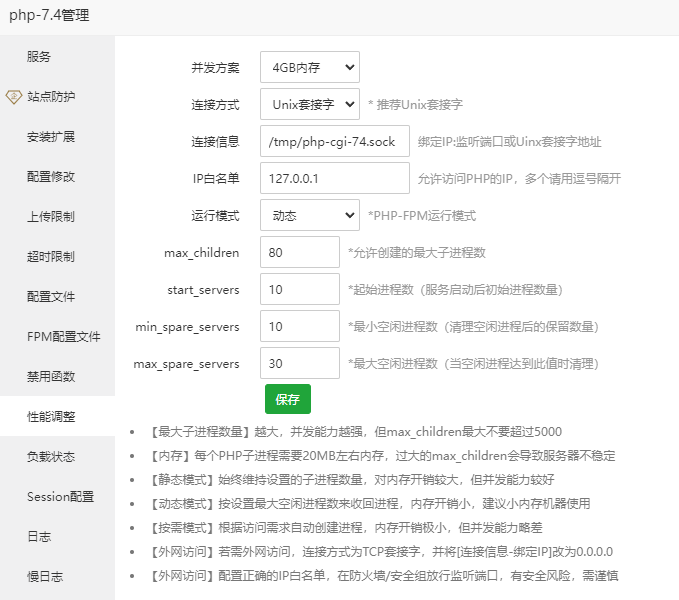
根据宝塔的推荐进行参数修改
我的是8G内存,修改成4G内存
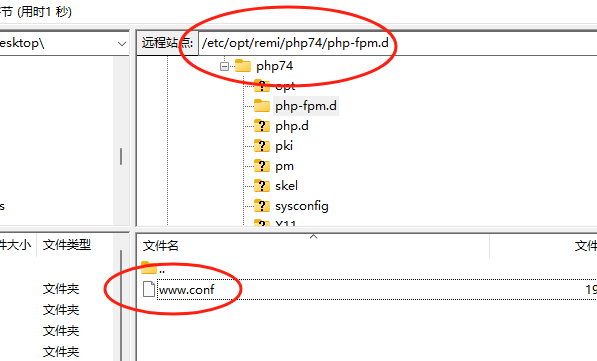
下面是备份:修改前的
; Start a new pool named 'www'.
; the variable $pool can be used in any directive and will be replaced by the
; pool name ('www' here)
[www]
; Per pool prefix
; It only applies on the following directives:
; - 'access.log'
; - 'slowlog'
; - 'listen' (unixsocket)
; - 'chroot'
; - 'chdir'
; - 'php_values'
; - 'php_admin_values'
; When not set, the global prefix (or @php_fpm_prefix@) applies instead.
; Note: This directive can also be relative to the global prefix.
; Default Value: none
;prefix = /path/to/pools/$pool
; Unix user/group of processes
; Note: The user is mandatory. If the group is not set, the default user's group
; will be used.
; RPM: apache user chosen to provide access to the same directories as httpd
user = www
; RPM: Keep a group allowed to write in log dir.
group = www
; The address on which to accept FastCGI requests.
; Valid syntaxes are:
; 'ip.add.re.ss:port' - to listen on a TCP socket to a specific IPv4 address on
; a specific port;
; '[ip:6:addr:ess]:port' - to listen on a TCP socket to a specific IPv6 address on
; a specific port;
; 'port' - to listen on a TCP socket to all addresses
; (IPv6 and IPv4-mapped) on a specific port;
; '/path/to/unix/socket' - to listen on a unix socket.
; Note: This value is mandatory.
listen = 127.0.0.1:9000
; Set listen(2) backlog.
; Default Value: 511
;listen.backlog = 511
; Set permissions for unix socket, if one is used. In Linux, read/write
; permissions must be set in order to allow connections from a web server.
; Default Values: user and group are set as the running user
; mode is set to 0660
;listen.owner = nobody
;listen.group = nobody
;listen.mode = 0660
; When POSIX Access Control Lists are supported you can set them using
; these options, value is a comma separated list of user/group names.
; When set, listen.owner and listen.group are ignored
;listen.acl_users = apache
;listen.acl_groups =
; List of addresses (IPv4/IPv6) of FastCGI clients which are allowed to connect.
; Equivalent to the FCGI_WEB_SERVER_ADDRS environment variable in the original
; PHP FCGI (5.2.2+). Makes sense only with a tcp listening socket. Each address
; must be separated by a comma. If this value is left blank, connections will be
; accepted from any ip address.
; Default Value: any
listen.allowed_clients = 127.0.0.1
; Specify the nice(2) priority to apply to the pool processes (only if set)
; The value can vary from -19 (highest priority) to 20 (lower priority)
; Note: - It will only work if the FPM master process is launched as root
; - The pool processes will inherit the master process priority
; unless it specified otherwise
; Default Value: no set
; process.priority = -19
; Set the process dumpable flag (PR_SET_DUMPABLE prctl) even if the process user
; or group is differrent than the master process user. It allows to create process
; core dump and ptrace the process for the pool user.
; Default Value: no
; process.dumpable = yes
; Choose how the process manager will control the number of child processes.
; Possible Values:
; static - a fixed number (pm.max_children) of child processes;
; dynamic - the number of child processes are set dynamically based on the
; following directives. With this process management, there will be
; always at least 1 children.
; pm.max_children - the maximum number of children that can
; be alive at the same time.
; pm.start_servers - the number of children created on startup.
; pm.min_spare_servers - the minimum number of children in 'idle'
; state (waiting to process). If the number
; of 'idle' processes is less than this
; number then some children will be created.
; pm.max_spare_servers - the maximum number of children in 'idle'
; state (waiting to process). If the number
; of 'idle' processes is greater than this
; number then some children will be killed.
; ondemand - no children are created at startup. Children will be forked when
; new requests will connect. The following parameter are used:
; pm.max_children - the maximum number of children that
; can be alive at the same time.
; pm.process_idle_timeout - The number of seconds after which
; an idle process will be killed.
; Note: This value is mandatory.
pm = dynamic
; The number of child processes to be created when pm is set to 'static' and the
; maximum number of child processes when pm is set to 'dynamic' or 'ondemand'.
; This value sets the limit on the number of simultaneous requests that will be
; served. Equivalent to the ApacheMaxClients directive with mpm_prefork.
; Equivalent to the PHP_FCGI_CHILDREN environment variable in the original PHP
; CGI. The below defaults are based on a server without much resources. Don't
; forget to tweak pm.* to fit your needs.
; Note: Used when pm is set to 'static', 'dynamic' or 'ondemand'
; Note: This value is mandatory.
pm.max_children = 50
; The number of child processes created on startup.
; Note: Used only when pm is set to 'dynamic'
; Default Value: min_spare_servers + (max_spare_servers - min_spare_servers) / 2
pm.start_servers = 5
; The desired minimum number of idle server processes.
; Note: Used only when pm is set to 'dynamic'
; Note: Mandatory when pm is set to 'dynamic'
pm.min_spare_servers = 5
; The desired maximum number of idle server processes.
; Note: Used only when pm is set to 'dynamic'
; Note: Mandatory when pm is set to 'dynamic'
pm.max_spare_servers = 35
; The number of seconds after which an idle process will be killed.
; Note: Used only when pm is set to 'ondemand'
; Default Value: 10s
;pm.process_idle_timeout = 10s;
; The number of requests each child process should execute before respawning.
; This can be useful to work around memory leaks in 3rd party libraries. For
; endless request processing specify '0'. Equivalent to PHP_FCGI_MAX_REQUESTS.
; Default Value: 0
;pm.max_requests = 500
; The URI to view the FPM status page. If this value is not set, no URI will be
; recognized as a status page. It shows the following informations:
; pool - the name of the pool;
; process manager - static, dynamic or ondemand;
; start time - the date and time FPM has started;
; start since - number of seconds since FPM has started;
; accepted conn - the number of request accepted by the pool;
; listen queue - the number of request in the queue of pending
; connections (see backlog in listen(2));
; max listen queue - the maximum number of requests in the queue
; of pending connections since FPM has started;
; listen queue len - the size of the socket queue of pending connections;
; idle processes - the number of idle processes;
; active processes - the number of active processes;
; total processes - the number of idle + active processes;
; max active processes - the maximum number of active processes since FPM
; has started;
; max children reached - number of times, the process limit has been reached,
; when pm tries to start more children (works only for
; pm 'dynamic' and 'ondemand');
; Value are updated in real time.
; Example output:
; pool: www
; process manager: static
; start time: 01/Jul/2011:17:53:49 +0200
; start since: 62636
; accepted conn: 190460
; listen queue: 0
; max listen queue: 1
; listen queue len: 42
; idle processes: 4
; active processes: 11
; total processes: 15
; max active processes: 12
; max children reached: 0
;
; By default the status page output is formatted as text/plain. Passing either
; 'html', 'xml' or 'json' in the query string will return the corresponding
; output syntax. Example:
; http://www.foo.bar/status
; http://www.foo.bar/status?json
; http://www.foo.bar/status?html
; http://www.foo.bar/status?xml
;
; By default the status page only outputs short status. Passing 'full' in the
; query string will also return status for each pool process.
; Example:
; http://www.foo.bar/status?full
; http://www.foo.bar/status?json&full
; http://www.foo.bar/status?html&full
; http://www.foo.bar/status?xml&full
; The Full status returns for each process:
; pid - the PID of the process;
; state - the state of the process (Idle, Running, ...);
; start time - the date and time the process has started;
; start since - the number of seconds since the process has started;
; requests - the number of requests the process has served;
; request duration - the duration in µs of the requests;
; request method - the request method (GET, POST, ...);
; request URI - the request URI with the query string;
; content length - the content length of the request (only with POST);
; user - the user (PHP_AUTH_USER) (or '-' if not set);
; script - the main script called (or '-' if not set);
; last request cpu - the %cpu the last request consumed
; it's always 0 if the process is not in Idle state
; because CPU calculation is done when the request
; processing has terminated;
; last request memory - the max amount of memory the last request consumed
; it's always 0 if the process is not in Idle state
; because memory calculation is done when the request
; processing has terminated;
; If the process is in Idle state, then informations are related to the
; last request the process has served. Otherwise informations are related to
; the current request being served.
; Example output:
; ************************
; pid: 31330
; state: Running
; start time: 01/Jul/2011:17:53:49 +0200
; start since: 63087
; requests: 12808
; request duration: 1250261
; request method: GET
; request URI: /test_mem.php?N=10000
; content length: 0
; user: -
; script: /home/fat/web/docs/php/test_mem.php
; last request cpu: 0.00
; last request memory: 0
;
; Note: There is a real-time FPM status monitoring sample web page available
; It's available in: @EXPANDED_DATADIR@/fpm/status.html
;
; Note: The value must start with a leading slash (/). The value can be
; anything, but it may not be a good idea to use the .php extension or it
; may conflict with a real PHP file.
; Default Value: not set
;pm.status_path = /status
; The ping URI to call the monitoring page of FPM. If this value is not set, no
; URI will be recognized as a ping page. This could be used to test from outside
; that FPM is alive and responding, or to
; - create a graph of FPM availability (rrd or such);
; - remove a server from a group if it is not responding (load balancing);
; - trigger alerts for the operating team (24/7).
; Note: The value must start with a leading slash (/). The value can be
; anything, but it may not be a good idea to use the .php extension or it
; may conflict with a real PHP file.
; Default Value: not set
;ping.path = /ping
; This directive may be used to customize the response of a ping request. The
; response is formatted as text/plain with a 200 response code.
; Default Value: pong
;ping.response = pong
; The access log file
; Default: not set
;access.log = log/$pool.access.log
; The access log format.
; The following syntax is allowed
; %%: the '%' character
; %C: %CPU used by the request
; it can accept the following format:
; - %{user}C for user CPU only
; - %{system}C for system CPU only
; - %{total}C for user + system CPU (default)
; %d: time taken to serve the request
; it can accept the following format:
; - %{seconds}d (default)
; - %{miliseconds}d
; - %{mili}d
; - %{microseconds}d
; - %{micro}d
; %e: an environment variable (same as $_ENV or $_SERVER)
; it must be associated with embraces to specify the name of the env
; variable. Some exemples:
; - server specifics like: %{REQUEST_METHOD}e or %{SERVER_PROTOCOL}e
; - HTTP headers like: %{HTTP_HOST}e or %{HTTP_USER_AGENT}e
; %f: script filename
; %l: content-length of the request (for POST request only)
; %m: request method
; %M: peak of memory allocated by PHP
; it can accept the following format:
; - %{bytes}M (default)
; - %{kilobytes}M
; - %{kilo}M
; - %{megabytes}M
; - %{mega}M
; %n: pool name
; %o: output header
; it must be associated with embraces to specify the name of the header:
; - %{Content-Type}o
; - %{X-Powered-By}o
; - %{Transfert-Encoding}o
; - ....
; %p: PID of the child that serviced the request
; %P: PID of the parent of the child that serviced the request
; %q: the query string
; %Q: the '?' character if query string exists
; %r: the request URI (without the query string, see %q and %Q)
; %R: remote IP address
; %s: status (response code)
; %t: server time the request was received
; it can accept a strftime(3) format:
; %d/%b/%Y:%H:%M:%S %z (default)
; The strftime(3) format must be encapsuled in a %{<strftime_format>}t tag
; e.g. for a ISO8601 formatted timestring, use: %{%Y-%m-%dT%H:%M:%S%z}t
; %T: time the log has been written (the request has finished)
; it can accept a strftime(3) format:
; %d/%b/%Y:%H:%M:%S %z (default)
; The strftime(3) format must be encapsuled in a %{<strftime_format>}t tag
; e.g. for a ISO8601 formatted timestring, use: %{%Y-%m-%dT%H:%M:%S%z}t
; %u: remote user
;
; Default: "%R - %u %t \"%m %r\" %s"
;access.format = "%R - %u %t \"%m %r%Q%q\" %s %f %{mili}d %{kilo}M %C%%"
; The log file for slow requests
; Default Value: not set
; Note: slowlog is mandatory if request_slowlog_timeout is set
slowlog = /var/opt/remi/php74/log/php-fpm/www-slow.log
; The timeout for serving a single request after which a PHP backtrace will be
; dumped to the 'slowlog' file. A value of '0s' means 'off'.
; Available units: s(econds)(default), m(inutes), h(ours), or d(ays)
; Default Value: 0
;request_slowlog_timeout = 0
; Depth of slow log stack trace.
; Default Value: 20
;request_slowlog_trace_depth = 20
; The timeout for serving a single request after which the worker process will
; be killed. This option should be used when the 'max_execution_time' ini option
; does not stop script execution for some reason. A value of '0' means 'off'.
; Available units: s(econds)(default), m(inutes), h(ours), or d(ays)
; Default Value: 0
;request_terminate_timeout = 0
; Set open file descriptor rlimit.
; Default Value: system defined value
;rlimit_files = 1024
; Set max core size rlimit.
; Possible Values: 'unlimited' or an integer greater or equal to 0
; Default Value: system defined value
;rlimit_core = 0
; Chroot to this directory at the start. This value must be defined as an
; absolute path. When this value is not set, chroot is not used.
; Note: you can prefix with '$prefix' to chroot to the pool prefix or one
; of its subdirectories. If the pool prefix is not set, the global prefix
; will be used instead.
; Note: chrooting is a great security feature and should be used whenever
; possible. However, all PHP paths will be relative to the chroot
; (error_log, sessions.save_path, ...).
; Default Value: not set
;chroot =
; Chdir to this directory at the start.
; Note: relative path can be used.
; Default Value: current directory or / when chroot
;chdir = /var/www
; Redirect worker stdout and stderr into main error log. If not set, stdout and
; stderr will be redirected to /dev/null according to FastCGI specs.
; Note: on highloaded environement, this can cause some delay in the page
; process time (several ms).
; Default Value: no
;catch_workers_output = yes
; Clear environment in FPM workers
; Prevents arbitrary environment variables from reaching FPM worker processes
; by clearing the environment in workers before env vars specified in this
; pool configuration are added.
; Setting to "no" will make all environment variables available to PHP code
; via getenv(), $_ENV and $_SERVER.
; Default Value: yes
;clear_env = no
; Limits the extensions of the main script FPM will allow to parse. This can
; prevent configuration mistakes on the web server side. You should only limit
; FPM to .php extensions to prevent malicious users to use other extensions to
; execute php code.
; Note: set an empty value to allow all extensions.
; Default Value: .php
;security.limit_extensions = .php .php3 .php4 .php5 .php7
; Pass environment variables like LD_LIBRARY_PATH. All $VARIABLEs are taken from
; the current environment.
; Default Value: clean env
;env[HOSTNAME] = $HOSTNAME
;env[PATH] = /usr/local/bin:/usr/bin:/bin
;env[TMP] = /tmp
;env[TMPDIR] = /tmp
;env[TEMP] = /tmp
; Additional php.ini defines, specific to this pool of workers. These settings
; overwrite the values previously defined in the php.ini. The directives are the
; same as the PHP SAPI:
; php_value/php_flag - you can set classic ini defines which can
; be overwritten from PHP call 'ini_set'.
; php_admin_value/php_admin_flag - these directives won't be overwritten by
; PHP call 'ini_set'
; For php_*flag, valid values are on, off, 1, 0, true, false, yes or no.
; Defining 'extension' will load the corresponding shared extension from
; extension_dir. Defining 'disable_functions' or 'disable_classes' will not
; overwrite previously defined php.ini values, but will append the new value
; instead.
; Note: path INI options can be relative and will be expanded with the prefix
; (pool, global or @prefix@)
; Default Value: nothing is defined by default except the values in php.ini and
; specified at startup with the -d argument
;php_admin_value[sendmail_path] = /usr/sbin/sendmail -t -i -f www@my.domain.com
;php_flag[display_errors] = off
php_admin_value[error_log] = /var/opt/remi/php74/log/php-fpm/www-error.log
php_admin_flag[log_errors] = on
;php_admin_value[memory_limit] = 128M
; Set the following data paths to directories owned by the FPM process user.
;
; Do not change the ownership of existing system directories, if the process
; user does not have write permission, create dedicated directories for this
; purpose.
;
; See warning about choosing the location of these directories on your system
; at http://php.net/session.save-path
php_value[session.save_handler] = files
php_value[session.save_path] = /var/opt/remi/php74/lib/php/session
php_value[soap.wsdl_cache_dir] = /var/opt/remi/php74/lib/php/wsdlcache
;php_value[opcache.file_cache] = /var/opt/remi/php74/lib/php/opcache
php环境,性能优化的更多相关文章
- Spring Cloud 生产环境性能优化
先思考几个问题: 什么是百万并发连接? 什么是吞吐量? 操作系统能否支持百万连接? 操作系统维持百万连接需要多少内存? 应用程序维持百万连接需要多少内存? 百万连接的吞吐量是否超过了网络限制? 百万的 ...
- 【云和恩墨】性能优化:Linux环境下合理配置大内存页(HugePage)
原创 2016-09-12 熊军 [云和恩墨]性能优化:Linux环境下合理配置大内存页(HugePage) 熊军(老熊) 云和恩墨西区总经理 Oracle ACED,ACOUG核心会员 PC S ...
- 近期业务大量突增微服务性能优化总结-3.针对 x86 云环境改进异步日志等待策略
最近,业务增长的很迅猛,对于我们后台这块也是一个不小的挑战,这次遇到的核心业务接口的性能瓶颈,并不是单独的一个问题导致的,而是几个问题揉在一起:我们解决一个之后,发上线,之后发现还有另一个的性能瓶颈问 ...
- 使用JRockit进行性能优化一:环境搭建
1. jrockit简介 jrockit前身是BA jrockit,后被oracle收购,并免费发布,但并不开源. jrockit可以看做是兼容标准的JDK基础上的JVM,同原有的JVM相比, ...
- Web性能优化:图片优化
程序员都是懒孩子,想直接看自动优化的点:传送门 我自己的Blog:http://cabbit.me/web-image-optimization/ HTTP Archieve有个统计,图片内容已经占到 ...
- C++ 应用程序性能优化
C++ 应用程序性能优化 eryar@163.com 1. Introduction 对于几何造型内核OpenCASCADE,由于会涉及到大量的数值算法,如矩阵相关计算,微积分,Newton迭代法解方 ...
- 直播推流端弱网优化策略 | 直播 SDK 性能优化实践
弱网优化的场景 网络直播行业经过一年多的快速发展,衍生出了各种各样的玩法.最早的网络直播是主播坐在 PC 前,安装好专业的直播设备(如摄像头和麦克风),然后才能开始直播.后来随着手机性能的提升和直播技 ...
- 【腾讯Bugly干货分享】跨平台 ListView 性能优化
本文来自于腾讯Bugly公众号(weixinBugly),未经作者同意,请勿转载,原文地址:https://mp.weixin.qq.com/s/FbiSLPxFdGqJ00WgpJ94yw 导语 精 ...
- CSS3与页面布局学习总结(八)——浏览器兼容与前端性能优化
一.浏览器兼容 1.1.概要 世界上没有任何一个浏览器是一样的,同样的代码在不一样的浏览器上运行就存在兼容性问题.不同浏览器其内核亦不尽相同,相同内核的版本不同,相同版本的内核浏览器品牌不一样,各种运 ...
- Unity性能优化(4)-官方教程Optimizing graphics rendering in Unity games翻译
本文是Unity官方教程,性能优化系列的第四篇<Optimizing graphics rendering in Unity games>的翻译. 相关文章: Unity性能优化(1)-官 ...
随机推荐
- Android 13 - Media框架(27)- ACodec(五)
关注公众号免费阅读全文,进入音视频开发技术分享群! 前面几节我们了解了OMXNodeInstance是如何处理setPortMode.allocateBuffer.useBuffer的,这一节我们再回 ...
- WPF 不透明蒙板概述
本文内容 先决条件 使用不透明蒙板创建视觉效果 创建不透明蒙板 将渐变用作不透明蒙板 显示另外 4 个 不透明蒙板能够使部分元素或视觉对象透明或部分透明. 要创建不透明蒙版,请将 Brush 应用于元 ...
- NOIP模拟87(多校20)
前言 题目不难,但是个人感觉小细节有一些,然后有亿点卡常.. 感觉对于笛卡尔树的题目看不出算法,然后代码实现方面细节注意太少,常数有点大. 下次注意吧. T1 集合均值 解题思路 感觉应该是期望题里面 ...
- node child_process模块exec
child_process是Node.js自带的核心模块之一,无需额外安装即可使用. child_process模块提供了创建子进程的功能,可以在Node.js中执行外部命令.脚本文件等,并与其进行交 ...
- 再谈中断机制(APIC)
中断是硬件和软件交互的一种机制,可以说整个操作系统,整个架构都是由中断来驱动的.一个中断的起末会经历设备,中断控制器,CPU 三个阶段:设备产生中断信号,中断控制器翻译信号,CPU 来实际处理信号. ...
- 一文带你搞清楚Python的多线程和多进程
本文分享自华为云社区<Python中的多线程与多进程编程大全[python指南]>,作者:柠檬味拥抱. Python作为一种高级编程语言,提供了多种并发编程的方式,其中多线程与多进程是最常 ...
- css 让页面变灰色
html { -webkit-filter: grayscale(1); }-webkit-filter(滤镜)有十种效果,分别是: // grayscale 灰度 // sepia ...
- 博客更换新域名为52ecy.cn
Tips:当你看到这个提示的时候,说明当前的文章是由原emlog博客系统搬迁至此的,文章发布时间已过于久远,编排和内容不一定完整,还请谅解` 博客更换新域名为52ecy.cn 日期:2017-10-2 ...
- MinIO 图片转文件的分界线RELEASE.2022-05-26T05-48-41Z
前言:本人想用MinIO存储文件,但是不想最新版本Mete文件,于是各种寻找于是终于找到办法了,原来是官方版本更新导致的.需要我们去寻找相应的版本. 1.官网下载网站 https://dl.min.i ...
- logging.basicConfig()
logging.basicConfig() 是 Python 标准库 logging 模块中的一个函数,用于配置日志记录器(logger)的基本选项.这个函数允许你在不创建和配置多个 logger.h ...