
Mac postman调分页接口,导出csv
准备后端接口
package com.ybchen.controller;

import com.ybchen.utils.JsonData;

import lombok.Data;

import org.springframework.web.bind.annotation.GetMapping;

import org.springframework.web.bind.annotation.RequestMapping;

import org.springframework.web.bind.annotation.RequestParam;

import org.springframework.web.bind.annotation.RestController;

import java.util.ArrayList;

import java.util.Date;

import java.util.List;

/**

 * @description: csv导出后端接口测试

 * @author: Alex

 * @create: 2023-11-16 22:41

 */

@RestController

@RequestMapping("/api/v1/csv")

public class CavController {

    /**

     * 分页接口

     *

     * @param page 页数

     * @param size 一页多少条

     * @return

     */

    @GetMapping("list")

    public JsonData<List<UserInfo>> list(

            @RequestParam(value = "page", defaultValue = "1") int page,

            @RequestParam(value = "size", defaultValue = "10") int size

    ) {

        List<UserInfo> resultList = new ArrayList<>(size);

        for (int i = 0; i < size; i++) {

            resultList.add(new UserInfo(

                    i,

                    "陈彦斌___"+page+"_"+i,

                    page+size+"@qq.com",

                    new Date()

            ));

        }

        return JsonData.buildSuccess(resultList);

    }

    @Data

    public class UserInfo {

        /**

         * 主键id

         */

        private int id;

        /**

         * 用户名

         */

        private String userName;

        /**

         * 邮箱

         */

        private String email;

        /**

         * 创建时间

         */

        private Date createTime;

        public UserInfo(int id, String userName, String email, Date createTime) {

            this.id = id;

            this.userName = userName;

            this.email = email;

            this.createTime = createTime;

        }

    }

}
接口数据
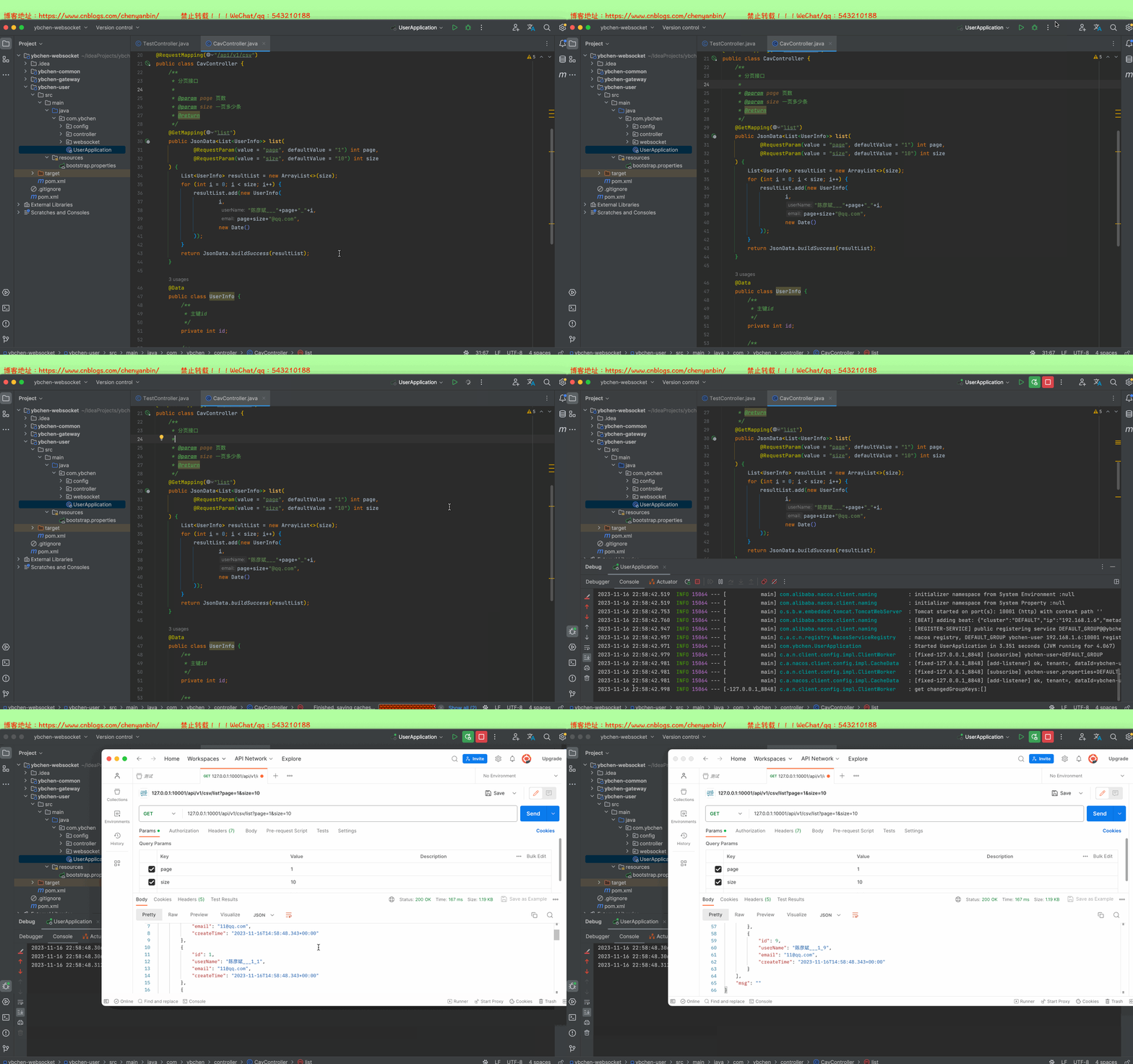
{

    "code": 0,

    "data": [

        {

            "id": 0,

            "userName": "陈彦斌___1_0",

            "email": "11@qq.com",

            "createTime": "2023-11-16T14:58:48.343+00:00"

        },

        {

            "id": 1,

            "userName": "陈彦斌___1_1",

            "email": "11@qq.com",

            "createTime": "2023-11-16T14:58:48.343+00:00"

        },

        {

            "id": 2,

            "userName": "陈彦斌___1_2",

            "email": "11@qq.com",

            "createTime": "2023-11-16T14:58:48.343+00:00"

        },

        {

            "id": 3,

            "userName": "陈彦斌___1_3",

            "email": "11@qq.com",

            "createTime": "2023-11-16T14:58:48.343+00:00"

        },

        {

            "id": 4,

            "userName": "陈彦斌___1_4",

            "email": "11@qq.com",

            "createTime": "2023-11-16T14:58:48.343+00:00"

        },

        {

            "id": 5,

            "userName": "陈彦斌___1_5",

            "email": "11@qq.com",

            "createTime": "2023-11-16T14:58:48.343+00:00"

        },

        {

            "id": 6,

            "userName": "陈彦斌___1_6",

            "email": "11@qq.com",

            "createTime": "2023-11-16T14:58:48.343+00:00"

        },

        {

            "id": 7,

            "userName": "陈彦斌___1_7",

            "email": "11@qq.com",

            "createTime": "2023-11-16T14:58:48.343+00:00"

        },

        {

            "id": 8,

            "userName": "陈彦斌___1_8",

            "email": "11@qq.com",

            "createTime": "2023-11-16T14:58:48.343+00:00"

        },

        {

            "id": 9,

            "userName": "陈彦斌___1_9",

            "email": "11@qq.com",

            "createTime": "2023-11-16T14:58:48.343+00:00"

        }

    ],

    "msg": ""

}
准备后端node环境
下载地址:https://nodejs.cn/download/
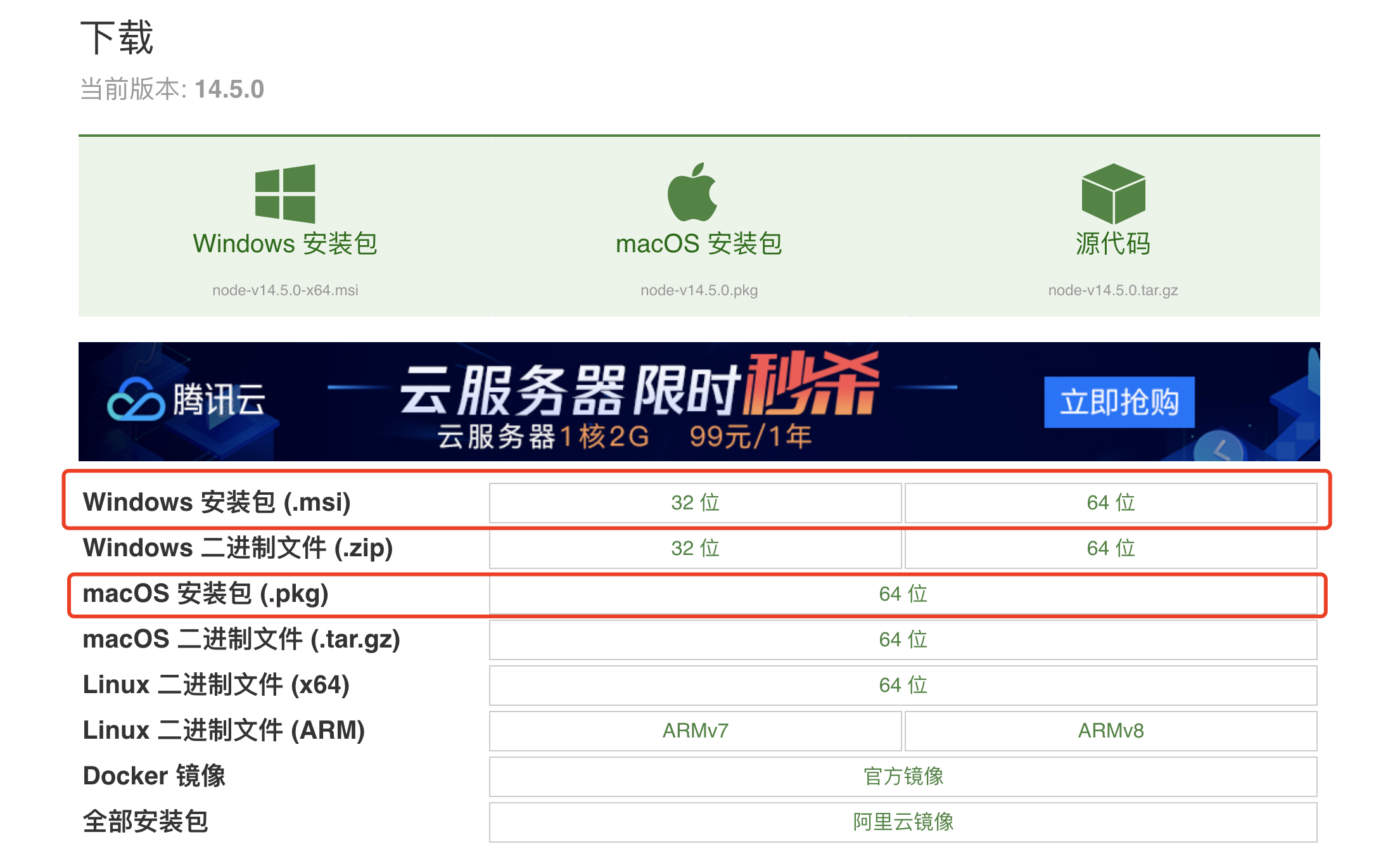
切换npm镜像源为淘宝npm镜像
sodu npm install -g cnpm --registry=https://registry.npm.taobao.org
下载node服务
源代码


{

  "name": "node-server",

  "version": "1.0.0",

  "description": "",

  "main": "index.js",

  "scripts": {

    "test": "echo \"Error: no test specified\" && exit 1"

  },

  "author": "",

  "license": "ISC",

  "dependencies": {

    "body-parser": "^1.18.3",

    "express": "^4.16.3",

    "shelljs": "^0.8.2"

  }

}
package.json
const express = require('express'),

  app = express(),

  fs = require('fs'),

  shell = require('shelljs'),

   // Modify the folder path in which responses need to be stored

  folderPath = './Responses/',

  defaultFileExtension = 'json', // Change the default file extension

  bodyParser = require('body-parser'),

  DEFAULT_MODE = 'writeFile',

  path = require('path');

// Create the folder path in case it doesn't exist

shell.mkdir('-p', folderPath);

 // Change the limits according to your response size

app.use(bodyParser.json({limit: '50mb', extended: true}));

app.use(bodyParser.urlencoded({ limit: '50mb', extended: true }));

app.get('/', (req, res) => res.send('Hello, I write data to file. Send them requests!'));

app.post('/write', (req, res) => {

  let extension = req.body.fileExtension || defaultFileExtension,

    fsMode = req.body.mode || DEFAULT_MODE,

    uniqueIdentifier = req.body.uniqueIdentifier ? typeof req.body.uniqueIdentifier === 'boolean' ? Date.now() : req.body.uniqueIdentifier : false,

    currentDate = new Date(),

    formattedDate = currentDate.toISOString().split('T')[0], // 获取年月日部分

    //文件名

    filename = formattedDate,

    filePath = `${path.join(folderPath, filename)}.${extension}`,

    options = req.body.options || undefined;

  fs[fsMode](filePath, req.body.responseData, options, (err) => {

    if (err) {

      console.log(err);

      res.send('Error');

    }

    else {

      res.send('Success');

    }

  });

});

app.listen(3000, () => {

  console.log('ResponsesToFile App is listening now! Send them requests my way!');

  console.log(`Data is being stored at location: ${path.join(process.cwd(), folderPath)}`);

});
script.js
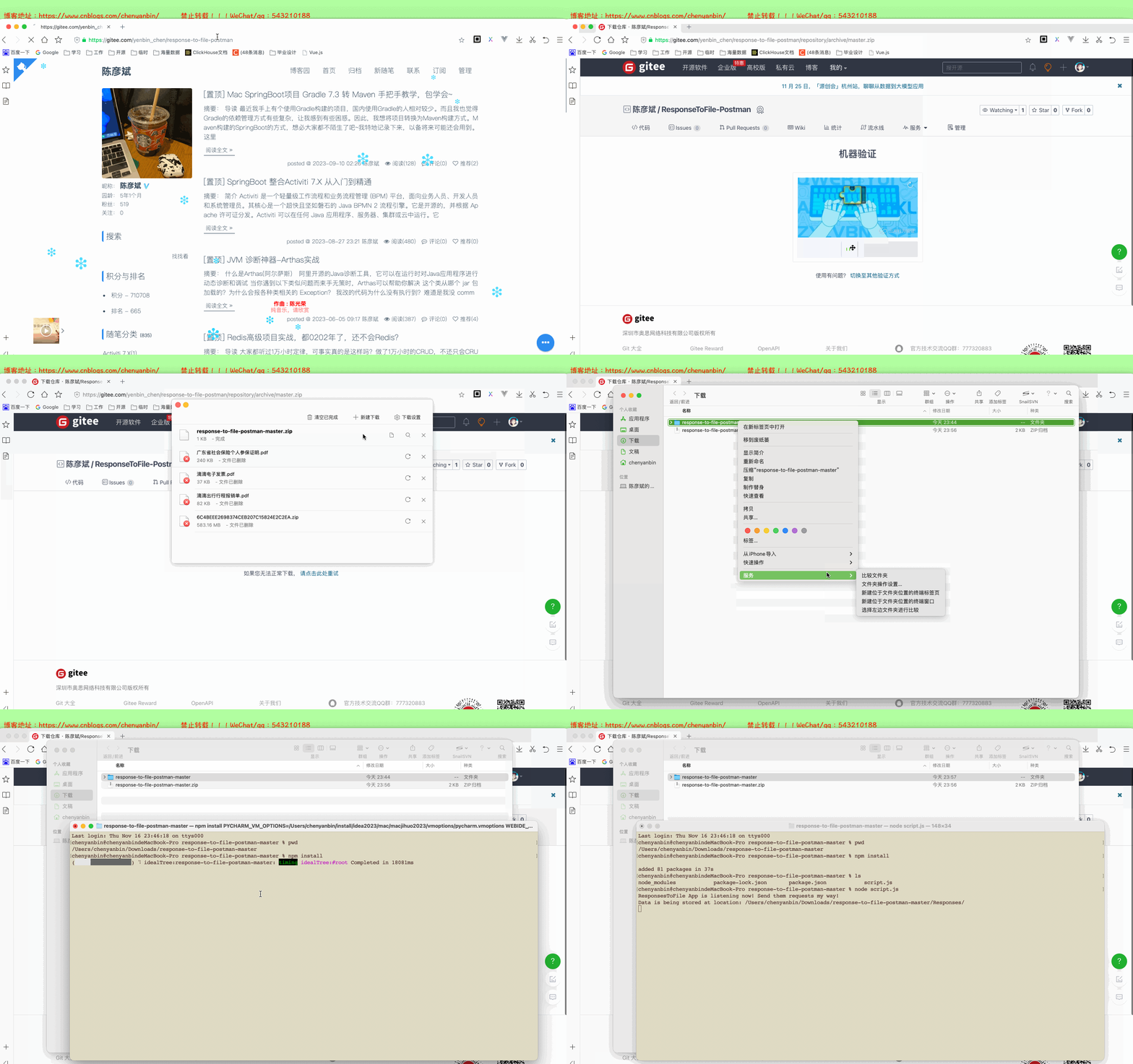
仓库地址:https://gitee.com/yenbin_chen/response-to-file-postman
启动node服务
- 下载依赖:npm install
- 启动node服务:node script.js
修改postman脚本
Pre-request Script
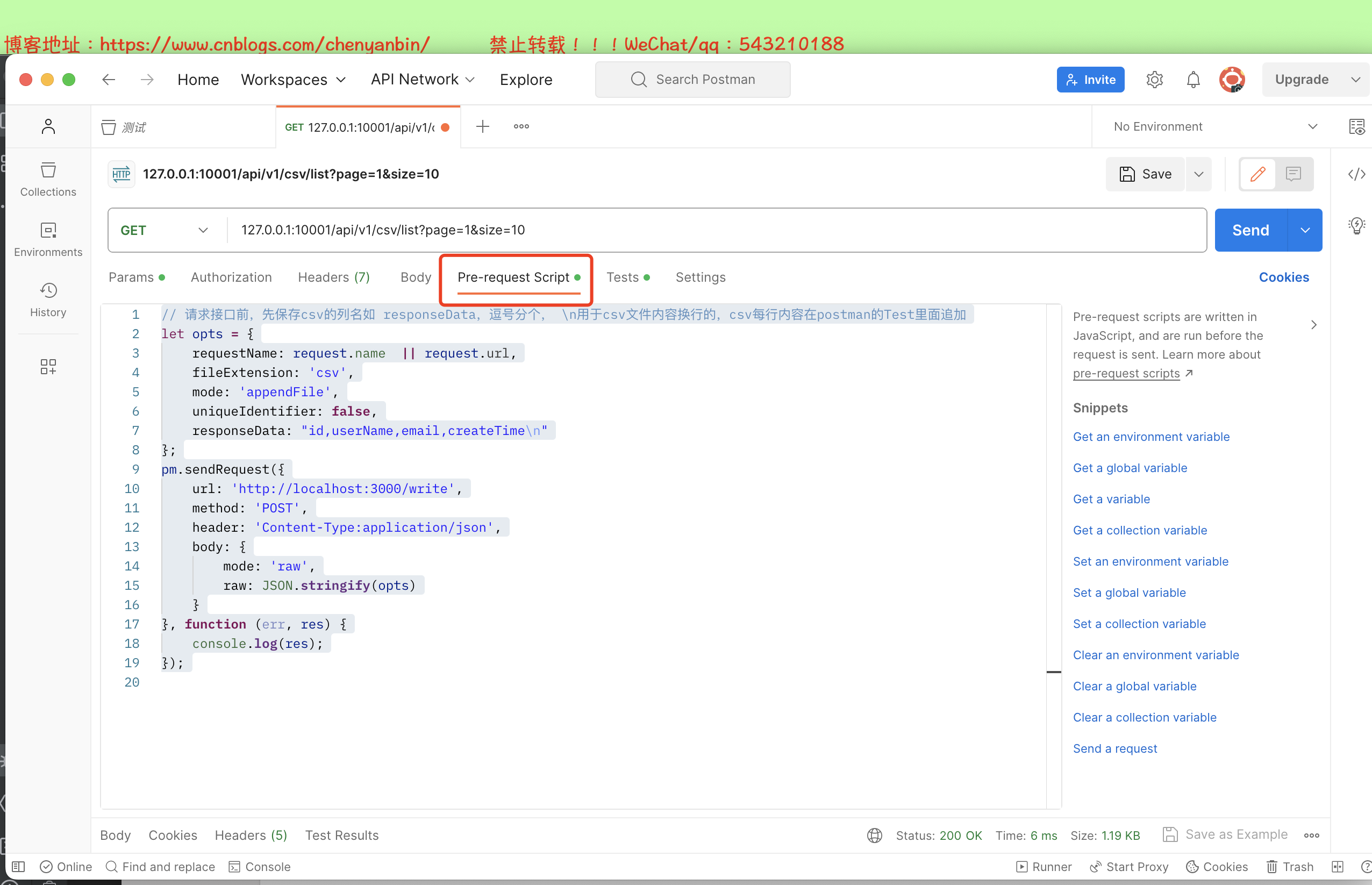
// 请求接口前,先保存csv的列名如 responseData,逗号分个, \n用于csv文件内容换行的,csv每行内容在postman的Test里面追加

let opts = {

    requestName: request.name  || request.url,

    fileExtension: 'csv',

    mode: 'appendFile',

    uniqueIdentifier: false,

    responseData: "id,userName,email,createTime\n"

};

pm.sendRequest({

    url: 'http://localhost:3000/write',

    method: 'POST',

    header: 'Content-Type:application/json',

    body: {

        mode: 'raw',

        raw: JSON.stringify(opts)

    }

}, function (err, res) {

    console.log(res);

});
Test
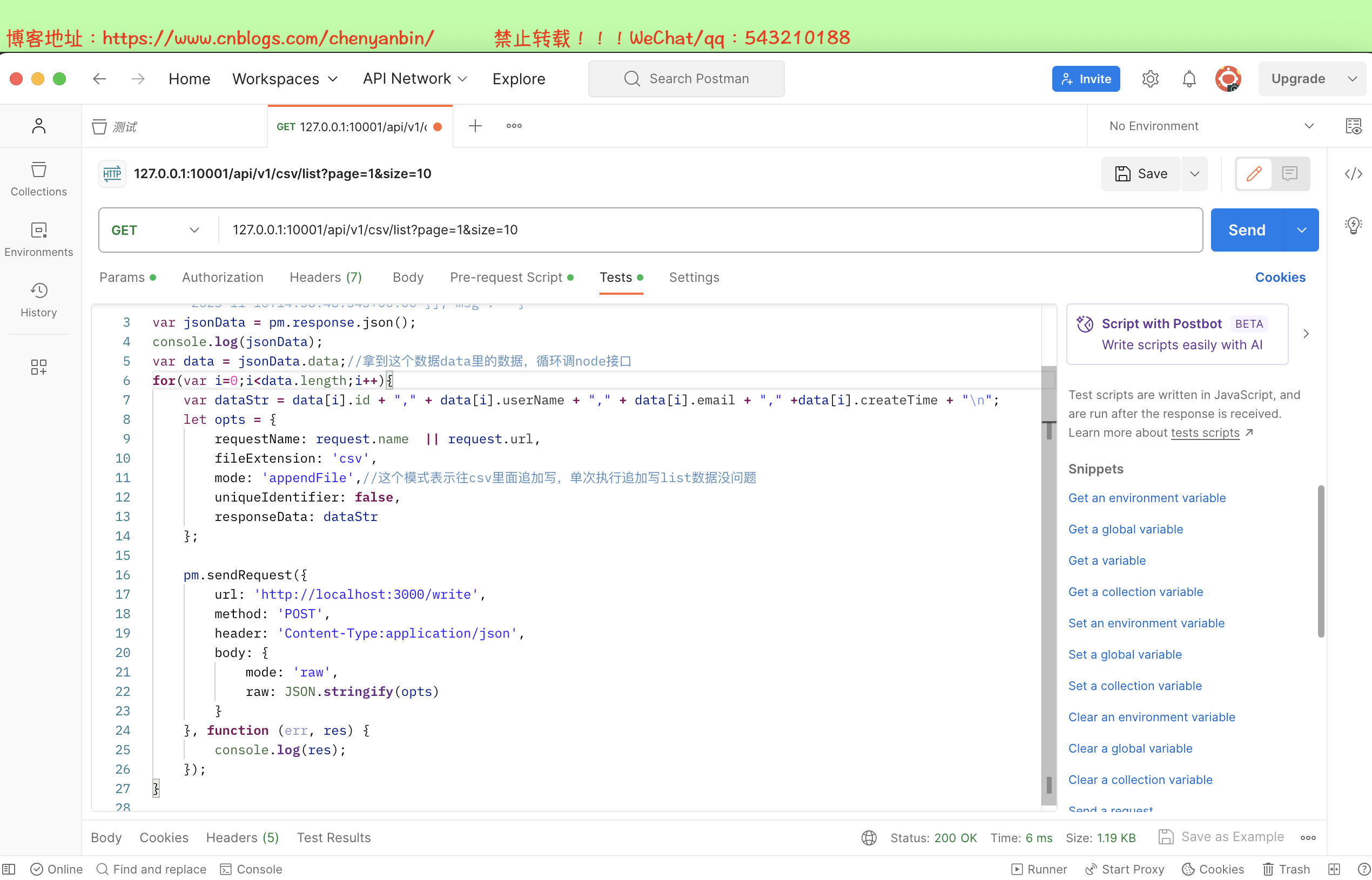
//备注说明:这里是接口请求之后的处理逻辑,pm.response.json()就是接口返回的json数据:

// { "code": 0,"data": [{"id": 0,"userName": "陈彦斌___1_0","email": "11@qq.com","createTime": "2023-11-16T14:58:48.343+00:00"},{"id": 1,"userName": "陈彦斌___1_1","email": "11@qq.com","createTime": "2023-11-16T14:58:48.343+00:00"}],"msg": ""}

var jsonData = pm.response.json();

console.log(jsonData);

var data = jsonData.data;//拿到这个数据data里的数据,循环调node接口

for(var i=0;i<data.length;i++){

    var dataStr = data[i].id + "," + data[i].userName + "," + data[i].email + "," +data[i].createTime + "\n";

    let opts = {

        requestName: request.name  || request.url,

        fileExtension: 'csv',

        mode: 'appendFile',//这个模式表示往csv里面追加写,单次执行追加写list数据没问题

        uniqueIdentifier: false,

        responseData: dataStr

    };

    pm.sendRequest({

        url: 'http://localhost:3000/write',

        method: 'POST',

        header: 'Content-Type:application/json',

        body: {

            mode: 'raw',

            raw: JSON.stringify(opts)

        }

    }, function (err, res) {

        console.log(res);

    });

}
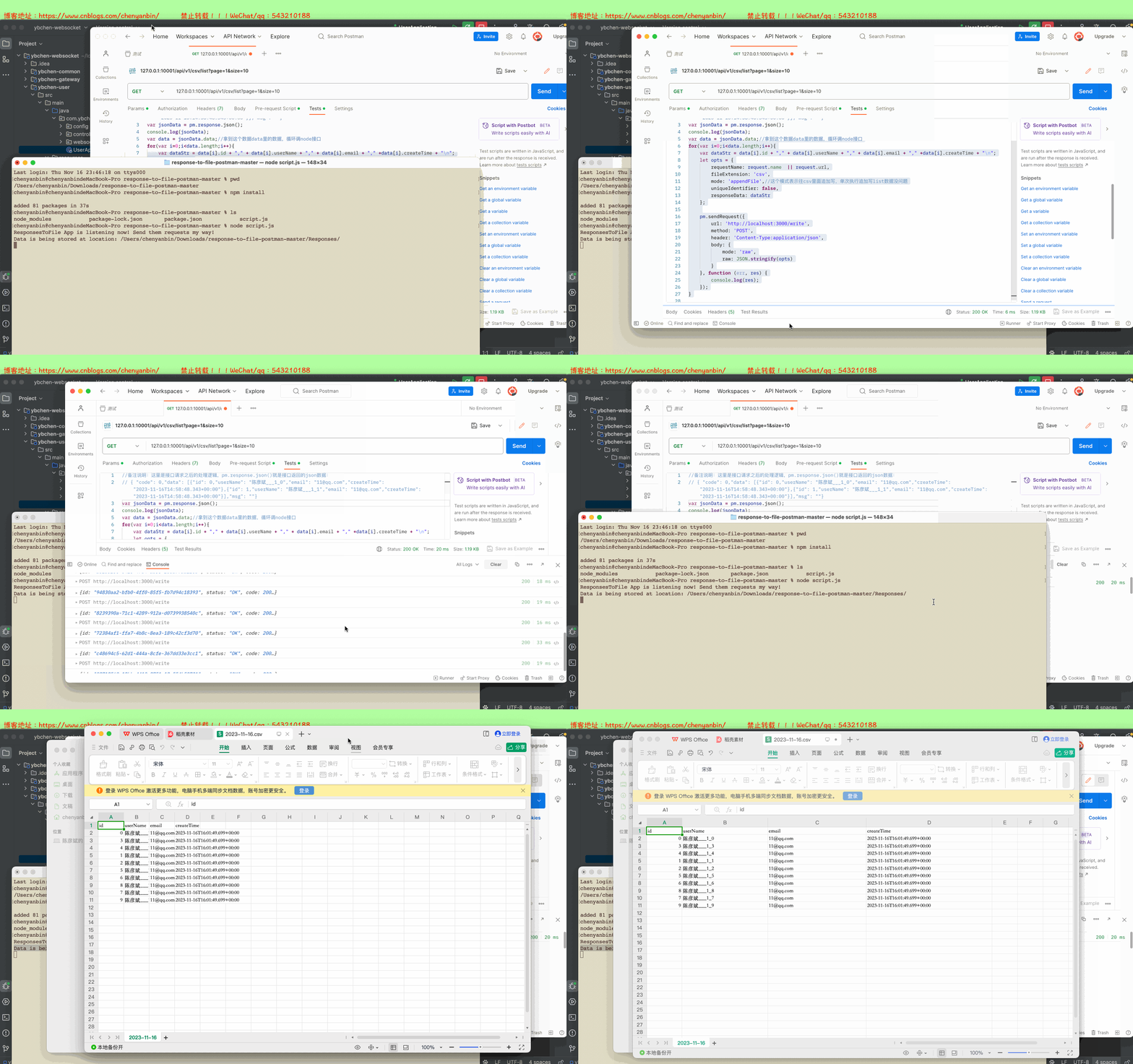
演示
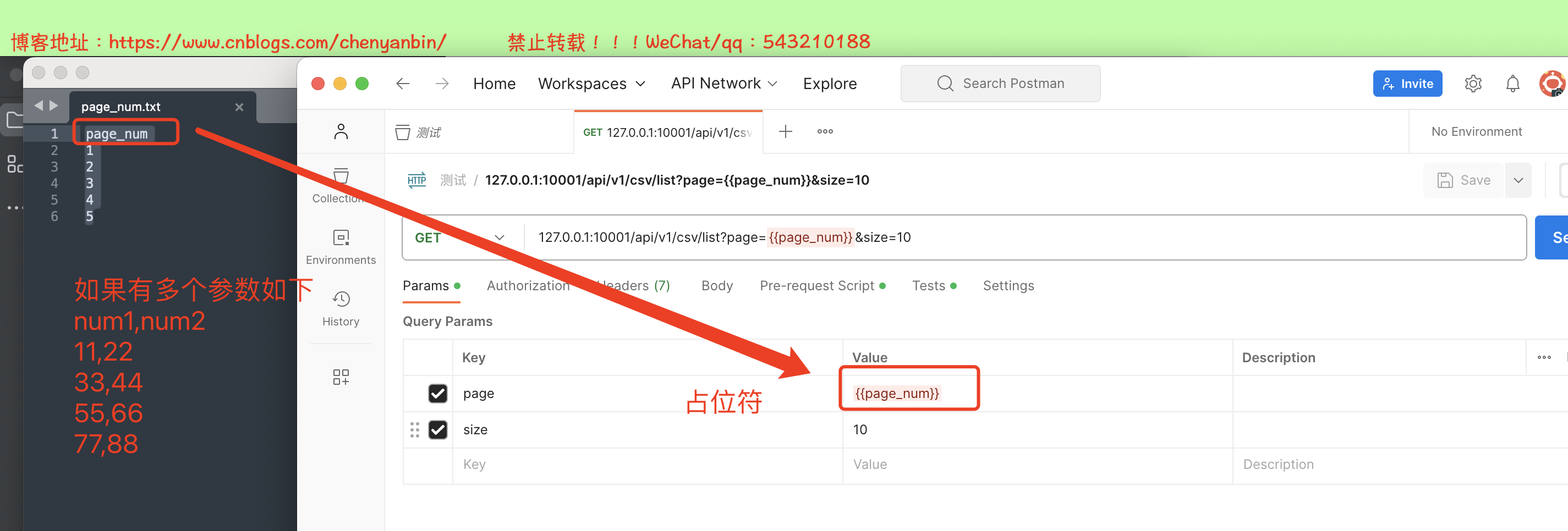
循环调postman接口,动态传开始页
我这里开始页,使用占位符:{{page_num}},准备参数,如下
page_num

1

2

3

4

5
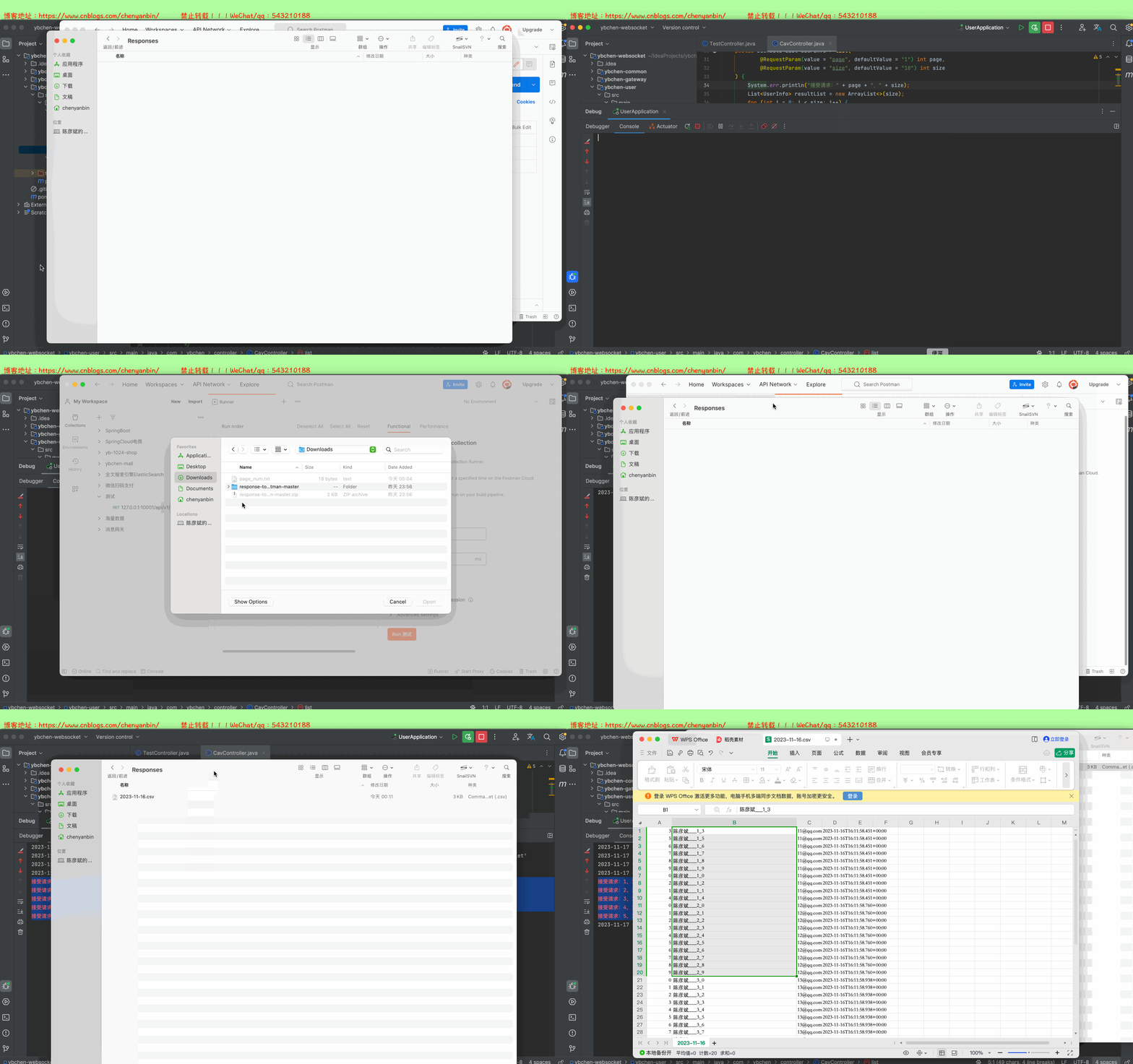
注意:因为要循环轮询调后端接口生成csv文件,需要将postman的生成csv的列名去掉,也就是把Pre-request Script逻辑去除,要不然会重复生成列名,等文件生成完后,在手动补充列名即可~~
功能演示
Mac postman调分页接口,导出csv的更多相关文章
- java实现接口导出csv文件
Tomxin7 Simple, Interesting | 简单,有趣 业务介绍 项目要求从数据库中查询出相关数据后,通过表格展示给用户,如果用户需要,可以点击导出按钮,导出数据为csv格式. 开发环 ...
- ngTbale假分页实现排序、搜索、导出CSV等功能
一. ngTable功能简化 使用ngTable经常有分页,排序,过滤等功能,实现诸多功能较为麻烦.为了方便开发过程,可以抽取一些table共同点写一个公有方法. 注意: 1. 由于很多特别的需求,可 ...
- HTTP Status 415 – Unsupported Media Type(使用@RequestBody后postman调接口报错)
1.问题描述:使用springMVC框架后,添加数据接口中,入参对象没使用@RequestBody注解,造成postman发起post请求, from-data可以调通接口,但是raw调不通接口,然后 ...
- 干掉 Postman?测试接口直接生成API文档,ApiPost真香!
实不相瞒我的收藏夹里躺着很多优质的开发工具,我有个爱好平时遇到感兴趣的开发工具都会记录下来,然后有时间在慢慢研究.前几天刚给同事分享一款非常好用的API文档工具,真的被惊艳到了,粉丝朋友们也感受一下吧 ...
- Web端导出CSV
前端导出文件大部分还是通过服务器端的方式生成文件,然后传递到客户端.但很多情况下当我们导出CSV时并不需要后端参与,甚至没有后端. 做过WebGIS的同学经常会碰到这种场景,用户的兴趣点数据以csv文 ...
- PHP 读取/导出 CSV文件
工作中经常会有遇到导入/导出的需求,下面是常用的方法.读取CSV文件,可以分页读取,设置读取行数,起始行数即可.导出CSV文件,用两种方法进行实现. /** * 读取CSV文件 * @param st ...
- 用NPOI实现导入导出csv、xls、xlsx数据功能
用NPOI实现导入导出csv.xls.xlsx数据功能 直接上代码 首先定义一个接口 如果需要直接操作文件的话,就自己在封装一次 然后定义csv类的具体实现 这个需要引入命名空间LumenWo ...
- Spring Boot下的一种导出CSV文件的代码框架
1.前言 CSV,逗号分隔值(Comma-Separated Values),即为逗号分隔的文本文件.如果值中含有逗号.换行符.制表符(Tab).单引号及双引号,则需要用双引号括起来:如果值中包含 ...
- 利用postman进行api接口开发
场景: api接口开发时,经常使用一些工具来帮助设计开发.Yapi主要是在设计阶段进行api接口设计,统一前后端参数请求和返回体:swagger主要在开发阶段,用来显示实际上后端开发进度和接口情况:p ...
- JSON导出CSV中文乱码解决方案
前言 以往datagrid导出数据全部在后台搞定,现在就想换中思路去解决,正常情况下使用easyui datagrid ajax获取数据源时都是json格式,那么此时需要导出数据时只要把该数据源扔出来 ...
随机推荐
- sql-lab通关
page1-less1-22 联合查询 第一关 发现是有回显的,且传入的参数是通过'1'包裹的,所以我们的payload,如下 测试列数 ?id=1' order by 3 --+ //超过第一条语句 ...
- Go命令
build: 编译包和依赖 clean: 移除对象文件 doc: 显示包或者符号的文档 env: 打印go的环境信息 bug: 启动错误报告 fix: 运行go tool fix fmt: 运行gof ...
- Python工具箱系列(三十九)
使用zlib对数据进行压缩 现实世界中,大量存在着对数据压缩的需求.为此,python内置了zlib压缩库,可以方便的对任意对象进行压缩. 下述代码演示了对字符串进行压缩: import zlib # ...
- CentOS7系统初始化个人配置
以下内容为个人最小化安装后的配置步骤 更换yum源为阿里云 yum install -y epel-release lrzsz wget yum-axelget mv /etc/yum.repos.d ...
- html5 2.0学习
列表定义:是一种特别的对象集合.集合:集中在一起合二为一(聚集). 聚集:多个列(信息资源)排在一起.信息资源:一堆数据,可能是字符,可能是图片. 列表分类:有序列表 无序列表 (自)定义列表 有 ...
- WPF --- 非Button自定义控件实现点击功能
引言 今天在做一个设置文件夹路径的功能,就是一个文本框,加个按钮,点击按钮,弹出 FolderBrowserDialog 再选择文件夹路径,简单做法,可以直接 StackPanel 横向放置一个 Te ...
- 【Azure App Service】为部署在App Service上的PHP应用开启JIT编译器
问题描述 在App Service for linux上创建一个PHP应用,通过 phpinfo() 查看PHP的扩展设置,发现JIT没有被开启, jit_buffer_size 大小为0. 那么,在 ...
- Pandas 使用教程 Series、DataFrame
目录 Series (一维数据) 指定索引值 使用 key/value 对象,创建对象 设置 Series 名称参数 DataFrame(二维数据) 使用字典(key/value)创建 loc 属性返 ...
- idea 热部署插件 JRebel 安装
idea 热部署插件 JRebel 安装 1.安装 直接在idea 插件搜索安装 JRebel and XRebel 安装,安装后需要破解才能使用 2.破解 破解原来需要远程连接服务器破解或者下载源码 ...
- 《Web安全基础》01. 基础知识
@ 目录 1:概念名词 1.1:域名 1.2:DNS 1.3:网站开发语言 1.4:后门 1.5:Web 1.6:Web 相关安全漏洞 2:数据包 2.1:HTTP 2.2:HTTPS 2.3:请求数 ...