
php实现图形计算器
存档:
index.php
 <html>

     <head>

         <title>图形计算器开发</title>

         <meta http-equiv="Content-type" content="text/html;charset=utf-8">

     </head>

     <body>

         <center>

             <h1>图形(周长&面积)计算器</h1>

             <a href="index.php?action=rect">矩形</a>

             <a href="index.php?action=triangle">三角形</a>

             <a href="index.php?action=circle">圆形</a>

         </center>

         <?php

             error_reporting(E_ALL & ~E_NOTICE);

             function __autoload($className){

                 include strtolower($className).".class.php";

             }

             echo new Form("index.php");

             if(isset($_POST["sub"])){

                 echo new Result();

             }

         ?>

     </body>

 </html>
form.class.php
 <?php

     class Form{

         private $action;

         private $shape;

         function __construct($action=""){

             $this->action = $action;

             $this->shape = isset($_GET["action"])?$_GET["action"]:"rect";

         }

         function __toString(){

             $form='<form action="'.$this->action.'?action='.$this->shape.'" method="post">';

             $shape="get".ucfirst($this->shape);

             $form .=$this->$shape();

             $form .='<br><input type="submit" name="sub" value="计算"><br>';

             $form .='</form>';

             return $form;

         }

         private function getRect(){

             $input = '<b>请输入|矩形|的宽度和高度:</b><p>';

             $input .= '宽度:<input type="text" name="width" value="'.$_POST["width"].'"><br>';

             $input .= '高度:<input type="text" name="height" value="'.$_POST["height"].'"><br>';

             return $input;

         }

         private function getTriangle(){

             $input = '<b>请输入|三角形|的三条边:</b><p>';

             $input .= '第一条边:<input type="text" name="side1" value="'.$_POST["side1"].'"><br>';

             $input .= '第二条边:<input type="text" name="side2" value="'.$_POST["side2"].'"><br>';

             $input .= '第三条边:<input type="text" name="side3" value="'.$_POST["side3"].'"><br>';

             return $input;

         }

         private function getCircle(){

             $input = '<b>请输入|圆形|的半径:</b><p>';

             $input .= '半径:<input type="text" name="radius" value="'.$_POST["radius"].'"><br>';

             return $input;

         }

     }

 ?>
shape.class.php
 <?php

     abstract class Shape{

         public $shapeName;

         abstract function area();

         abstract function perimeter();

         protected function validate($value,$message = '输入的值'){

             if($value=="" || !is_numeric($value) || $value<0){

                 $message=$this->shapeName.$message;

                 echo '<font color="red">'.$message.'必须为非负值的数字,并且不能为空</font><br>';

                 return false;

             }

             else{

                 return true;

             }

         }

     }

 ?>
result.class.php
 <?php

     class Result{

         private $shape = null;

         function __construct(){

             $this->shape = new $_GET['action']();

         }

         function __toString(){

             $result = $this->shape->shapeName.'的周长:'.round($this->shape->perimeter(),2).'<br>';

             $result .= $this->shape->shapeName.'的面积:'.round($this->shape->area(),2).'<br>';

             return $result;

         }

     }

 ?>
rect.class.php
 <?php

     class Rect extends Shape{

         private $width = 0;

         private $height = 0;

         function __construct(){

             $this->shapeName = "矩形";

             if($this->validate($_POST["width"],"宽度") & $this->validate($_POST["height"],"高度")){

                 $this->width = $_POST["width"];

                 $this->height = $_POST["height"];

             }

         }

         function area(){

             return $this->width*$this->height;

         }

         function perimeter(){

             return 2*($this->width+$this->height);

         }

     }

 ?>
triangle.class.php
 <?php

     class Triangle extends Shape{

         private $side1 = 0;

         private $side2 = 0;

         private $side3 = 0;

         function __construct(){

             $this->shapeName = "三角形";

             if($this->validate($_POST["side1"],"第一条边") &

                 $this->validate($_POST["side2"],"第二条边") &

                     $this->validate($_POST["side3"],"第三条边")){

                 if($this->validateSum($_POST["side1"],$_POST["side2"],$_POST["side3"])){

                     $this->side1 = $_POST["side1"];

                     $this->side2 = $_POST["side2"];

                     $this->side3 = $_POST["side3"];

                 }

                 else{

                     echo '<font color="red">三角形的两边之和要大于第三边</font><br>';

                 }

             }

         }

         function area(){

             $s = ($this->side1+$this->side2+$this->side3)/2;

             return sqrt($s*($s-$this->side1)*($s-$this->side2)*($s-$this->side3));

         }

         function perimeter(){

             return $this->side1+$this->side2+$this->side3;

         }

         private function validateSum($s1,$s2,$s3){

             if((($s1+$s2)>$s3) && (($s1+$s3)>$s2) && (($s2+$s3)>$s1)){

                 return true;

             }

             else{

                 return false;

             }

         }

     }

 ?>
circle.class.php
 <?php

     class Circle extends Shape{

         private $radius = 0;

         function __construct(){

             $this->shapeName = "图形";

             if($this->validate($_POST['radius'],'半径')){

                 $this->radius = $_POST['radius'];

             }

         }

         function area(){

             return pi()*$this->radius*$this->radius;

         }

         function perimeter(){

             return 2*pi()*$this->radius;

         }

     }

 ?>
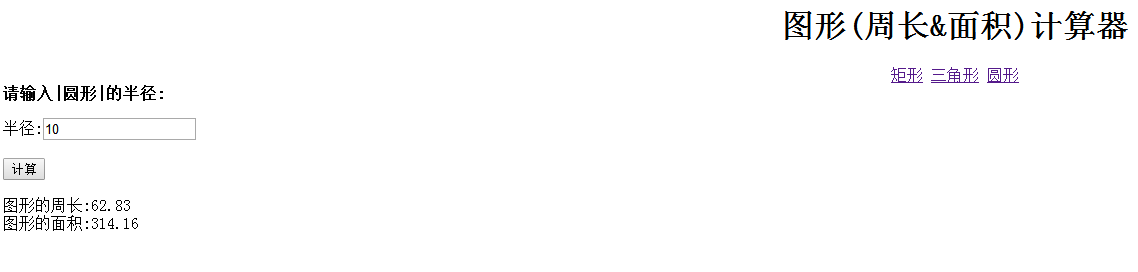
结果如下:


php实现图形计算器的更多相关文章
- PHP学习笔记06——面向对象版图形计算器
index.php 用于显示页面 <!DOCTYPE html PUBLIC "-//W3C//DTD HTML 4.01 Transitional//EN" "h ...
- PHP.11-PHP实例(二)-面向对象实例(图形计算器)
面向对象实例(图形计算器) [PHP语法详解] 1.实现外观 #不同的动作,输出不同的表单 ###关于PHP中,无法使用localhost访问.php文件[http://www.360doc.com/ ...
- PHP图形计算器(计算三角形矩形周长面积)
运用PHP面向对象的知识设计一个图形计算器,同时也运用到了抽象类知识,这个计算器可以计算三角形的周长和面积以及矩形的周长和面积.本图形计算器有4个页面:1.PHP图形计算器主页index.php; ...
- php:兄弟连之面向对象版图形计算器1
曾经看细说PHP的时候就想做这个,可是一直没什么时间,这次总算忙里偷闲搞了代码量比較多的project. 首先,文档结构,都在一个文件夹下就好了,我的就例如以下. 一開始,进入index.php文件. ...
- [图形计算器]Desmos
一.图形计算器 var elt = document.getElementById('calculator'); var calculator = Desmos.GraphingCalculator( ...
- 图形计算器(geogebra[5.0.278.0])使用QQ浏览器打开下载
点击这里下载Geogebra图形计算器
- PHP面向对象实例(图形计算器)
效果:
- 【java图形计算器】 java awt swing组件应用
package package1; import java.awt.*; import java.awt.event.*; import javax.swing.*; import javax.swi ...
- php:兄弟连之面向对象版图形计算器2
上篇说到通过result.class.php来分流,因为三个类都继承了shape这个类,让我们来看一下,面向对象中的继承. shape.class.shape文件 <?php abstract ...
随机推荐
- 《metasploit渗透测试魔鬼训练营》靶机演练之第五章实战案例KingView 6.53版本CVE-2011-0406漏洞
在一个笔记本上开两个虚拟机有点卡,而且太麻烦,就把metasploit的目标靶机放在别的机器上了,ip自己配置了一下, 目标主机:192.168.137.254 入侵机:192.168.137.253 ...
- 折腾一下WebSocket的ArrayBuffer传输方式
前言 之前写WebSocket都是基于文本传输的,后来准备升级项目,于是打算尝试一下arraybuffer传输方式,由于是第一次使用javascript处理字符串转arraybuffer,不过真的 ...
- QTP基本方法4------手动写入信息到测试结果报告中
可以使用写代码的方式添加结果信息到测试结果报告中. 结构:reporter.ReportEvent result,object,details,path result:状态:4种状态:micPass. ...
- YourUninstaller注册码(可用)
Name:Giveawayoftheday Registration code: 000017-2PNBK2-J59U6F-317E09-R5TGJQ-6B1WNA-AZCYNJ-GVP86A-7VP ...
- XMPP备忘笔记
xmpp中文翻译计划: http://wiki.jabbercn.org/%E9%A6%96%E9%A1%B5 XEP-0004: 数据表单 摘要: 本文定义了一个XMPP扩展协议用于数据表单,可以用 ...
- 【.net开发者自学java系列】使用Eclipse开发SpringMVC(1)
第一篇随笔,有点紧张.有错别字是正常的.... 好了,自我描述下.我是一个有几年.net开发经验的老菜鸟.是的,老菜鸟.别跟我讨论底层,别跟我讨论协议.TMD啥都不会. 为什么要学JAVA,我也不想, ...
- Java中的冒泡排序
Java中的冒泡排序排序的第一种思想:将第一个值与后面的值相比较,如果第一个值比其他值小,那么将较大的值与第一个换位置,然后继续比较直至所有的数比较完成.这样就可以保证第一个数是最大数.然后将第二个数 ...
- 使用xampp发现php的date()函数与本地相差7个小时
具体方法: 1. 打开php.ini 2. 搜索timezone 3. 修改为PRC 4. 回车键 5. 修改为PRC 6. 完成 没想到这么一个小问题也是一个大坑,在网上找了半天基本都是说要修改这个 ...
- css布局-内容自适应屏幕
css页面布局,实现内容部分自适应屏幕,当内容高度小于浏览器窗口高度时,页脚在浏览器窗口底部:当内容高度高于浏览器窗口高度时,页脚自动被撑到页面底部. <style type="tex ...
- 日期插件rolldate.js的使用
日期插件rolldate.js的使用 下载地址:http://www.jq22.com/jquery-info19834 效果: 代码: <!DOCTYPE html> <html ...