
8、Web Service-IDEA-jaxws规范下的 spring整合CXF
前提:开发和之前eclipse的开发有很大的不同!
1、服务端的实现
1、新建项目
此时创建的是web项目
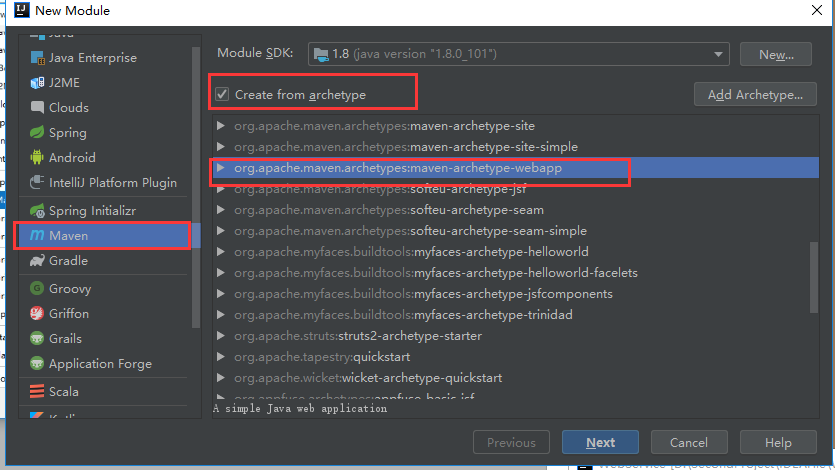
2、此时创建的项目是不完整的需要开发人员手动补充完整
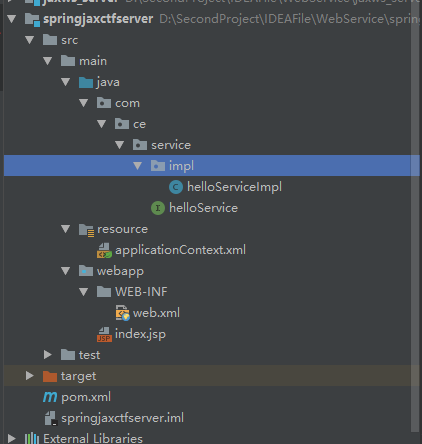
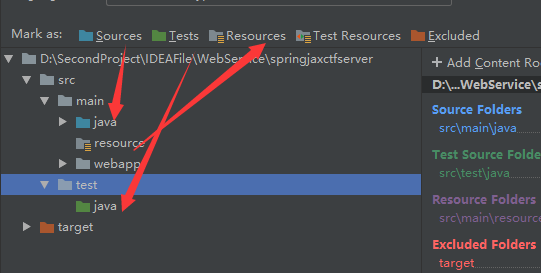
3、对文件夹的设置(满满的软件使用方法)
helloService.java
package com.ce.service;

import javax.jws.WebService;

@WebService

public interface helloService {

    public String hello(String name);

}
接口的实现类:
package com.ce.service.impl;

import com.ce.service.helloService;

public class helloServiceImpl implements helloService {

    @Override

    public String hello(String name) {

       return "你好 : " + name;

    }

}
关键的是web.xml文件的配置:
这里的url-pattern是一个切点(知道就好了)
<?xml version="1.0" encoding="UTF-8"?>

<web-app xmlns:xsi="http://www.w3.org/2001/XMLSchema-instance" xmlns="http://xmlns.jcp.org/xml/ns/javaee" xsi:schemaLocation="http://xmlns.jcp.org/xml/ns/javaeehttp://xmlns.jcp.org/xml/ns/javaee/web-app_3_1.xsd" version="3.1">

  <display-name>cxf</display-name>

  <servlet>

    <servlet-name>CXFServlet</servlet-name>

    <servlet-class>org.apache.cxf.transport.servlet.CXFServlet</servlet-class>

  </servlet>

  <servlet-mapping>

    <servlet-name>CXFServlet</servlet-name>

    <!--将作为前缀的一部分-->

    <url-pattern>/cr/*</url-pattern>

  </servlet-mapping>

  <context-param>

    <param-name>contextConfigLocation</param-name>

    <param-value>classpath:/applicationContext.xml</param-value>

  </context-param>

  <listener>

    <listener-class>org.springframework.web.context.ContextLoaderListener</listener-class>

  </listener>

</web-app>
spring的配置文件
applicationContext.xml
这里需要引入约束
<?xml version="1.0" encoding="UTF-8"?>

<beans  xmlns="http://www.springframework.org/schema/beans"

        xmlns:context="http://www.springframework.org/schema/context"

        xmlns:xsi="http://www.w3.org/2001/XMLSchema-instance"

        xmlns:cxf="http://cxf.apache.org/core"

        xmlns:jaxws="http://cxf.apache.org/jaxws"

        xmlns:jaxrs="http://cxf.apache.org/jaxrs"

        xsi:schemaLocation="

http://www.springframework.org/schema/beans

http://www.springframework.org/schema/beans/spring-beans.xsd

http://www.springframework.org/schema/context

http://www.springframework.org/schema/spring-context.xsd

http://cxf.apache.org/core

http://cxf.apache.org/schema/core.xsd

http://cxf.apache.org/jaxws

http://cxf.apache.org/schemas/jaxws.xsd

http://cxf.apache.org/jaxrs

http://cxf.apache.org/schemas/jaxrs.xsd">
<!--服务地址-->
<jaxws:server address="/hello">

    <!--服务类-->

    <jaxws:serviceBean>

        <bean class="com.ce.service.impl.helloServiceImpl"></bean>

    </jaxws:serviceBean>

</jaxws:server>

</beans>
添加tomcat进行运行项目:
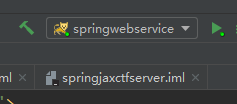
在同tomcat文件夹中加入jar(坑位)
否则启动就会立即进行报错


2、客户端
1、新建项目

2、工程目录

3、pom文件的依赖
pom文件的依赖与服务的相同
4、applicationContext.xml
<?xml version="1.0" encoding="UTF-8"?>

<beans  xmlns="http://www.springframework.org/schema/beans"

        xmlns:context="http://www.springframework.org/schema/context"

        xmlns:xsi="http://www.w3.org/2001/XMLSchema-instance"

        xmlns:cxf="http://cxf.apache.org/core"

        xmlns:jaxws="http://cxf.apache.org/jaxws"

        xmlns:jaxrs="http://cxf.apache.org/jaxrs"

        xsi:schemaLocation="

http://www.springframework.org/schema/beans

http://www.springframework.org/schema/beans/spring-beans.xsd

http://www.springframework.org/schema/context

http://www.springframework.org/schema/spring-context.xsd

http://cxf.apache.org/core

http://cxf.apache.org/schema/core.xsd

http://cxf.apache.org/jaxws

http://cxf.apache.org/schemas/jaxws.xsd

http://cxf.apache.org/jaxrs

http://cxf.apache.org/schemas/jaxrs.xsd">

<!--客户端配置-->

<!--

服务地址

服务接口类型

-->

<jaxws:client id="helloService"

  serviceClass="com.ce.service.helloService"
  address="http://localhost:8082/cr/hello">
</jaxws:client>

</beans>
测试类:
package com.ce;

import com.ce.service.helloService;

import org.junit.Test;

import org.junit.runner.RunWith;

import org.springframework.test.context.ContextConfiguration;

import org.springframework.test.context.junit4.SpringJUnit4ClassRunner;

import javax.annotation.Resource;

@RunWith(SpringJUnit4ClassRunner.class)

@ContextConfiguration("classpath:applicationContext.xml")

public class Client {

    //注入对象

    @Resource

    private com.ce.service.helloService helloService;

    @Test

    public void test(){

        //查看接口的代理对象类型

        System.out.println(helloService.getClass());

        //远程访问服务的的方法

        String mr = helloService.hello("Mr");

        System.out.println(mr);

    }

}
此时测试可以得到答案!!!
8、Web Service-IDEA-jaxws规范下的 spring整合CXF的更多相关文章
- 分析下为什么spring 整合mybatis后为啥用不上session缓存
因为一直用spring整合了mybatis,所以很少用到mybatis的session缓存. 习惯是本地缓存自己用map写或者引入第三方的本地缓存框架ehcache,Guava 所以提出来纠结下 实验 ...
- 2017年2月16日 分析下为什么spring 整合mybatis后为啥用不上session缓存
因为一直用spring整合了mybatis,所以很少用到mybatis的session缓存. 习惯是本地缓存自己用map写或者引入第三方的本地缓存框架ehcache,Guava 所以提出来纠结下 实验 ...
- Web Service 之JAX-WS 与CXF实现
Web Service的实现方式有很多种,本篇介绍的是基于JAX-WS(纯Java)实现的,然后借由CXF工具生成Javabean. 第一步:创建一个Java工程,编写CalService接口,此接口 ...
- Apache CXF实现Web Service(1)——不借助重量级Web容器和Spring实现一个纯的JAX-WS web service
废话少说,先在Eclipse中新建一个Java Project (可以不是WTP的Dynamic Web Project) 选择Java Project 再看pom.xml 我们使用cxf 3.1.4 ...
- 什么情况下应该使用Web Service?
现在我将列举三种情况,在这三种情况下,你将会发现使用Web service会带来极大的好处.此后,我还会举出不应该使用Web service的一些情况. 跨越防火墙的通信 如果你的应用程序有成千上万的 ...
- Web Service(1.8)
“基于 XMLWeb Service 的 Java API”(JAX-WS)通过使用注释来指定与 Web Service 实现相关联的元数据以及简化 Web Service 的开发.注释描述如何将 ...
- 【Java学习笔记】如何写一个简单的Web Service
本Guide利用Eclipse以及Ant建立一个简单的Web Service,以演示Web Service的基本开发过程: 1.系统条件: Eclipse Java EE IDE for Web De ...
- Java:Web Service初入门
前言 Web Service技术在我第一次接触,又没有实际使用时完全不理解这是什么.以为是一种类似Spring,Shiro的编程框架.后来渐渐理解,WS(即Web Service缩写)是一种通用的接口 ...
- Web Service学习小结(概念性回忆)-希望你们会喜欢
Web Service的出现带来了很多系统工程直接相互的调用.无疑让代码的隐藏得到了好的封装. Web Service 它的主要的组成要素: SOAP:(Simple Object Access P ...
随机推荐
- Cheatsheet: 2018 08.01 ~ 2018 10.31
Other Building the Ultimate Developer PC 3.0 - The Parts List for my new computer, IronHeart Face re ...
- 一键安装lamp环境出现的问题
前言:之前安装lamp是独立安装的,安装扩展很方便,现在用这个一键安装包,不知道怎么样,尝试一把. Part1:安装过程中出现的问题 error: utf8_mime2text() has new s ...
- mybatis之typehandles
mybatis之typehandles 无论是Mybatis在预处理语句PreparedStatement中设置一个参数时,还是从结果集中取出一个值时,都会用类型处理器将获取的值以合适的方式转换成ja ...
- K:栈相关的算法
本博文总结了常见的应用栈来进行实现的相关算法 ps:点击相关问题的标题,即可进入相关的博文进行查看其算法的思想及其实现,这篇博文更多的是作为目录使用 大数加法:在java中,整数是有最大上限的.所谓大 ...
- NodeJS中resolve添加地址无效
今天一个朋友在群里问了这样一个问题,他使用url.resolve()添加地址无效,我看了一下,发现是他没有注意细节, resolve可以在二级目录下增加,他使用的时候只是一级目录,所以添加会有问题.他 ...
- js-script标签放在的位置
* 建议把script标签放到</body>后面 * 如果现在有这样一个需求 在js里面需要获取到input里面的值,如果把script标签放到head里面,会出现问题.HTML解析是从上 ...
- js-js的运算
** js里面不区分整数和小数 var j = 123; alert(j/1000*1000); //在Java里面结果是0 //在js里面不区分整数和小数 123/1000 = 0.123 *100 ...
- textarea的maxlength属性兼容解决方案
IE10版本的textarea才支持maxlength属性:低版本的IE都不兼容,实际上低版本的IE的市场存在率还是很高的: 所以还是很有必要来整合一套解决方案的: Jquery版本 $(functi ...
- JS算法之A*(A星)寻路算法
今天写一个连连看的游戏的时候,接触到了一些寻路算法,我就大概讲讲其中的A*算法. 这个是我学习后的一点个人理解,有错误欢迎各位看官指正. 寻路模式主要有三种:广度游戏搜索.深度优先搜索和启发式搜索. ...
- sublime text3 jQuery Emmet 插件 安装方法,快捷键
preference->package control->install package> emmet / jQuery 先说jQuery jQuery 集成了很多JS的补全功能.例 ...