
Angular2 *ngFor把数据显示在多个input中出错解决方法
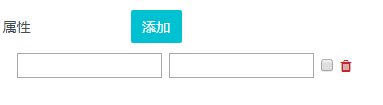
点击添加按钮会自动添加一个空的input组
html
<div class="form-inline">

            <label class="form-control-label">属性</label>

            <button type="button" class="btn btn-test" (click)="addProperty()">添加</button>

        </div>

        <div class="properties" *ngIf="options.properties">

            <div class="property-inline" *ngFor="let property of options.properties; let idx=index">

                <div class="form-inline" >

                    <label class="form-control-label"></label>

                    <div class="input-group">

                        <div class="form-inline">

                            <input type="text" class="property-input" name="proName_field" [(ngModel)]="property.name">

                            <input type="{{property.secret ? 'password' : 'text'}}" class="property-input" name="proValue_field" [(ngModel)]="property.value" >

                            <input type="checkbox" [(ngModel)]="property.secret" name="secret_field">

                            <a (click)="deleteProperty(idx)"><i class="fa fa-trash color-red"></i></a>

                        </div>

                    </div>

                </div>

            </div>

        </div>
js
addProperty() {

        const tempProperty = {

            name: '',

            value: ''

        };

        if (!this.options.properties) {

            this.options.properties = [];

        }

        this.options.properties.push(tempProperty);

 }

    deleteProperty(index) {

        this.options.properties.splice(index, 1);

    }
出现的问题是,当我在第一行input中分别添加上数据xxx,ddd后,再次点击添加按钮,此时页面刷新,添加一个空的input行,此时有两行,而第一行input中填好的值却不见了,查看元素它的model属性明明又是绑定了刚输入的值的,页面上怎么没有显示呢?
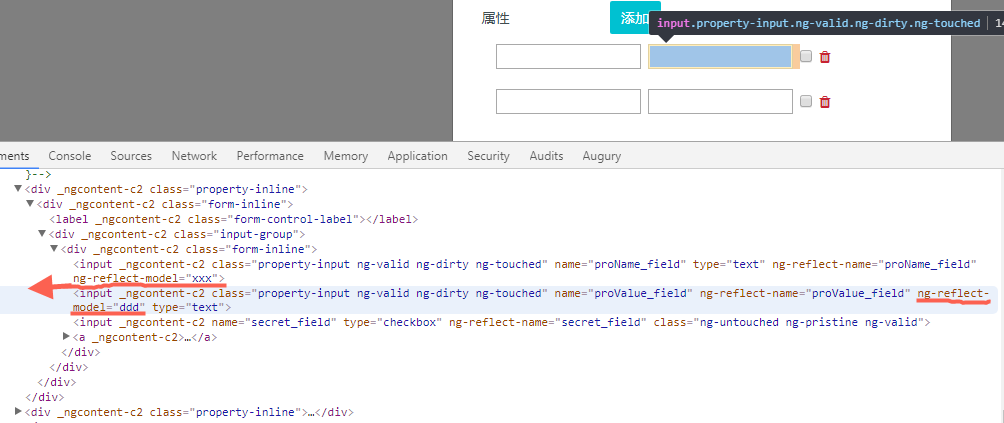
通过查阅资料了解到在ng2表单中使用ngModel需要注意,必须带有name属性或者使用 [ngModelOptions]=”{standalone: true}”,二选其一,再看我的html代码中我把显示name的input的name属性设置为一个定值,这样再经过*ngFor后,显示不同name值的input的name属性都是一样的,是不是这个原因导致的呢,于是就试着把每个input的name属性设为不一样的值:
<div class="form-inline">

            <label class="form-control-label">属性</label>

            <button type="button" class="btn btn-test" (click)="addProperty()">添加</button>

        </div>

        <div class="properties" *ngIf="options.properties">

            <div class="property-inline" *ngFor="let property of options.properties; let idx=index">

                <div class="form-inline" >

                    <label class="form-control-label"></label>

                    <div class="input-group">

                        <div class="form-inline">

                            <input type="text" class="property-input" [name]="'proName_field' + idx" [value]="property.name" [(ngModel)]="property.name">

                            <input type="{{property.secret ? 'password' : 'text'}}" class="property-input" [name]="'proValue_field'+idx" [(ngModel)]="property.value" >

                            <input type="checkbox" [(ngModel)]="property.secret" [name]="'secret_field'+idx">

                            <a (click)="deleteProperty(idx)"><i class="fa fa-trash color-red"></i></a>

                        </div>

                    </div>

                </div>

            </div>

        </div>
问题解决了。。。。
Angular2 *ngFor把数据显示在多个input中出错解决方法的更多相关文章
- WebView中input file的解决方法
public class MyWb extends Activity { /** Called when the activity is first created. */ WebView web; ...
- Android WebView 不支持 H5 input type="file" 解决方法
最近因为赶项目进度,因此将本来要用原生控件实现的界面,自己做了H5并嵌入webview中.发现点击H5中 标签 不能打开android资源管理器. 通过网络搜索发现是因为 android webvie ...
- thinkphp配置rewrite模式访问时不生效 出现No input file specified解决方法
使用thinkphp配置rewire模式的路径访问网站时, 直接复制官网的.htaccess文件的代码复制过去 1 2 3 4 5 6 <IfModule mod_rewrite.c> ...
- 移动端页面输入法挡住input输入框的解决方法
1,宽高用了百分比或者vw/vh布局的,input输入框的最外层父容器的可用JS动态设置为当前窗口的宽高(防止输入法的弹出令页面变形) 2,最外层父容器用了fixed定位的,不要用top:0;要用bo ...
- thinkphp 5.6以上版本出现No input file specified解决办法
打开thinkphp,出现No input file specified. 解决方法:在工程下的.htaccess文件里, 把RewriteRule ^(.*)$ index.php/$1 [QSA, ...
- PHP icov转码报错解决方法,iconv(): Detected an illegal character in input string
iconv(): Detected an illegal character in input string 错误解决方法 //转码 function iconv_gbk_to_uft8($strin ...
- js 实时监听input中值变化
注意:用到了jquery需要引入jquery.min.js. 需求: 1.每个地方需要分别打分,总分为100; 2.第一个打分总分为40; 3.第二个打分总分为60. 注意:需要判断null.&quo ...
- 实现滑动条与表单中的input中的value交互
最近在写一个考试系统的项目,遇到一些比较有意思的小知识,在这里分享给大家 下面是一个滑动条与input中的value值的交互,即滑动条的颜色会跟随给定input的value值实时变化,虽然表单中的ra ...
- laravel Input Cokkie 的各种方法 超实用!!!
基本输入 Laravel使用一种简单的方式来访问用户提交的信息. 你可以用统一的方式来访问用户提交的信息,而不用为用户提交信息的方式操心. 获取一个用户提交的值 代码如下: $name = Input ...
随机推荐
- 使用 Redis 实现分布式锁(转载)
背景 在一般的分布式应用中,要安全有效地同步多服务器多进程之间的共享资源访问,就要涉及到分布式锁.目前项目是基于 Tornado 实现的分布式部署,同时也使用了 Redis 作为缓存.参考了一些资料并 ...
- Timer控件
Timer控件是定期引发事件的控件,时间间隔的长度由interval属性定义,其值以毫秒为单位吗,若启用了该组件,则每个事件间隔引发一个Tick事件,Timer组件的主要方法包括start和stop, ...
- MUI框架 picker日期选择器实例
MUI官方文档点我 (一)准备工作,下载相关的js.cs文件,地址 (二)新建普通html页面 1)引入相关js.cs文件 2) 一个input,记录下id: <form> <lab ...
- Chrome , Firfox 不支持fireEvent的方法
转自:http://bossdai.iteye.com/blog/2111458 Chrome , Firfox 不支持fireEvent的方法 可以使用dispatchEvent的方法替代, 直接给 ...
- 三、curator recipes之共享的可重入读写锁
简介 curator实现了跨JVM的可重入读写互斥锁.它使用zookeeper去进行加锁,所以指定相同路径的处理线程将会基于“公平锁”的机制去竞争锁资源. 读写锁包含了读锁.写锁两个,它们的互斥关系如 ...
- SpringMVC笔记:annotation注解式开发
一.配置式开发 在我们之前的学习中,springmvc使用配置式开发模式,需要在核心配置文件中springmvc.xml注册大量的bean来注入controller控制器,工作繁琐容易出错,下面我们学 ...
- jvm工具及命令大全
虚拟机栈 栈桢大小缺省为1M,可用参数 –Xss调整大小,例如-Xss256k 堆 -Xms:堆的最小值: -Xmx:堆的最大值: -Xmn:新生代的大小: -XX:NewSize:新生代最小值: ...
- Servlet学习系列1
一.引言: 1.什么是Servlet? JavaWeb 开发规范中的一个组成部分. 服务器端的一段小程序(代码) 2.什么是服务器?→ 安装了服务器软件的计算机. 硬件:电脑 --->高性能 ...
- Eclipse3.2查找jre的问题
前几天遇到一个问题,最开始电脑上使用的是解压的JDK(带jre),但是不能打开jar文件.所以从网上下载了一个jre1.8,然后问题来了,Eclipse打开就报错,弹出一个框,在eclipse的目录下 ...
- 轻松学习java可重入锁(ReentrantLock)的实现原理(转 图解)
前言 相信学过java的人都知道 synchronized 这个关键词,也知道它用于控制多线程对并发资源的安全访问,兴许,你还用过Lock相关的功能,但你可能从来没有想过java中的锁底层的机制是怎么 ...