
nim_duilib(6)之listbox
introduction
xml文件添加代码
基于上一篇, 继续向basic.xml中添加下面关于ListBox的代码。 xml完整源码在文末。
<HBox>

  <!-- List -->

  <VListBox class="list" name="list" padding="5,3,5,3">

  </VListBox>

  <VBox>

    <!-- Buttons -->

    <CheckBox class="checkbox_font12" name="list_checkbox_add_to_top" text="add to top" margin="0,5,0,10"/>

    <Button class="btn_global_blue_80x30" name="list_btn_add" text="add" />

    <CheckBox class="checkbox_font12" name="list_checkbox_remove_all" text="del all?" margin="0,5,0,10"/>

    <Button class="btn_global_white_80x30" name="list_btn_remove" text="remove"/>

  </VBox>

</HBox>
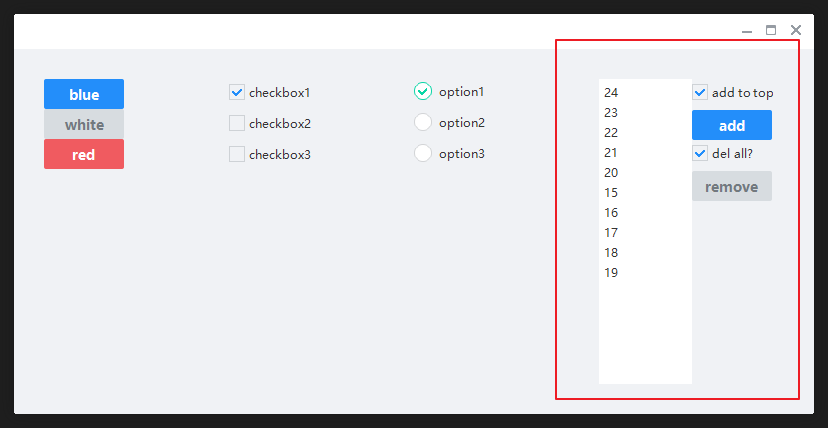
上面的代码创建了一个水平容器,容器从左往右分别是:listbox和一个垂直容器,垂直容器中从上到下是复选框和按钮。效果如下:
代码中关联
BasicForm.h
- 打开BasicForm.h,类中添加下面的代码用于关联界面控件。
	// list

	ui::ListBox	*plist_;

	// list的删除和添加按钮

	ui::Button	*plist_btn_arr_[2];

	// list 的复选框,

	ui::CheckBox	*plist_cb_arr_[2];
同时,类中再额外添加2个函数,用于监听Add和remove的点击。
	// list的删除和添加

	bool OnListBoxAddItem(ui::EventArgs* msg);

	bool OnListBoxRemoveItem(ui::EventArgs* msg);
BasicForm.cpp
InitWindow函数
- 转到BasicForm.cpp,找到 InitWindow 函数,向其增加下面的代码
void BasicForm::InitWindow()

{

  ......

	// 4.list控件

	//----------------------------------------------------------------------------------------

	plist_ = dynamic_cast<ui::ListBox*>(FindControl(L"list"));

	if (plist_)

	{

		for (auto i = 0; i < 15; ++i)

		{

			ui::ListContainerElement* pelement = new(std::nothrow) ui::ListContainerElement;

			if (pelement)

			{

				// 设置item显示的内容

				pelement->SetText(nbase::StringPrintf(L"%d", i));

				// 设置item的样式,可以在global.xml中找到

				pelement->SetClass(L"listitem");

				pelement->SetFixedHeight(20);

				plist_->Add(pelement);

			}

		}

	}

	// list关联的删除和添加按钮

	plist_btn_arr_[0] = dynamic_cast<ui::Button*>(FindControl(L"list_btn_add"));

	plist_btn_arr_[1] = dynamic_cast<ui::Button*>(FindControl(L"list_btn_remove"));

	if (plist_btn_arr_[0])

		plist_btn_arr_[0]->AttachClick(nbase::Bind(&BasicForm::OnListBoxAddItem, this, std::placeholders::_1));

	if (plist_btn_arr_[1])

		plist_btn_arr_[1]->AttachClick(nbase::Bind(&BasicForm::OnListBoxRemoveItem, this, std::placeholders::_1));

	// list 关联checkbox

	plist_cb_arr_[0] = dynamic_cast<ui::CheckBox*>(FindControl(L"list_checkbox_add_to_top"));

	plist_cb_arr_[1] = dynamic_cast<ui::CheckBox*>(FindControl(L"list_checkbox_remove_all"));

}
OnListBoxAddItem
函数体代码如下
bool BasicForm::OnListBoxAddItem(ui::EventArgs* msg)

{

	if (plist_)

	{

		static int count_start_15 = 15;

		ui::ListContainerElement* pelement = new(std::nothrow) ui::ListContainerElement;

		if (pelement)

		{

			// 设置item显示的内容

			pelement->SetText(nbase::StringPrintf(L"%d", count_start_15));

			// 设置item的样式,可以在global.xml中找到

			pelement->SetClass(L"listitem");

			pelement->SetFixedHeight(20);

			// 添加到最前面

			if (plist_cb_arr_[0]->IsSelected())

				plist_->AddAt(pelement, 0);

			else

				plist_->Add(pelement);

			++count_start_15;

		}

	}

	return false;

}
OnListBoxRemoveItem
OnListBoxRemoveItem函数体如下:
bool BasicForm::OnListBoxRemoveItem(ui::EventArgs* msg)

{

	if (plist_)

	{

		if (plist_cb_arr_[1])

		{

			if (plist_cb_arr_[1]->IsSelected())

			{

				int list_count = plist_->GetCount();

				if (0 < list_count)

					plist_->RemoveAll();

				else

					;

			}

			else

			{

				int index = plist_->GetCurSel();

				// 没有选中,将返回-1

				if (-1 != index)

				{

					plist_->RemoveAt(index);

				}

				else

				{

					;

				}

			}

		}

		else

		{

			;

		}

	}

	else

	{

		;

	}

	return false;

}
运行结果
xml完整源码
<?xml version="1.0" encoding="UTF-8"?>

<Window size="800,400" caption="0,0,0,35">

  <VBox bkcolor="bk_wnd_darkcolor">

    <HBox width="stretch" height="35" bkcolor="bk_wnd_lightcolor">

      <Control />

        <Button class="btn_wnd_min" name="minbtn" margin="4,6,0,0" />

        <Box width="21" margin="4,6,0,0">

          <Button class="btn_wnd_max" name="maxbtn"/>

          <Button class="btn_wnd_restore" name="restorebtn" visible="false"/>

        </Box>

      <Button class="btn_wnd_close" name="closebtn" margin="4,6,8,0"/>

    </HBox>

    <!--下面是中间的控件-->

    <VBox padding="30, 30, 30, 30" >

      <HBox>

        <VBox>

          <!-- Buttons -->

          <Button class="btn_global_blue_80x30" name="btn_blue" text="blue" />

          <Button class="btn_global_white_80x30" name="btn_white" text="white"/>

          <Button class="btn_global_red_80x30" name="btn_red" text="red"/>

        </VBox>

        <!--checkbox-->

        <VBox>

          <CheckBox class="checkbox_font12" name="checkbox1" text="checkbox1" margin="0,5,0,10" selected="true"/>

          <CheckBox class="checkbox_font12" name="checkbox2" text="checkbox2" margin="0,5,0,10"/>

          <CheckBox class="checkbox_font12" name="checkbox3" text="checkbox3" margin="0,5,0,10"/>

        </VBox>

        <!-- option-->

        <VBox>

          <Option class="circle_option_2" name="option1" group="option_group" text="option1" margin="0,3,0,10" selected="true"/>

          <Option class="circle_option_2" name="option2" group="option_group" text="option2" margin="0,3,0,10"/>

          <Option class="circle_option_2" name="option3" group="option_group" text="option3" margin="0,3,0,10"/>

        </VBox>

        <HBox>

          <!-- List -->

          <VListBox class="list" name="list" padding="5,3,5,3">

          </VListBox>

          <VBox>

            <!-- Buttons -->

            <CheckBox class="checkbox_font12" name="list_checkbox_add_to_top" text="add to top" margin="0,5,0,10"/>

            <Button class="btn_global_blue_80x30" name="list_btn_add" text="add" />

            <CheckBox class="checkbox_font12" name="list_checkbox_remove_all" text="del all?" margin="0,5,0,10"/>

            <Button class="btn_global_white_80x30" name="list_btn_remove" text="remove"/>

          </VBox>

        </HBox>

      </HBox>

    </VBox> <!--下面是中间的控件 结束-->

  </VBox>

</Window>
nim_duilib(6)之listbox的更多相关文章
- nim_duilib(13)之添加fmt库
introduction 习惯使用fmt库做字符串的格式化操作.尽管nim_duilib提供了类似的函数. 故项目demo_xml引入了外部库fmt framework.h中添加下面的以便使用fmt库 ...
- MVVM下listbox默认显示最后一行
原文地址:http://stackoverflow.com/questions/16866309/listbox-scroll-into-view-with-mvvm public class Scr ...
- WPF 自定义列表筛选 自定义TreeView模板 自定义ListBox模板
有很多项目,都有数据筛选的操作.下面提供一个案例,给大家做参考. 左侧是数据源,搜索框加TreeView控件,右侧是ListBox控件.在左侧数据列点击添加数据,然后点击确定,得到所筛选的数据. 下面 ...
- WPF制作的VS黑色风格的Listbox
最近写的一个玩具,WPF写出来的东西还是挺好看的 style.xaml <ResourceDictionary xmlns="http://schemas.microsoft.com/ ...
- jquery 双向select控件bootstrap Dual listbox
http://www.cnblogs.com/hangwei/p/5040866.html -->jquery 双向select控件bootstrap Dual listboxhtt ...
- C# 向listbox添加大量数据项的实践心得
使用 ListBox.Items.Add 方法添加项时,可以使用 BeginUpdate 方法,以防止每次向列表添加项时控件都重新绘制 ListBox.完成向列表添加项的任务后,调用 EndUpdat ...
- 实现一个纵向排列的 ListBox ,并具有操作按钮
需要实现的效果如下: 要想把 ListBox 的内容纵向显示很简单,只需把 ListBox 的内容控件为 WrapPanel 就可以了: <ListBox.ItemsPanel> < ...
- 背水一战 Windows 10 (33) - 控件(选择类): ListBox, RadioButton, CheckBox, ToggleSwitch
[源码下载] 背水一战 Windows 10 (33) - 控件(选择类): ListBox, RadioButton, CheckBox, ToggleSwitch 作者:webabcd 介绍背水一 ...
- WPF 显示文件列表中使用 ListBox 变到ListView 最后使用DataGrid
WPF 显示文件列表中使用 ListBox 变到ListView 最后使用DataGrid 故事背景: 需要检索某目录下文件,并列出来,提供选择和其他功能. 第一版需求: 列出文件供选择即可,代码如下 ...
随机推荐
- excel-合并多个Excel文件--VBA合并当前目录下所有Excel工作簿中的所有工作表
在网上找EXCEL多文件合并的方法,思路: 一.Linux 或者window+cmder,直接用命令行cat合并EXCEL文件,但是,需要安装辅助东西才能直接处理(也许也不可以,但是,可以用文件格式转 ...
- C++面试基础篇(二)
1.数组与指针的区别 数组下标运算实际上都是通过指针进行的. 数组名代表着指向该数组中下标为0的元素的指针,但有例外:sizeof(数组名)返回整个数组的大小,而非指针大小:&数组名返回一个指 ...
- 振鹏同学正式学习java的第一天!
一.今日收获 1.最棒的莫过于运行Java的HelloWorld! 2.在同学的帮助下历经坎坷困苦安装完成了Eclipse软件并设置好环境变量. 3.最最最开始了解了Java的前世今生,编程语言发展的 ...
- 日常Java 2021/10/10
多态就是同一个行为具有多个不同表现形式的能力 多态就是同一个接口,使用不同的实例而执行不同操作 多态的优点 1.消除类型之间的耦合关系 2.可替换性 3.可扩充性 4.接口性 5.灵活性 6.简化性 ...
- 答应我,这次必须搞懂!痛点难点Promise。(小点心async/await,基于Promise的更优方案)
Promise 出现的原因 在 Promise 出现以前,我们处理一个异步网络请求,大概是这样: // 请求 代表 一个异步网络调用. // 请求结果 代表网络请求的响应. 请求1(function( ...
- Linux学习 - 条件判断
一.判断格式 test -e /root/install.log 或 [ -e /root/install.log ] 使用echo $?查看是否正确,当返回0时表示返回正确 1 按照文件类型进行判断 ...
- Objective-C运行时定义了几种重要的类型
Objective-C运行时定义了几种重要的类型. Class:定义Objective-C类 Ivar:定义对象的实例变量,包括类型和名字. Protocol:定义正式协议. objc_propert ...
- Spring DM 2.0 环境配置 解决Log4j问题
搭建 spring dm 2.0 环境出的问题 log4j 的问题解决办法是 一.引入SpringDM2.0的Bundle,最后完成如下图所示:注意:要引入slf4j.api.slf4j.log4j. ...
- my38_MySQL事务知识点零记
从innodb中查看事务信息 show engine innodb status\G; ------------ TRANSACTIONS------------Trx id counter 3153 ...
- maven根据profile,resources,filters来区分部署环境
项目过程中,在不同的阶段,分别需要部署开发环境,测试环境,线上环境.如果都用一套配置文件,很容易弄乱,所以维持多套配置文件很有必要. maven提供了一组属性以供开发人员灵活搭配,可以根据环境来打包, ...