
PQGrid商业化的表格组件
官网地址https://paramquery.com/pro/grid
右侧导航条有目录哟,看着更方便
- 快速入门
- 表格构建
- API简单介绍
- 主要研究功能介绍
快速入门
ParamQuery Grid Pro是ParamQuery Grid的商业级版本,相对于之前研究的Bootstrap Table组件,就一字字稳,商业化的东西就是好,不会出一些莫名其妙的Bug,虽然网上资料不多但是官方文档非常详细(本次基于6.x版本,只是入门使用版本应该关系不大)
需要导入的文件
	<link rel="stylesheet" href="../resources/css/pqbase/jquery-ui.css">

    <link rel="stylesheet" href="../resources/css/pqbase/bootstrap.min.css">

    <link rel="stylesheet" href="../resources/css/pqbase/pqgrid.min.css" >

    <link rel="stylesheet" href="../resources/css/pqbase/pqgrid.ui.min.css" id="pqgrid_ui_link">

    <link rel="stylesheet" href="../resources/css/pqbase/pqgrid.css" id="pqgrid_office_link">

    <link rel="stylesheet" href="../resources/css/base/bootstrap.min.css">

	<script src="../resources/js/pqbase/jquery-2.2.4.min.js"></script>

	<script src="../resources/js/pqbase/jquery-ui.min.js"></script>

	<script src="../resources/js/pqbase/pqgrid.min.js"></script>

	<script src="../resources/js/pqbase/pq-localize-en.js"></script>

	<script src="../resources/js/pqbase/jquery.resize.js"></script>

	<script src="../resources/js/pqbase/bootstrap.min.js"></script>
这些文件我就不提供了,研究的话打开官网查看源代码,去扣下来就行了,官方也提供免费的评估版本(当然需要申请),使用的话就得去买一版了
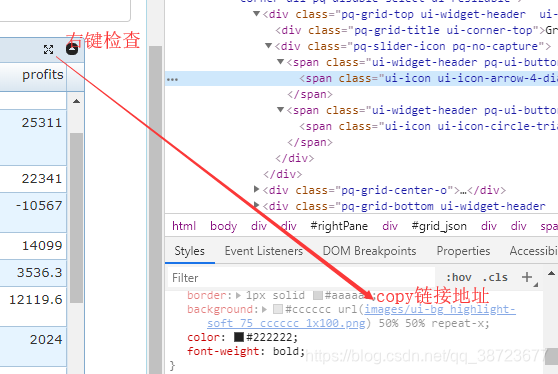
你还有几张图片需要下载,不然你看不到表格上的一些按钮
这里随便找了一个官方例子
<div id="grid_json" style="margin:auto;"></div>
    $(function () {

        var data = [

            { rank: 1, company: 'Exxon Mobil', revenues: 339938.0, profits: 36130.0 },

            { rank: 2, company: 'Wal-Mart Stores', revenues: 315654.0, profits: 11231.0 },

            { rank: 3, company: 'Royal Dutch Shell', revenues: 306731.0, profits: 25311.0 },

            { rank: 4, company: 'BP', revenues: 267600.0, profits: 22341.0 },

            { rank: 5, company: 'General Motors', revenues: 192604.0, profits: -10567.0 },

            { rank: 6, company: 'Chevron', revenues: 189481.0, profits: 14099.0 },

            { rank: 7, company: 'DaimlerChrysler', revenues: 186106.3, profits: 3536.3 },

            { rank: 8, company: 'Toyota Motor', revenues: 185805.0, profits: 12119.6 },

            { rank: 9, company: 'Ford Motor', revenues: 177210.0, profits: 2024.0 },

            { rank: 10, company: 'ConocoPhillips', revenues: 166683.0, profits: 13529.0 },

            { rank: 11, company: 'General Electric', revenues: 157153.0, profits: 16353.0 },

            { rank: 12, company: 'Total', revenues: 152360.7, profits: 15250.0 },

            { rank: 13, company: 'ING Group', revenues: 138235.3, profits: 8958.9 },

            { rank: 14, company: 'Citigroup', revenues: 131045.0, profits: 24589.0 },

            { rank: 15, company: 'AXA', revenues: 129839.2, profits: 5186.5 },

            { rank: 16, company: 'Allianz', revenues: 121406.0, profits: 5442.4 },

            { rank: 17, company: 'Volkswagen', revenues: 118376.6, profits: 1391.7 },

            { rank: 18, company: 'Fortis', revenues: 112351.4, profits: 4896.3 },

            { rank: 19, company: 'Crédit Agricole', revenues: 110764.6, profits: 7434.3 },

            { rank: 20, company: 'American Intl. Group', revenues: 108905.0, profits: 10477.0 }

        ];

        var obj = {

            width: "80%",

            height: 400,

            resizable: true,

            title: "Grid From JSON",

            showBottom: false,

            scrollModel: { autoFit: true },

            dataModel: { data: data }

        };

        $("#grid_json").pqGrid(obj);

    });
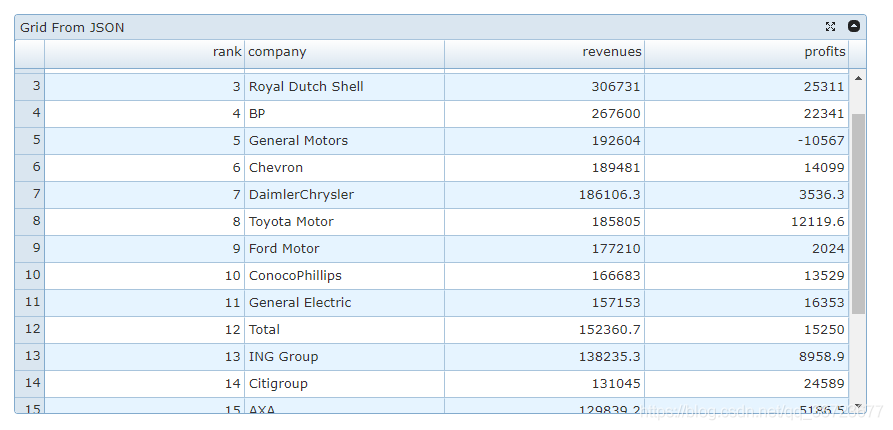
导入上方的js文件,在Html中写一个div,r然后在js中将表格渲染进该div中
能够正确显示出表格你就成功了
表格构建(官网Remote paging(远程分页)例子)
HTML
<div id="grid_paging" style="margin:5px auto;"></div>
js
 $(function () {

        var colM = [				//列定义,pqgrid会根据dataIndex自动填充数据

            { title: "Order ID", width: 100, dataIndx: "OrderID" },

            { title: "Customer Name", width: 130, dataIndx: "CustomerName" },

            { title: "Product Name", width: 190, dataIndx: "ProductName" },

            { title: "Unit Price", width: 100, dataIndx: "UnitPrice", align: "right" },

            { title: "Quantity", width: 100, dataIndx: "Quantity", align: "right" },

		    { title: "Order Date", width: 100, dataIndx: "OrderDate", dataType:'date', align:'right' },

		    { title: "Required Date", width: 100, dataIndx: "RequiredDate", dataType:'date' },

		    { title: "Shipped Date", width: 100, dataIndx: "ShippedDate", dataType:'date' },

            { title: "ShipCountry", width: 100, dataIndx: "ShipCountry" },

            { title: "Freight", width: 100, align: "right", dataIndx: "Freight" },

            { title: "Shipping Name", width: 120, dataIndx: "ShipName" },

            { title: "Shipping Address", width: 180, dataIndx: "ShipAddress" },

            { title: "Shipping City", width: 100, dataIndx: "ShipCity" },

            { title: "Shipping Region", width: 110, dataIndx: "ShipRegion" },

            { title: "Shipping Postal Code", width: 130, dataIndx: "ShipPostalCode" }

		];

        var dataModel = {								//数据源

            location: "remote",							//数据位置远程

            dataType: "JSON",							//数据格式JSON

            method: "GET",								//获取方法GET

            url: "/pro/invoice/paging",				//获取地址

            getData: function (dataJSON) {		//返回后的分页处理,需要前后台协调

                var data = dataJSON.data;

                return { curPage: dataJSON.curPage, totalRecords: dataJSON.totalRecords, data: data };

            }

        };

        var grid1 = $("div#grid_paging").pqGrid({ 					//表格属性的创建与定义

            width: 800, height: 450,											//宽高

            dataModel: dataModel,											//数据模型,上面定义

            colModel: colM,														//表格,列的定义

            freezeCols: 2,															//固定列,固定的列数

            pageModel: { type: "remote", rPP: 20, strRpp: "{0}" },		//默认的页码与大小

            sortable: false,

            selectionModel: { swipe: false },								//选定方式

            wrap: false, hwrap: false,

            numberCell: { resizable: true, width: 30, title: "#" },

            title: "Shipping Orders",

            resizable: true															//列宽可调整大小

        });

    });
java 官方是为了可以方便演示,你的数据接口不用和他一样只需要注意返回值和参数就行
package controller;

import domain.Invoice;

import flexjson.JSONSerializer;

import flexjson.transformer.DateTransformer;

import java.util.Date;

import java.util.List;

import org.springframework.jdbc.core.BeanPropertyRowMapper;

import org.springframework.jdbc.core.support.JdbcDaoSupport;

import org.springframework.stereotype.Controller;

import org.springframework.web.bind.annotation.*;

/**

 * @author paramvir

 */

@Controller

public class InvoiceController extends JdbcDaoSupport{

    @RequestMapping(value="/invoice/paging",method=RequestMethod.GET)

    public @ResponseBody String paging(@RequestParam int pq_curpage, @RequestParam int pq_rpp)

    {

        int total_Records = getJdbcTemplate().queryForInt(

            "Select count(*) as count from invoices order by orderID " );

        int skip = (pq_rpp * (pq_curpage - 1));

        if (skip >= total_Records)

        {

            pq_curpage = (int)Math.ceil(((double)total_Records) / pq_rpp);

            skip = (pq_rpp * (pq_curpage - 1));

        }

        List<Invoice> invoices = getJdbcTemplate().

            query("Select * from invoices order by orderID limit " + skip + " , " + pq_rpp,

                new BeanPropertyRowMapper(Invoice.class));

        JSONSerializer serializer = new JSONSerializer().exclude("*.class");

        String serializedInvoices = serializer

                .transform(new DateTransformer("MM/dd/yyyy"), Date.class)

                .serialize(invoices);

        String sb = "{\"totalRecords\":" + total_Records + ",\"curPage\":" + pq_curpage + ",\"data\":" + serializedInvoices + "}";

        return sb;

    }

}
API简单介绍
pqgrid的demo给的非常全面,几乎不用你自己费力气去构建,直接copy就差不多满足你的需求,而且pqgrid还会提供相应的后台代码
demo地址:https://paramquery.com/pro/demos
API地址:https://paramquery.com/pro/api
主要研究功能介绍
诸如列固定,列可拖动,后台分页等在PQGrid中都非常稳定 唯一缺陷就是没有Cookie Paging功能,如果想实现修改后返回原来页面需要自己编写
后台分页
该功能在表格构建中已经讲解
查询功能 我使用官方文档中的传值方式不太方便,而且把查询条件输入框加入到表格内部也不太美观
function Search(){

    url="/BootStrapTableTest/test/selectall2.do";					//我的url设置为了全局变量,方便修改

    var params = $('#_searchForm').serializeObject();//将form中的查询条件转换成对象

    //传入数据

    DM = $grid.pqGrid("option", "dataModel");

    DM.postData = params;

    pm = $grid.pqGrid("option", "pageModel");

	//刷新表格重新获取数据

    refresh();

}

//刷新按钮

function refresh() {

    $grid.pqGrid("refreshDataAndView");

}
PQGrid商业化的表格组件的更多相关文章
- Web jquery表格组件 JQGrid 的使用 - 从入门到精通 开篇及索引
因为内容比较多,所以每篇讲解一些内容,最后会放出全部代码,可以参考.操作中总会遇到各式各样的问题,个人对部分问题的研究在最后一篇 问题研究 里.欢迎大家探讨学习. 代码都经过个人测试,但仍可能有各种未 ...
- JS组件系列——表格组件神器:bootstrap table
前言:之前一直在忙着各种什么效果,殊不知最基础的Bootstrap Table用法都没有涉及,罪过,罪过.今天补起来吧.上午博主由零开始自己从头到尾使用了一遍Bootstrap Table ,遇到不少 ...
- JS组件系列——表格组件神器:bootstrap table(二:父子表和行列调序)
前言:上篇 JS组件系列——表格组件神器:bootstrap table 简单介绍了下Bootstrap Table的基础用法,没想到讨论还挺热烈的.有园友在评论中提到了父子表的用法,今天就结合Boo ...
- JS组件系列——表格组件神器:bootstrap table(三:终结篇,最后的干货福利)
前言:前面介绍了两篇关于bootstrap table的基础用法,这章我们继续来看看它比较常用的一些功能,来个终结篇吧,毛爷爷告诉我们做事要有始有终~~bootstrap table这东西要想所有功能 ...
- Web jquery表格组件 JQGrid 的使用 - 11.问题研究
系列索引 Web jquery表格组件 JQGrid 的使用 - 从入门到精通 开篇及索引 Web jquery表格组件 JQGrid 的使用 - 4.JQGrid参数.ColModel API.事件 ...
- Web jquery表格组件 JQGrid 的使用 - 4.JQGrid参数、ColModel API、事件及方法
系列索引 Web jquery表格组件 JQGrid 的使用 - 从入门到精通 开篇及索引 Web jquery表格组件 JQGrid 的使用 - 4.JQGrid参数.ColModel API.事件 ...
- Web jquery表格组件 JQGrid 的使用 - 5.Pager翻页、搜索、格式化、自定义按钮
系列索引 Web jquery表格组件 JQGrid 的使用 - 从入门到精通 开篇及索引 Web jquery表格组件 JQGrid 的使用 - 4.JQGrid参数.ColModel API.事件 ...
- Web jquery表格组件 JQGrid 的使用 - 6.准备工作 & Hello JQGrid
系列索引 Web jquery表格组件 JQGrid 的使用 - 从入门到精通 开篇及索引 Web jquery表格组件 JQGrid 的使用 - 4.JQGrid参数.ColModel API.事件 ...
- Web jquery表格组件 JQGrid 的使用 - 7.查询数据、编辑数据、删除数据
系列索引 Web jquery表格组件 JQGrid 的使用 - 从入门到精通 开篇及索引 Web jquery表格组件 JQGrid 的使用 - 4.JQGrid参数.ColModel API.事件 ...
随机推荐
- deepin安装Motrix,cocomusic
1,motrix(下载工具):https://motrix.app/ 2,cocomusic(开源音乐播放器):https://github.com/xtuJSer/CoCoMusic/release ...
- PAT甲级:1066 Root of AVL Tree (25分)
PAT甲级:1066 Root of AVL Tree (25分) 题干 An AVL tree is a self-balancing binary search tree. In an AVL t ...
- MySQL问题定位-性能优化之我见
前言 首先任何一个数据库不是独立存在的,也不是凭空想象决定出来的. 数据库的架构离不开应用的场景.所以,为了解决某些深入的问题,首先你得掌握数据库的原理与架构.原理掌握得越深入,越能帮助你定位复杂与隐 ...
- CF404D-DP【成就达成】
CF404D-DP 正经的东西 题意 给定一个字符串,只包含'0','1','2','*','?'五种字符,其中'?'可被替换为其他任何一种,求使序列符合扫雷地图定义的方案数. 一个数字字符大小表示与 ...
- FormData提交文件(十四)
问题 在通过ajax提交表单时,表单中有Excel文件,在后台还需要读取excel文件中的数据,普通的提交方式无法实现.可以通过创建FormData对象的方式. 代码示例: 前端: 创建想要提交的fo ...
- 前端基础css(三)
HTML:用于显示页面的内容 CSS:用于以什么样的形式(样式)去显示 一. 选择器 [1] 标签/元素选择器 (整个页面的所有的相同的标签都显示统一的样式) h1{ font-size: 20px; ...
- js中的 true 与 false
可判断为 false 的情况: 0,-0,NaN,undedined,"",false,null,缺省的值 可判断为 true 的情况: 除false的其他情况均可,包括负数.&q ...
- 第二十五篇 -- C++宝典中的图书管理系统
此篇文章是基于C++宝典写的图书管理系统,本人对其中的部分做了相应修改,并且以现有格式替代原有格式,使程序更加清晰明了.此程序运行在VS2017上. 系统设计 图书管理系统分为四个模块:图书管理模块. ...
- 算法优化---素数(质数)(Java版)
4.1优化算法-----输出素数 最简代码请直接移步文末 原代码:https://www.cnblogs.com/Tianhaoblog/p/15077840.html 对应优化如下 优化一:在遍历内 ...
- Java流程控制04——Switch选择结构
switch 多选择结构 switch case 语句判断一个变量与一系列值中某个值是否相等,每个支撑位一个分支. switch语句中的变量类型可以是: byte short int 或者 char ...