
HTML网页设计基础笔记 • 【第8章 页面布局与规划】
全部章节 >>>>
本章目录
8.1 表格布局
8.1.1 表格布局
- HTML5 的表格标签除了以网格形式显示数据以外,还可以被应用于对网页内容的布局。
- 传统表格布局方式实际上利用了 table 标签所具有的无边框特性,因此可以将网页中的内容按版式划分放入表格的各单元格中,从而实现复杂的排版组合。
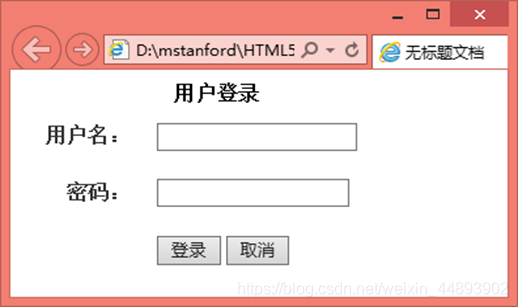
示例:
<body>

      <form>

            <table class="form_table">

	   <caption><b> 用户登录 </b></caption>

	   <col width="90px" /><col />

	   <tr><th> 用户名:</th>

	   <td><input type="text" name="admin_name" alt=" 请填写用户名 " /></td>

	   </tr><tr><th> 密码:</th>

	   <td><input type="password" name="password" alt=" 请填写密码 " /></td>

	   </tr><tr><th></th>

	   <td><input type="submit" value=" 登录 " /><input type="reset" value=" 取消 " />

	   </td>

	   </tr></table>

	</form>

</body>
<style type="text/css">

	.form_table {

		margin-top: 10px;  width: 300px;

	}

	.form_table th {

		color: #333333;    font-weight: bold;

		padding: 5px 8px 5px 0;

		text-align: right; 	  white-space: nowrap;

	}

	.form_table td {

		color: #717171;	 line-height: 200%;

		padding: 6px 0 5px 10px;  text-align: left;

	}

</style>
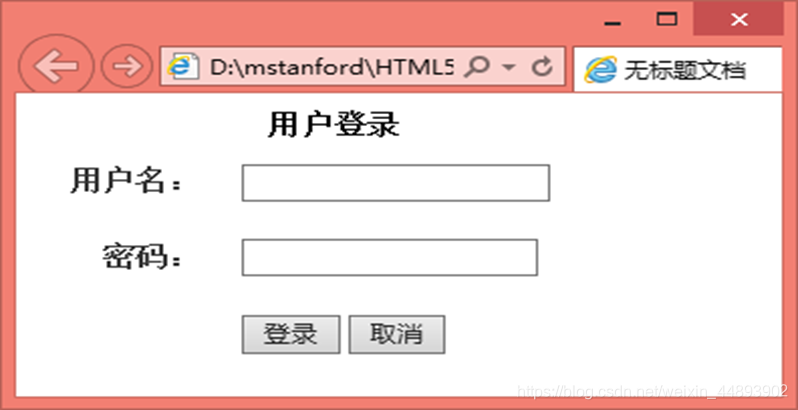
th里面的文本在一行显示
td里面内容左边对齐
8.2 流式布局
流式布局不受窗口宽度影响,使用百分比宽度来限定布局元素,这样可以根据客户端分辨率的大小来进行合理的显示。即从左到右对该容器中的控件进行布局,当一行不能容纳时自动换行。该布局是从左到右,然后从上到下。
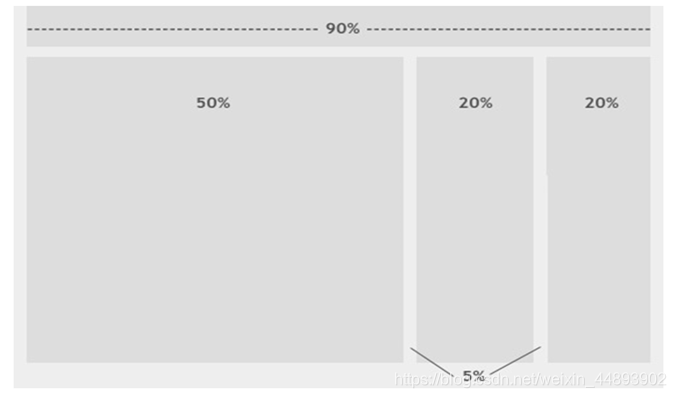
流式布局是默认的页面布局方式。流式布局用百分比来做,简单明了又实用。
8.2.1 瀑布流布局
瀑布流布局是流式布局的一种,是当下比较流行的一种网站页面布局,视觉表现为参差不齐的多栏布局,随着页面滚动条向下滚动,这种布局还会不断加载数据块并附加至当前尾部。
示例:
<body>

	<h1> 流式布局 </h1>

	<img src="logo.jpg">

	<p>

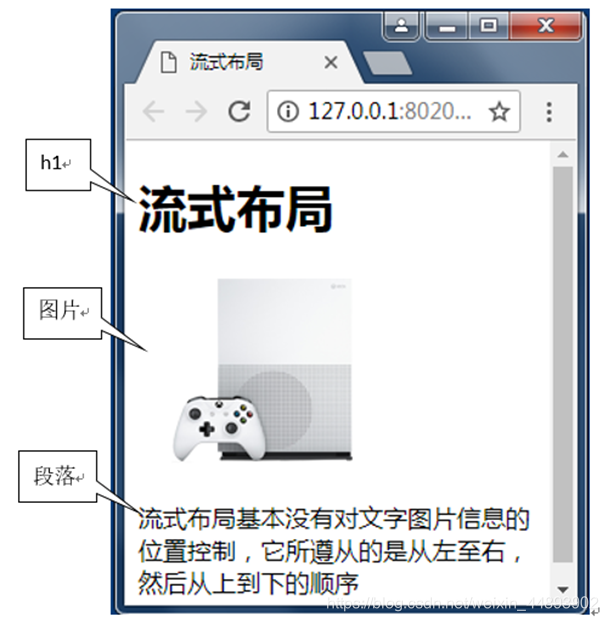
	流式布局基本没有对文字图片信息的位置控制,它所遵从的是从左至右,然后从上到下的顺序

	</p>

</body>
8.2.2 masonry 实现瀑布流布局
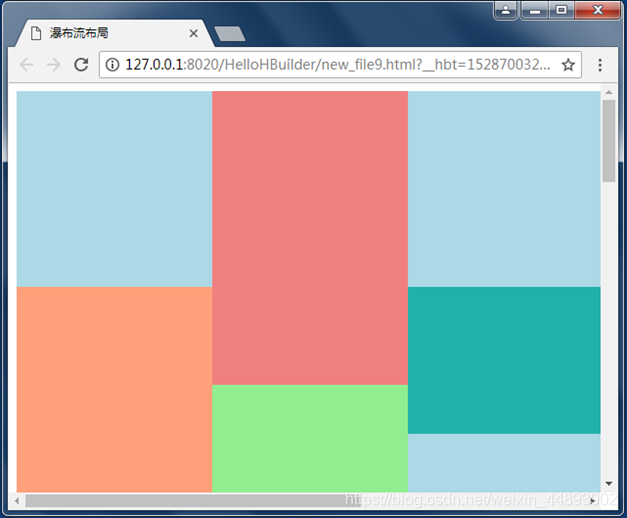
masonry 是一个 javascript 插件,通过该插件可以轻松实现瀑布流布局,和 CSS 中 float 的效果不太一样的地方在于 float 先水平排列,然后再垂直排列,使用 masonry 则垂直排列元素,然后将下一个元素放置到网格中的下一个开发区域。这种效果可以最小化处理 不同高度的元素在垂直方向的间隙。
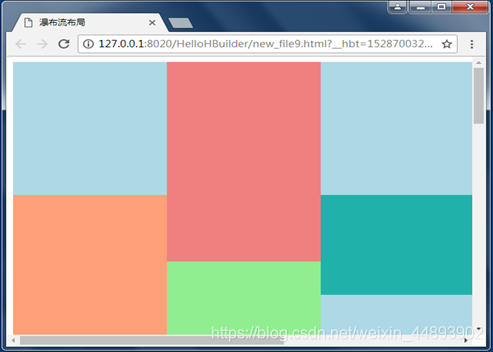
示例:
<body>

	<div id="grid">

	<div class="grid-item a">

	</div>

	<div class="grid-item b">

	</div>

	......

	<div class="grid-item d">

	</div>

	<div class="grid-item e">

	</div>

	</div>

</body>
<style type="text/css">

#grid { width: 1000px;margin: 0 auto;}

.grid-item { width: 200px;float: left;}

.a { background: lightblue;height: 200px;}

.b { background: lightcoral; height: 300px;}

.c { background: lightgreen;height: 500px;}

.d { background: lightsalmon;height: 350px;}

.e { background: lightseagreen;height: 150px;}

</style>
<script src="masonry.pkgd.min.js"></script>

<script type="text/javascript">

	var msnry = new Masonry('#grid', {

		itemSelector: '.grid-item',

		columnWidth: 200

	});

</script>
8.3 div 布局
传统的表格排版是通过大小不一的表格和表格嵌套来定位排版网页内容,改用 CSS 排版后,就是通过由 CSS 定义的大小不一的盒子和盒子嵌套来编排网页。因为用这种方式排版的网页代码简洁,更新方便,能兼容更多的浏览器。
CSS 的盒子模式div 排版的核心所在。

8.3.1 上下结构
上下结构布局的用处一般用来做背景图,外围是灰色的,当中页面的正文底是白色的,非常大气。这是最常见的,也是最简单的页面表现形式,头部放 Logo 和 banner,下面是主体内容。

示例:
<body>

	<div id="container">

		<div id="header">这是头部</div>

		<div id="mainContent">

			<p>这是主体</p>

		</div>

	</div>

</body>
<style type="text/css">

	body {font-family: Verdana;font-size: 14px;margin: 0;background: #E9E9E9;

	}

	#container {margin: 0 auto;width: 900px;background: #FFFFFF;padding: 15px;	}

	#header {height: 100px; background: #6cf; margin-bottom: 5px;

	}

	#mainContent {height: 300px; background: #cff; margin-bottom: 5px;

	}

</style>
8.3.2 上中下结构
上下结构也是一种常见的页面表现形式,头部放 Logo 和 banner,中间是主体内容,尾部放版权等内容。
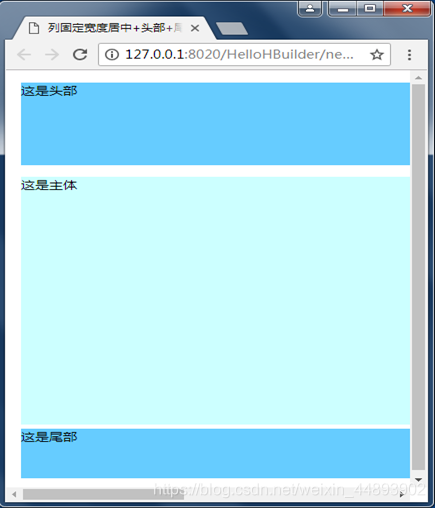
示例:
<body>

	<div id="container">

		<div id="header">这是头部</div>

		<div id="mainContent">

			<p>这是主体</p>

		</div>

		<div id="footer">这是尾部</div>

	</div>

</body>
<style type="text/css">

	body { font-family: Verdana; font-size: 14px; margin: 0; background: #E9E9E9;	}

	#container { margin: 0 auto; width: 900px; background: #FFFFFF; padding: 15px;	}

	#header { height: 100px; background: #6cf; margin-bottom: 5px;	}

	#mainContent { height: 300px; background: #cff; margin-bottom: 5px;	}

	#footer { height: 60px; background: #6cf;}

</style>
8.3.3 上导航中下结构
一个标准的网站都有导航,这是最常用的页面表现形式。
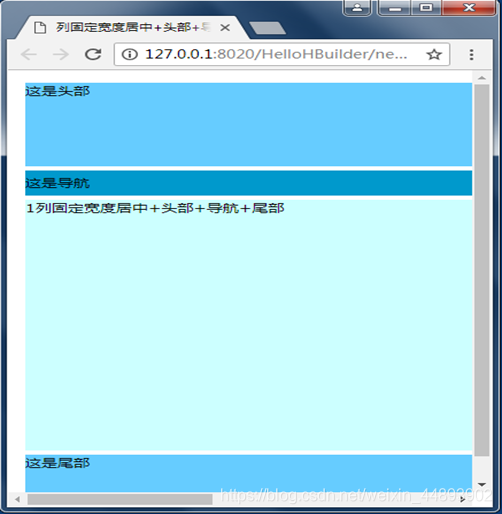
示例:
<body>

	<div id="container">

		<div id="header">这是头部</div>

		<div id="menu">这是导航</div>

		<div id="mainContent">

			<p>1列固定宽度居中+头部+导航+尾部</p>

		</div>

		<div id="footer">这是尾部</div>

	</div>

</body>
<style type="text/css">

	body {font-family: Verdana;font-size: 14px;margin: 0;background: #E9E9E9;}

	p {margin: 0;}

	#container {margin: 0 auto;width: 900px;background: #FFFFFF;padding: 15px;}

	#header {height: 100px;background: #6cf;margin-bottom: 5px;}

	#menu {height: 30px;background: #09c;margin-bottom: 5px;line-height: 30px}

	#mainContent {height: 300px;background: #cff;margin-bottom: 5px;}

	#footer {height: 60px;background: #6cf;}

</style>
8.3.4 左窄右宽
div 左右布局是 CSS 中较为复杂的。
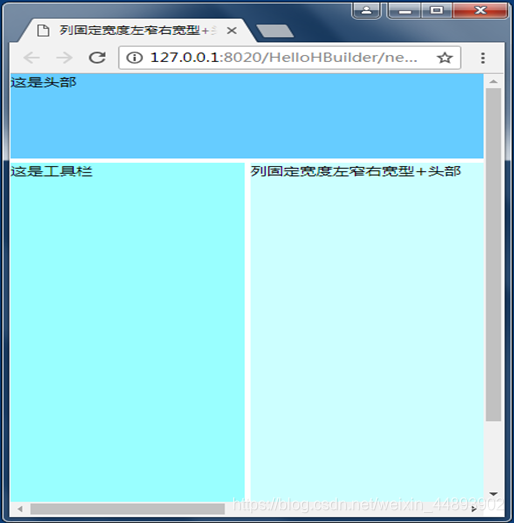
示例:
<body>

	<div id="container">

		<div id="header">这是头部</div>

		<div id="mainContent">

			<div id="sidebar">这是工具栏</div>

			<div id="content">列固定宽度左窄右宽型+头部</div>

		</div>

	</div>

</body>
<style type="text/css">

	body {font-family: Verdana;font-size: 14px;margin: 0;}

	#container {margin: 0 auto;width: 900px;}

	#header {height: 100px;background: #6cf;margin-bottom: 5px;}

	#mainContent {margin-bottom: 5px;}

	#sidebar {float: left;width: 200px;height: 500px;background: #9ff;}

	#content {float: right;width: 695px;height: 500px;background: #cff;}

</style>
8.4 div 高级
8.4.1 内容左中右
内容左中右布局是 div 中较为复杂的 3 列并排居中布局。
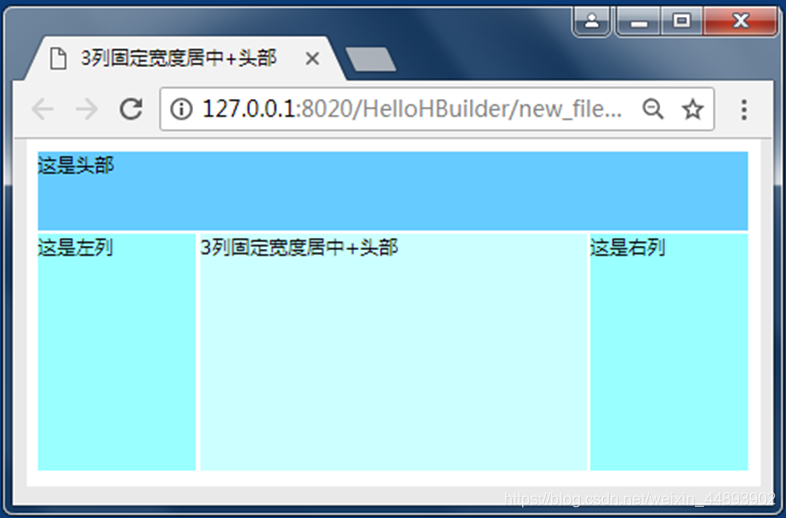
示例:
<body>

	<div id="container">

		<div id="header">这是头部</div>

		<div id="mainContent">

			<div id="sidebar">这是左列</div>

			<div id="sidebar2">这是右列</div>

			<div id="content">3列固定宽度居中+头部</div>

		</div>

	</div>

</body>
<style type="text/css">

	body { font-family: Verdana;font-size: 14px;margin: 0;background: #E9E9E9;}

	#container {margin: 0 auto;width: 900px;background: #FFFFFF;padding: 15px;}

	#header {height: 100px;background: #6cf;margin-bottom: 5px;}

	#mainContent {height: 300px;margin-bottom: 5px;}

	#sidebar {float: left;width: 200px;height: 300px;background: #9ff;}

	#sidebar2 {float: right;width: 200px;height: 300px;background: #9ff;}

	#content {margin: 0 205px;height: 300px;background: #cff;}

</style>
8.4.2 导航内容左中右
导航内容左中右布局是 3 列并排居中配上头部和尾部,这是国外 BLOG 经常使用的格式。

示例:
<body>

	<div id="container">

		<div id="header">这是头部</div>

		<div id="menu">这是导航</div>

		<div id="mainContent">

			<div id="sidebar">这是左列</div>

			<div id="sidebar2">这是右列</div>

			<div id="content">3列固定宽度居中+头部+尾部</div>

		</div>

		<div id="footer">这是尾部</div>

	</div>

</body>
<style type="text/css">

	body {font-family: Verdana;font-size: 14px;margin: 0;background: #E9E9E9;}

	#container {margin: 0 auto;width: 900px;background: #FFFFFF;padding: 15px;}

	#header {height: 100px;background: #6cf;margin-bottom: 5px;}

	#menu {height: 30px;background: #09c;margin-bottom: 5px;line-height: 30px;}

	#mainContent {height: 300px;margin-bottom: 5px;}

	#sidebar {float: left;width: 200px;height: 300px;background: #9ff;}

	#sidebar2 {float: right;width: 200px;height: 300px;background: #9ff;}

	#content {margin: 0 205px;height: 300px;background: #cff;}

	#footer {height: 60px;background: #6cf;}

</style>
8.4.3 内容右窄左宽
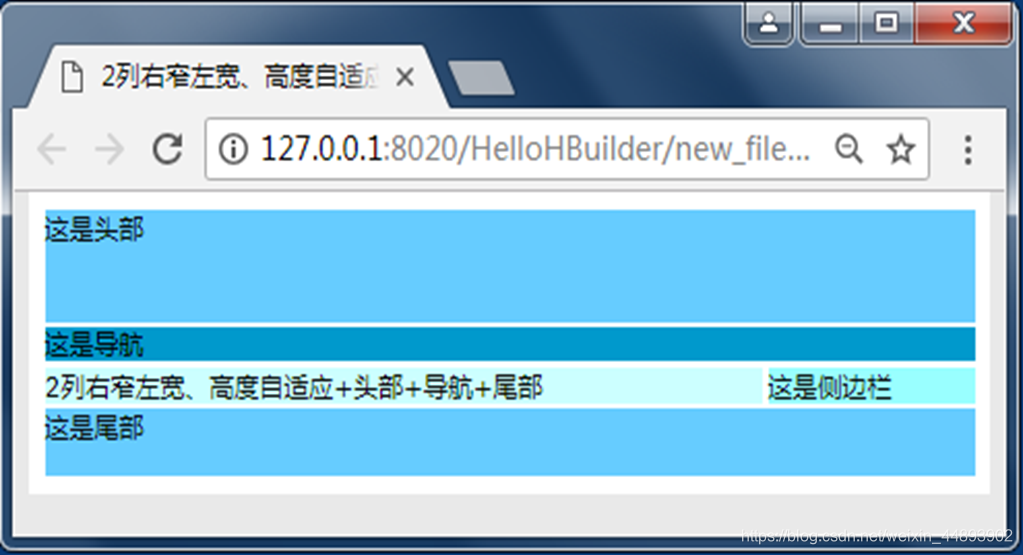
示例:
<body>

	<div id="container">

		<div id="header">这是头部</div>

		<div class="clearfloat"></div>

		<div id="menu">这是导航</div>

		<div class="clearfloat"></div>

		<div id="mainContent">

			<div id="sidebar">这是侧边栏</div>

			<div id="content">2列右窄左宽、高度自适应+头部+导航+尾部</div>

		</div>

		<div class="clearfloat"></div>

		<div id="footer">这是尾部</div>

	</div>

</body>
<style type="text/css">

	body {font-family: Verdana;font-size: 14px;margin: 0;background: #E9E9E9;}

	.clearfloat {clear: both;height: 0;font-size: 1px;line-height: 0px;}

	#container {margin: 0 auto;width: 900px;background: #FFFFFF;padding: 15px;}

	#header {height: 100px;background: #6cf;margin-bottom: 5px;}

	#menu {height: 30px;background: #09c;margin-bottom: 5px;line-height: 30px}

	#mainContent {}

	#sidebar {float: right;width: 200px;background: #9ff;margin-bottom: 5px;}

	#content {float: left;width: 695px;background: #cff;margin-bottom: 5px;}

	#footer {height: 60px;background: #6cf;}

</style>
8.4.4 内容左窄右宽

示例:
<body>

	<div id="container">

		<div id="header">这是头部</div>

		<div class="clearfloat"></div>

		<div id="menu">这是导航</div>

		<div class="clearfloat"></div>

		<div id="mainContent">

			<div id="sidebar">这是侧边栏</div>

			<div id="content">

			2列左窄右宽高度自适应且未知高度底部平齐+头部+导航+尾部

			</div>

		</div>

		<div class="clearfloat"></div>

		<div id="footer">这是尾部</div>

	</div>

</body>
<style type="text/css">

	body {font-family: Verdana;font-size: 14px;margin: 0;background: #E9E9E9;}

	.clearfloat {clear: both;height: 0;font-size: 1px;line-height: 0px;}

	#container {margin: 0 auto;width: 900px;background: #FFFFFF;padding: 15px;}

	#header {height: 100px;background: #6cf;margin-bottom: 5px;}

	#menu {height: 30px;background: #09c;margin-bottom: 5px;line-height: 30px}

	#mainContent {}

	#sidebar {float: left;width: 200px;background: #9ff;margin-bottom: 5px;}

	#content {float: right;width: 695px;background: #cff;margin-bottom: 5px;}

	#footer {height: 60px;background: #6cf;}

</style>
总结:
- 传统表格布局方式实际上利用了 table 标签所具有的无边框特性,因此可以将网页中的内容按版式划分放入表格的各单元格中,从而实现复杂的排版组合。
- 表格布局一般设置的样式有table样式、th样式和td样式
- 流式布局不受窗口宽度影响,流式布局使用百分比宽度来限定布局元素,这样可以根据客户端分辨率的大小来进行合理的显示。
- div简单布局控制头部、导航、内容和脚部。
- div复杂布局控制头部、导航、内容左边、内容中间、内容右边和脚部。
HTML网页设计基础笔记 • 【第8章 页面布局与规划】的更多相关文章
- HTML网页设计基础笔记 • 【目录】
持续更新中- 我的大学笔记>>> 章节 内容 第1章 HTML网页设计基础笔记 • [第1章 HTML5基础] 第2章 HTML网页设计基础笔记 • [第2章 排列页面内容] 第3章 ...
- HTML网页设计基础笔记 • 【第2章 排列页面内容】
全部章节 >>>> 本章目录 2.1 音频标签和视频标签 2.1.1 音频标签 2.1.2 视频标签 2.2 列表.div 以及 span 标签 2.2.1 列表标签 2. ...
- HTML网页设计基础笔记 • 【第4章 CSS3基础】
全部章节 >>>> 本章目录 4.1 CSS 概述 4.1.1 CSS 简介 4.1.2 CSS3 基本语法 4.1.3 样式表的分类 4.2 CSS 基本选择器 4.2. ...
- 学习笔记 第十一章 CSS3布局基础
第11章 CSS3布局基础 [学习重点] 了解CSS2盒模型. 设计边框样式. 设计边界样式. 设计补白样式. 了解CSS3盒模型. 11.1 CSS盒模型基础 页面中所有元素基本显示形态为方形 ...
- CSS3与页面布局学习笔记(四)——页面布局大全(负边距、双飞翼、多栏、弹性、流式、瀑布流、响应式布局)
一.负边距与浮动布局 1.1.负边距 所谓的负边距就是margin取负值的情况,如margin:-100px,margin:-100%.当一个元素与另一个元素margin取负值时将拉近距离.常见的功能 ...
- HTML5+CSS3学习笔记(二) 页面布局:HTML5新元素及其特性
HTML5的语义化标签以及属性,可以让开发者非常方便地实现清晰的web页面布局,加上CSS3的效果渲染,快速建立丰富灵活的web页面显得非常简单. 本次学习HTML5的新标签元素有: <head ...
- HTML5/CSS3 第三章页面布局
页面布局 1 页面组成 2 布局相关的标签 <div></div> 定义文档中的分区或节 <span></span> 这是一个行内元素,没有任何意义 & ...
- HTML网页设计基础笔记 • 【第6章 背景和阴影】
全部章节 >>>> 本章目录 6.1 背景属性 6.1.1 背景颜色 6.1.2 背景图片 6.1.3 背景图片的重复方式 6.2 背景图片的定位 6.2.1 backg ...
- HTML网页设计基础笔记 • 【第5章 常用的样式属性】
全部章节 >>>> 本章目录 5.1 字体及文本属性 5.1.1 字体属性 5.1.2 文本属性 5.2 边距和填充 5.2.1 边距 5.2.2 填充 5.3 边框属性 ...
随机推荐
- 爬虫系列:存储 CSV 文件
上一期:爬虫系列:存储媒体文件,讲解了如果通过爬虫下载媒体文件,以及下载媒体文件相关代码讲解. 本期将讲解如果将数据保存到 CSV 文件. 逗号分隔值(Comma-Separated Values,C ...
- Spring DM 2.0 环境配置 解决Log4j问题
搭建 spring dm 2.0 环境出的问题 log4j 的问题解决办法是 一.引入SpringDM2.0的Bundle,最后完成如下图所示:注意:要引入slf4j.api.slf4j.log4j. ...
- 【C/C++】例题5-4 反片语/算法竞赛入门经典/C++与STL入门/映射:map
本题是映射:map的例题. map:键值对. [题目] 输入一些单词,找出所有满足如下条件的单词:该单词不能通过字母重排,得到输入文本中的另外一个单词. 在判断是否满足条件时,字母不分大小写,但在输出 ...
- python的随机森林模型调参
一.一般的模型调参原则 1.调参前提:模型调参其实是没有定论,需要根据不同的数据集和不同的模型去调.但是有一些调参的思想是有规律可循的,首先我们可以知道,模型不准确只有两种情况:一是过拟合,而是欠拟合 ...
- 深入.NET框架与面向对象的回顾
.NET DOTNET DNET 点NET(.NET框架支持跨语言开发.如C#,VB .NET ,C++.NET,F# ,lronRuby,Others) 任何人,在任何地方,使用任何终端设备,都能访 ...
- C# 编写一个小巧快速的 Windows 动态桌面软件
开源自己前段时间使用 C# 编写的 Windows 动态桌面软件,在接下来的博客我将描写一些技术细节和遇到的一些坑.这个软件可以把视频设置成桌面背景播放,不仅如此而且还可以把网页或一个网页文件设置成桌 ...
- 转:Java多线程基础问题
如果你即将去一家从事大型系统研发的公司进行Java面试,不可避免的会有多线程相关的问题.下面是一些针对初学者或者新手的问题,如果你已经具备良好的基础,那么你可以跳过本文,直接尝试针对进阶水平的Java ...
- Linux目录基础
一.解析映射文件 本地的DNS Linux: /etc/hosts Windows:C:\Windows\System32\drivers\etc\hosts 二.磁盘挂载文件 /etc/fstab ...
- 『忘了再学』Shell基础 — 2、Shell的作用与分类
目录 1.Shell的作用 2.Shell的分类 1.Shell的作用 Shell除了能解释用户输入的命令,将它传递给内核,还可以: 调用其他程序,给其他程序传递数据或参数,并获取程序的处理结果. 在 ...
- CF1003C Intense Heat 题解
Content 给定一个长度为 \(n\) 的数列,求数列中所有长度 \(\geqslant k\) 的区间的最大平均值. 数据范围:\(1\leqslant k,n,a_i\leqslant 500 ...