
SpringCloud 2020.0.4 系列之 Bus
1. 概述
老话说的好:会休息的人才更会工作,身体是革命的本钱,身体垮了,就无法再工作了。
言归正传,之前我们聊了 SpringCloud 的 分布式配置中心 Config,文章里我们聊了config配置的动态刷新,但这个动态刷新,一次只能刷新一个 Config Client 节点,如果服务节点少还好,如果业务多了,有成百上千个服务节点,再一台一台刷新,就不合适了。
因此,今天我们来聊聊 SpringCloud的消息总线组件 Bus,Bus 组件可以借助MQ中间件,向所有的 Config Client 发送刷新广播,只需要调用一个接口,就可以刷新整个集群的Config 配置。
我们使用 RabbitMQ 作为中间件,关于 RabbitMQ 集群的搭建,可参见我的另一篇文章《RabbitMQ 3.9.7 镜像模式集群的搭建》(https://www.cnblogs.com/w84422/p/15356202.html)。
闲话不多说,直接上代码。
2. Git 准备
1)创建一个 repository,用于放置配置文件,例如:my-config-repo
2)创建 my-bus-client 文件夹
3)在 my-bus-client 文件夹下,新建 my-bus-client-dev.yml 配置文件,内容如下:
info:

  profile: dev

name: zhuifengren

desc: hello dev
3. Config Server 引入 Bus 组件
3.1 主要依赖
        <dependency>

            <groupId>org.springframework.cloud</groupId>

            <artifactId>spring-cloud-starter-netflix-eureka-client</artifactId>

        </dependency>

        <dependency>

            <groupId>org.springframework.cloud</groupId>

            <artifactId>spring-cloud-config-server</artifactId>

        </dependency>

        <dependency>

            <groupId>org.springframework.cloud</groupId>

            <artifactId>spring-cloud-starter-bootstrap</artifactId>

            <version>3.0.2</version>

        </dependency>

        <dependency>

            <groupId>org.springframework.cloud</groupId>

            <artifactId>spring-cloud-starter-bus-amqp</artifactId>

        </dependency>

        <dependency>

            <groupId>org.springframework.boot</groupId>

            <artifactId>spring-boot-starter-actuator</artifactId>

        </dependency>
3.2 application.yml 配置
server:

  port: 42000

spring:

  application:

    name: my-bus-server

  rabbitmq:

    addresses: 192.168.1.22:5672,192.168.1.12:5672,192.168.1.11:5672  # rabbitmq 集群的地址

    username: guest

    password: guest

    virtual-host: /

    connection-timeout: 16000

  cloud:

    config:

      server:

        git:

          uri: https://github.com/w84422/my-config-repo.git   # git地址

          force-pull: true  # 强制拉取资源文件

          default-label: main   # 默认拉取的分支

          search-paths: '{application}'      # 将配置文件放到接入方服务名称对应的文件夹下,这种写法,只在config组件设置生效

management:

  endpoints:

    web:

      exposure:

        include: '*'

  endpoint:

    health:

      show-details: always

eureka:

  client:

    service-url:

      defaultZone: http://zhuifengren1:35000/eureka/,http://zhuifengren2:35001/eureka/    # Eureka Server的地址
3.3 启动类增加注解
@SpringBootApplication

@EnableConfigServer

@EnableDiscoveryClient

public class MyBusServerApplication {

    public static void main(String[] args) {

        SpringApplication.run(MyBusServerApplication.class, args);

    }

}
3.4 启动 Config Server
启动 Config Server
4. Config Client 引入 Bus 组件
4.1 主要依赖
        <dependency>

            <groupId>org.springframework.cloud</groupId>

            <artifactId>spring-cloud-starter-netflix-eureka-client</artifactId>

        </dependency>

        <dependency>

            <groupId>org.springframework.boot</groupId>

            <artifactId>spring-boot-starter-web</artifactId>

        </dependency>

        <dependency>

            <groupId>org.springframework.cloud</groupId>

            <artifactId>spring-cloud-starter-config</artifactId>

            <version>3.0.4</version>

        </dependency>

        <dependency>

            <groupId>org.springframework.cloud</groupId>

            <artifactId>spring-cloud-starter-bootstrap</artifactId>

            <version>3.0.2</version>

        </dependency>

        <dependency>

            <groupId>org.springframework.boot</groupId>

            <artifactId>spring-boot-starter-actuator</artifactId>

        </dependency>

        <!-- rabbitmq -->

        <dependency>

            <groupId>org.springframework.cloud</groupId>

            <artifactId>spring-cloud-starter-bus-amqp</artifactId>

        </dependency>
4.2 bootstrap.yml 配置
server:

  port: 43000

spring:

  application:

    name: my-bus-client

  rabbitmq:

    addresses: 192.168.1.22:5672,192.168.1.12:5672,192.168.1.11:5672

    username: guest

    password: guest

    virtual-host: /

    connection-timeout: 16000

  cloud:

    config:

      profile: dev  # 拉取的配置文件

      label: main   # 拉取的分支

      name: my-bus-client  # 指定远程获取配置文件的 application,默认会取 spring.application.name

      discovery:

        enabled: true

        service-id: my-bus-server    # config服务的服务名称

myDesc: ${desc}

eureka:

  client:

    service-url:

      defaultZone: http://zhuifengren1:35000/eureka/,http://zhuifengren2:35001/eureka/    # Eureka Server的地址

management:

  endpoints:

    web:

      exposure:

        include: '*'

  endpoint:

    health:

      show-details: always
4.3 启动类增加注解
@SpringBootApplication

@EnableDiscoveryClient

public class MyBusClientApplication {

    public static void main(String[] args) {

        SpringApplication.run(MyBusClientApplication.class, args);

    }

}
4.4 增加用于实验的 Controller 类
@RefreshScope

@RestController

public class MyBusClientRefreshController {

    @Value("${info.profile}")

    private String profile;

    @Value("${name}")

    private String name;

    @Value("${myDesc}")

    private String desc;

    @RequestMapping("/refresh-info")

    public String getInfo() {

        String info = "profile:" + profile + "<br>";

        info += "name:" + name + "<br>";

        info += "desc:" + desc + "<br>";

        return info;

    }

}
4.5 启动 Config Client 服务,并进行验证
4.5.1 启动 Config Client 服务
启动两个或多个 Config Client 服务
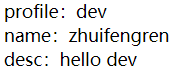
4.5.2 访问 Controller 接口,获取配置信息
GET http://localhost:43000/refresh-info
4.5.3 修改 Git 上的配置
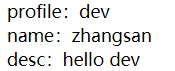
将 name 改为 zhangsan
4.5.4 执行bus配置刷新接口
在 Config Server 或 任意 Config Client 节点,执行 bus 配置刷新接口
POST http://localhost:42000/actuator/busrefresh
4.5.5 在所有 Config Client 节点调用 Controller 接口,重新获取信息
GET http://localhost:43000/refresh-info
5. 综述
今天聊了一下 SpringCloud 的 Bus 组件,希望可以对大家的工作有所帮助。
欢迎帮忙点赞、评论、转发、加关注 :)
关注追风人聊Java,每天更新Java干货。
6. 个人公众号
追风人聊Java,欢迎大家关注

SpringCloud 2020.0.4 系列之 Bus的更多相关文章
- SpringCloud 2020.0.4 系列之 Feign
1. 概述 老话说的好:任何问题都有不止一种的解决方法,当前的问题没有解决,只是还没有发现解决方法,而并不是无解. 言归正传,之前我们聊了 SpringCloud 的服务治理组件 Eureka,今天我 ...
- SpringCloud 2020.0.4 系列之 Stream 消息广播 与 消息分组 的实现
1. 概述 老话说的好:事情太多,做不过来,就先把事情记在本子上,然后理清思路.排好优先级,一件一件的去完成. 言归正传,今天我们来聊一下 SpringCloud 的 Stream 组件,Spring ...
- SpringCloud 2020.0.4 系列之 Stream 延迟消息 的实现
1. 概述 老话说的好:对待工作要有责任心,不仅要完成自己的部分,还要定期了解整体的进展. 言归正传,我们在开发产品时,常常会遇到一段时间后检查状态的场景,例如:用户下单场景,如果订单生成30分钟后, ...
- SpringCloud 2020.0.4 系列之 Stream 消息出错重试 与 死信队列 的实现
1. 概述 老话说的好:出错不怕,怕的是出了错,却不去改正.如果屡次出错,无法改对,就先记下了,然后找援军解决. 言归正传,今天来聊一下 Stream 组件的 出错重试 和 死信队列. RabbitM ...
- SpringCloud 2020.0.4 系列之Eureka
1. 概述 老话说的好:遇见困难,首先要做的是积极的想解决办法,而不是先去泄气.抱怨或生气. 言归正传,微服务是当今非常流行的一种架构方式,其中 SpringCloud 是我们常用的一种微服务框架. ...
- SpringCloud 2020.0.4 系列之服务降级
1. 概述 老话说的好:做人要正直,做事要正派,胸怀坦荡.光明磊落,才会赢得他人的信赖与尊敬. 言归正传,之前聊了服务间通信的组件 Feign,今天我们来聊聊服务降级. 服务降级简单的理解就是给一个备 ...
- SpringCloud 2020.0.4 系列之 Gateway入门
1. 概述 老话说的好:做人要有幽默感,懂得幽默的人才会活的更开心. 言归正传,今天我们来聊聊 SpringCloud 的网关组件 Gateway,之前我们去访问 SpringCloud 不同服务的接 ...
- SpringCloud 2020.0.4 系列之 JWT用户鉴权
1. 概述 老话说的好:善待他人就是善待自己,虽然可能有所付出,但也能得到应有的收获. 言归正传,之前我们聊了 Gateway 组件,今天来聊一下如何使用 JWT 技术给用户授权,以及如果在 Gate ...
- SpringCloud 2020.0.4 系列之服务降级的其他用法与熔断
1. 概述 老话说的好:控制好自己的情绪,才能控制好自己的人生.冲动是魔鬼,冷静才最重要. 言归正传,之前聊了在 Feign 调用时,如何给整个 Feign接口类 增加降级策略. 今天我们来聊一下 H ...
随机推荐
- PHP出现iconv(): Detected an illegal character in input string
PHP传给JS字符串用ecsape转换加到url里,又用PHP接收,再用网上找的unscape函数转换一下,这样得到的字符串是UTF-8的,但我需要的是GB2312,于是用iconv转换 开始是这样用 ...
- JDBC-1(概述&建立)
基于宋红康老师所讲JDBC所作笔记 1.JDBC概述 1.1 数据持久化 持久化:将数据保持到可掉电式存储设备中以供之后使用. 数据持久化意味着将内存中的数据保存到硬盘上加以固化,实现过程大多通过各种 ...
- 如何在word中美观地插入编程代码
零.缘起 在整理Java笔记时,想把代码直接贴到word文档中,原来一直截图很麻烦,所以找到以下方法. 思想:问题比答案更重要!你能想到问题,才知道去百度搜索. 一.打开网站 http://www.p ...
- 虚拟机启动jenkins,访问提示:该Jenkins实例似乎已离线
ubuntu虚拟机使用java命令启动jenkins,本地访问提示:该Jenkins实例似乎已离线. https://www.cnblogs.com/du-hong/p/10655635.html 没 ...
- 《使用Jmeter进行批量发送http请求》
本文主要针对批量接口发送数据 一:接口测试的环境准备 1:JDK的安装:网上下载即可>1.6.0版本以上 2:jemeter工具的下载 (免安装):网上下载即可 3:插件的下载安装地址:http ...
- AVS 端能力之蓝牙模块
该类为蓝牙端能力处理类,主要负责蓝牙设备配对和蓝牙音频播放功能. 功能简介 实现蓝牙设备的启动发现模式.扫描蓝牙设备.建立蓝牙连接功能 实现蓝牙设备音频播放.停止.上一首.下一首功能 其它细节参考&l ...
- 『GoLang』数组与切片
数组 数组是具有相同唯一类型的一组已编号且长度固定的数据项序列(这是一种同构的数据结构):这种类型可以是任意的原始类型例如整型.字符串或者自定义类型. 数组长度必须是一个常量表达式,并且必须是一个非负 ...
- 剑指offer计划27(栈与队列困难)---java
1.1.题目1 剑指 Offer 59 - I. 滑动窗口的最大值 1.2.解法 解题思路:(来自作者bigbeats) 相当于维护一个最大队列(队头元素最大,向队尾非严格递减) 在未形成窗口前,先构 ...
- 11.2.0.4 RAC manual opatch
1.Stop the CRS managed resources running from DB homes. If this is a GI Home environment, as the dat ...
- Spatial Analyst 工具-数学分析
数学分析 # Process: Abs arcpy.gp.Abs_sa("", 输出栅格) # Process: Exp arcpy.gp.Exp_sa("", ...