
asp.net core监控—引入Prometheus(三)
上一篇博文中说到Prometheus有四种指标类型:Counter(计数器)、Gauge(仪表盘)、Histogram(直方图)、Summary(摘要),并且我们做了一个Counter的Demo,接下来看看Gauge。
2、Gauge:仪表盘,有增有减
这个指标非常像汽车的车速表,指针是在一定范围内有增有减的。下面我们接着上一篇博文的Sample来说,现在需要实时监控处在下“单完成”,“支付完成”,“发货完成”的单据数据,和各三种状态的占比;我们知道一个订单在一个时刻只能是一种状态,我们可以在下单时增加计数order的指标,但当订单从order转到pay状态后,pay指标会增加,同时order指标会减少,这个场景就会用上了Gauge了。
有了这个思路,我们可以上手代码了,BusinessController的代码不变(因为我们实现了业务逻辑代码和监控数据指标采集分离),这里我们需要在MetricsHub.cs中添加Gauge类型的指标收集集合:
 public class MetricsHub

    {

        private static Dictionary<string, Counter> _counterDictionary = new Dictionary<string, Counter>();

        private static Dictionary<string, Dictionary<string, Gauge>> _gaugeDictionary = new Dictionary<string, Dictionary<string, Gauge>>();

        public Counter GetCounter(string key)

        {

            if (_counterDictionary.ContainsKey(key))

            {

                return _counterDictionary[key];

            }

            else

            {

                return null;

            }

        }

        public Dictionary<string, Gauge> GetGauge(string key)

        {

            if (_gaugeDictionary.ContainsKey(key))

            {

                return _gaugeDictionary[key];

            }

            else

            {

                return null;

            }

        }

        public void AddCounter(string key, Counter counter)

        {

            _counterDictionary.Add(key, counter);

        }

        public void AddGauge(string key, Dictionary<string, Gauge> gauges)

        {

            _gaugeDictionary.Add(key, gauges);

        }

    }
因为在上面分析中,我们一个动作,比如pay时,会触发两个指标的改变,order指标减少,pay指标增加,所以Gauge是一个Dictionary<string, Dictionary<string, Gauge>>类型,内部的字典存放减少和增加的Gauge的监控指标对象。
接下来就要在BusinessMetricsMiddleware的中间件中添加处理Gauge指标增加减少的代码了:
using Microsoft.AspNetCore.Http;

using PrometheusSample.Models;

using System.IO;

using System.Threading.Tasks;

namespace PrometheusSample.Middlewares

{

    /// <summary>

    /// 请求记录中间件

    /// </summary>

    public class BusinessMetricsMiddleware

    {

        private readonly RequestDelegate _next;

        public BusinessMetricsMiddleware(RequestDelegate next)

        {

            _next = next;

        }

        public async Task InvokeAsync(HttpContext context, MetricsHub metricsHub)

        {

            var originalBody = context.Response.Body;

            try

            {

                using (var memStream = new MemoryStream())

                {

                    //从管理返回的Response中取出返回数据,根据返回值进行监控指标计数

                    context.Response.Body = memStream;

                    await _next(context);

                    memStream.Position = 0;

                    string responseBody = new StreamReader(memStream).ReadToEnd();

                    memStream.Position = 0;

                    await memStream.CopyToAsync(originalBody);

                    if (metricsHub.GetCounter(context.Request.Path) != null || metricsHub.GetGauge(context.Request.Path) != null)

                    {

                        //这里约定所有action返回值是一个APIResult类型

                        var result = System.Text.Json.JsonSerializer.Deserialize<APIResult>(responseBody, new System.Text.Json.JsonSerializerOptions { PropertyNameCaseInsensitive = true });

                        if (result != null && result.Result)

                        {

                            //获取到Counter

                            var counter = metricsHub.GetCounter(context.Request.Path);

                            if (counter != null)

                            {

                                //计数

                                counter.Inc();

                            }

                            var gauges = metricsHub.GetGauge(context.Request.Path);

                            if (gauges != null)

                            {

                                //存在增加指标+就Inc

                                if (gauges.ContainsKey("+"))

                                {

                                    gauges["+"].Inc();

                                }

                                //存在减少指标-就Dec

                                if (gauges.ContainsKey("-"))

                                {

                                    gauges["-"].Dec();

                                }

                            }

                        }

                    }

                }

            }

            finally

            {

                context.Response.Body = originalBody;

            }

        }

    }

}
再就是在Starsup中配置对应url的Gauge参数了:
using Microsoft.AspNetCore.Builder;

using Microsoft.AspNetCore.Hosting;

using Microsoft.Extensions.Configuration;

using Microsoft.Extensions.DependencyInjection;

using Microsoft.Extensions.Hosting;

using Microsoft.OpenApi.Models;

using Prometheus;

using PrometheusSample.Middlewares;

using PrometheusSample.Services;

using System.Collections.Generic;

namespace PrometheusSample

{

    public class Startup

    {

        public Startup(IConfiguration configuration)

        {

            Configuration = configuration;

        }

        public IConfiguration Configuration { get; }

        public void ConfigureServices(IServiceCollection services)

        {

            MetricsHandle(services);

            services.AddScoped<IOrderService, OrderService>();

            services.AddControllers();

            services.AddSwaggerGen(c =>

            {

                c.SwaggerDoc("v1", new OpenApiInfo { Title = "PrometheusSample", Version = "v1" });

            });

        }

        public void Configure(IApplicationBuilder app, IWebHostEnvironment env)

        {

            if (env.IsDevelopment())

            {

                app.UseDeveloperExceptionPage();

                app.UseSwagger();

                app.UseSwaggerUI(c => c.SwaggerEndpoint("/swagger/v1/swagger.json", "PrometheusSample v1"));

            }

            app.UseRouting();

            //http请求的中间件

            app.UseHttpMetrics();

            app.UseAuthorization();

            //自定义业务跟踪

            app.UseBusinessMetrics();

            app.UseEndpoints(endpoints =>

            {

                //映射监控地址为  /metrics

                endpoints.MapMetrics();

                endpoints.MapControllers();

            });

        }

        /// <summary>

        /// 处理监控事项

        /// </summary>

        /// <param name="services"></param>

        void MetricsHandle(IServiceCollection services)

        {

            var metricsHub = new MetricsHub();

            //counter

            metricsHub.AddCounter("/register", Metrics.CreateCounter("business_register_user", "注册用户数。"));

            metricsHub.AddCounter("/order", Metrics.CreateCounter("business_order_total", "下单总数。"));

            metricsHub.AddCounter("/pay", Metrics.CreateCounter("business_pay_total", "支付总数。"));

            metricsHub.AddCounter("/ship", Metrics.CreateCounter("business_ship_total", "发货总数。"));

            //gauge

            var orderGauge = Metrics.CreateGauge("business_order_count", "当前下单数量。");

            var payGauge = Metrics.CreateGauge("business_pay_count", "当前支付数量。");

            var shipGauge = Metrics.CreateGauge("business_ship_count", "当前发货数据。");

            metricsHub.AddGauge("/order", new Dictionary<string, Gauge> {

                { "+", orderGauge}

            });

            metricsHub.AddGauge("/pay", new Dictionary<string, Gauge> {

                {"-",orderGauge},

                {"+",payGauge}

            });

            metricsHub.AddGauge("/ship", new Dictionary<string, Gauge> {

                {"+",shipGauge},

                {"-",payGauge}

            });

            services.AddSingleton(metricsHub);

        }

    }

}
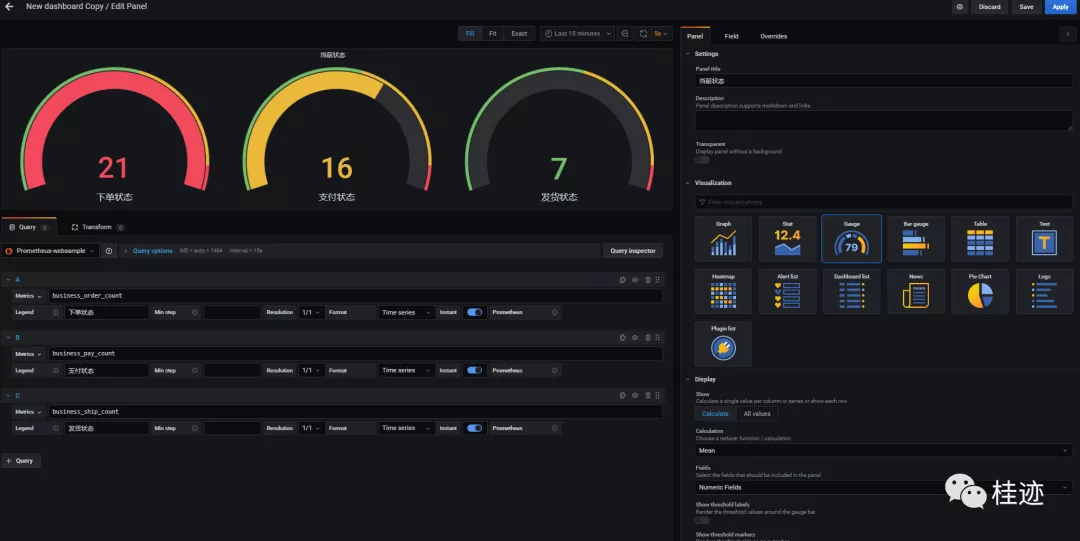
最后一步,就是打开Grafana来配置展示图表了
订单状态数据仪表盘
订单状态比例图
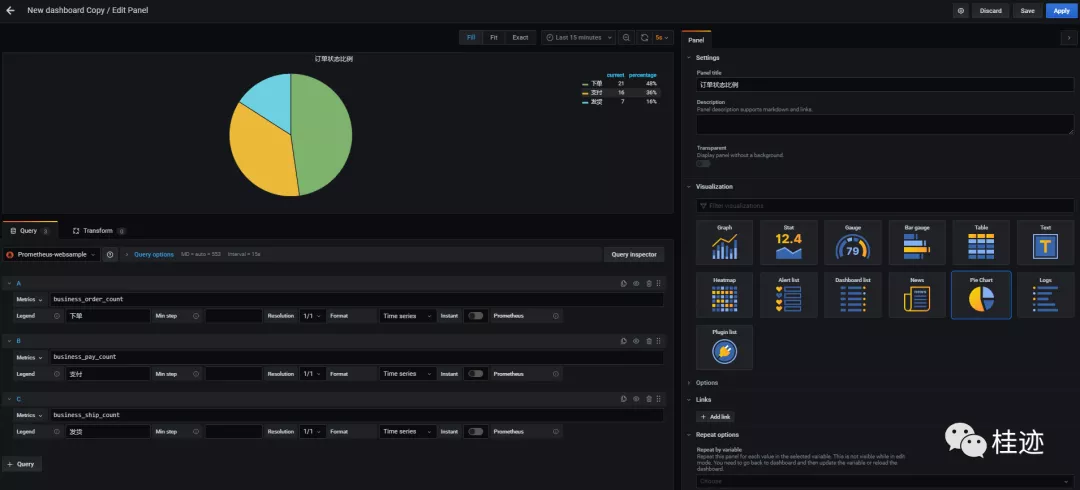
最终的展示结果

上一篇中我们说过自定义业务计数器类型的步骤,其实仪盘的步骤也一样
1、分析业务,规划好监控跟踪指标
2、定义指标收集器
3、侵入编程(尽量在开发时分离业务实现与监控指票的收集代码)收集指标
4、开发grafana展示模板,完成展示

asp.net core监控—引入Prometheus(三)的更多相关文章
- Pro ASP.NET Core MVC 6th 第三章
第三章 MVC 模式,项目和约定 在深入了解ASP.NET Core MVC的细节之前,我想确保您熟悉MVC设计模式背后的思路以及将其转换为ASP.NET Core MVC项目的方式. 您可能已经了解 ...
- 探索 ASP.Net Core 3.0系列三:ASP.Net Core 3.0中的Service provider validation
前言:在本文中,我将描述ASP.NET Core 3.0中新的“validate on build”功能. 这可以用来检测您的DI service provider是否配置错误. 具体而言,该功能可检 ...
- 从零开始一个个人博客 by asp.net core and angular(三)
这是第三篇了,第一篇只是介绍,第二篇介绍了api项目的运行和启动,如果api项目没什么问题了,调试都正常了,那基本上就没什么事了,由于这一篇是讲前端项目的,所以需要运行angular项目了,由于前端项 ...
- 022年9月12日 学习ASP.NET Core Blazor编程系列三——实体
学习ASP.NET Core Blazor编程系列一--综述 学习ASP.NET Core Blazor编程系列二--第一个Blazor应用程序(上) 学习ASP.NET Core Blazor编程系 ...
- ASP.NET Core 简单引入教程
0.简介 开源.跨平台 1.环境安装 参考官方教程 Core 官方文档 2.向世界问个好 sheel/cmd 下: dotnet --help // 查看帮助 dotnet new * / ...
- ASP.NET Core 基础知识(三) Program.cs类
ASP.NET Framework应用程序是严重依赖于IIS的,System.Web 中有很多方法都是直接调用的 IIS API,并且它还是驻留在IIS进程中的.而 ASP.NET Core 的运行则 ...
- ASP.NET Core 学习笔记 第三篇 依赖注入框架的使用
前言 首先感谢小可爱门的支持,写了这个系列的第二篇后,得到了好多人的鼓励,也更加坚定我把这个系列写完的决心,也能更好的督促自己的学习,分享自己的学习成果.还记得上篇文章中最后提及到,假如服务越来越多怎 ...
- 学习ASP.NET Core Razor 编程系列三——创建数据表及创建项目基本页面
一.创建脚本工具并执行初始迁移 在本节中,您将使用包管理控制台(PMC)来更新数据库: •添加VisualStudio Web代码生成包.这个包是运行脚本引擎所必需的. • 执行Add-Migrati ...
- ASP.NET Core Authentication系列(三)Cookie选项
前言 在本系列第一篇文章介绍了ASP.NET时代如何认证,并且介绍了如何通过web.config文件来配置Auth Cookie的选项. 第二篇文章介绍了如何使用Cookie认证,本文介绍几个常见的C ...
随机推荐
- 【LeetCode】172. Factorial Trailing Zeroes 解题报告(Java & Python)
作者: 负雪明烛 id: fuxuemingzhu 个人博客: http://fuxuemingzhu.cn/ 目录 题目描述 题目大意 递归 循环 日期 题目描述 Given an integer ...
- Amazing!!CSS 也能实现烟雾效果?
最近利用 CSS 实现了一些看似超出 CSS 能力的效果: 巧用渐变实现高级感拉满的背景光动画 Amazing!!CSS 也能实现极光? 本文继续此系列,本文主要想探讨一下,使用 CSS 能否比较好的 ...
- 【python】PyQt5 QAction 添加点击事件
def test(): #your function ui.yourQActionName.triggered.connect(lambda:test()) #添加lambda: 就不报错了
- 第二十七个知识点:什么是对称密码加密的AEAD安全定义?
第二十七个知识点:什么是对称密码加密的AEAD安全定义? AEAD 在之前的博客里,Luke描述了一种被广泛使用的操作模式(ECB,CBC和CTR)对块密码.我们也可能会想我们加密方案的完整性,完整性 ...
- 【】JSON语法RFC4627
Network Working Group D. Crockford Request for Comments: 4627 JSON.org Category: Informational July ...
- Lombok的利弊
1.介绍 Lombok是一个可以大量减少代码的工具, 通过Pluggable Annotation Processing API的方式解析注解, 在编译期为class文件注入getter,setter ...
- ActiveMQ基础教程(二):安装与配置(单机与集群)
因为本文会用到集群介绍,因此准备了三台虚拟机(当然读者也可以使用一个虚拟机,然后使用不同的端口来模拟实现伪集群): 192.168.209.133 test1 192.168.209.134 test ...
- PHP-FPM 开启慢日志记录
首先,找到 php-fpm 所在的目录: 使用 which php-fpm 使用 whereis php-fpm 然后找到 php-fpm.conf 所在的目录: 使用 ps -ef | grep p ...
- Linux 使用 tail 命令查看文件内容
使用方法: $ tail --help 用法:tail [选项]... [文件]... 以标准输出的形式打印文件的最后10行内容: 如果不指定文件,或者文件为"-",则从标准输入中 ...
- 年功序列c++游戏
题目描述 在虚拟国度里多了很多 Virtual oier,为了树立对后辈的威信,从第 11 个 Virtual oier 开始的 oier 们搞起了年功序列的制度. 虚拟国度的创始人 oier Cht ...