
Java读取图片exif信息实现图片方向自动纠正
起因
一个对试卷进行OCR识别需求,需要实现一个功能,一个章节下的题目图片需要上下拼接合成一张大图,起初写了一个工具实现图片的合并,程序一直很稳定的运行着,有一反馈合成的图片方向不对,起初怀疑是本身图片方向有问题,但是用windows图片查看器打开图片方向是正常“显示”的
定位
exif信息
查阅相关资料,图片信息中有个exif标准,exif信息如下:
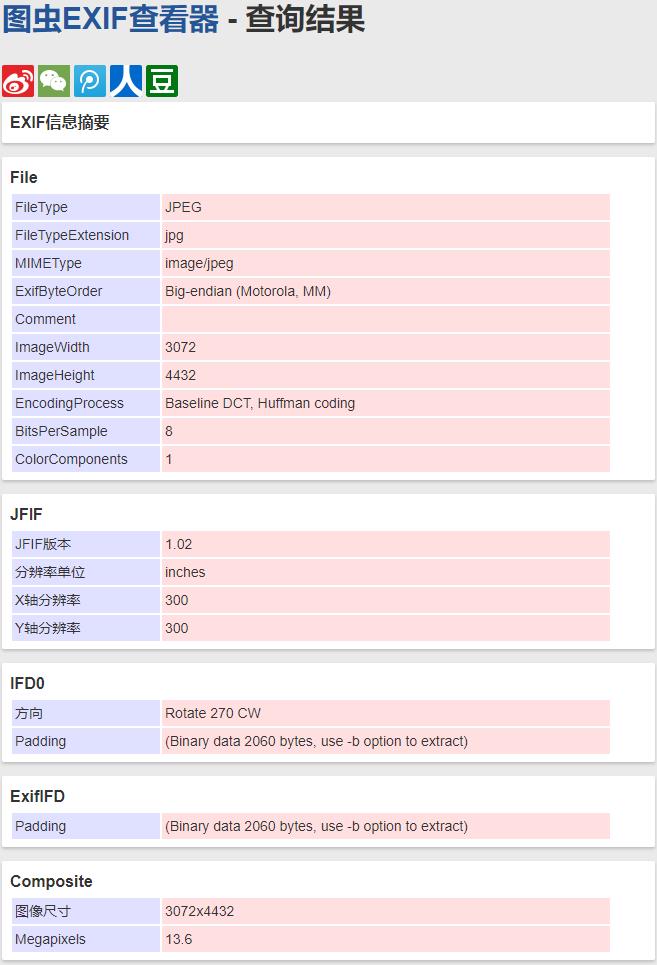
图虫exif信息查看器:https://exif.tuchong.com/
关注IFD0节点方向,Rotate 270 CW,意思图片需要顺时针旋转270°方向正常,windows默认的图片查看器已经帮我们自动旋转展示了,我们在手机横排或者扫描仪、数码相机输出的图片通常包含此类信息,但是我们java读取的是图片的真实方向,所以在生成图片方向自然也就不对了
代码
添加依赖
<dependency>

    <groupId>com.drewnoakes</groupId>

    <artifactId>metadata-extractor</artifactId>

    <version>2.15.0</version>

</dependency>
自旋转代码
旋转图片
private static void rotateImage(List<String> stringList) {

    stringList.forEach(s -> {

        File file = new File(s);

        try {

            Metadata metadata = ImageMetadataReader.readMetadata(file);

            StringBuilder description = new StringBuilder();

            metadata.getDirectories().forEach(directory -> {

                directory.getTags().forEach(tag -> {

                    if (tag.getTagType() == ExifDirectoryBase.TAG_ORIENTATION) {

                        description.append(tag.getDescription().replaceAll(" ", ""));

                    }

                });

            });

            if (description.length() > 0) {

                int rotateIndex = description.indexOf("Rotate");

                int cwIndex = description.indexOf("CW");

                if (rotateIndex >= 0 && cwIndex > 0 && rotateIndex < cwIndex) {

                    int angel = Integer.valueOf(description.substring(rotateIndex + 6, cwIndex));

                    log.info("============图片方向纠正,顺时针旋转{}°,图片路径:{}===========", angel, s);

                    BufferedImage oldImage = ImageIO.read(file);

                    BufferedImage newImage = RotateImage.Rotate(oldImage, angel);

                    ImageIO.write(newImage, "jpg", file);

                    newImage.getGraphics().dispose();

                    oldImage.getGraphics().dispose();

                }

            }

        } catch (ImageProcessingException e) {

            e.printStackTrace();

        } catch (IOException e) {

            e.printStackTrace();

        }

    });

}
图片旋转工具类
import java.awt.*;

import java.awt.image.BufferedImage;

public class RotateImage {

    /**

     * 对图片进行旋转

     *

     * @param src   被旋转图片

     * @param angel 旋转角度

     * @return 旋转后的图片

     */

    public static BufferedImage Rotate(Image src, int angel) {

        int srcWidth = src.getWidth(null);

        int srcHeight = src.getHeight(null);

        // 计算旋转后图片的尺寸

        Rectangle rect_des = CalcRotatedSize(new Rectangle(new Dimension(

            srcWidth, srcHeight)), angel);

        BufferedImage res = null;

        res = new BufferedImage(rect_des.width, rect_des.height,

            BufferedImage.TYPE_INT_RGB);

        Graphics2D g2 = res.createGraphics();

        // 进行转换

        g2.translate((rect_des.width - srcWidth) / 2,

            (rect_des.height - srcHeight) / 2);

        g2.rotate(Math.toRadians(angel), srcWidth / 2, srcHeight / 2);

        g2.drawImage(src, null, null);

        return res;

    }

    /**

     * 计算旋转后的图片

     *

     * @param src   被旋转的图片

     * @param angel 旋转角度

     * @return 旋转后的图片

     */

    public static Rectangle CalcRotatedSize(Rectangle src, int angel) {

        // 如果旋转的角度大于90度做相应的转换

        if (angel >= 90) {

            if (angel / 90 % 2 == 1) {

                int temp = src.height;

                src.height = src.width;

                src.width = temp;

            }

            angel = angel % 90;

        }

        double r = Math.sqrt(src.height * src.height + src.width * src.width) / 2;

        double len = 2 * Math.sin(Math.toRadians(angel) / 2) * r;

        double angelAlpha = (Math.PI - Math.toRadians(angel)) / 2;

        double angelDeltaWidth = Math.atan((double) src.height / src.width);

        double angelDeltaHeight = Math.atan((double) src.width / src.height);

        int lenDeltaWidth = (int) (len * Math.cos(Math.PI - angelAlpha

            - angelDeltaWidth));

        int lenDeltaHeight = (int) (len * Math.cos(Math.PI - angelAlpha

            - angelDeltaHeight));

        int desWidth = src.width + lenDeltaWidth * 2;

        int desHeight = src.height + lenDeltaHeight * 2;

        return new Rectangle(new Dimension(desWidth, desHeight));

    }

}
测试代码
public static void main(String[] args) throws ImageProcessingException, IOException {

    File file = new File("D:\\temp\\error_direction");

    List<String> stringList = Arrays.asList(file.listFiles()).stream().map(File::getAbsolutePath).collect(Collectors.toList());

    rotateImage(stringList);

}
控制台日志如下:
18:52:40.066 [main] INFO ============图片方向纠正,顺时针旋转270°,图片路径:D:\temp\error_direction\185.jpg===========

18:52:40.879 [main] INFO ============图片方向纠正,顺时针旋转90°,图片路径:D:\temp\error_direction\186.jpg===========
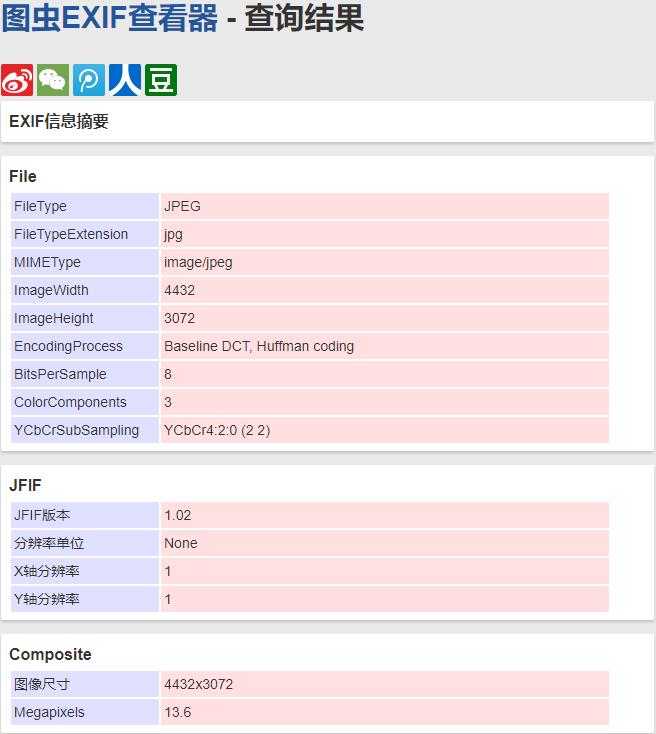
至此,我们原始图片的方向被纠正了,我们再来看下纠正之后的图片的exif信息,发现旋转信息已经没有了
Java读取图片exif信息实现图片方向自动纠正的更多相关文章
- Android 图片Exif信息相关的获取与修改
1 Exif是什么 Exif是一种图像文件格式,它的数据存储于JPEG格式是完全相同的,实际上Exif格式就是JPEG格式头插入了 数码照片的信息,包括拍摄的光圈.快门.平衡白.ISO.焦距.日期时间 ...
- Android--操作图片Exif信息
前言 在Android系统中,图片文件在内存中以像素点的二维数组加载,存放像素信息,还会在开头加上一些额外的照片拍摄参数信息,这些信息就是Exif.Android2.0之后,媒体库加入了操作图片Exi ...
- Android -- 加载大图片到内存,从gallery获取图片,获取图片exif信息
1. 加载大图片到内存,从gallery获取图片 android默认的最大堆栈只有16M, 图片像素太高会导致内存不足的异常, 需要将图片等比例缩小到适合手机屏幕分辨率, 再加载. 从gallery ...
- 七牛--关于图片上传方向不统一的问题--主要关于图片EXIF信息中旋转参数Orientation的理解
[图片引用方向纠正]直接在图片后面添加 ?imageMogr/auto-orient eg:http://data.upfitapp.com/data/2016/10/18/1629114767606 ...
- Android 获取图片exif信息
使用android api读取图片的exif信息 布局代码: <LinearLayout xmlns:android="http://schemas.android.com/apk/r ...
- 改动图片exif信息
我们先了解一下EXIF: EXIF能够附加于JPEG.TIFF.RIFF等文件之中.为其添加有关数码相机拍摄信息的内容和索引图或图像处理软件的版本号信息. 全部的JPEG文件以字符串"0xF ...
- 图片Exif 信息中Orientation的理解和对此的处理
这个问题是在用七牛上传图片后获取宽高时发现的,一张图片,用图片浏览器打开始终是竖图,但是查看属性或者用七牛获取宽高,却发现宽大于高,也就是在属性中这是个横图.这样导致客户端用该宽高来展示图片会出现问题 ...
- 七牛:关于图片 EXIF 信息中旋转参数 Orientation 的理解
EXIF(Exchangeable Image File)是 “可交换图像文件” 的缩写,当中包含了专门为数码相机的照片而定制的元数据,可以记录数码照片的拍摄参数.缩略图及其他属性信息,简单来说,Ex ...
- 图片Exif信息
Exif文件格式简述链接:https://www.zhihu.com/question/23727439/answer/25467748 可交换图像文件常被简称为Exif(Exchangeable i ...
随机推荐
- html5 useful skills blogs
html5 useful skills blogs preload & prefetch https://www.30secondsofcode.org/snippet/ary blogs h ...
- 【PY从0到1】 一文掌握Pandas量化进阶
# 一文掌握Pandas量化进阶 # 这节课学习Pandas更深的内容. # 导入库: import numpy as np import pandas as pd # 制作DataFrame np. ...
- 【Python】set 与 list ——如何对列表进行去重?
在Python中,形如 {1,2,3,4,5} 这样的数据类型叫做"集合",外形酷似列表list [1,2,3,4,5] 但是集合与列表有很多区别,具体表现在以下几方面: List ...
- mbatis中的#{}和${}
#{}和${}的区别是什么?a.#{}是预编译处理,${}是字符串替换. b.Mybatis 在处理#{}时,会将 sql 中的#{}替换为?号,调用 PreparedStatement 的 set ...
- javascript中的内置对象和数据结构
目录 简介 基础类型 undefined Boolean和Boolean对象 Number和BigInt String Symbol null Object Function Date Array K ...
- Bitter.NotifyOpenPaltform : HTTP 异步消息接收调度中心—开源贡献 之 一:简介
现在互联网的系统越来越趋向于复杂,从单体系统到现在的微服务体系演变.公司与公司的分工也越来越明确. 大数据公司提供了大数据服务 人脸识别公司提供了人脸识别服务 OCR 公司提供了专业的OCR 服务 车 ...
- 【翻译】Python PEP8编码规范(中文版)
原文链接:http://legacy.python.org/dev/peps/pep-0008/ item detail PEP 8 Title Style Guide for Python Code ...
- Python3+PYQT5 实现并打包exe小工具(1)
前言: 由于项目原因,配置测试环境与正式环境切换频率很高,固写了一键切换环境的工具.用于记录. 实现逻辑: 1.读取注册表中客户端的安装目录,把固定的环境配置文件添加到固定目录下实现配置测试环境: 2 ...
- Django-用户权限,用户角色使用指南
RBAC(Role-Based Access Control,基于角色的访问控制)就是用户通过角色与权限进行关联.简单地说,一个用户拥有若干角色,每一个角色拥有若干权限.这样,就构造成"用户 ...
- .NET测试--模拟框架NSubstitute
.NET测试--模拟框架NSubstitute .NET测试 NSubstitute在GitHub的开源地址:https://github.com/nsubstitute/nsubstitute/do ...