
dython:Python数据建模宝藏库
尽管已经有了scikit-learn、statsmodels、seaborn等非常优秀的数据建模库,但实际数据分析过程中常用到的一些功能场景仍然需要编写数十行以上的代码才能实现。
而今天要给大家推荐的dython就是一款集成了诸多实用功能的数据建模工具库,帮助我们更加高效地完成数据分析过程中的诸多任务:

通过下面两种方式均可完成对dython的安装:
pip install dython
或:
conda install -c conda-forge dython
dython中目前根据功能分类划分为以下几个子模块:
- data_utils
data_utils子模块集成了一些基础性的数据探索性分析相关的API,如identify_columns_with_na()可用于快速检查数据集中的缺失值情况:
>> df = pd.DataFrame({'col1': ['a', np.nan, 'a', 'a'], 'col2': [3, np.nan, 2, np.nan], 'col3': [1., 2., 3., 4.]})

>> identify_columns_with_na(df)

  column  na_count

1   col2         2

0   col1         1
identify_columns_by_type()可快速选择数据集中具有指定数据类型的字段:
>> df = pd.DataFrame({'col1': ['a', 'b', 'c', 'a'], 'col2': [3, 4, 2, 1], 'col3': [1., 2., 3., 4.]})

>> identify_columns_by_type(df, include=['int64', 'float64'])

['col2', 'col3']
one_hot_encode()可快速对数组进行独热编码:
>> one_hot_encode([1,0,5])

[[0. 1. 0. 0. 0. 0.]

 [1. 0. 0. 0. 0. 0.]

 [0. 0. 0. 0. 0. 1.]]
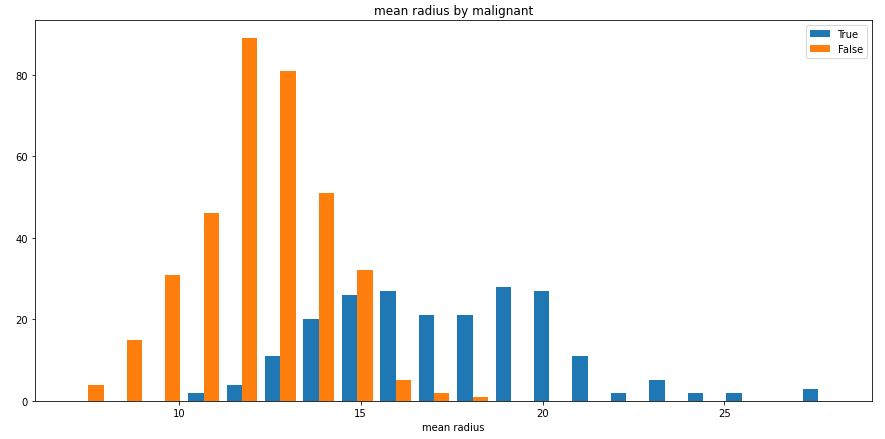
split_hist()则可以快速绘制分组直方图,帮助用户快速探索数据集特征分布:
import pandas as pd

from sklearn import datasets

from dython.data_utils import split_hist

# Load data and convert to DataFrame

data = datasets.load_breast_cancer()

df = pd.DataFrame(data=data.data, columns=data.feature_names)

df['malignant'] = [not bool(x) for x in data.target]

# Plot histogram

split_hist(df, 'mean radius', split_by='malignant', bins=20, figsize=(15,7))
- nominal
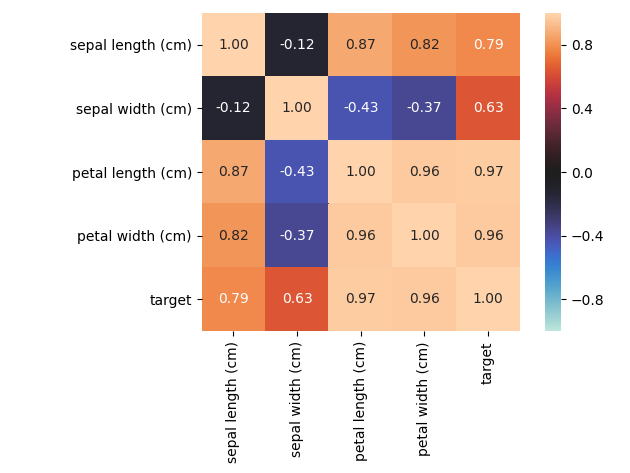
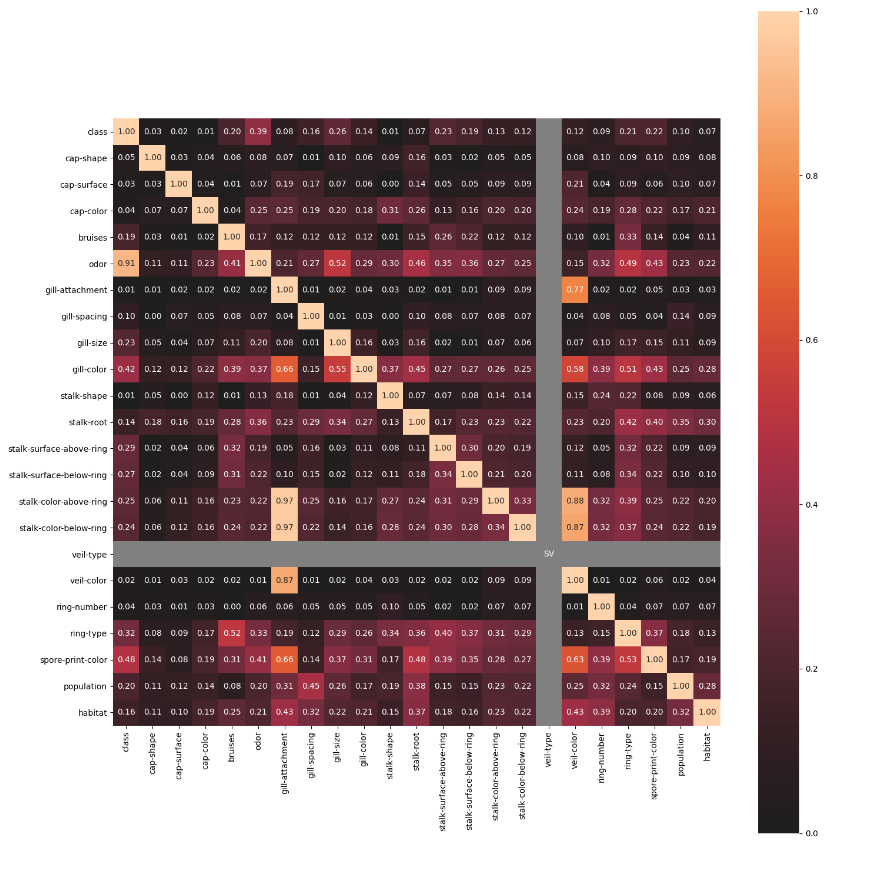
nominal子模块包含了一些进阶的特征相关性度量功能,例如其中的associations()可以自适应由连续型和类别型特征混合的数据集,并自动计算出相应的Pearson、Cramer's V、Theil's U、条件熵等多样化的系数;cluster_correlations()可以绘制出基于层次聚类的相关系数矩阵图等实用功能:
- model_utils
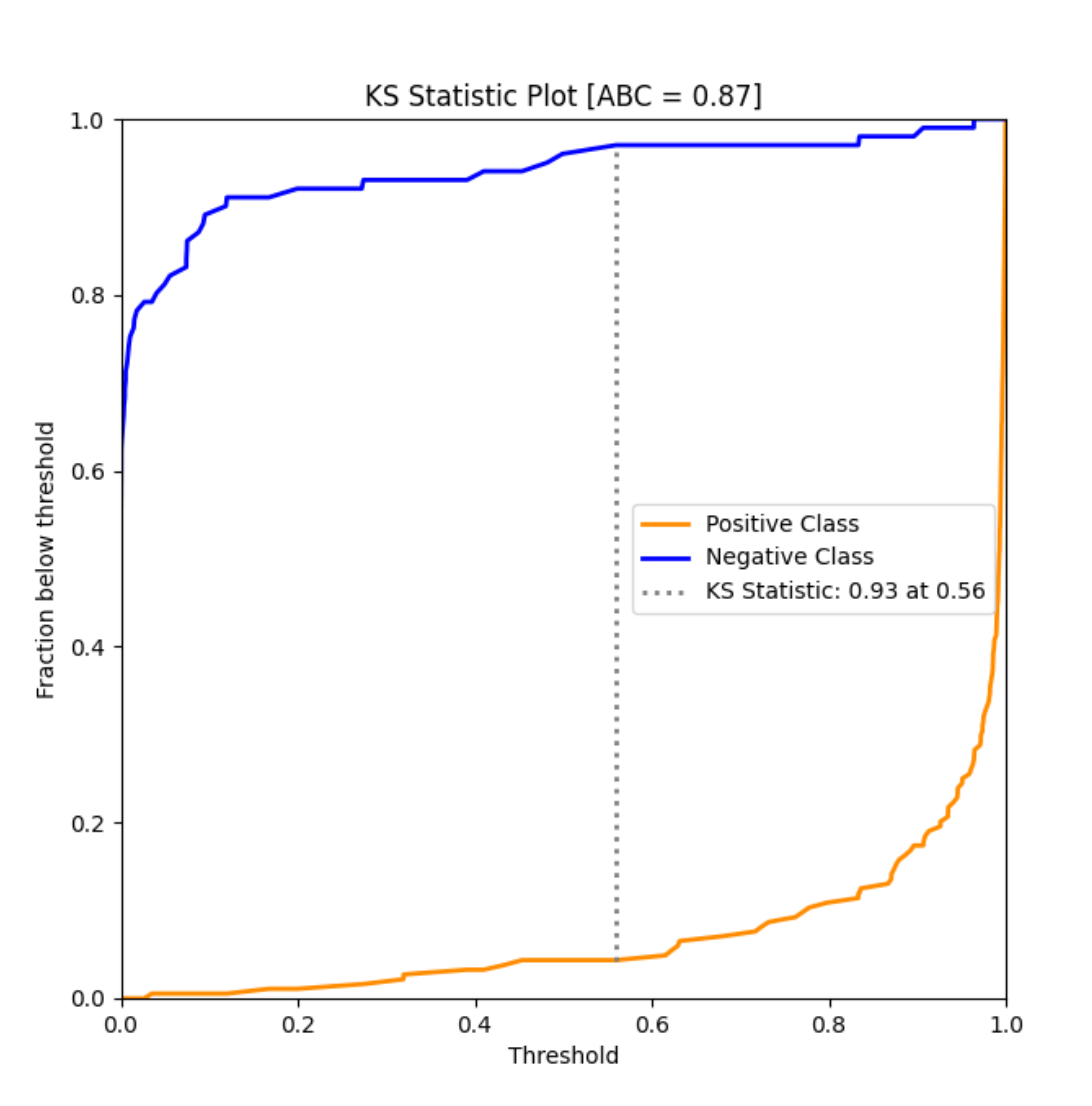
model_utils子模块包含了诸多对机器学习模型进行性能评估的工具,如ks_abc():
from sklearn import datasets

from sklearn.model_selection import train_test_split

from sklearn.linear_model import LogisticRegression

from dython.model_utils import ks_abc

# Load and split data

data = datasets.load_breast_cancer()

X_train, X_test, y_train, y_test = train_test_split(data.data, data.target, test_size=.5, random_state=0)

# Train model and predict

model = LogisticRegression(solver='liblinear')

model.fit(X_train, y_train)

y_pred = model.predict_proba(X_test)

# Perform KS test and compute area between curves

ks_abc(y_test, y_pred[:,1])
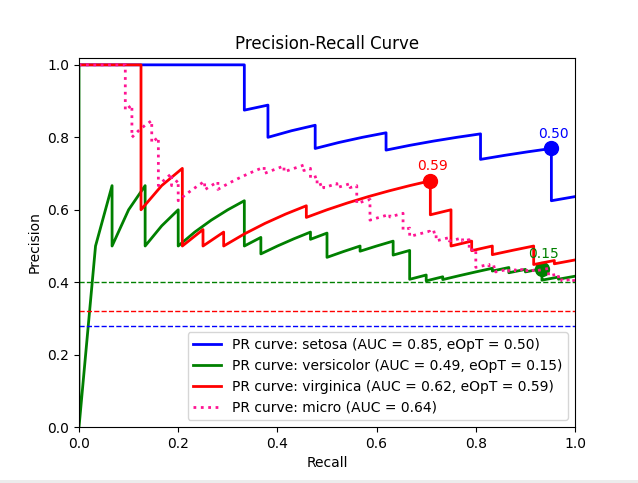
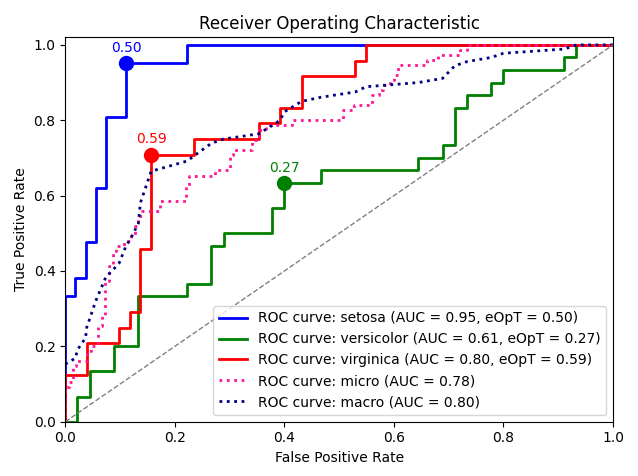
metric_graph():
import numpy as np

from sklearn import svm, datasets

from sklearn.model_selection import train_test_split

from sklearn.preprocessing import label_binarize

from sklearn.multiclass import OneVsRestClassifier

from dython.model_utils import metric_graph

# Load data

iris = datasets.load_iris()

X = iris.data

y = label_binarize(iris.target, classes=[0, 1, 2])

# Add noisy features

random_state = np.random.RandomState(4)

n_samples, n_features = X.shape

X = np.c_[X, random_state.randn(n_samples, 200 * n_features)]

# Train a model

X_train, X_test, y_train, y_test = train_test_split(X, y, test_size=.5, random_state=0)

classifier = OneVsRestClassifier(svm.SVC(kernel='linear', probability=True, random_state=0))

# Predict

y_score = classifier.fit(X_train, y_train).predict_proba(X_test)

# Plot ROC graphs

metric_graph(y_test, y_score, 'pr', class_names=iris.target_names)
import numpy as np

from sklearn import svm, datasets

from sklearn.model_selection import train_test_split

from sklearn.preprocessing import label_binarize

from sklearn.multiclass import OneVsRestClassifier

from dython.model_utils import metric_graph

# Load data

iris = datasets.load_iris()

X = iris.data

y = label_binarize(iris.target, classes=[0, 1, 2])

# Add noisy features

random_state = np.random.RandomState(4)

n_samples, n_features = X.shape

X = np.c_[X, random_state.randn(n_samples, 200 * n_features)]

# Train a model

X_train, X_test, y_train, y_test = train_test_split(X, y, test_size=.5, random_state=0)

classifier = OneVsRestClassifier(svm.SVC(kernel='linear', probability=True, random_state=0))

# Predict

y_score = classifier.fit(X_train, y_train).predict_proba(X_test)

# Plot ROC graphs

metric_graph(y_test, y_score, 'roc', class_names=iris.target_names)
- sampling
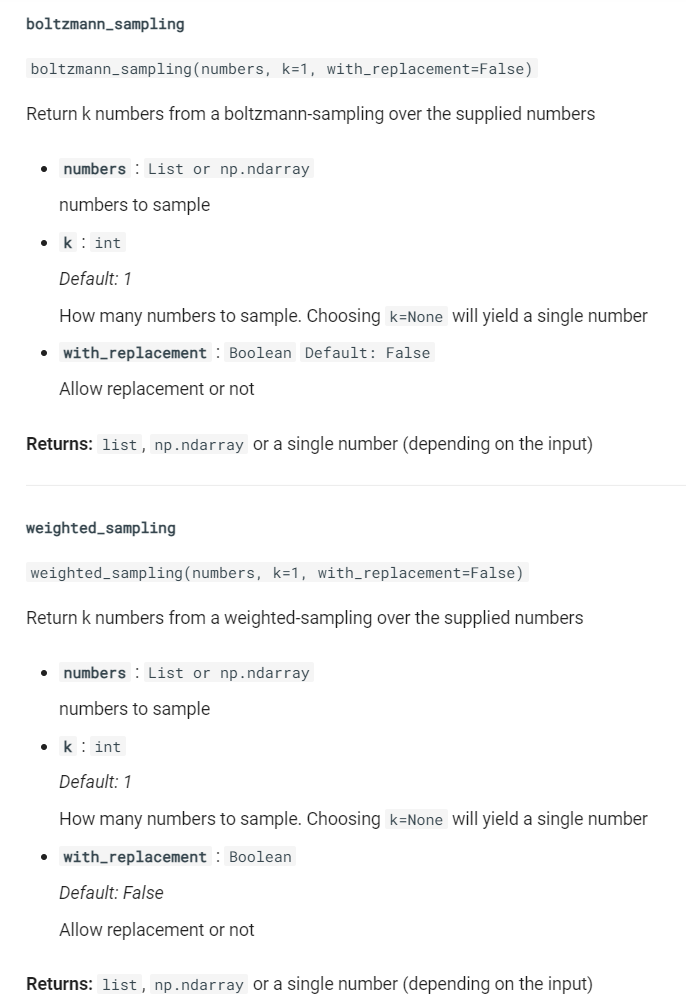
sampling子模块则包含了boltzmann_sampling()和weighted_sampling()两种数据采样方法,简化数据建模流程。
dython作为一个处于快速开发迭代过程的Python库,陆续会有更多的实用功能引入,感兴趣的朋友们可以前往https://github.com/shakedzy/dython查看更多内容或对此项目保持关注。
以上就是本文的全部内容,欢迎在评论区与我进行讨论~
dython:Python数据建模宝藏库的更多相关文章
- Python数据可视化-seaborn库之countplot
在Python数据可视化中,seaborn较好的提供了图形的一些可视化功效. seaborn官方文档见链接:http://seaborn.pydata.org/api.html countplot是s ...
- python发送邮件之宝藏库yagmail
之前使用email模块+smtplib模块发送邮件,虽然可以实现功能,但过程比较繁琐,今天发现一个宝藏库(yagmail),可以说是炒鸡好用啦!!! 贴上实现代码,大家细品 yagmail安装 pip ...
- Python数据科学“冷门”库
Python是一种神奇的语言.事实上,它是近几年世界上发展最快的编程语言之一,它一次又一次证明了它在开发工作和数据科学立场各行业的实用性.整个Python系统和库是对于世界各地的用户(无论是初学者或者 ...
- (长期更新)【python数据建模实战】零零散散问题及解决方案梳理
注1:本文旨在梳理汇总出我们在建模过程中遇到的零碎小问题及解决方案(即当作一份答疑文档),会不定期更新,不断完善, 也欢迎大家提问,我会填写进来. 注2:感谢阅读.为方便您查找想要问题的答案,可以就本 ...
- 9 个鲜为人知的 Python 数据科学库
除了 pandas.scikit-learn 和 matplotlib,还要学习一些用 Python 进行数据科学的新技巧. Python 是一种令人惊叹的语言.事实上,它是世界上增长最快的编程语言之 ...
- 20个最有用的Python数据科学库
核心库与统计 1. NumPy(提交:17911,贡献者:641) 一般我们会将科学领域的库作为清单打头,NumPy 是该领域的主要软件库之一.它旨在处理大型的多维数组和矩阵,并提供了很多高级的数学函 ...
- Python数学建模-02.数据导入
数据导入是所有数模编程的第一步,比你想象的更重要. 先要学会一种未必最佳,但是通用.安全.简单.好学的方法. 『Python 数学建模 @ Youcans』带你从数模小白成为国赛达人. 1. 数据导入 ...
- Python的工具包[1] -> pandas数据预处理 -> pandas 库及使用总结
pandas数据预处理 / pandas data pre-processing 目录 关于 pandas pandas 库 pandas 基本操作 pandas 计算 pandas 的 Series ...
- TDengine的数据建模?库、表、超级表是什么?怎么用?
欢迎来到物联网的数据世界 在典型的物联网场景中,一般有多种不同类型的采集设备,采集多种不同的物理量,同一种采集设备类型,往往有多个设备分布在不同的地点,系统需对各种采集的数据汇总,进行计算和分析对于 ...
随机推荐
- SpringCloud微服务(基于Eureka+Feign+Hystrix+Zuul)
一.搭建注册中心 1.1.创建一个cloud-service项目 1.2:POM文件依赖 1 <?xml version="1.0" encoding="UTF-8 ...
- 【译】GO语言:管理多个错误
原文:https://medium.com/a-journey-with-go/go-multiple-errors-management-a67477628cf1 关于开发者使用Go遇到的最大挑 ...
- AcWing 1250. 格子游戏
#include<bits/stdc++.h> using namespace std; int n,m; int fa[1000000]; int found(int x) { if(f ...
- Springboot整合shardingsphere和druid进行读写分离
最近在使用springboot整合shardingsphere和druid实现mysql数据库读写分离时遇到了一些问题,特此记录一下. 依赖版本 Springboot 2.1.6.RElEASE sh ...
- mysql中的空值
空值,即NULL,在数据库中通过is null 和is not null来查询 陷阱一:空值不一定为空 空值是一个比较特殊的字段.在MySQL数据库中,在不同的情形下,空值往往代表不同的含义.这是My ...
- mysql被收购 用mariadb (转)
~]# systemctl start mysql.service 要启动MySQL数据库是却是这样的提示 Failed to start mysqld.service: Unit not found ...
- centos7 php开发环境安装-composer
1.安装composer cd /usr/local/src curl -sS https://getcomposer.org/installer | php mv composer.phar /us ...
- 64. Minimum Path Sum 动态规划
description: Given a m x n grid filled with non-negative numbers, find a path from top left to botto ...
- vuejs知识总结
1.Vue.js是当下很火的一个JavaScript MVVM库,它是以数据驱动和组件化的思想构建的.ViewModel是Vue.js的核心,它是一个Vue实例. <!DOCTYPE html& ...
- python pyinsane应用
import sys from PIL import Image try: import src.abstract as pyinsane except ImportError: import pyi ...