
Angular 弹窗 控件
这个控件个人很喜欢,比起primgNG等弹窗组建,这款弹窗可以很轻松的定义自己的样式和布局。
可控参数有:宽度,高度,是否带有关闭图标,基本满足基础弹窗需求。
并且 Title/Content/Footer可以不强制三者并存。
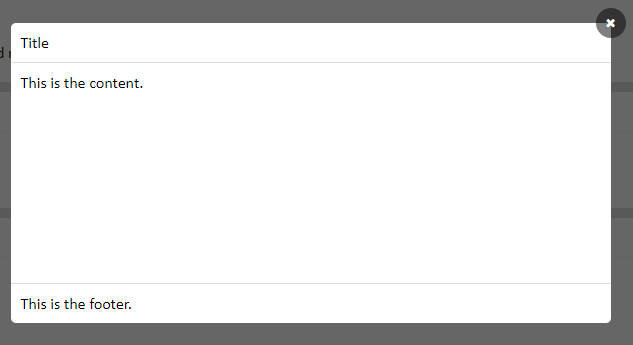
调用组件方法如下:
<popup-common *ngIf="showPupup" [width]="600" [height]="300" [closebtn]="true" (popupData)="closePopupFn($event)">

        <div class="popup-title">Title</div>

        <div class="popup-content">

            This is the content.

        </div>

        <div class="popup-footer">

            This is the footer.

        </div>

 </popup-common>
弹窗组件:
import { Component, OnInit, Input, Output, EventEmitter } from '@angular/core';

@Component ({

    selector: 'popup-common',

    template: `<div class="popup-mask">

                    <div class="popup-maskBox">

                        <div class="popup-maskContentBox" [ngStyle]="getStyle()">

                            <ng-content select=".popup-title"></ng-content>

                            <ng-content select=".popup-content"></ng-content>

                            <ng-content select=".popup-footer"></ng-content>

                            <span class="fa fa-close close-icon" *ngIf="closebtn" (click)="closePopupFn()"></span>

                        </div>

                    </div>

                </div>

                `,

    styles: [`

        .popup-maskContentBox {

            position: relative;

        }

        .close-icon {

            position: absolute;

            right: -15px;

            top: -15px;

            color: #fff;

            background: rgba(0,0,0,.5);

            border-radius: 50%;

            font-size: 12px;

            width: 30px;

            height: 30px;

            text-align: center;

            line-height: 30px;

        }

        .close-icon:hover {

            cursor: pointer;

        }

    `]

})

export class PopupCommonComponent implements OnInit {

    @Input() width: number;

    @Input() height: number;

    @Input() showPopup: boolean;

    @Input() closebtn: boolean = true;

    @Output() popupData = new EventEmitter();

    ngOnInit(){

        this.width = this.width != undefined ? this.width : 500;

    }

    getStyle(){

        return { width: this.width + 'px', height: this.height + 'px' }

    }

    closePopupFn(){

        this.showPopup = false;

        this.popupData.emit(this.showPopup);

    }

}
Angular 弹窗 控件的更多相关文章
- 多功能弹窗控件layer
开发网站的时候,如何合理运用好各种插件对开发的帮助是很大的. 免去了我们调试各种交互效果, 比如常用的弹窗.气泡.提示.加载.焦点.标签.导航.折叠等等 这里会推荐几个常用的js插件,丰富多样简单易移 ...
- jquery.sobox 经典版弹窗控件
sobox 是一款非常实用的,基于 jQuery 的弹窗控件.功能非常完整,而代码量又非常少(压缩完仅8k不到)的一款弹窗控件,如果你熟悉ext的弹窗控件,那么sobox的使用对你来说应该是愉悦而完全 ...
- Kendo UI for Angular 2 控件
Kendo UI for Angular 2 控件 伴随着 Angular 2 的正式 release,Kendo UI for Angular 2 的第一批控件已经发布了,当前是 Beta 版本,免 ...
- (转载)Android UI设计之AlertDialog弹窗控件
Android UI设计之AlertDialog弹窗控件 作者:qq_27630169 字体:[增加 减小] 类型:转载 时间:2016-08-18我要评论 这篇文章主要为大家详细介绍了Android ...
- 集成 Kendo UI for Angular 2 控件
伴随着 Angular 2 的正式 release,Kendo UI for Angular 2 的第一批控件已经发布了,当前是 Beta 版本,免费使用. 官方站点:Kendo UI for Ang ...
- 玩转控件:重写/重绘Dev中MessageBox弹窗控件
很久没有更新博客了,本想着直接发一篇<手撕ERP>系列,从控件重写.重绘,到框架搭建,再到部分模块实现+业务的.但是每次动手的时候,都觉得难以下手.直接从数据库设计开始吧,模块设计还没定下 ...
- Jbox弹窗控件无法获取子页面元素值得问题
top.$.jBox.open("iframe:${ctx}/report/reportSubjectDatabase/toChildWindow", "请选择重构快照表 ...
- [iOS基础控件 - 6.11.3] 私人通讯录Demo 控制器的数据传递、存储
A.需求 1.搭建一个"私人通讯录"Demo 2.模拟登陆界面 账号 密码 记住密码开关 自动登陆开关 登陆按钮 3.退出注销 4.增删改查 5.恢复数据(取消修改) 这个代码 ...
- angular+bootstrap+MVC 之三,分页控件初级版
今天实现一个分页控件,效果如下: 1.HTML: <!doctype html> <!--suppress ALL --> <html ng-app="appT ...
随机推荐
- vue组件编写知识点
- PLSQL Developer V10 注册码
PLSQL Developer V10 注册码(V10.0.3.1701可以使用)注册时间至:9999/12/31 License Number:999 Product Code:ljkfuhjpcc ...
- Linux工具-nmon
1.nmon下载地址:https://sourceforge.net/projects/nmon/files/ 创建文件nmon:# mkdir nmon 解压文件夹:# tar -zxvf nmon ...
- leetcode Ch2-Dynamic Programming I
一. 1. Edit Distance class Solution { public: int minDistance(string t1,string t2) { int len1=t1.size ...
- Unity IOC/DI使用
一.IOC介绍 IOC(Inversion of Control),中文译为控制反转,又称为“依赖注入”(DI =Dependence Injection) IOC的基本概念是:不创建对象,但是描述创 ...
- React学习笔记(六)事件处理
React学习笔记(六) 五.事件处理 React事件绑定属性的命名采用驼峰写法,不同于传统DOM全部小写. 如果采用JSX的语法,事件函数需要用大括号{}包裹函数名,不同于传统DOM字符串小括号的方 ...
- 使用TryUpdateModel进行数据更新
在控制器中可以使用TryUpdateModel或者UpdateModel方法来对指定的数据Model进行更新,如图所示的更新操作. POST请求数据如下所示 使用如下代码就可以对指定的字段进行更新 使 ...
- Asp.Net MVC Identity 2.2.1 使用技巧(五)
创建用户管理相关视图 1.添加视图 打开UsersAdminController.cs 将鼠标移动到public ActionResult Index()上 右键>添加视图 系统会弹出 ...
- Linux提权后获取敏感信息的方法与途径
在本文开始之前,我想指出我不是专家.据我所知,在这个庞大的区域,没有一个“神奇”的答案.分享,共享(我的出发点).下面是一个混合的命令做同样的事情,在不同的地方,或只是一个不同的眼光来看待事物.我知道 ...
- 【【模板】严格次小生成树[BJWC2010]】
树上的路径怎么能没有树剖 显然,次小生成树和最小生成树只在一条边上有差距,于是我们就可以枚举这一条边,将所有边加入最小生成树,之后再来从这些并不是那么小的生成树中找到那个最小的 我们往最小生成树里加入 ...