
Angular 弹窗 控件
这个控件个人很喜欢,比起primgNG等弹窗组建,这款弹窗可以很轻松的定义自己的样式和布局。
可控参数有:宽度,高度,是否带有关闭图标,基本满足基础弹窗需求。
并且 Title/Content/Footer可以不强制三者并存。
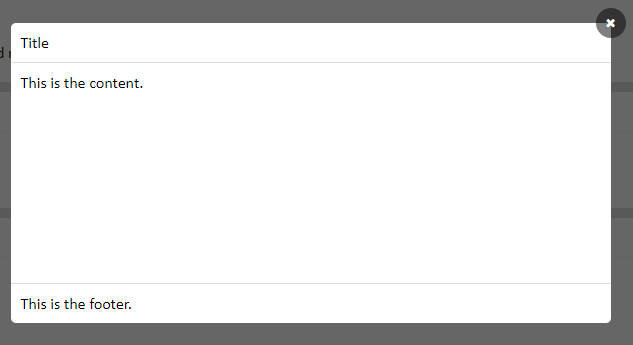
调用组件方法如下:
<popup-common *ngIf="showPupup" [width]="600" [height]="300" [closebtn]="true" (popupData)="closePopupFn($event)">

        <div class="popup-title">Title</div>

        <div class="popup-content">

            This is the content.

        </div>

        <div class="popup-footer">

            This is the footer.

        </div>

 </popup-common>
弹窗组件:
import { Component, OnInit, Input, Output, EventEmitter } from '@angular/core';

@Component ({

    selector: 'popup-common',

    template: `<div class="popup-mask">

                    <div class="popup-maskBox">

                        <div class="popup-maskContentBox" [ngStyle]="getStyle()">

                            <ng-content select=".popup-title"></ng-content>

                            <ng-content select=".popup-content"></ng-content>

                            <ng-content select=".popup-footer"></ng-content>

                            <span class="fa fa-close close-icon" *ngIf="closebtn" (click)="closePopupFn()"></span>

                        </div>

                    </div>

                </div>

                `,

    styles: [`

        .popup-maskContentBox {

            position: relative;

        }

        .close-icon {

            position: absolute;

            right: -15px;

            top: -15px;

            color: #fff;

            background: rgba(0,0,0,.5);

            border-radius: 50%;

            font-size: 12px;

            width: 30px;

            height: 30px;

            text-align: center;

            line-height: 30px;

        }

        .close-icon:hover {

            cursor: pointer;

        }

    `]

})

export class PopupCommonComponent implements OnInit {

    @Input() width: number;

    @Input() height: number;

    @Input() showPopup: boolean;

    @Input() closebtn: boolean = true;

    @Output() popupData = new EventEmitter();

    ngOnInit(){

        this.width = this.width != undefined ? this.width : 500;

    }

    getStyle(){

        return { width: this.width + 'px', height: this.height + 'px' }

    }

    closePopupFn(){

        this.showPopup = false;

        this.popupData.emit(this.showPopup);

    }

}
Angular 弹窗 控件的更多相关文章
- 多功能弹窗控件layer
开发网站的时候,如何合理运用好各种插件对开发的帮助是很大的. 免去了我们调试各种交互效果, 比如常用的弹窗.气泡.提示.加载.焦点.标签.导航.折叠等等 这里会推荐几个常用的js插件,丰富多样简单易移 ...
- jquery.sobox 经典版弹窗控件
sobox 是一款非常实用的,基于 jQuery 的弹窗控件.功能非常完整,而代码量又非常少(压缩完仅8k不到)的一款弹窗控件,如果你熟悉ext的弹窗控件,那么sobox的使用对你来说应该是愉悦而完全 ...
- Kendo UI for Angular 2 控件
Kendo UI for Angular 2 控件 伴随着 Angular 2 的正式 release,Kendo UI for Angular 2 的第一批控件已经发布了,当前是 Beta 版本,免 ...
- (转载)Android UI设计之AlertDialog弹窗控件
Android UI设计之AlertDialog弹窗控件 作者:qq_27630169 字体:[增加 减小] 类型:转载 时间:2016-08-18我要评论 这篇文章主要为大家详细介绍了Android ...
- 集成 Kendo UI for Angular 2 控件
伴随着 Angular 2 的正式 release,Kendo UI for Angular 2 的第一批控件已经发布了,当前是 Beta 版本,免费使用. 官方站点:Kendo UI for Ang ...
- 玩转控件:重写/重绘Dev中MessageBox弹窗控件
很久没有更新博客了,本想着直接发一篇<手撕ERP>系列,从控件重写.重绘,到框架搭建,再到部分模块实现+业务的.但是每次动手的时候,都觉得难以下手.直接从数据库设计开始吧,模块设计还没定下 ...
- Jbox弹窗控件无法获取子页面元素值得问题
top.$.jBox.open("iframe:${ctx}/report/reportSubjectDatabase/toChildWindow", "请选择重构快照表 ...
- [iOS基础控件 - 6.11.3] 私人通讯录Demo 控制器的数据传递、存储
A.需求 1.搭建一个"私人通讯录"Demo 2.模拟登陆界面 账号 密码 记住密码开关 自动登陆开关 登陆按钮 3.退出注销 4.增删改查 5.恢复数据(取消修改) 这个代码 ...
- angular+bootstrap+MVC 之三,分页控件初级版
今天实现一个分页控件,效果如下: 1.HTML: <!doctype html> <!--suppress ALL --> <html ng-app="appT ...
随机推荐
- Hibernate_Validator学习
1. Hibernate Validator介绍 1.1 背景 在任何时候,当你要处理一个应用程序的业务逻辑,数据校验是你必须要考虑和面对的事情.应用程序必须通过某种手段来确保输入进来的数据从 ...
- windows&cmd常用命令&快捷键
1: cls即CLear Screen 功能:清除屏幕上的所有显示 2:Win+Tab快捷键进行3D窗口切换还有比较快速切换窗口的新方法. 3:利用Alt+Tab快捷键进行切换窗口时,在桌面中间会显示 ...
- java笔记--重定向输出流实现程序输出到日志
重定向输出流实现程序输出到日志 --如果朋友您想转载本文章请注明转载地址"http://www.cnblogs.com/XHJT/p/3877248.html "谢谢-- 利用Sy ...
- 运维监控---企业级Zabbix详解_【all】
基础LNMP环境搭建 Linux 下LNMP环境搭建 下载Zabbix 链接:https://pan.baidu.com/s/1n36esVyYAKstwnFopbV2sg 密码:izll 创建zab ...
- 深入浅出SharePoint2013——常用术语
CAS(Code Access Security)自定义代码访问安全性 Sandboxed solution 沙箱解决方案
- codeforces 703E Mishka and Divisors
codeforces 703E Mishka and Divisors 题面 给出大小为\(1000\)的数组和一个数\(k\),求长度最短的一个子序列使得子序列的元素之积是\(k\)的倍数,如果有多 ...
- 如何在windows下用IDA优雅调试ELF
在windows下如何用IDA优雅调试ELF brief: 构建一个IDA-linux_server-docker镜像,优雅地IDA远程调试 使用传统虚拟机来运行一个linux程序就得跑一个完整的li ...
- mac 学习笔记
1.关于launchctl http://zhengwei.name/2011/11/lanunchctl-notes/ 2.php-fpm 默认配置 php-fpm.conf :/etc/php-f ...
- 函数去抖(debounce)与 函数节流(throttle)
以下场景往往由于事件频繁被触发,因而频繁执行DOM操作.资源加载等重行为,导致UI停顿甚至浏览器崩溃. 1. window对象的resize.scroll事件 2. 拖拽时的mousemove事件 3 ...
- Angular2 Router路由相关
路由设置 Angular中路由的配置应该按照先具体路由到通用路由的设置,因为Angular使用先匹配者优先的原则. 示例: 路由设置如下: export const reportRoute: Rout ...