
C++输入输出流--<iostream>详解
C++输入输出流包含在头文件<iostream>中,
流的定义如下:
通过设备驱动程序与键盘、屏幕、文件、打印机等进行交互, iostream 类提供与之交互的方法。
输出流:
输出流的对象是字节目标,三个重要的输出流类是ostream、ofstream和ostringsream。
Ostream派生于basic_ostream支持预定义的流对象又:
cout标准输出
cerr标准错误输出,不经过缓冲
clog类似cerr,使用缓冲
注:缓冲是指将所有输出集中存放,然后一次性显示在屏幕上,避免多次刷屏。
格式控制
输出宽度:
输出宽度可以采用<iostream>中自带的width()函数,或者使用< iomanip >中的setw, setw 和宽度均不截断值。
使用width()函数代码如下:
 #include "stdafx.h"

 #include <iostream>

 using namespace std;

 int _tmain(int argc, _TCHAR* argv[])

 {

     double values[] = { 1.23, 35.36, 653.7, 4358.24 };

     for (int i = ; i < ; i++)

     {

         cout.width();

         cout << values[i] << '\n';

     }

     getchar();

     return ;

 }
使用setw()函数
 #include "stdafx.h"

 #include <iostream>

 #include <iomanip>

 using namespace std;

 int _tmain(int argc, _TCHAR* argv[])

 {

     double values[] = { 1.23, 35.36, 653.7, 4358.24 };

     for (int i = ; i < ; i++)

     {

         //cout.width(10);

         cout << setw() << values[i] << '\n';

     }

     getchar();

     return ;

 }
程序运行结果:

宽度设置
设置宽度后,cout默认空白填充,如果需要填充某个字符,可采用fill()或setfill()函数。
采用fill()函数
 #include "stdafx.h"

 #include <iostream>

 using namespace std;

 int _tmain(int argc, _TCHAR* argv[])

 {

     double values[] = { 1.23, 35.36, 653.7, 4358.24 };

     for (int i = ; i < ; i++)

     {

         cout.width();

         cout.fill('*');

         cout << values[i] << '\n';

     }

     getchar();

     return ;

 }
采用setfill()函数
 #include "stdafx.h"

 #include <iomanip>

 #include <iostream>

 using namespace std;

 int _tmain(int argc, _TCHAR* argv[])

 {

     double values[] = { 1.23, 35.36, 653.7, 4358.24 };

     for (int i = ; i < ; i++)

     {

         cout.width();

         cout << setfill('*') << values[i] << '\n';

     }

     getchar();

     return ;

 }
程序运行结果:

精度设置
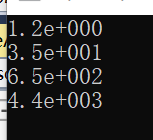
浮点的默认精度默认为六,如果需要修改,使用setprecision()。数字输出可以设置为固定型和科学型,输出形式采用setiosflags(ios::fixed)控制,fixed表示固定型,scientific表示科学型,默认为科学型。
科学型代码:
 #include "stdafx.h"

 #include <iostream>

 using namespace std;

 int _tmain(int argc, _TCHAR* argv[])

 {

     double values[] = { 1.23, 35.36, 653.7, 4358.24 };

     for (int i = ; i < ; i++)

         cout << setprecision()

         << values[i]

         << endl;

     getchar();

     return ;

 }
运行结果:
使用固定记数法
 #include "stdafx.h"

 #include <iomanip>

 #include <iostream>

 using namespace std;

 int _tmain(int argc, _TCHAR* argv[])

 {

     double values[] = { 1.23, 35.36, 653.7, 4358.24 };

     for (int i = ; i < ; i++)

         cout << setiosflags(ios::fixed) << setprecision()

         << values[i]

         << endl;

     getchar();

     return ;

 }
运行结果:

将整形数字按照不同进制输出:
 #include "stdafx.h"

 #include <iostream>

 using namespace std;

 int _tmain(int argc, _TCHAR* argv[])

 {

     cout <<  << endl;//十进制

     cout <<dec<<  << endl;//十进制

     cout << oct <<  << endl;//八进制

     cout << hex <<  << endl;//十六进制

     getchar();

     return ;

 }
运行结果:

输入输出数据到文件:
 #include "stdafx.h"

 #include <iostream>

 #include <fstream>

 using namespace std;

 int _tmain(int argc, _TCHAR* argv[])

 {

     ifstream ifile;

     char buff[] = {  };

     ifile.open("d:/FILE1.txt", ios::in);

     ifile.getline(buff, );

     // Do some output

     ifile.close(); // FILE1 closed

     cout << buff << endl;//

     getchar();

     return ;

 }
运行结果:

采用>>运算符读入整个字符串:
 #include "stdafx.h"

 #include <iostream>

 #include <fstream>

 using namespace std;

 int _tmain(int argc, _TCHAR* argv[])

 {

     ifstream ifile;

     char buff[] = {  };

     ifile.open("d:/FILE1.txt", ios::in);

     ifile >> buff;

     // Do some output

     ifile.close(); // FILE1 closed

     cout << buff << endl;//

     getchar();

     return ;

 }
运行结果:

写入文件主要采用以下函数:
cout.flush() //刷新缓冲区
cout.put() //把字符写入流中
cout.write() //将字符串写入当前输出流中
代码如下:
 #include "stdafx.h"

 #include <iostream>

 #include <fstream>

 using namespace std;

 int _tmain(int argc, _TCHAR* argv[])

 {

     ofstream ofile;

     char buff[] = {  };

     ofile.open("d:/FILE1.txt", ios::in);

     if (!ofile)

     {

         cout << "打开文件失败"  << endl;

     }

     ofile << "" << endl;

     ofile.write("xyz", );

     ofile.put('M');

     ofile.flush();//清空缓冲区

     ofile.close(); // FILE1 closed

     getchar();

     return ;

 }
运行结果:

C++输入输出流--<iostream>详解的更多相关文章
- Python基本语法_输入/输出语句详解
目录 目录 前言 输入 raw_input input raw_input 和 input 的区别 输出 print print 基本格式化输出 print复杂格式化输出 flags标志位 width ...
- Android系统输入事件分发详解
什么是输入事件? 我们知道,运行android系统的设备本质上是一台计算机,使用者在和计算机进行交互的时候可以抽象成简单的对计算机的输入和输出(IO).那么对于运行在计算机上的操作系统来说,操作系统在 ...
- 12.Linux之输入子系统分析(详解)
版权声明:本文为博主原创文章,转载请标注出处: 在此节之前,我们学的都是简单的字符驱动,涉及的内容有字符驱动的框架.自动创建设备节点.linux中断.poll机制.异步通知.同步互斥/非阻塞.定时 ...
- Android输入控件详解
输入控件 输入控件是您的应用用户界面中的交互式组件.Android 提供了多种可在 UI 中使用的控件,如按钮.文本字段.定位栏.复选框.缩放按钮.切换按钮等. 向 UI 中添加输入控件与向 XML ...
- logstash中关于Jdbc输入配置选项详解
Setting Input type Required clean_run boolean No columns_charset hash No connection_retry_attempts n ...
- android EditText输入变化事件详解
editText.addTextChangedListener(new TextWatcher(){ public void afterTextChanged(Editable s) { // ...
- 【转】scp命令详解
先说下常用的情况: 两台机器IP分别为:A.104.238.161.75,B.43.224.34.73. 在A服务器上操作,将B服务器上/home/lk/目录下所有的文件全部复制到本地的/root目录 ...
- Java I/O输入输出流详解
一.文件的编码 开发时一定要注意项目默认的编码!!!!!!!! 文件操作的时候一定要记得关闭!!!!!!!! ASCII:美国标准 ...
- Java-IO 输入输出流详解
一.文件的编码 开发时一定要注意项目默认的编码!!!!!!!! 文件操作的时候一定要记得关闭!!!!!!!! ASCII:美国标准 ...
随机推荐
- python数据类型详解(全面)
python数据类型详解 目录1.字符串2.布尔类型3.整数4.浮点数5.数字6.列表7.元组8.字典9.日期 1.字符串1.1.如何在Python中使用字符串a.使用单引号(')用单引号括起来表示字 ...
- Vue子组件监听事件中传递参数的方法
在子组件中,我们可以通过以下方式监听事件: v-on:click="$emit('funcName',a)" 如果需要传多个参数,可以通过以下方式: v-on:click=&quo ...
- Java Web 热部署
热部署有多种方案,下面的方案是其中的一种. 暂时还没找到一种令人满意的方案. 1,配置WEB Server 去这里 (https://tomcat.apache.org/download-90.cgi ...
- 基于CentOS7系统一键配置Aria2 实现服务器离线下载工具
我们有些网友购买的海外VPS主机并不是用来做网站的,而是用来作为下载资源工具使用的.确实用这样的工具搭建之后是比本地下载速度快,因为有些资源.软件等是海外资源,而且挂载在服务器上不占用本地的资源.在这 ...
- 彻底理解JDK异步
学而时习之,不亦说乎! --<论语> 首发,转载请附原文链接,谢谢. 原文使用MD格式编写,复制进来代码缩成一团了,读者见谅,需要 ...
- Focal Loss 的前向与后向公式推导
把Focal Loss的前向和后向进行数学化描述.本文的公式可能数学公式比较多.本文尽量采用分解的方式一步一步的推倒.达到能易懂的目的. Focal Loss 前向计算 其中 是输入的数据 是输入的标 ...
- java并行之parallelStream与CompletableFuture比较
1. import java.util.Arrays; import java.util.List; import java.util.concurrent.CompletableFuture; im ...
- xenu简单介绍
目录: 1.软件介绍 2.软件作用 3.功能特点 4.测试原理 5.使用说明 6.状态识别 工具下载链接:https://pan.baidu.com/s/1i4I9QK1 密码:lej7 1.软件介绍 ...
- 使用Java Servlet进行简单登录
效果图 登录页面代码:login.html <%@ page language="java" contentType="text/html; charset=UTF ...
- 快速排序分析及实现(C++)
目录 快速排序算法分析及实现(C++) 算法思想 快速排序步骤 优点分析 C++语言实现 快速排序算法分析及实现(C++) 算法思想 把n个元素划分为三段:左端Left,中间段middle和右端r ...