
SSM 整合
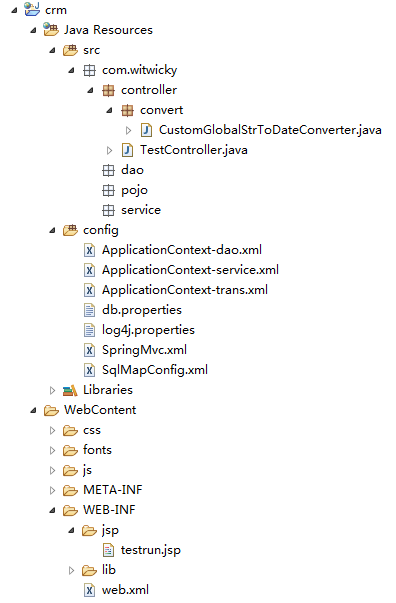
---

分为三层:
DAO层:负责与数据源进行交互
Service:业务处理层,也可称为服务层,对上层提供统一接口的服务。
Controller: 控制器层,负责处理来自客户端的请求。
通用配置:
db.properties 数据库配置
|
jdbc.driver=com.mysql.jdbc.Driver jdbc.url=jdbc:mysql://localhost:3306/crm?characterEncoding=utf-8 jdbc.username=root jdbc.password=admin |
log4j.properties 日志配置
|
# Global logging configuration log4j.rootLogger=DEBUG, stdout # Console output... log4j.appender.stdout=org.apache.log4j.ConsoleAppender log4j.appender.stdout.layout=org.apache.log4j.PatternLayout log4j.appender.stdout.layout.ConversionPattern=%5p [%t] - %m%n |
Dao:
ApplicationContext-dao.xml 分层的Spring配置文件
1.配置数据源
2.创建mybatis会话工厂
3.扫描dao层接口
|
<?xml version="1.0" encoding="UTF-8"?> <beans xmlns="http://www.springframework.org/schema/beans" xmlns:context="http://www.springframework.org/schema/context" xmlns:p="http://www.springframework.org/schema/p" xmlns:aop="http://www.springframework.org/schema/aop" xmlns:tx="http://www.springframework.org/schema/tx" xmlns:xsi="http://www.w3.org/2001/XMLSchema-instance" xsi:schemaLocation="http://www.springframework.org/schema/beans http://www.springframework.org/schema/beans/spring-beans-4.0.xsd http://www.springframework.org/schema/context http://www.springframework.org/schema/context/spring-context-4.0.xsd http://www.springframework.org/schema/aop http://www.springframework.org/schema/aop/spring-aop-4.0.xsd http://www.springframework.org/schema/tx http://www.springframework.org/schema/tx/spring-tx-4.0.xsd http://www.springframework.org/schema/util http://www.springframework.org/schema/util/spring-util-4.0.xsd"> <!-- 加载配置文件 --> <context:property-placeholder location="classpath:db.properties" /> <!-- 数据库连接池 --> <bean id="dataSource" class="com.alibaba.druid.pool.DruidDataSource" destroy-method="close"> <property name="driverClassName" value="${jdbc.driver}" /> <property name="url" value="${jdbc.url}" /> <property name="username" value="${jdbc.username}" /> <property name="password" value="${jdbc.password}" /> <property name="maxActive" value="10" /> <property name="maxIdle" value="5" /> </bean> <!-- mapper配置 --> <!-- 让spring管理sqlsessionfactory 使用mybatis和spring整合包中的 --> <bean id="sqlSessionFactory" class="org.mybatis.spring.SqlSessionFactoryBean"> <!-- 数据库连接池 --> <property name="dataSource" ref="dataSource" /> <!-- 加载mybatis的全局配置文件 --> <property name="configLocation" value="classpath:SqlMapConfig.xml" /> </bean> <!-- 配置Mapper扫描器 --> <bean class="org.mybatis.spring.mapper.MapperScannerConfigurer"> <property name="basePackage" value="com.witwicky.dao" /> </bean> </beans> |
SQLMapConfig.xml mybatis 配置文件
|
<?xml version="1.0" encoding="UTF-8" ?> <!DOCTYPE configuration PUBLIC "-//mybatis.org//DTD Config 3.0//EN" "http://mybatis.org/dtd/mybatis-3-config.dtd"> <configuration> </configuration> |
Service
ApplicationContext-service.xml 扫描Service类
|
<?xml version="1.0" encoding="UTF-8"?> <beans xmlns="http://www.springframework.org/schema/beans" xmlns:context="http://www.springframework.org/schema/context" xmlns:p="http://www.springframework.org/schema/p" xmlns:aop="http://www.springframework.org/schema/aop" xmlns:tx="http://www.springframework.org/schema/tx" xmlns:xsi="http://www.w3.org/2001/XMLSchema-instance" xsi:schemaLocation="http://www.springframework.org/schema/beans http://www.springframework.org/schema/beans/spring-beans-4.0.xsd http://www.springframework.org/schema/context http://www.springframework.org/schema/context/spring-context-4.0.xsd http://www.springframework.org/schema/aop http://www.springframework.org/schema/aop/spring-aop-4.0.xsd http://www.springframework.org/schema/tx http://www.springframework.org/schema/tx/spring-tx-4.0.xsd http://www.springframework.org/schema/util http://www.springframework.org/schema/util/spring-util-4.0.xsd"> <!-- @Service扫描 --> <context:component-scan base-package="com.witwicky.service"/> </beans> |
ApplicationContext-transcation.xml spring事物配置
|
<?xml version="1.0" encoding="UTF-8"?> <beans xmlns="http://www.springframework.org/schema/beans" xmlns:context="http://www.springframework.org/schema/context" xmlns:p="http://www.springframework.org/schema/p" xmlns:aop="http://www.springframework.org/schema/aop" xmlns:tx="http://www.springframework.org/schema/tx" xmlns:xsi="http://www.w3.org/2001/XMLSchema-instance" xsi:schemaLocation="http://www.springframework.org/schema/beans http://www.springframework.org/schema/beans/spring-beans-4.0.xsd http://www.springframework.org/schema/context http://www.springframework.org/schema/context/spring-context-4.0.xsd http://www.springframework.org/schema/aop http://www.springframework.org/schema/aop/spring-aop-4.0.xsd http://www.springframework.org/schema/tx http://www.springframework.org/schema/tx/spring-tx-4.0.xsd http://www.springframework.org/schema/util http://www.springframework.org/schema/util/spring-util-4.0.xsd"> <!-- 事务管理器 --> <bean id="transactionManager" class="org.springframework.jdbc.datasource.DataSourceTransactionManager"> <!-- 数据源 --> <property name="dataSource" ref="dataSource" /> </bean> <!-- 通知 --> <tx:advice id="txAdvice" transaction-manager="transactionManager"> <tx:attributes> <!-- 传播行为 --> <tx:method name="save*" propagation="REQUIRED" /> <tx:method name="insert*" propagation="REQUIRED" /> <tx:method name="delete*" propagation="REQUIRED" /> <tx:method name="update*" propagation="REQUIRED" /> <tx:method name="find*" propagation="SUPPORTS" read-only="true" /> <tx:method name="get*" propagation="SUPPORTS" read-only="true" /> </tx:attributes> </tx:advice> <!-- 切面 --> <aop:config> <aop:advisor advice-ref="txAdvice" pointcut="execution(* com.witwicky.service.*.*(..))" /> </aop:config> </beans> |
Controller
SpringMVC.xml springMVC核心配置文件
1.组件扫描 用于扫描controller类
2.注解驱动 用户注册 处理器适配器和映射器适配器
3.试图解析器
4.配置参数转换器 如:string->date类型的转换
|
<?xml version="1.0" encoding="UTF-8"?> <beans xmlns="http://www.springframework.org/schema/beans" xmlns:xsi="http://www.w3.org/2001/XMLSchema-instance" xmlns:p="http://www.springframework.org/schema/p" xmlns:context="http://www.springframework.org/schema/context" xmlns:dubbo="http://code.alibabatech.com/schema/dubbo" xmlns:mvc="http://www.springframework.org/schema/mvc" xsi:schemaLocation="http://www.springframework.org/schema/beans http://www.springframework.org/schema/beans/spring-beans-4.0.xsd http://www.springframework.org/schema/mvc http://www.springframework.org/schema/mvc/spring-mvc-4.0.xsd http://code.alibabatech.com/schema/dubbo http://code.alibabatech.com/schema/dubbo/dubbo.xsd http://www.springframework.org/schema/context http://www.springframework.org/schema/context/spring-context-4.0.xsd"> <!-- @Controller注解扫描 --> <context:component-scan base-package="com.witwicky.controller"></context:component-scan> <!-- 注解驱动: 替我们显示的配置了最新版的注解的处理器映射器和处理器适配器 --> <mvc:annotation-driven conversion-service="conversionService"></mvc:annotation-driven> <!-- 配置视图解析器 作用:在controller中指定页面路径的时候就不用写页面的完整路径名称了,可以直接写页面去掉扩展名的名称 --> <bean class="org.springframework.web.servlet.view.InternalResourceViewResolver"> <!-- 真正的页面路径 = 前缀 + 去掉后缀名的页面名称 + 后缀 --> <!-- 前缀 --> <property name="prefix" value="/WEB-INF/jsp/"></property> <!-- 后缀 --> <property name="suffix" value=".jsp"></property> </bean> <!-- 配置自定义转换器 注意: 一定要将自定义的转换器配置到注解驱动上 --> <bean id="conversionService" class="org.springframework.format.support.FormattingConversionServiceFactoryBean"> <property name="converters"> <set> <!-- 指定自定义转换器的全路径名称 --> <bean class="com.witwicky.controller.convert.CustomGlobalStrToDateConverter" /> </set> </property> </bean> </beans> |
web.xml
spring监听器 用于服务器启动时同时启动spring
springMVC请求处理器 DispatchServlet
统一编码的过滤器
|
<?xml version="1.0" encoding="UTF-8"?> <web-app xmlns:xsi="http://www.w3.org/2001/XMLSchema-instance" xmlns="http://java.sun.com/xml/ns/javaee" xsi:schemaLocation="http://java.sun.com/xml/ns/javaee http://java.sun.com/xml/ns/javaee/web-app_2_5.xsd" id="WebApp_ID" version="2.5"> <!-- 加载spring容器 --> <context-param> <param-name>contextConfigLocation</param-name> <param-value>classpath:ApplicationContext-*.xml</param-value> </context-param> <listener> <listener-class>org.springframework.web.context.ContextLoaderListener</listener-class> </listener> <!-- springmvc前端控制器 --> <servlet> <servlet-name>springMvc</servlet-name> <servlet-class>org.springframework.web.servlet.DispatcherServlet</servlet-class> <init-param> <param-name>contextConfigLocation</param-name> <param-value>classpath:SpringMvc.xml</param-value> </init-param> <!-- 在tomcat启动的时候就加载这个servlet --> <load-on-startup>1</load-on-startup> </servlet> <servlet-mapping> <servlet-name>springMvc</servlet-name> <!-- *.action 代表拦截后缀名为.action结尾的 / 拦截所有但是不包括.jsp /* 拦截所有包括.jsp --> <url-pattern>*.action</url-pattern> </servlet-mapping> <!-- 配置Post请求乱码 --> <filter> <filter-name>CharacterEncodingFilter</filter-name> <filter-class>org.springframework.web.filter.CharacterEncodingFilter</filter-class> <init-param> <param-name>encoding</param-name> <param-value>utf-8</param-value> </init-param> </filter> <filter-mapping> <filter-name>CharacterEncodingFilter</filter-name> <url-pattern>/*</url-pattern> </filter-mapping> </web-app> |
SSM 整合的更多相关文章
- Maven + 最新SSM整合
. 1. 开发环境搭建 参考博文:Eclipse4.6(Neon) + Tomcat8 + MAVEN3.3.9 + SVN项目完整环境搭建 2. Maven Web项目创建 2.1. 2.2. 2. ...
- SSM整合配置
SSM三大框架整合详细教程(Spring+SpringMVC+MyBatis) 使用SSM(Spring.SpringMVC和Mybatis)已经有三个多月了,项目在技术上已经没有什么难点了,基于现有 ...
- SSM整合中遇到的不能扫描注解的bug
我的开发环境为: ubuntu14.04LTS 64bit; Spring Tool Suite 3.5.0.RELEASE Maven 3.2.3 SSM整合中遇到的不能扫描注解的bug 最终解决 ...
- 基于Maven的SSM整合的web工程
此文章主要有以下几个知识点: 一.如何创建 Maven的Web 工程 二.整合SSM(Spring,SpringMvc,Mybatis),包括所有的配置文件 三.用 mybatis 逆向工程生成对应的 ...
- ssm整合说明与模板-Spring Spring MVC Mybatis整合开发
ssm整合说明 spring+spring mvc+mybatis 说明 源码下载 由于之前存在ssh框架,spring+struts+hibernate,其中spring负责aop与ioc,所以一般 ...
- 04.redis集群+SSM整合使用
redis集群+SSM整合使用 首先是创建redis-cluster文件夹: 因为redis最少需要6个节点(三主三从),为了更好的理解,我这里创建了两台虚拟机(192.168.0.109 192.1 ...
- SSM整合---实现全部用户查询
SSM整合 准备 1.创建工程 2.导入必须jar包 链接: https://pan.baidu.com/s/1nvCDQJ3 密码: v5xs 3.工程结构 代码 SqlMapConfig < ...
- spring MVC框架入门(外加SSM整合)
spring MVC框架 一.什么是sping MVC Spring MVC属于SpringFrameWork的后续产品,已经融合在Spring Web Flow里面.Spring 框架提供了构建 W ...
- SpringMVC之简单的增删改查示例(SSM整合)
本篇文章主要介绍了SpringMVC之简单的增删改查示例(SSM整合),这个例子是基于SpringMVC+Spring+Mybatis实现的.有兴趣的可以了解一下. 虽然已经在做关于SpringMVC ...
- ssm 整合(方案二 maven)
通过maven来整合ssm方便很多,至少不用去找jar包 具体架构如下: 1.配置pom.xml <project xmlns="http://maven.apache.org/POM ...
随机推荐
- webDAV服务的开启以及客户端的上传、下载、删除、新建文件夾、列表的代码(C#)
windows server 2003开启webDAV服务 1. 启动“IIS管理器”选择“WEB服务扩展”,选择“WEBDAV”的允许按钮启动WEBDAV功能 2.建立一个虚拟目录,对应到一个本地目 ...
- FreeBSD搭建SVN服务器
我最喜欢使用的OS就是FreeBSD,而且现在刚好有一台FreeBSD服务器,所以我想把我的SVN服务器迁移到FreeBSD上,再配合hudson和ant就可以自动编译了. 第一步:安装svn: 在安 ...
- Redis(二十一):Redis性能问题排查解决手册(转)
性能相关的数据指标 通过Redis-cli命令行界面访问到Redis服务器,然后使用info命令获取所有与Redis服务相关的信息.通过这些信息来分析文章后面提到的一些性能指标. info命令输出的数 ...
- HTML5背景音乐的暂停与播放
HTML代码: <audio id="myaudio" loop="loop" preload="auto" autoplay ...
- C程序-进程内存结构分析
1. 每个进程都运行在自己私有的内存空间中(即虚拟地址空间).在32位系统中,4GB的进程地址东健被分为用户空间和内核空间两个部分.用户空间占据着0~3GB(用16进制表示为0xC0000000),而 ...
- Linux经常使用命令(六) - mv
mv命令是move的缩写.能够用来移动文件或者将文件改名(move (rename) files),是Linux系统下经常使用的命令,经经常使用来备份文件或者文件夹. 1.命令格式: mv [选项] ...
- Linux debugger lldb
https://lldb.llvm.org/ https://lldb.llvm.org/lldb-gdb.html https://lldb.llvm.org/tutorial.html
- C#数据库帮助类SqlHelper
using System; using System.Collections.Generic; using System.Linq; using System.Web; using System.Da ...
- SQL Developer 警告--无法安装某些模块
第一次启动正常,第二次启动就开始报错,说无法安装某写模块.具体如下: 警告--无法安装某些模块(Warning - could not install some modules) 在oracle官方的 ...
- VS2012 WIN7下使用DotNetBar 使用Office2007Form皮肤 窗体运行不显示问题解决方法
在窗体属性中有个EnableGlass属性,设置为False即可.