
184使用 Core Image 框架处理照片
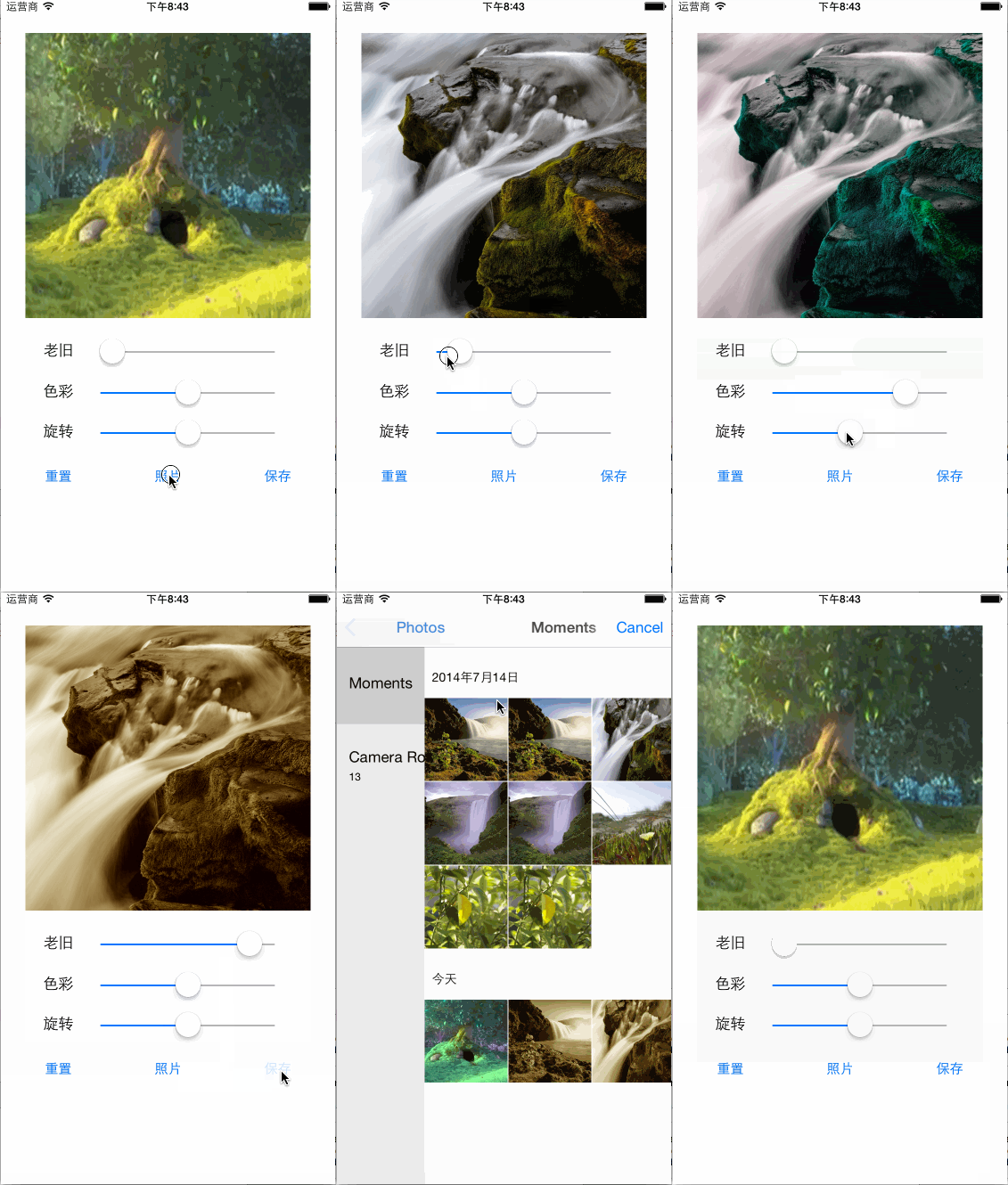
实现图片的老旧、色彩、旋转效果
(1)使用 StoryBoard 故事版布局界面;
(2)使用 Core Image 框架的 CIFilter 过滤器;分别对应的过滤器名称是:CISepiaTone(棕黑色调)、CIHueAdjust(色彩调整)、CIStraightenFilter(纠正过滤器);
(3)另外就是使用 UIImagePickerController 来从图片库中选择图片,使用 ALAssetsLibrary 保存过滤器效果处理后的图片到图片库里。
图片处理过程:
1、创建基于 GPU的CIContext 对象实例
2、通过过滤器名称创建 CIFilter 对象实例
3、设置 CIFilter 对象实例参数
4、通过 CIFilter 对象实例的 outputImage 方法产生 CIImager 对象实例
5、通过 CIContext 对象实例的 createCGImage 方法将 CIImager 对象实例转换为 CGImageRef 对象实例
6、通过 UIImage 类的 imageWithCGImage 方法创建 UIImage 对象实例
7、绑定图片视图的图片为过滤器效果处理后的 UIImage 对象实例
8、使用 CGImageRelease 方法释放 CGImageRef 对象实例
关键操作:
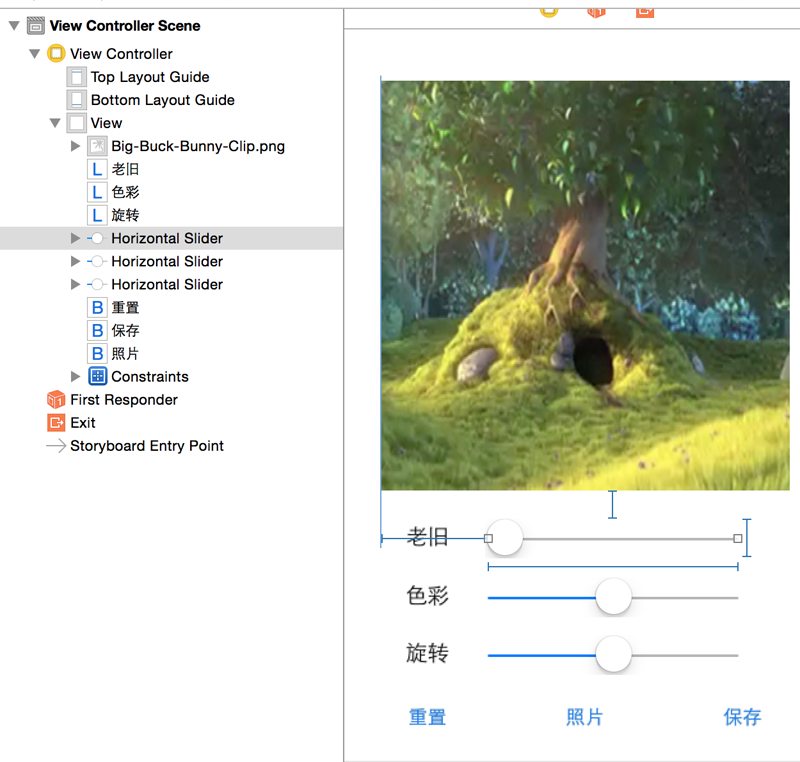
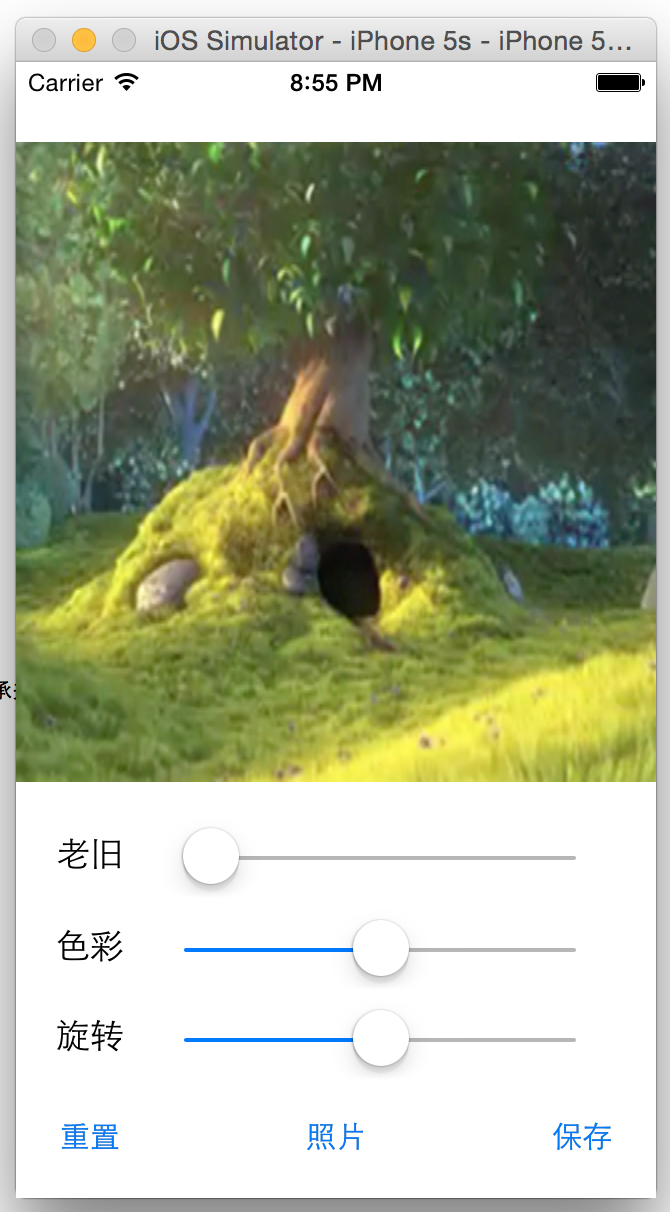
效果如下:
iPhone 5s
iPhone 6
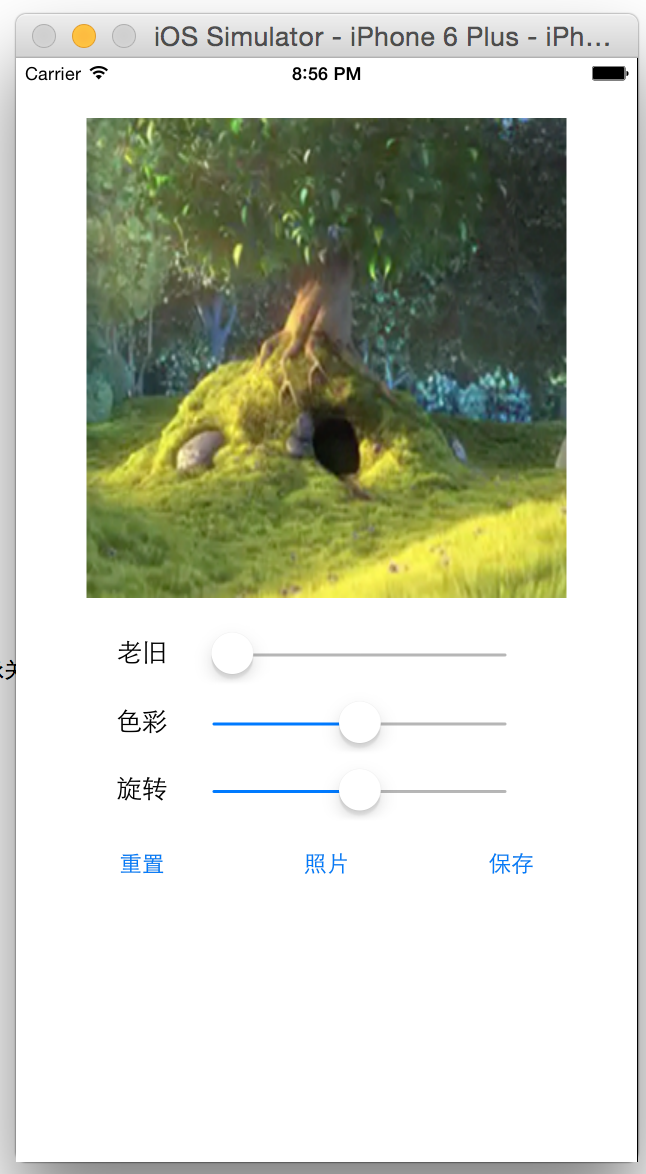
iPhone 6 Plus
ViewController.h
 #import <UIKit/UIKit.h>

 #import <AssetsLibrary/AssetsLibrary.h>

 @interface ViewController : UIViewController <UIImagePickerControllerDelegate, UINavigationControllerDelegate>

 @property (strong, nonatomic) IBOutlet UIImageView *imgVCustom;

 @property (strong, nonatomic) IBOutlet UISlider *sldSepiaTone;

 @property (strong, nonatomic) IBOutlet UISlider *sldHueAdjust;

 @property (strong, nonatomic) IBOutlet UISlider *sldStraightenFilter;

 @end
ViewController.m
 #import "ViewController.h"

 @interface ViewController ()

 @property (strong, nonatomic) CIContext *context;

 @property (strong, nonatomic) CIImage *imgSource;

 @property (strong, nonatomic) CIFilter *filterSepiaTone;

 @property (strong, nonatomic) CIFilter *filterHueAdjust;

 @property (strong, nonatomic) CIFilter *filterStraightenFilter;

 - (void)layoutUI;

 - (void)displayImageWithFilter:(CIFilter *)filter;

 @end

 @implementation ViewController

 - (void)viewDidLoad {

     [super viewDidLoad];

     [self layoutUI];

 }

 - (void)didReceiveMemoryWarning {

     [super didReceiveMemoryWarning];

     // Dispose of any resources that can be recreated.

 }

 - (void)layoutUI {

     //设置是否是连续性的;默认值为YES,表示拉动中也会触发Value Changed事件方法;这里我们设置为NO,在拉动后才触发

     _sldSepiaTone.continuous = NO;

     _sldHueAdjust.continuous = NO;

     _sldStraightenFilter.continuous = NO;

     //得到图片路径创建CIImage对象实例

     NSString *filePath = [[NSBundle mainBundle] pathForResource:@"Big-Buck-Bunny-Clip" ofType:@"png"];

     NSURL *fileURL = [NSURL fileURLWithPath:filePath];

     _imgSource = [CIImage imageWithContentsOfURL:fileURL];

     //创建基于CPU的CIContext对象实例

     //_context = [CIContext contextWithOptions: [NSDictionary dictionaryWithObject:[NSNumber numberWithBool:YES] forKey:kCIContextUseSoftwareRenderer]];

     //创建基于GPU的CIContext对象实例

     _context = [CIContext contextWithOptions: nil];

     //创建过滤器

     _filterSepiaTone = [CIFilter filterWithName:@"CISepiaTone"]; //棕黑色调

     _filterHueAdjust = [CIFilter filterWithName:@"CIHueAdjust"]; //色彩调整

     _filterStraightenFilter = [CIFilter filterWithName:@"CIStraightenFilter"]; //纠正过滤器

 }

 - (void)displayImageWithFilter:(CIFilter *)filter {

     //得到过滤后的图片

     CIImage *imgOutput = [filter outputImage];

     //转换图片

     CGImageRef imgRef = [_context createCGImage:imgOutput fromRect:[imgOutput extent]];

     UIImage *imgNew = [UIImage imageWithCGImage:imgRef];

     _imgVCustom.image = imgNew;

     //释放CGImageRef对象实例

     CGImageRelease(imgRef);

 }

 #pragma mark - IBAction

 - (IBAction)changeSepiaTone:(id)sender {

     _sldHueAdjust.value = 0.0;

     _sldStraightenFilter.value = 0.0;

     float slideVal = _sldSepiaTone.value;

     //设置过滤器参数

     [_filterSepiaTone setValue:_imgSource forKey:kCIInputImageKey];

     [_filterSepiaTone setValue:[NSNumber numberWithFloat:slideVal] forKey:@"inputIntensity"];

     [self displayImageWithFilter:_filterSepiaTone];

 }

 - (IBAction)changeHueAdjust:(id)sender {

     _sldSepiaTone.value = 0.0;

     _sldStraightenFilter.value = 0.0;

     float slideVal = _sldHueAdjust.value;

     //设置过滤器参数

     [_filterHueAdjust setValue:_imgSource forKey:kCIInputImageKey];

     [_filterHueAdjust setValue:[NSNumber numberWithFloat:slideVal] forKey:@"inputAngle"];

     [self displayImageWithFilter:_filterHueAdjust];

 }

 - (IBAction)changeStraightenFilter:(id)sender {

     _sldSepiaTone.value = 0.0;

     _sldHueAdjust.value = 0.0;

     float slideVal = _sldStraightenFilter.value;

     //设置过滤器参数

     [_filterStraightenFilter setValue:_imgSource forKey:kCIInputImageKey];

     [_filterStraightenFilter setValue:[NSNumber numberWithFloat:slideVal] forKey:@"inputAngle"];

     [self displayImageWithFilter:_filterStraightenFilter];

 }

 - (IBAction)resetImage:(id)sender {

     //得到图片路径创建CIImage对象实例

     NSString *filePath = [[NSBundle mainBundle] pathForResource:@"Big-Buck-Bunny-Clip" ofType:@"png"];

     NSURL *fileURL = [NSURL fileURLWithPath:filePath];

     _imgSource = [CIImage imageWithContentsOfURL:fileURL];

     //重置滑杆值

     _sldSepiaTone.value = 0.0;

     _sldHueAdjust.value = 0.0;

     _sldStraightenFilter.value = 0.0;

     _imgVCustom.image = [UIImage imageWithContentsOfFile:filePath];

 }

 - (IBAction)chooseImage:(id)sender {

     UIImagePickerController *imagePickerController = [[UIImagePickerController alloc] init];

     imagePickerController.delegate = self;

     [self presentViewController:imagePickerController

                        animated:YES

                      completion:^{

                          //code

                      }];

 }

 - (IBAction)saveImage:(id)sender {

     CIFilter *filter;

     if (_sldSepiaTone.value != 0.0) {

         filter = _filterSepiaTone;

     } else if (_sldHueAdjust.value != 0.0) {

         filter = _filterHueAdjust;

     } else {

         filter = _filterStraightenFilter;

     }

     CIImage *imgOutput = [filter outputImage];

     CGImageRef imgRefToSave = [_context createCGImage:imgOutput fromRect:[imgOutput extent]];

     //需要导入头文件<AssetsLibrary/AssetsLibrary.h>

     //保存到图片库中

     ALAssetsLibrary *library = [[ALAssetsLibrary alloc] init];

     [library writeImageToSavedPhotosAlbum:imgRefToSave

                                  metadata:[imgOutput properties]

                           completionBlock:^(NSURL *assetURL, NSError *error) {

                               CGImageRelease(imgRefToSave);

                               UIAlertView *alertV = [[UIAlertView alloc] initWithTitle:@"提示信息"

                                                                                message:@"保存成功"

                                                                               delegate:nil

                                                                      cancelButtonTitle:nil

                                                                      otherButtonTitles:@"确定", nil];

                               [alertV show];

                           }];

 }

 #pragma mark - UIImagePickerControllerDelegate

 - (void)imagePickerController:(UIImagePickerController *)picker didFinishPickingMediaWithInfo:(NSDictionary *)info {

     [self dismissViewControllerAnimated:YES completion:nil];

     UIImage *imgChoice = [info objectForKey:UIImagePickerControllerOriginalImage];

     _imgSource = [CIImage imageWithCGImage:imgChoice.CGImage];

     _imgVCustom.image = imgChoice;

 }

 - (void)imagePickerControllerDidCancel:(UIImagePickerController *)picker {

     [self dismissViewControllerAnimated:YES completion:nil];

 }

 @end
Main.storyboard
 <?xml version="1.0" encoding="UTF-8" standalone="no"?>

 <document type="com.apple.InterfaceBuilder3.CocoaTouch.Storyboard.XIB" version="3.0" toolsVersion="7702" systemVersion="14D136" targetRuntime="iOS.CocoaTouch" propertyAccessControl="none" useAutolayout="YES" useTraitCollections="YES" initialViewController="vXZ-lx-hvc">

     <dependencies>

         <plugIn identifier="com.apple.InterfaceBuilder.IBCocoaTouchPlugin" version="7701"/>

     </dependencies>

     <scenes>

         <!--View Controller-->

         <scene sceneID="ufC-wZ-h7g">

             <objects>

                 <viewController id="vXZ-lx-hvc" customClass="ViewController" sceneMemberID="viewController">

                     <layoutGuides>

                         <viewControllerLayoutGuide type="top" id="jyV-Pf-zRb"/>

                         <viewControllerLayoutGuide type="bottom" id="2fi-mo-0CV"/>

                     </layoutGuides>

                     <view key="view" contentMode="scaleToFill" id="kh9-bI-dsS">

                         <rect key="frame" x="0.0" y="0.0" width="600" height="600"/>

                         <autoresizingMask key="autoresizingMask" flexibleMaxX="YES" flexibleMaxY="YES"/>

                         <subviews>

                             <imageView userInteractionEnabled="NO" contentMode="scaleToFill" horizontalHuggingPriority="251" verticalHuggingPriority="251" image="Big-Buck-Bunny-Clip.png" translatesAutoresizingMaskIntoConstraints="NO" id="ReO-qZ-fAW">

                                 <rect key="frame" x="140" y="40" width="320" height="320"/>

                                 <constraints>

                                     <constraint firstAttribute="width" constant="320" id="C2r-Kz-KPF"/>

                                     <constraint firstAttribute="height" constant="320" id="dkB-gF-zbC"/>

                                 </constraints>

                             </imageView>

                             <label opaque="NO" userInteractionEnabled="NO" contentMode="left" horizontalHuggingPriority="251" verticalHuggingPriority="251" text="老旧" lineBreakMode="tailTruncation" baselineAdjustment="alignBaselines" adjustsFontSizeToFit="NO" translatesAutoresizingMaskIntoConstraints="NO" id="OWZ-rg-m0K">

                                 <rect key="frame" x="160" y="386" width="34" height="21"/>

                                 <fontDescription key="fontDescription" type="system" pointSize="17"/>

                                 <color key="textColor" cocoaTouchSystemColor="darkTextColor"/>

                                 <nil key="highlightedColor"/>

                             </label>

                             <label opaque="NO" userInteractionEnabled="NO" contentMode="left" horizontalHuggingPriority="251" verticalHuggingPriority="251" text="色彩" lineBreakMode="tailTruncation" baselineAdjustment="alignBaselines" adjustsFontSizeToFit="NO" translatesAutoresizingMaskIntoConstraints="NO" id="k3P-wv-puF">

                                 <rect key="frame" x="160" y="432" width="34" height="21"/>

                                 <fontDescription key="fontDescription" type="system" pointSize="17"/>

                                 <color key="textColor" cocoaTouchSystemColor="darkTextColor"/>

                                 <nil key="highlightedColor"/>

                             </label>

                             <label opaque="NO" userInteractionEnabled="NO" contentMode="left" horizontalHuggingPriority="251" verticalHuggingPriority="251" text="旋转" lineBreakMode="tailTruncation" baselineAdjustment="alignBaselines" adjustsFontSizeToFit="NO" translatesAutoresizingMaskIntoConstraints="NO" id="uSa-M2-dak">

                                 <rect key="frame" x="160" y="477" width="34" height="21"/>

                                 <fontDescription key="fontDescription" type="system" pointSize="17"/>

                                 <color key="textColor" cocoaTouchSystemColor="darkTextColor"/>

                                 <nil key="highlightedColor"/>

                             </label>

                             <slider opaque="NO" contentMode="scaleToFill" contentHorizontalAlignment="center" contentVerticalAlignment="center" minValue="0.0" maxValue="1" translatesAutoresizingMaskIntoConstraints="NO" id="za9-U7-UTZ">

                                 <rect key="frame" x="222" y="382" width="200" height="31"/>

                                 <constraints>

                                     <constraint firstAttribute="width" constant="196" id="5L7-au-P38"/>

                                     <constraint firstAttribute="height" constant="30" id="LTM-RW-tBZ"/>

                                 </constraints>

                                 <connections>

                                     <action selector="changeSepiaTone:" destination="vXZ-lx-hvc" eventType="valueChanged" id="s3f-rF-RWp"/>

                                 </connections>

                             </slider>

                             <slider opaque="NO" contentMode="scaleToFill" contentHorizontalAlignment="center" contentVerticalAlignment="center" minValue="-3.1400000000000001" maxValue="3.1400000000000001" translatesAutoresizingMaskIntoConstraints="NO" id="D5r-XT-NhQ">

                                 <rect key="frame" x="222" y="428" width="200" height="31"/>

                                 <constraints>

                                     <constraint firstAttribute="width" constant="196" id="E9q-ag-z5a"/>

                                     <constraint firstAttribute="height" constant="30" id="rfR-PP-ZFJ"/>

                                 </constraints>

                                 <connections>

                                     <action selector="changeHueAdjust:" destination="vXZ-lx-hvc" eventType="valueChanged" id="8mV-I5-bQo"/>

                                 </connections>

                             </slider>

                             <slider opaque="NO" contentMode="scaleToFill" contentHorizontalAlignment="center" contentVerticalAlignment="center" minValue="-3.1400000000000001" maxValue="3.1400000000000001" translatesAutoresizingMaskIntoConstraints="NO" id="SJf-EV-oYp">

                                 <rect key="frame" x="222" y="473" width="200" height="31"/>

                                 <constraints>

                                     <constraint firstAttribute="height" constant="30" id="MDv-9v-eTp"/>

                                     <constraint firstAttribute="width" constant="196" id="QPl-IW-Cr1"/>

                                 </constraints>

                                 <connections>

                                     <action selector="changeStraightenFilter:" destination="vXZ-lx-hvc" eventType="valueChanged" id="SQH-LR-ujT"/>

                                 </connections>

                             </slider>

                             <button opaque="NO" contentMode="scaleToFill" contentHorizontalAlignment="center" contentVerticalAlignment="center" buttonType="roundedRect" lineBreakMode="middleTruncation" translatesAutoresizingMaskIntoConstraints="NO" id="0Te-5X-NMj">

                                 <rect key="frame" x="162" y="522" width="30" height="30"/>

                                 <state key="normal" title="重置">

                                     <color key="titleShadowColor" white="0.5" alpha="1" colorSpace="calibratedWhite"/>

                                 </state>

                                 <connections>

                                     <action selector="resetImage:" destination="vXZ-lx-hvc" eventType="touchUpInside" id="LA0-CK-Cax"/>

                                 </connections>

                             </button>

                             <button opaque="NO" contentMode="scaleToFill" contentHorizontalAlignment="center" contentVerticalAlignment="center" buttonType="roundedRect" lineBreakMode="middleTruncation" translatesAutoresizingMaskIntoConstraints="NO" id="6cL-cO-scq">

                                 <rect key="frame" x="408" y="522" width="30" height="30"/>

                                 <state key="normal" title="保存">

                                     <color key="titleShadowColor" white="0.5" alpha="1" colorSpace="calibratedWhite"/>

                                 </state>

                                 <connections>

                                     <action selector="saveImage:" destination="vXZ-lx-hvc" eventType="touchUpInside" id="CeK-jp-JjI"/>

                                 </connections>

                             </button>

                             <button opaque="NO" contentMode="scaleToFill" contentHorizontalAlignment="center" contentVerticalAlignment="center" buttonType="roundedRect" lineBreakMode="middleTruncation" translatesAutoresizingMaskIntoConstraints="NO" id="RJd-TD-yLu">

                                 <rect key="frame" x="285" y="522" width="30" height="30"/>

                                 <state key="normal" title="照片">

                                     <color key="titleShadowColor" white="0.5" alpha="1" colorSpace="calibratedWhite"/>

                                 </state>

                                 <connections>

                                     <action selector="chooseImage:" destination="vXZ-lx-hvc" eventType="touchUpInside" id="ZaP-zL-bjr"/>

                                 </connections>

                             </button>

                         </subviews>

                         <color key="backgroundColor" white="1" alpha="1" colorSpace="custom" customColorSpace="calibratedWhite"/>

                         <constraints>

                             <constraint firstItem="RJd-TD-yLu" firstAttribute="leading" secondItem="ReO-qZ-fAW" secondAttribute="leading" constant="111" id="1Xc-pv-nf5"/>

                             <constraint firstItem="ReO-qZ-fAW" firstAttribute="trailing" secondItem="6cL-cO-scq" secondAttribute="trailing" constant="22" id="2eD-1z-x0R"/>

                             <constraint firstItem="za9-U7-UTZ" firstAttribute="leading" secondItem="ReO-qZ-fAW" secondAttribute="leading" constant="84" id="3NB-Bx-Q6O"/>

                             <constraint firstItem="SJf-EV-oYp" firstAttribute="leading" secondItem="ReO-qZ-fAW" secondAttribute="leading" constant="84" id="83Z-cU-kxw"/>

                             <constraint firstItem="RJd-TD-yLu" firstAttribute="top" secondItem="ReO-qZ-fAW" secondAttribute="bottom" constant="162" id="9gi-rx-JP8"/>

                             <constraint firstItem="za9-U7-UTZ" firstAttribute="top" secondItem="ReO-qZ-fAW" secondAttribute="bottom" constant="22" id="Cvd-N5-JI2"/>

                             <constraint firstItem="RJd-TD-yLu" firstAttribute="centerX" secondItem="ReO-qZ-fAW" secondAttribute="centerX" id="D1Y-sj-sEJ"/>

                             <constraint firstItem="uSa-M2-dak" firstAttribute="top" secondItem="ReO-qZ-fAW" secondAttribute="bottom" constant="117" id="E87-nx-szc"/>

                             <constraint firstItem="ReO-qZ-fAW" firstAttribute="leading" secondItem="D5r-XT-NhQ" secondAttribute="leading" constant="-84" id="X5f-S0-s32"/>

                             <constraint firstItem="ReO-qZ-fAW" firstAttribute="leading" secondItem="6cL-cO-scq" secondAttribute="leading" constant="-202" id="YDf-6o-ael"/>

                             <constraint firstItem="k3P-wv-puF" firstAttribute="top" secondItem="ReO-qZ-fAW" secondAttribute="bottom" constant="72" id="aR4-nO-nDR"/>

                             <constraint firstItem="SJf-EV-oYp" firstAttribute="top" secondItem="ReO-qZ-fAW" secondAttribute="bottom" constant="113" id="b4C-YG-pCD"/>

                             <constraint firstItem="ReO-qZ-fAW" firstAttribute="top" secondItem="jyV-Pf-zRb" secondAttribute="bottom" constant="20" id="bDR-wl-gln"/>

                             <constraint firstItem="OWZ-rg-m0K" firstAttribute="leading" secondItem="ReO-qZ-fAW" secondAttribute="leading" constant="20" id="eSk-OG-mwG"/>

                             <constraint firstItem="6cL-cO-scq" firstAttribute="top" secondItem="ReO-qZ-fAW" secondAttribute="bottom" constant="162" id="fDO-my-Y2B"/>

                             <constraint firstItem="0Te-5X-NMj" firstAttribute="leading" secondItem="ReO-qZ-fAW" secondAttribute="leading" constant="22" id="gnL-Tl-Gct"/>

                             <constraint firstItem="k3P-wv-puF" firstAttribute="leading" secondItem="ReO-qZ-fAW" secondAttribute="leading" constant="20" id="iLD-r8-ys0"/>

                             <constraint firstItem="OWZ-rg-m0K" firstAttribute="top" secondItem="ReO-qZ-fAW" secondAttribute="bottom" constant="26" id="l0h-GI-Jl5"/>

                             <constraint firstItem="uSa-M2-dak" firstAttribute="leading" secondItem="ReO-qZ-fAW" secondAttribute="leading" constant="20" id="loZ-MY-9xZ"/>

                             <constraint firstItem="D5r-XT-NhQ" firstAttribute="top" secondItem="ReO-qZ-fAW" secondAttribute="bottom" constant="68" id="ltH-7b-Knn"/>

                             <constraint firstItem="RJd-TD-yLu" firstAttribute="leading" secondItem="ReO-qZ-fAW" secondAttribute="leading" constant="111" id="nPl-Q1-9VA"/>

                             <constraint firstItem="0Te-5X-NMj" firstAttribute="top" secondItem="ReO-qZ-fAW" secondAttribute="bottom" constant="162" id="s8u-rt-ZdR"/>

                             <constraint firstItem="ReO-qZ-fAW" firstAttribute="centerX" secondItem="kh9-bI-dsS" secondAttribute="centerX" id="t69-2F-C2v"/>

                         </constraints>

                         <variation key="default">

                             <mask key="constraints">

                                 <exclude reference="YDf-6o-ael"/>

                                 <exclude reference="1Xc-pv-nf5"/>

                                 <exclude reference="nPl-Q1-9VA"/>

                             </mask>

                         </variation>

                     </view>

                     <connections>

                         <outlet property="imgVCustom" destination="ReO-qZ-fAW" id="24S-lL-ecd"/>

                         <outlet property="sldHueAdjust" destination="D5r-XT-NhQ" id="AcU-Md-asg"/>

                         <outlet property="sldSepiaTone" destination="za9-U7-UTZ" id="IJb-Zv-KEu"/>

                         <outlet property="sldStraightenFilter" destination="SJf-EV-oYp" id="fvE-8k-f0f"/>

                     </connections>

                 </viewController>

                 <placeholder placeholderIdentifier="IBFirstResponder" id="x5A-6p-PRh" sceneMemberID="firstResponder"/>

             </objects>

         </scene>

     </scenes>

     <resources>

         <image name="Big-Buck-Bunny-Clip.png" width="320" height="230"/>

     </resources>

 </document>
184使用 Core Image 框架处理照片的更多相关文章
- Core Foundation框架
转载自:http://blog.csdn.net/weiwangchao_/article/details/7744972 Core Foundation框架 (CoreFoundation.fram ...
- IOS之Core Foundation框架和Cocoa Foundation框架的区别
Core Foundation框架 (CoreFoundation.framework) 是一组C语言接口,它们为iOS应用程序提供基本数据管理和服务功能.下面列举该框架支持进行管理的数据以及可提供的 ...
- iPhone的定位技术与Core Location框架
来源:http://www.cnblogs.com/lovecode/archive/2011/12/24/2300579.html iPhone定位来源通常有:1. GPS定位 2. WiFi定位 ...
- 【转】Core Bluetooth框架之一:Central与Peripheral
原文网址:http://southpeak.github.io/blog/2014/07/29/core-bluetoothkuang-jia-zhi-%5B%3F%5D-:centralyu-per ...
- Core Foundation框架介绍
Core Foundation框架介绍 **参考网址: ARC下OC对象和CF对象之间的桥接 Core Foundation框架介绍 Core Foundation框架 Core Foundation ...
- Swift—Core Foundation框架-备
Core Foundation框架是苹果公司提供一套概念来源于Foundation框架,编程接口面向C语言风格的API.虽然在Swift中调用这种C语言风格的API比较麻烦,但是在OS X和iOS开发 ...
- 在drawRect:方法中绘制图片,文字以及Core Graphics 框架的了解
p.p1 { margin: 0.0px 0.0px 0.0px 0.0px; font: 11.0px Menlo; color: #000000 } p.p2 { margin: 0.0px 0. ...
- Core Graphics框架
在iOS中常用的框架是Quartz 2D,它是Core Graphics框架的一部分,是一个强大的二维图像绘制引擎.我们日常开发所用到的UIKit的组件都是由Core Graphics框架进行绘制的. ...
- Core Graphics框架是Quartz的核心,也是内容描画的基本接口。
Core Graphics框架是Quartz的核心,也是内容描画的基本接口.
随机推荐
- 基于HTML5手机上下滑动翻页特效
基于HTML5手机上下滑动翻页特效.这是一款手机移动端触屏滑动翻页代码下载.效果图如下: 在线预览 源码下载 实现的代码. html代码: <section class="u-al ...
- jsp----标签编程(JSTL)
标签编程简介 JSP的开发是在HTML代码中嵌入了大量的Java代码,但是这样一来会使得JSP页面中充满了Java程序,修改或维护起来非常的不方便, 定义一个简单的标签----空标签 要想实现一个标签 ...
- Android——音乐播放器完善——进度条显示当前播放进度,加可拖动进度条(未待解决完问题)
效果: 问题:可拖动进度条随进度条移动时,会致使音乐卡顿(待解决) xml <?xml version="1.0" encoding="utf-8"?&g ...
- 用图片做div背景的列表布局 CSS代码
思路: 1.因为是竖型列表,所以外层用 相对定位,这样 在不会重叠在一起 relative 2.里面用绝对位置 absolute,覆盖在图片上面 3.这里有个小技巧,我里面有个特效,文字竖立,并向右旋 ...
- centos7安装rabbitmq3.7
centos7安装rabbitmq3.7安装erlang # vim /etc/yum.repos.d/rabbitmq-erlang.repo [rabbitmq-erlang] name=rabb ...
- 云服务器启动tomcat巨慢,很慢
增加随机数生成熵池 0.查看熵池 cat /proc/sys/kernel/random/entropy_avail 1. yum install rng-tools 2. systemctl sta ...
- PCL中分割方法的介绍(2)
(2)关于上一篇博文中提到的欧几里德分割法称之为标准的距离分离,当然接下来介绍其他的与之相关的延伸出来的聚类的方法,我称之为条件欧几里德聚类法,(是我的个人理解),这个条件的设置是可以由我们自定义的, ...
- 半个月使用rust语言的体验
从第一次下载rust语言的编译器到今天刚好第14天. 简单说一下对这个语言的感觉吧. 一.性能 把以前用java写的一个中文地址切分的算法,用rust重新实现了一下(https://github.co ...
- Ubuntu16.04安装Mininet
Ubuntu16.04源码安装Mininet 本文介绍了VMware虚拟机ubuntu16.04中安装Mininet的方法,物理机中的方法与之相同.主要参考了Mininet官方的教程.官方提供了四种安 ...
- Mac 系统上安装Lua和SubmlimeText 编译器
第一步:安装命令 curl -R -O http://www.lua.org/ftp/lua-5.2.3.tar.gz tar zxf lua-5.2.3.tar.gz cd lua-5.2.3 ma ...