
Linux-Ubuntu14.04下mongodb安装部署
mongo 下载:https://www.mongodb.com/download-center/community?jmp=nav
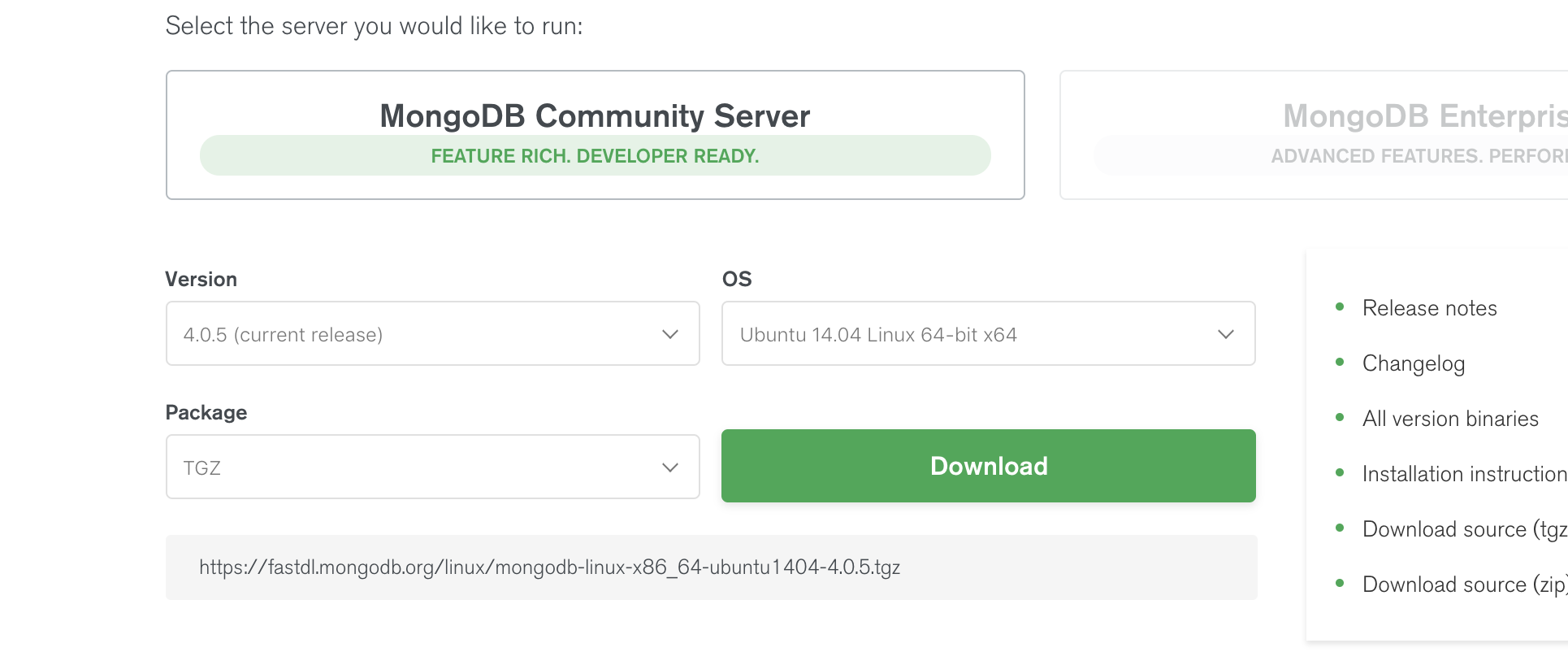
创建目录,将下载的文件放在如下位置
xxx@ubuntu:/usr/local$ sudo mkdir mongo

xxx@ubuntu:/usr/local$ ls

bin  etc  games  include  lib  man  mongo  sbin  share  src

xxx@ubuntu:/usr/local$ cd mongo/

xxx@ubuntu:/usr/local/mongo$ ls

mongodb-linux-x86_64-ubuntu1404-4.0..tgz
解压
xxx@ubuntu:/usr/local/mongo$ sudo tar -xvf mongodb-linux-x86_64-ubuntu1404-4.0..tgz

xxx@ubuntu:/usr/local/mongo$ ls

mongodb-linux-x86_64-ubuntu1404-4.0.

mongodb-linux-x86_64-ubuntu1404-4.0..tgz
创建数据库目录以及日志文件
xxx@ubuntu:/usr/local/mongo$ cd mongodb-linux-x86_64-ubuntu1404-4.0.5
xxx@ubuntu:/usr/local/mongo/mongodb-linux-x86_64-ubuntu1404-4.0.5$ sudo mkdir data
xxx@ubuntu:/usr/local/mongo/mongodb-linux-x86_64-ubuntu1404-4.0.5$ sudo touch logs
xxx@ubuntu:/usr/local/mongo/mongodb-linux-x86_64-ubuntu1404-4.0.5$ ls
bin logs MPL-2 data logs.2019-01-14T08-18-21 README LICENSE-Community.txt logs.2019-01-14T08-25-22 THIRD-PARTY-NOTICES
安装客户端
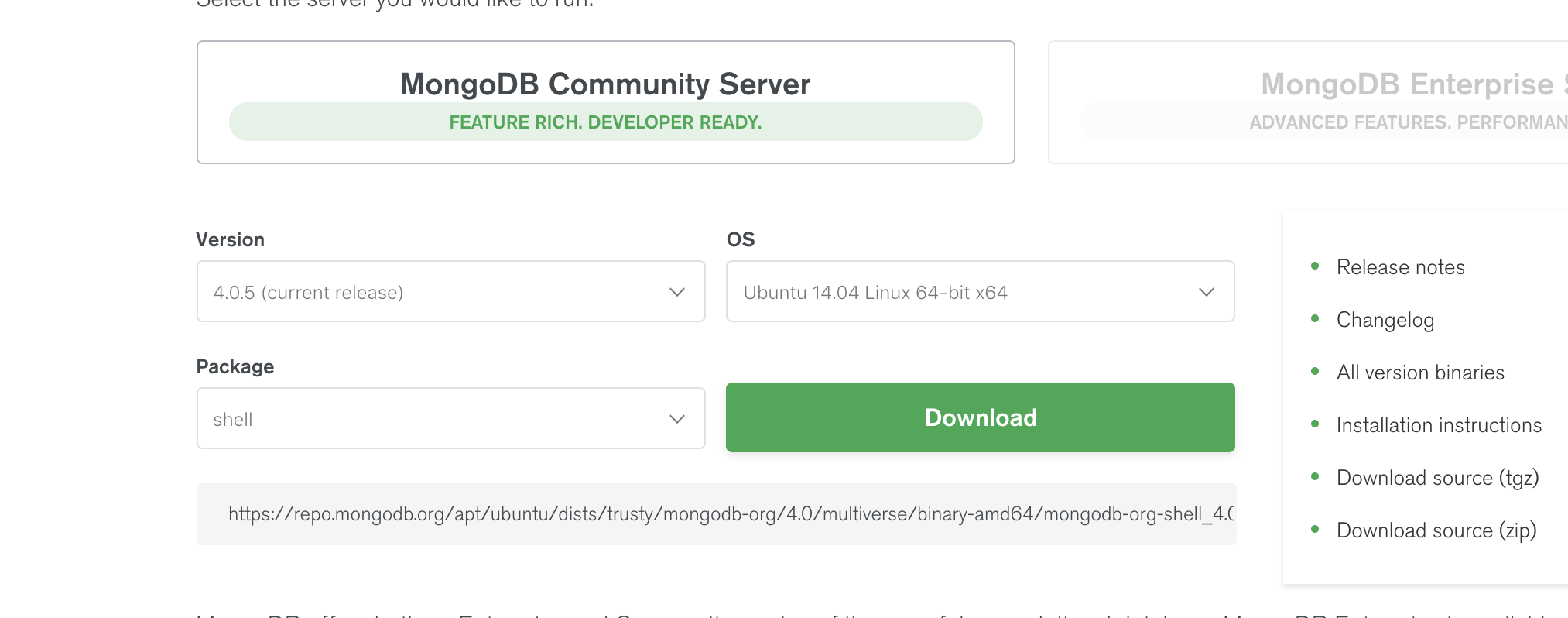
先下载这个文件,然后安装
sudo dpkg -i mongodb-org-shell_4..5_amd64.deb
进入到mongodb下面的bin里面查看mongodb帮助文档
./mongod -h
找到参数
--fork

--dbpath arg

--logpath arg

--nohttpinterface
--dbpath=/usr/local/mongodb/data/ 用于指定存放的mongodb数据库
--fork 是后台执行,不然一直在前台
--logpath=/usr/local/mongodb/logs 用于指定mongodb的日志记录文件
启动数据库
sudo ./mongod --dbpath=/usr/local/mongo/mongodb-linux-x86_64-ubuntu1404-4.0.5/data/ --logpath=/usr/local/mongo/mongodb-linux-x86_64-ubuntu1404-4.0.5/logs
即可通过mongo命令进入数据库。
xxx@ubuntu:~/Desktop$ mongo

MongoDB shell version v4.0.5

connecting to: mongodb://127.0.0.1:27017/?gssapiServiceName=mongodb

Implicit session: session { "id" : UUID("0783a892-c57e-4dee-94af-c3746762298a") }

MongoDB server version: 4.0.

Server has startup warnings:

--14T16::44.102+ I STORAGE  [initandlisten]

--14T16::44.102+ I STORAGE  [initandlisten] ** WARNING: Using the XFS filesystem is strongly recommended with the WiredTiger storage engine

--14T16::44.102+ I STORAGE  [initandlisten] **          See http://dochub.mongodb.org/core/prodnotes-filesystem

--14T16::44.839+ I CONTROL  [initandlisten]

--14T16::44.839+ I CONTROL  [initandlisten] ** WARNING: Access control is not enabled for the database.

--14T16::44.839+ I CONTROL  [initandlisten] **          Read and write access to data and configuration is unrestricted.

--14T16::44.839+ I CONTROL  [initandlisten] ** WARNING: You are running this process as the root user, which is not recommended.

--14T16::44.839+ I CONTROL  [initandlisten]

--14T16::44.839+ I CONTROL  [initandlisten] ** WARNING: This server is bound to localhost.

--14T16::44.839+ I CONTROL  [initandlisten] **          Remote systems will be unable to connect to this server.

--14T16::44.839+ I CONTROL  [initandlisten] **          Start the server with --bind_ip <address> to specify which IP

--14T16::44.839+ I CONTROL  [initandlisten] **          addresses it should serve responses from, or with --bind_ip_all to

--14T16::44.839+ I CONTROL  [initandlisten] **          bind to all interfaces. If this behavior is desired, start the

--14T16::44.839+ I CONTROL  [initandlisten] **          server with --bind_ip 127.0.0.1 to disable this warning.

--14T16::44.839+ I CONTROL  [initandlisten]

--14T16::44.839+ I CONTROL  [initandlisten]

--14T16::44.839+ I CONTROL  [initandlisten] ** WARNING: /sys/kernel/mm/transparent_hugepage/enabled is 'always'.

--14T16::44.839+ I CONTROL  [initandlisten] **        We suggest setting it to 'never'

--14T16::44.839+ I CONTROL  [initandlisten]

--14T16::44.840+ I CONTROL  [initandlisten] ** WARNING: /sys/kernel/mm/transparent_hugepage/defrag is 'always'.

--14T16::44.840+ I CONTROL  [initandlisten] **        We suggest setting it to 'never'

--14T16::44.840+ I CONTROL  [initandlisten]

---

Enable MongoDB's free cloud-based monitoring service, which will then receive and display

metrics about your deployment (disk utilization, CPU, operation statistics, etc).

The monitoring data will be available on a MongoDB website with a unique URL accessible to you

and anyone you share the URL with. MongoDB may use this information to make product

improvements and to suggest MongoDB products and deployment options to you.

To enable free monitoring, run the following command: db.enableFreeMonitoring()

To permanently disable this reminder, run the following command: db.disableFreeMonitoring()

---

>
Linux-Ubuntu14.04下mongodb安装部署的更多相关文章
- Ubuntu14.04下Mongodb(离线安装方式|非apt-get)安装部署步骤(图文详解)(博主推荐)
不多说,直接上干货! 说在前面的话 首先,查看下你的操作系统的版本. root@zhouls-virtual-machine:~# cat /etc/issue Ubuntu LTS \n \l r ...
- Ubuntu14.04下Mongodb数据库可视化工具安装部署步骤(图文详解)(博主推荐)
不多说,直接上干货! 前期博客 Ubuntu14.04下Mongodb(离线安装方式|非apt-get)安装部署步骤(图文详解)(博主推荐) Ubuntu14.04下Mongodb官网安装部署步骤(图 ...
- Ubuntu14.04下Mongodb官网安装部署步骤(图文详解)(博主推荐)
不多说,直接上干货! 在这篇博客里,我采用了非官网的安装步骤,来进行安装.走了弯路,同时,也是不建议.因为在大数据领域和实际生产里,还是要走正规的为好. Ubuntu14.04下Mongodb(离线安 ...
- Ubuntu14.04下Ambari安装搭建部署大数据集群(图文分五大步详解)(博主强烈推荐)
不多说,直接上干货! 写在前面的话 (1) 最近一段时间,因担任我团队实验室的大数据环境集群真实物理机器工作,至此,本人秉持负责.认真和细心的态度,先分别在虚拟机上模拟搭建ambari(基于CentO ...
- Ubuntu14.04下Mongodb官网卸载部署步骤(图文详解)(博主推荐)
不多说,直接上干货! 前期博客 Ubuntu14.04下Mongodb官网安装部署步骤(图文详解)(博主推荐) https://docs.mongodb.com/manual/tutorial/ins ...
- Ubuntu14.04下Mongodb的Java API编程实例(手动项目或者maven项目)
不多说,直接上干货! 若大家,不会安装的话,则请移步,随便挑选一种. Ubuntu14.04下Mongodb(在线安装方式|apt-get)安装部署步骤(图文详解)(博主推荐) Ubuntu14.04 ...
- Ubuntu14.04 Django Mysql安装部署全过程
Ubuntu14.04 Django Mysql安装部署全过程 一.简要步骤.(阿里云Ubuntu14.04) Python安装 Django Mysql的安装与配置 记录一下我的部署过程,也方便 ...
- ubuntu14.04下编译安装ambari-2.4.2.0
ubuntu14.04下编译安装ambari-2.4.2.0 编译前的准备工作 准备工作有: 系统参数 系统依赖(编译环境) 离线安装包 java环境 maven环境 Nodejs环境 git环境 a ...
- ubuntu14.04下手动安装eclipse
ubuntu14.04下手动安装eclipse 第一步: 安装jdk 第二步: 下载eclipse,假设下载的文件文件名为eclipse.tar.gz 第三步: 解压 sudo -zxvf ./ecl ...
随机推荐
- Py-lamda表达式学习【转载】
转自:https://blog.csdn.net/zjuxsl/article/details/79437563 1.语法定义 在Python中,lambda的语法是唯一的.其形式如下: lambda ...
- Hive学习笔记:基础语法
Hive基础语法 1.创建表 – 用户表 CREATE [EXTERNAL外部表] TABLE [IF NOT EXISTS 是否存在] HUserInfo ( userid int comment ...
- numpy的ravel()和flatten()函数
相同点: 两者所要实现的功能是一致的(将多维数组降位一维).这点从两个单词的意也可以看出来,ravel(散开,解开),flatten(变平). In [14]: x=np.array([[1,2],[ ...
- malloc 实现原理
1. Reference: 如何实现一个malloc http://blog.codinglabs.org/articles/a-malloc-tutorial.html 2.
- 来自阿里妈妈的iconfont(转)
转自http://www.augsky.com/775.html 随便说说两者的优缺点 其实主要是说iconfont的优点和Font Awesome的缺点.-_-|||iconfont的图标库相当巨大 ...
- wordpress 修改域名后的403
wordpress的好处就是方便,不好呢,额,反正就是有. 最近,修改域名,也遇到了这个问题[修改域名后,出现403]. 网上的办法似乎有很多,但有一些并不好,比如修改数据库什么的,如果是新手,数据库 ...
- RPC和RabbitMQ
在单台机器或者单个进程中,如果要调用某个函数,只需要通过函数指针,传入相关参数,即可调用成功并获得结果.但如果是在分布式系统中,某个进程想要调用远程机器上的其它进程提供的方法(服务),就需要采用RPC ...
- LINUX环境变量(一)
Linux 的变量可分为两类:环境变量和本地变量 环境变量,或者称为全局变量,存在与所有的shell 中,在你登陆系统的时候就已经有了相应的系统定义的环境变量了.Linux 的环境变量具有继承性,即子 ...
- git必备命令
git status 查看git的状态git add <path>的形式把我们<path>添加到索引库中,<path>可以是文件也可以是目录.git add -u ...
- bzoj1638 / P2883 [USACO07MAR]牛交通Cow Traffic
P2883 [USACO07MAR]牛交通Cow Traffic 对于每一条边$(u,v)$ 设入度为0的点到$u$有$f[u]$种走法 点$n$到$v$(通过反向边)有$f2[v]$种走法 显然经过 ...