
20162311 编写Android程序测试查找排序算法
20162311 编写Android程序测试查找排序算法
一、设置图形界面
因为是测试查找和排序算法,所以先要有一个目标数组。为了得到一个目标数组,我设置一个
EditText和一个Button来添加数据
     <LinearLayout

        android:layout_width="match_parent"

        android:layout_height="match_parent"

        android:layout_weight="2"

        android:orientation="vertical">

        <EditText

            android:id="@+id/addData"

            android:layout_width="match_parent"

            android:layout_height="wrap_content"

            android:hint="输入要添加的数据"></EditText>

        <Button

            android:id="@+id/add"

            android:layout_width="match_parent"

            android:layout_height="wrap_content"

            android:text="添加数据" />

        <TextView

            android:id="@+id/dataArray"

            android:layout_width="match_parent"

            android:layout_height="wrap_content"

            android:text=""/>

    </LinearLayout>
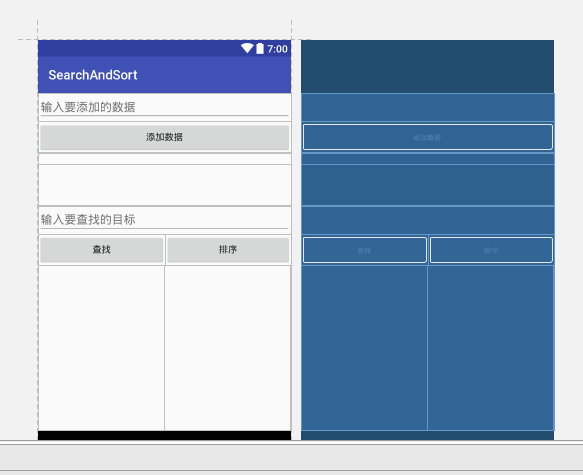
采用垂直线性布局,EditText添加一个hint属性,提示用户添加数据,然后点击按钮即可把数据添加到数组中,后面的TextView用来显示数组中的元素。接下来又是一个EditText,用来让客户输入要查找的对象;之后是两个按钮,一个是查找,点击之后可以在目标数组中进行查找,一个是排序,点击之后会对目标数组进行排序,并把排序结果显示在后面的TextView中
<LinearLayout

        android:layout_width="match_parent"

        android:layout_height="match_parent"

        android:layout_weight="1"

        android:orientation="vertical">

        <EditText

            android:id="@+id/target"

            android:layout_width="match_parent"

            android:layout_height="wrap_content"

            android:hint="输入要查找的目标"></EditText>

        <LinearLayout

            android:layout_width="match_parent"

            android:layout_height="wrap_content"

            android:orientation="horizontal">

            <Button

                android:id="@+id/search"

                android:layout_width="193dp"

                android:layout_height="wrap_content"

                android:text="查找" />

            <Button

                android:id="@+id/sort"

                android:layout_width="match_parent"

                android:layout_height="wrap_content"

                android:layout_weight="1"

                android:text="排序" />

        </LinearLayout>

        <LinearLayout

            android:orientation="horizontal"

            android:layout_width="match_parent"

            android:layout_height="match_parent">

            <TextView

                android:id="@+id/searchText"

                android:layout_weight="1"

                android:layout_width="match_parent"

                android:layout_height="match_parent"

                android:hint=""/>

            <TextView

                android:id="@+id/sortText"

                android:layout_weight="1"

                android:layout_width="match_parent"

                android:layout_height="match_parent"

                android:hint=""/>

        </LinearLayout>

    </LinearLayout>
整体的布局采用了线性布局,其中又嵌套了线性布局,利用weight这个属性合理的分配空间。最后的结果如下
二、编写MainActivity
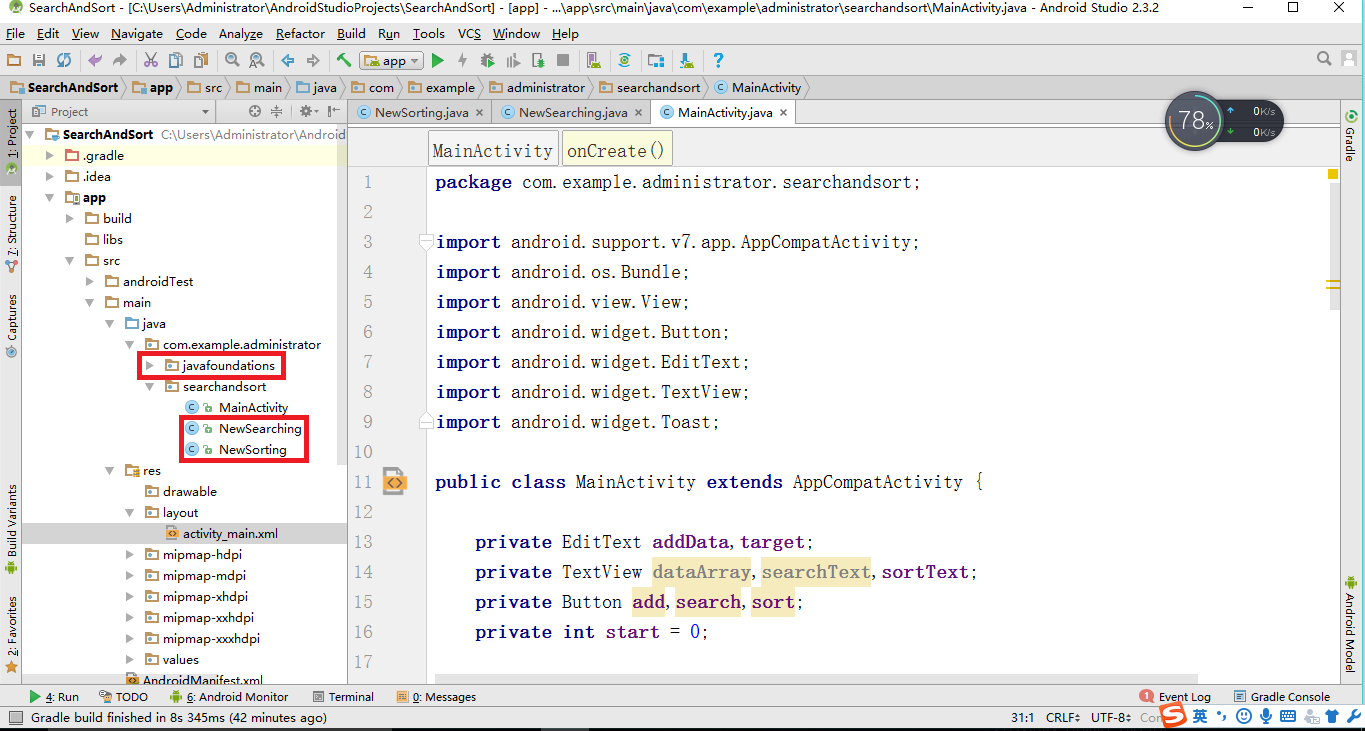
因为要用到之前实现的查找排序算法和一些相关的类,所以先把他们从IEDA中复制到Android项目里来
- 设置变量,找到对应控件的id
private EditText addData,target;

private TextView dataArray,searchText,sortText;

private Button add,search,sort;
addData = (EditText) findViewById(R.id.addData);

target = (EditText) findViewById(R.id.target);

dataArray = (TextView)findViewById(R.id.dataArray);

searchText = (TextView)findViewById(R.id.searchText);

sortText = (TextView)findViewById(R.id.sortText);

add = (Button)findViewById(R.id.add);

search = (Button)findViewById(R.id.search);

sort = (Button)findViewById(R.id.sort);
- 给对应的按钮设置监听器
首先是add按钮,它的功能是把第一个EditText中输入的数据存入数组中,然后把数组中的数据显示在下面的TextView中。其中start是一个整型变量,初始值为0,每添加一个元素自加一
add.setOnClickListener(new View.OnClickListener(){

            @Override

            public void onClick(View v){

                Integer dataText = Integer.getInteger(addData.getText().toString());

                data[start] = dataText;

                start++;

                String result = "";

                for(int i:data)

                    result += i+" ";

                dataArray.setText(result);

            }

        });
然后设置search按钮,它的功能是接收第二个EditText中的数据,作为查找目标,然后调用查找方法进行查找,并把结果显示在下面的TextView中。我这里是以数表查找为例
search.setOnClickListener(new View.OnClickListener(){

            @Override

            public void onClick(View v){

                int targetext = Integer.getInteger(target.getText().toString());

                int result = NewSearching.treeSearch(data,targetext);

                searchText.setText("查找结果为:"+ result);

            }

        });
最后是sort按钮,用来对目标数组进行排序,然后把排序结果显示在下面的TextView中,我这里以二叉树排序为例
sort.setOnClickListener(new View.OnClickListener(){

            @Override

            public void onClick(View v){

                NewSorting.binaryTreeSort(data);

                String result = "排序结果:\n";

                for (int s: data)

                    result += s+"\n";

                sortText.setText(result);

            }

        });
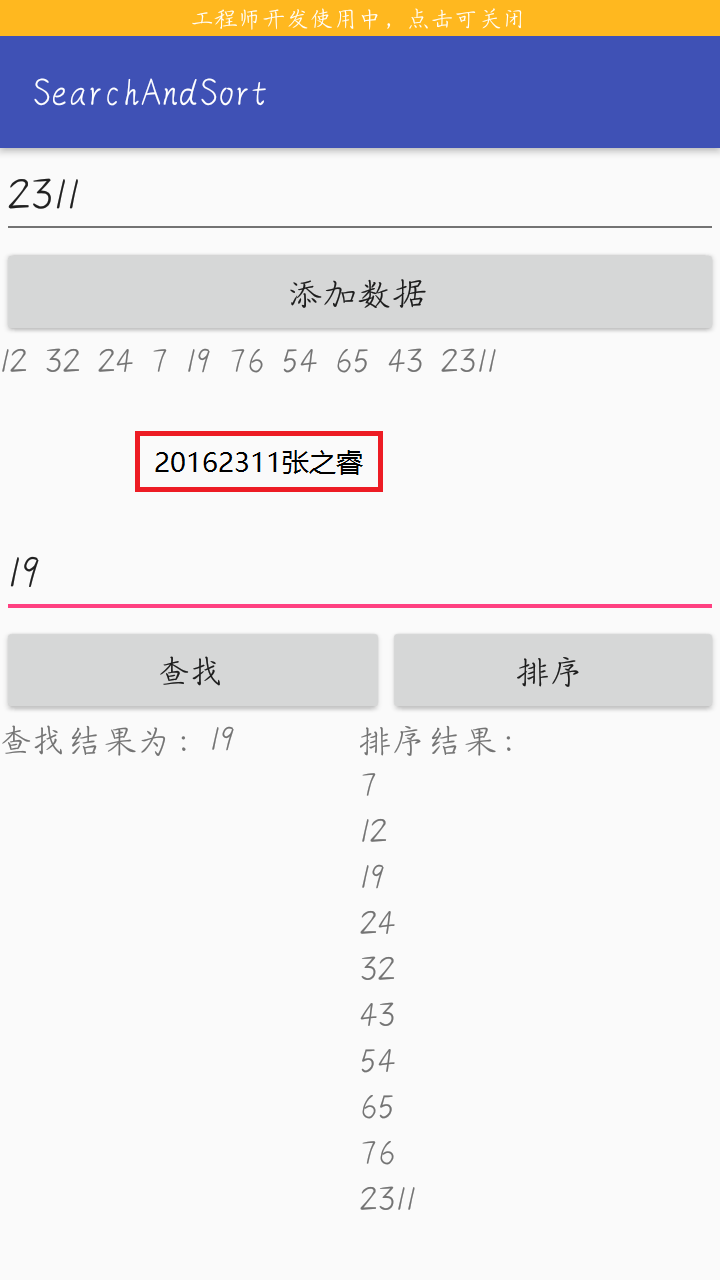
三、测试结果截图
20162311 编写Android程序测试查找排序算法的更多相关文章
- 用Eclipse编写Android程序的代码提示功能
用Eclipse编写Android程序的代码提示功能主要是在java和xml文件中,有时候会失效,默认的提示功能有限. 1)java文件自动提示 Window->Preferences- ...
- Visual Studio 开始支持编写 Android 程序并自带 Android 模拟器【转载】
原文地址 本文内容 为什么需要一个 Android 模拟器 针对 Visual Studio Android 模拟器的调试 Visual Studio Android 模拟器的传感器模拟和其他功能 A ...
- Android程序测试
一.建立测试环境 安装了Android Developer Tools (ADT) 插件的Eclipse将为你创建,构建,以及运行Android程序提供一个基于图形界面的集成开发环境.Eclipse的 ...
- java小程序整理及排序算法
1. 利用循环打印如下图形 ***** **** *** ** * public class Main { public static void main(String[] args) { // TO ...
- 剑指offer 查找和排序的基本操作:查找排序算法大集合
重点 查找算法着重掌握:顺序查找.二分查找.哈希表查找.二叉排序树查找. 排序算法着重掌握:冒泡排序.插入排序.归并排序.快速排序. 顺序查找 算法说明 顺序查找适合于存储结构为顺序存储或链接存储的线 ...
- c#(控制台应用程序)实现排序算法的研究总结
前言:闲来无事,便研究起来对数组的排序算法,怕过后遗忘,特地总结一下,也希望能帮到大家 概要: 总结的算法: 冒泡排序.插入排序.选择排序 要排序的一列数(从小到大): 1, 5, 3, 83, 4 ...
- [转]eclipse下编写android程序突然不会自动生成R.java文件和包的解决办法
原网址 : http://www.cnblogs.com/zdz8207/archive/2012/11/30/eclipse-android-adt-update.html 网上解决方法主要有这几种 ...
- 用Xamarin + VS 编写Android程序体验及其与Android Studio的比较
昨天看了微软2016Build大会,Xamarin免费了.恩,5亿美刀的家伙,哈哈,我也要体验一下..... 1. 首先在Xamarin官网下载安向导:https://www.xamarin.com/ ...
- 用eclipse编写Android程序时怎样生成apk文件
转载请注明出处:http://blog.csdn.net/ns_code/article/details/16828449 APK是Android Package的缩写,即Android安装包.通过将 ...
随机推荐
- GCD之各种派发
dispatch_apply的用法 并行模拟for循环,将指定的代码循环10次,一般会把这些代码附加到一个queue上,然后在 dispatch_apply里并行 dispatch_queue_t q ...
- jeb 下载
jeb-1.5.201408040(full)_keygen_by_scz(20150725) http://scz.617.cn/ 修改jeb_wincon.bat 中java home 变量,然后 ...
- 2018/03/30 每日一个Linux命令 之 创建用户/密码
感悟: 感觉每天学习下指令真的很不错,虽然感觉也没啥东西,但是真的用到了,马上就能想起来个大概,忘了详细的用法,就回来看看自己的博客. 话说今天GitHub上有个人 star 了我的项目,很开心,嘎嘎 ...
- KVM VCPU线程调度问题的讨论
2017-11-15 今天闲着没有突然想了想VCPU线程调度的问题,具体描述如下: 当代表VCPU的线程获得控制权后,首先会通过KVM接口进入到内核,从内核进入到非根模式,那么此时站在全局调度器的点上 ...
- Infopath表单&Reproting Service在IE11下问题解决
一.打开表单出现错误:“对象不支持“addEventListener”属性或方法”错误 解决方法: 1. IE11浏览器--->选项 2. 勾选"在兼容性视图中显示intranet站点 ...
- android activity and fragment活动周期
1.状态 /* 每个活动一共有四种状态 *:1.运行状态,就是栈顶的那个 * 2.暂停状态:就是不处于栈顶,但是依然可见,比如对话框下面的界面 * 3.停止状态:不处于栈顶,并且不可见 * 4.销毁状 ...
- mac版 android studio问题解决
1.mac安装android studio 解决方案:如果你是安装新手,可以下载androud studio boundls 和 安装环境的jdk就可以了,不需要单独在配置环境了,如果你有经验,可以单 ...
- 使用java进行excel读取和写入
1:添加处理excel的依赖jar包 <!-- 引入poi,解析workbook视图 --> <dependency> <groupId>org.apache.po ...
- 测试人员需要了解的sql知识(基础篇)
这是第一篇关于数据库的,本着详细的原则,基础的还是不能放过,还是那句话,有问题,欢迎指出! ------------------------------------------------------ ...
- PAT 1017 Queueing at Bank[一般]
1017 Queueing at Bank (25)(25 分)提问 Suppose a bank has K windows open for service. There is a yellow ...