
RouterOS 设定NAT loopback (Hairpin NAT)回流
In the below network topology a web server behind a router is on private IP address space, and the router performs NAT to forward traffic to its public IP address to the web server behind it.
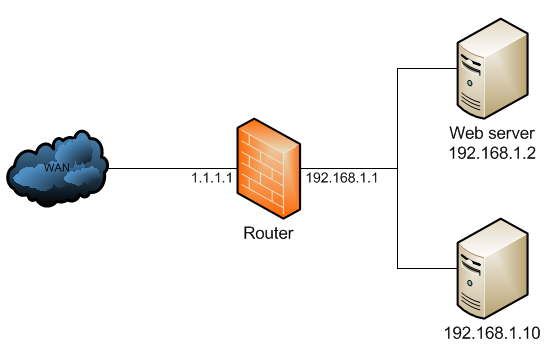
The NAT configuration would look like below:
/ip firewall natadd chain=dstnat dst-address=1.1.1.1 protocol=tcp dst-port=80 \ action=dst-nat to-address=192.168.1.2add chain=srcnat out-interface=WAN action=masquerade
When a client out on the Internet with IP address 2.2.2.2 establishes a connection to the web server, the router performs NAT as configured.
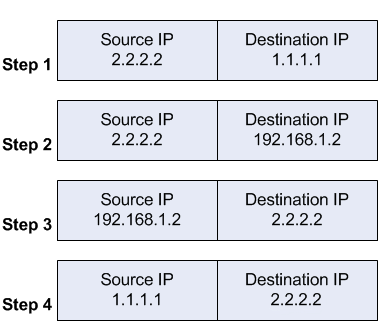
- the client sends a packet with a source IP address of 2.2.2.2 to a destination IP address of 1.1.1.1 on port tcp/80 to request some web resource.
- the router destination NATs the packet to 192.168.1.2 and replaces the destination IP address in the packet accordingly. The source IP address stays the same: 2.2.2.2.
- the server replies to the client's request and the reply packet has a source IP address of 192.168.1.2 and a destination IP address of 2.2.2.2.
- the router determines that the packet is part of a previous connection and undoes the destination NAT, and puts the original destination IP address into the source IP address field. The destination IP address is 2.2.2.2, and the source IP address is 1.1.1.1.
The client receives the reply packet it expects, and the connection is established.
When a client on the same internal network as the web server requests a connection to the web server's public IP address, the connection breaks.
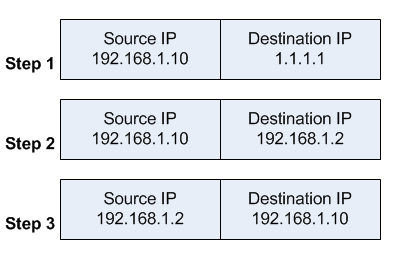
- the client sends a packet with a source IP address of 192.168.1.10 to a destination IP address of 1.1.1.1 on port tcp/80 to request some web resource.
- the router destination NATs the packet to 192.168.1.2 and replaces the destination IP address in the packet accordingly. The source IP address stays the same: 192.168.1.10.
- the server replies to the client's request. However, the source IP address of the request is on the same subnet as the web server. The web server does not send the reply back to the router, but sends it back directly to 192.168.1.10 with a source IP address in the reply of 192.168.1.2.
The client receives the reply packet, but it discards it because it expects a packet back from 1.1.1.1, and not from 192.168.1.2. As far as the client is concerned the packet is invalid and not related to any connection the client previously attempted to establish.
To fix the issue, an additional NAT rule needs to be introduced on the router to enforce that all reply traffic flows through the router, despite the client and server being on the same subnet. The rule below is very specific to only apply to the traffic that the issue could occur with - if there are many servers the issue occurs with, the rule could be made broader to save having one such exception per forwarded service.
/ip firewall natadd chain=srcnat src-address=192.168.1.0/24 \ dst-address=192.168.1.2 protocol=tcp dst-port=80 \ out-interface=LAN action=masquerade
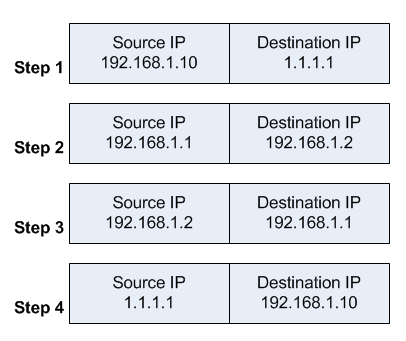
With that additional rule, the flow now changes:
- the client sends a packet with a source IP address of 192.168.1.10 to a destination IP address of 1.1.1.1 on port tcp/80 to request some web resource.
- the router destination NATs the packet to 192.168.1.2 and replaces the destination IP address in the packet accordingly. It also source NATs the packet and replaces the source IP address in the packet with the IP address on its LAN interface. The destination IP address is 192.168.1.2, and the source IP address is 192.168.1.1.
- the web server replies to the request and sends the reply with a source IP address of 192.168.1.2 back to the router's LAN interface IP address of 192.168.1.1.
- the router determines that the packet is part of a previous connection and undoes both the source and destination NAT, and puts the original destination IP address of 1.1.1.1 into the source IP address field, and the original source IP address of 192.168.1.10 into the destination IP address field.
The client receives the reply packet it expects, and the connection is established.
However, the web server only ever sees a source IP address of 192.168.1.1 for all requests from internal clients regardless of the internal client's real IP address. There is no way to avoid this without either using a router that can do application level DNS inspection and can rewrite A records accordingly, or a split DNS server that serves the internal clients the internal server IP address and external clients the external server IP address.
This is called - among other terms - hair pin NAT because the traffic flow has clients enter the router through the same interface it leaves through, which when drawn looks like a hair pin.
RouterOS 设定NAT loopback (Hairpin NAT)回流的更多相关文章
- Linux 与 CONE NAT 和 Symmetric NAT
http://alexanderlaw.blog.hexun.com/31883661_d.html 1. NAT 的划分 RFC3489 中将 NAT 的实现分为四大类: 1. Full Cone ...
- 静态NAT、动态NAT
静态NAT.动态NAT 实验拓扑: 实验目的:熟悉网络地址转换协议 掌握静态NAT 和动态NAT的配置 分析静态NAT 和动态NAT的区别 使用show命令来检查NAT的运行情况 实验要求:按拓扑图来 ...
- 运营商级NAT(Carrier-grade NAT)
运营商级NAT(Carrier-grade NAT) 运营商级(Carrier-grade)NAT,是用于缓解是IPV4地址枯竭的一种方法,通过这种方法,原来被分配公网ip的端点.家庭网络等可以被 ...
- CONE NAT 和 Symmetric NAT
CONE NAT 和 Symmetric NAT 1. NAT 的划分 RFC3489 中将 NAT 的实现分为四大类: Full Cone NAT 完全锥形 NAT Restricted Cone ...
- 什么叫NAT,设置NAT的两个方法
NAT是网络地址翻译就是把公网IP翻译成私有地址, 又叫端口映射或端口转发. 采用路由方式是指ADSL拥有一个动态或固定的公网IP,ADSL直接接在HUB或交换机上,所有的电脑共享上网.这时ADSL的 ...
- NAT and Traversal NAT(TURN/STUN/ICE)
http://www.cnblogs.com/whyandinside/archive/2010/12/08/1900492.html -------------------------------- ...
- 静态NAT、动态NAT、PAT(端口多路复用)的配置
静态NAT.动态NAT.PAT(端口多路复用)的配置 NAT的实现方式有三种,即静态转换Static Nat.动态转换Dynamic Nat 和 端口多路复用OverLoad. 静态转换 ( ...
- NAT原理与NAT穿越
最近在看东西的时候发现很多网络程序中都需要NAT穿越,特意在此总结一下. 先做一个约定: 内网A中有:A1(192.168.0.8).A2(192.168.0.9)两用户 网关X1(一个NAT设备)有 ...
- NAT与FULL NAT的区别
LVS 当前应用主要采用 DR 和 NAT 模式,但这 2 种模式要求 RealServer 和 LVS在同一个 vlan中,导致部署成本过高:TUNNEL 模式虽然可以跨 vlan,但RealSer ...
随机推荐
- centos 7安装tomcat
1.下载安装包 http://tomcat.apache.org/download-80.cgi 2.安装tomcat 注:安装前需要安装jdk环境 #解压 [root@localhost soft] ...
- SWIFT模糊效果
首先创建一个模糊效果 let blurEffect = UIBlurEffect(style: UIBlurEffectStyle.Light) 接着创建一个承载模糊效果的视图let blurView ...
- hog+svm+检测人(代替默认的参数)
#include <iostream>#include <opencv2/core/core.hpp>#include <opencv2/highgui/highgui. ...
- Knight Tournament 合并区间
Hooray! Berl II, the king of Berland is making a knight tournament. The king has already sent the me ...
- MySQL--Alter Table注意事项
======================================================================== ALTER TABLE 和FLUSH TABLE导致的 ...
- NoSQLUnit
NoSQLUnit Core Overview Unit testing is a method by which the smallest testable part of an applicati ...
- nyoj 单调递增子序列(二)
单调递增子序列(二) 时间限制:1000 ms | 内存限制:65535 KB 难度:4 描述 给定一整型数列{a1,a2...,an}(0<n<=100000),找出单调递增最长 ...
- FastAdmin 如何用 composer bower 安装
FastAdmin 如何安装 composer bower 众所周知的原因,compower bower 安装并不怎么稳定. 刚开始安装时还有侥幸,用软件安装里的设置端口代理,composer 倒是可 ...
- jvm 知识点
双亲委派模型的工作流程是: 如果一个类加载器收到了类加载的请求,它首先不会自己去尝试加载这个类,而是把请求委托给父加载器去完成,依次向上,因此,所有的类加载请求最终都应该被传递到顶层的启动类加载器中, ...
- linux同一客户端多个git账号的配置
有时候我们需要在同一台机器上使用多个git账号,为了避免冲突,我们需要配置~/.ssh/config文件. 步骤一:用ssh-keygen命令生成一组新的id_rsa_new和id_rsa_new.p ...