
android中RecyclerView控件的使用
1、RecyclerView控件不在标准的库里面,需要先引入,引入比较简单,点击控件右边的下载按钮即可

2、先添加一个新闻实体类,用来为新闻列表提供数据,news.java:
package com.example.chenrui.common;

public class News {

    private String title;

    private int pic;

    public News(String title, int pic) {

        this.title = title;

        this.pic = pic;

    }

    public String getTitle() {

        return title;

    }

    public void setTitle(String title) {

        this.title = title;

    }

    public int getPic() {

        return pic;

    }

    public void setPic(int pic) {

        this.pic = pic;

    }

}
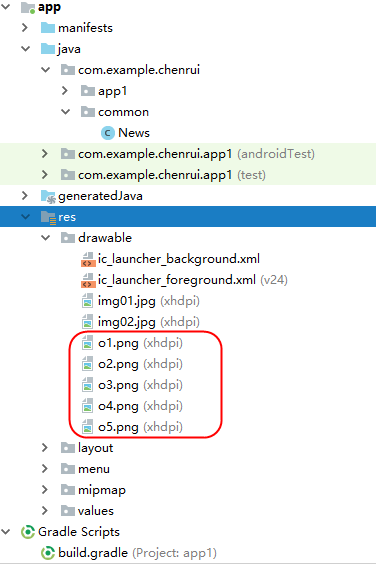
3、在res/drawable/xhdpi目录下引用几个图片,做为新闻图片的资源
4、添加一个Layout XML File,做为列表项的内容,news_item.xml:
<?xml version="1.0" encoding="utf-8"?>

<android.support.constraint.ConstraintLayout xmlns:android="http://schemas.android.com/apk/res/android"

    xmlns:app="http://schemas.android.com/apk/res-auto"

    xmlns:tools="http://schemas.android.com/tools"

    android:id="@+id/linearLayout"

    android:layout_width="match_parent"

    android:layout_height="100dp">

    <ImageView

        android:id="@+id/newsPic"

        android:layout_width="120dp"

        android:layout_height="80dp"

        android:layout_marginLeft="8dp"

        android:layout_marginTop="8dp"

        android:layout_marginBottom="8dp"

        android:adjustViewBounds="false"

        app:layout_constraintBottom_toBottomOf="parent"

        app:layout_constraintLeft_toLeftOf="parent"

        app:layout_constraintTop_toTopOf="parent" />

    <TextView

        android:id="@+id/newsTitle"

        android:layout_width="0dp"

        android:layout_height="wrap_content"

        android:text="TextView"

        app:layout_constraintLeft_toRightOf="@+id/newsPic"

        app:layout_constraintRight_toRightOf="parent"

        app:layout_constraintTop_toTopOf="@+id/newsPic" />

</android.support.constraint.ConstraintLayout>
5、添加一个适配器,这个适配器用于为RecyclerView指定使用的Layout数据项模板,以及对应的数据操作,NewsAdapter.java:
package com.example.chenrui.app1;

import android.support.annotation.NonNull;

import android.support.v7.widget.RecyclerView;

import android.view.LayoutInflater;

import android.view.View;

import android.view.ViewGroup;

import android.widget.ImageView;

import android.widget.TextView;

import com.example.chenrui.common.News;

import java.util.List;

public class NewsAdapter extends RecyclerView.Adapter<News2Adapter.ViewHolder> {

    private List<News> newsList;

    public News2Adapter(List<News> newsList) {

        this.newsList = newsList;

    }

    @NonNull

    @Override

    public ViewHolder onCreateViewHolder(@NonNull ViewGroup viewGroup, int i) {

        View view = LayoutInflater.from(viewGroup.getContext()).inflate(R.layout.news_item,viewGroup,false);

        ViewHolder viewHolder = new ViewHolder(view);

        return viewHolder;

    }

    @Override

    public void onBindViewHolder(@NonNull ViewHolder viewHolder, int i) {

        News news = newsList.get(i);

        viewHolder.newsImage.setImageResource(news.getPic());

        viewHolder.newsTitle.setText(news.getTitle());

    }

    @Override

    public int getItemCount() {

        return newsList.size();

    }

    static class ViewHolder extends RecyclerView.ViewHolder {

        ImageView newsImage;

        TextView newsTitle;

        public ViewHolder(@NonNull View itemView) {

            super(itemView);

            newsImage = itemView.findViewById(R.id.newsPic);

            newsTitle = itemView.findViewById(R.id.newsTitle);

        }

    }

}
6、接下来就是主体Activity了
activity_main.xml
<?xml version="1.0" encoding="utf-8"?>

<android.support.constraint.ConstraintLayout xmlns:android="http://schemas.android.com/apk/res/android"

    xmlns:app="http://schemas.android.com/apk/res-auto"

    xmlns:tools="http://schemas.android.com/tools"

    android:layout_width="match_parent"

    android:layout_height="match_parent"

    tools:context=".Main13Activity">

    <android.support.v7.widget.RecyclerView

        android:id="@+id/list1"

        android:layout_width="match_parent"

        android:layout_height="match_parent" />

</android.support.constraint.ConstraintLayout>
MainActivity.java
package com.example.chenrui.app1;

import android.support.v7.app.AppCompatActivity;

import android.os.Bundle;

import android.support.v7.widget.LinearLayoutManager;

import android.support.v7.widget.RecyclerView;

import android.widget.LinearLayout;

import com.example.chenrui.common.News;

import java.util.ArrayList;

import java.util.List;

public class MainActivity extends AppCompatActivity {

    @Override

    protected void onCreate(Bundle savedInstanceState) {

        super.onCreate(savedInstanceState);

        setContentView(R.layout.activity_main);

        List<News> newsList = new ArrayList();

        newsList.add(new News("新闻标题1",R.drawable.o1));

        newsList.add(new News("新闻标题2",R.drawable.o2));

        newsList.add(new News("新闻标题3",R.drawable.o3));

        newsList.add(new News("新闻标题4",R.drawable.o4));

        newsList.add(new News("新闻标题5",R.drawable.o5));

        NewsAdapter newsAdapter = new NewsAdapter(newsList);

        RecyclerView view = findViewById(R.id.list1);

        LinearLayoutManager layoutManager = new LinearLayoutManager(this);

        view.setLayoutManager(layoutManager);

        view.setAdapter(newsAdapter);

    }

}
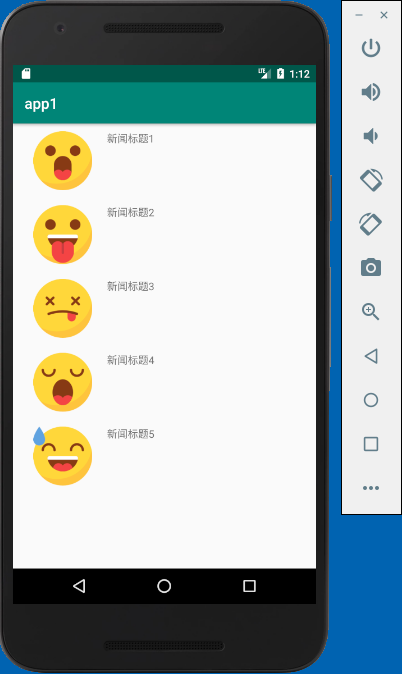
到此一个简单的RecyclerView控件示例就完成了,显示效果如下:
android中RecyclerView控件的使用的更多相关文章
- android中RecyclerView控件实现点击事件
RecyclerView控件实现点击事件跟ListView控件不同,并没有提供类似setOnItemClickListener()这样的注册监听器方法,而是需要自己给子项具体的注册点击事件. 本文的例 ...
- android中RecyclerView控件实现瀑布流布局
本文是在之前文章的基础上做的修改:android中RecyclerView控件的使用 1.修改列表项news_item.xml: <?xml version="1.0" en ...
- android中RecyclerView控件的列表项横向排列
本文是在上一篇文章的基础上做的修改:android中RecyclerView控件的使用 1.修改列表项news_item.xml:我这里是把新闻标题挪到了新闻图片的下面显示 <?xml vers ...
- android中RecyclerView控件实现长按弹出PopupMenu菜单功能
之前写过一篇文章:android中实现简单的聊天功能 现在是在之前功能的基础上,添加一个长按聊天记录,删除对应聊天记录的功能 RecyclerView控件,没有对应的长按事件,我们需要自己手工添加,修 ...
- Android中ListView控件的使用
Android中ListView控件的使用 ListView展示数据的原理 在Android中,其实ListView就相当于web中的jsp,Adapter是适配器,它就相当于web中的Servlet ...
- android中ListView控件&&onItemClick事件中获取listView传递的数据
http://blog.csdn.net/aben_2005/article/details/6592205 本文转载自:android中ListView控件&&onItemClick ...
- Android中ExpandableListView控件基本使用
本文採用一个Demo来展示Android中ExpandableListView控件的使用,如怎样在组/子ListView中绑定数据源.直接上代码例如以下: 程序结构图: layout文件夹下的 mai ...
- android中倒计时控件CountDownTimer分析
android中倒计时控件CountDownTimer分析 1 示例代码 new CountDownTimer(10000, 1000) { public void onTick(long milli ...
- Android 中常见控件的介绍和使用
1 TextView文本框 1.1 TextView类的结构 TextView 是用于显示字符串的组件,对于用户来说就是屏幕中一块用于显示文本的区域.TextView类的层次关系如下: java.la ...
随机推荐
- Java---16---多线程---死锁
死锁: 概念: 所谓死锁: 是指两个或两个以上的进程在执行过程中,因争夺资源而造成的一种互相等待的现象,若无外力作用.它们都将无法推进下去.此时称系统处于死锁状态或系统产生了死锁,这些永远在互相等待的 ...
- lufylegend:图形变形3
面来看看drawtriangles函数的扩展.利用drawtriangles函数来实现一个旋转的3D地球,效果如下 因为lufylegend1.5.0版的drawtriangles函数有个bug,所以 ...
- Subversion detected an unsupported working copy version
关于这个错误:Subversion detected an unsupported working copy version while checking the status of 'XXXX'. ...
- 罪恶黑名单第四季/全集The Blacklist迅雷下载
英文全名The Blacklist,第1季(2016)NBC.本季看点:<罪恶黑名单>我们知道:剧情紧接第三季结尾,每个人——Liz,Red以及特别行动组的其他人——似乎都有许多故事可说: ...
- centos 7 版本升级nginx
1.首先下载对应最新版nginx wget http://nginx.org/packages/centos/7/noarch/RPMS/nginx-release-centos-7-0.el7.ng ...
- 《RESTful Web APIs中文版》
<RESTful Web APIs中文版> 基本信息 原书名:RESTful Web APIs 原出版社: O'Reilly Media 作者: Leonard Richardson ...
- Hadoop集群WordCount运行详解(转)
原文链接:Hadoop集群(第6期)_WordCount运行详解 1.MapReduce理论简介 1.1 MapReduce编程模型 MapReduce采用"分而治之"的思想,把对 ...
- hdu-4466-Triangle 数学题
题目链接: http://acm.hdu.edu.cn/showproblem.php?pid=4466 题目意思: 一根长为N的木棒,长度分成若干个三角形,使得任意两个三角形都相似.对应顺序三角形全 ...
- 【StatLearn】统计学习中knn算法实验(2)
接着统计学习中knn算法实验(1)的内容 Problem: Explore the data before classification using summary statistics or vis ...
- js操作XML文件兼容IE与FireFox
最近项目中用到了xml,需求是用户安装产品时先把一系列的数据保存到xml文件中,当执行到最后一步时才写入数据库,这样最大限度的减少了数据库的访问,于是不得不纠结在各浏览器的兼容性的问题(悲哀啊.... ...