
android中RecyclerView控件的使用
1、RecyclerView控件不在标准的库里面,需要先引入,引入比较简单,点击控件右边的下载按钮即可

2、先添加一个新闻实体类,用来为新闻列表提供数据,news.java:
package com.example.chenrui.common;

public class News {

    private String title;

    private int pic;

    public News(String title, int pic) {

        this.title = title;

        this.pic = pic;

    }

    public String getTitle() {

        return title;

    }

    public void setTitle(String title) {

        this.title = title;

    }

    public int getPic() {

        return pic;

    }

    public void setPic(int pic) {

        this.pic = pic;

    }

}
3、在res/drawable/xhdpi目录下引用几个图片,做为新闻图片的资源
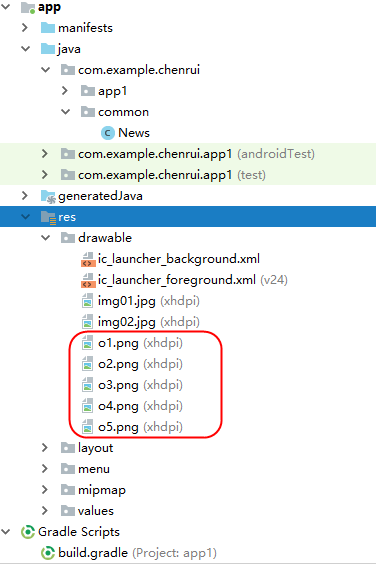
4、添加一个Layout XML File,做为列表项的内容,news_item.xml:
<?xml version="1.0" encoding="utf-8"?>

<android.support.constraint.ConstraintLayout xmlns:android="http://schemas.android.com/apk/res/android"

    xmlns:app="http://schemas.android.com/apk/res-auto"

    xmlns:tools="http://schemas.android.com/tools"

    android:id="@+id/linearLayout"

    android:layout_width="match_parent"

    android:layout_height="100dp">

    <ImageView

        android:id="@+id/newsPic"

        android:layout_width="120dp"

        android:layout_height="80dp"

        android:layout_marginLeft="8dp"

        android:layout_marginTop="8dp"

        android:layout_marginBottom="8dp"

        android:adjustViewBounds="false"

        app:layout_constraintBottom_toBottomOf="parent"

        app:layout_constraintLeft_toLeftOf="parent"

        app:layout_constraintTop_toTopOf="parent" />

    <TextView

        android:id="@+id/newsTitle"

        android:layout_width="0dp"

        android:layout_height="wrap_content"

        android:text="TextView"

        app:layout_constraintLeft_toRightOf="@+id/newsPic"

        app:layout_constraintRight_toRightOf="parent"

        app:layout_constraintTop_toTopOf="@+id/newsPic" />

</android.support.constraint.ConstraintLayout>
5、添加一个适配器,这个适配器用于为RecyclerView指定使用的Layout数据项模板,以及对应的数据操作,NewsAdapter.java:
package com.example.chenrui.app1;

import android.support.annotation.NonNull;

import android.support.v7.widget.RecyclerView;

import android.view.LayoutInflater;

import android.view.View;

import android.view.ViewGroup;

import android.widget.ImageView;

import android.widget.TextView;

import com.example.chenrui.common.News;

import java.util.List;

public class NewsAdapter extends RecyclerView.Adapter<News2Adapter.ViewHolder> {

    private List<News> newsList;

    public News2Adapter(List<News> newsList) {

        this.newsList = newsList;

    }

    @NonNull

    @Override

    public ViewHolder onCreateViewHolder(@NonNull ViewGroup viewGroup, int i) {

        View view = LayoutInflater.from(viewGroup.getContext()).inflate(R.layout.news_item,viewGroup,false);

        ViewHolder viewHolder = new ViewHolder(view);

        return viewHolder;

    }

    @Override

    public void onBindViewHolder(@NonNull ViewHolder viewHolder, int i) {

        News news = newsList.get(i);

        viewHolder.newsImage.setImageResource(news.getPic());

        viewHolder.newsTitle.setText(news.getTitle());

    }

    @Override

    public int getItemCount() {

        return newsList.size();

    }

    static class ViewHolder extends RecyclerView.ViewHolder {

        ImageView newsImage;

        TextView newsTitle;

        public ViewHolder(@NonNull View itemView) {

            super(itemView);

            newsImage = itemView.findViewById(R.id.newsPic);

            newsTitle = itemView.findViewById(R.id.newsTitle);

        }

    }

}
6、接下来就是主体Activity了
activity_main.xml
<?xml version="1.0" encoding="utf-8"?>

<android.support.constraint.ConstraintLayout xmlns:android="http://schemas.android.com/apk/res/android"

    xmlns:app="http://schemas.android.com/apk/res-auto"

    xmlns:tools="http://schemas.android.com/tools"

    android:layout_width="match_parent"

    android:layout_height="match_parent"

    tools:context=".Main13Activity">

    <android.support.v7.widget.RecyclerView

        android:id="@+id/list1"

        android:layout_width="match_parent"

        android:layout_height="match_parent" />

</android.support.constraint.ConstraintLayout>
MainActivity.java
package com.example.chenrui.app1;

import android.support.v7.app.AppCompatActivity;

import android.os.Bundle;

import android.support.v7.widget.LinearLayoutManager;

import android.support.v7.widget.RecyclerView;

import android.widget.LinearLayout;

import com.example.chenrui.common.News;

import java.util.ArrayList;

import java.util.List;

public class MainActivity extends AppCompatActivity {

    @Override

    protected void onCreate(Bundle savedInstanceState) {

        super.onCreate(savedInstanceState);

        setContentView(R.layout.activity_main);

        List<News> newsList = new ArrayList();

        newsList.add(new News("新闻标题1",R.drawable.o1));

        newsList.add(new News("新闻标题2",R.drawable.o2));

        newsList.add(new News("新闻标题3",R.drawable.o3));

        newsList.add(new News("新闻标题4",R.drawable.o4));

        newsList.add(new News("新闻标题5",R.drawable.o5));

        NewsAdapter newsAdapter = new NewsAdapter(newsList);

        RecyclerView view = findViewById(R.id.list1);

        LinearLayoutManager layoutManager = new LinearLayoutManager(this);

        view.setLayoutManager(layoutManager);

        view.setAdapter(newsAdapter);

    }

}
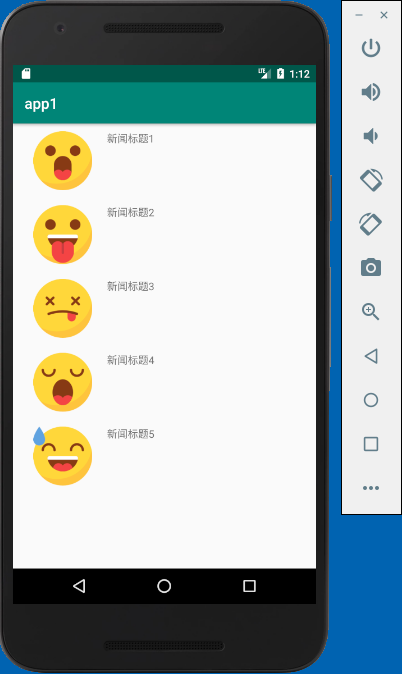
到此一个简单的RecyclerView控件示例就完成了,显示效果如下:
android中RecyclerView控件的使用的更多相关文章
- android中RecyclerView控件实现点击事件
RecyclerView控件实现点击事件跟ListView控件不同,并没有提供类似setOnItemClickListener()这样的注册监听器方法,而是需要自己给子项具体的注册点击事件. 本文的例 ...
- android中RecyclerView控件实现瀑布流布局
本文是在之前文章的基础上做的修改:android中RecyclerView控件的使用 1.修改列表项news_item.xml: <?xml version="1.0" en ...
- android中RecyclerView控件的列表项横向排列
本文是在上一篇文章的基础上做的修改:android中RecyclerView控件的使用 1.修改列表项news_item.xml:我这里是把新闻标题挪到了新闻图片的下面显示 <?xml vers ...
- android中RecyclerView控件实现长按弹出PopupMenu菜单功能
之前写过一篇文章:android中实现简单的聊天功能 现在是在之前功能的基础上,添加一个长按聊天记录,删除对应聊天记录的功能 RecyclerView控件,没有对应的长按事件,我们需要自己手工添加,修 ...
- Android中ListView控件的使用
Android中ListView控件的使用 ListView展示数据的原理 在Android中,其实ListView就相当于web中的jsp,Adapter是适配器,它就相当于web中的Servlet ...
- android中ListView控件&&onItemClick事件中获取listView传递的数据
http://blog.csdn.net/aben_2005/article/details/6592205 本文转载自:android中ListView控件&&onItemClick ...
- Android中ExpandableListView控件基本使用
本文採用一个Demo来展示Android中ExpandableListView控件的使用,如怎样在组/子ListView中绑定数据源.直接上代码例如以下: 程序结构图: layout文件夹下的 mai ...
- android中倒计时控件CountDownTimer分析
android中倒计时控件CountDownTimer分析 1 示例代码 new CountDownTimer(10000, 1000) { public void onTick(long milli ...
- Android 中常见控件的介绍和使用
1 TextView文本框 1.1 TextView类的结构 TextView 是用于显示字符串的组件,对于用户来说就是屏幕中一块用于显示文本的区域.TextView类的层次关系如下: java.la ...
随机推荐
- uitextfield 设置为密码框显示
uitextfield 设置为密码框显示: 在xib中,将文本secure的复选框选中即可.
- 1300多万条数据30G论坛大数据优化实战经验小结
最近由于某大型网站社区论坛运行效率比较低用户反馈论坛有些卡需要对系统进行优化,论坛性能影响了公司的形象还有网站的流量,当然这也会影响到公司的收入,而且后期还需要长期维护网站的社区论坛服务. 1:并发访 ...
- java.io.IOException: Attempted read from closed stream解决
在HttpClient请求的时候,返回结果解析时出现java.io.IOException: Attempted read from closed stream. 异常,解决 原因是EntityUti ...
- MyBatis入参类型是List时判断非空
一.参数list时,先判断是否为空,否则会报错. 二.mybatis ${}与#{}的区别 简单来说#{} 解析的是占位符?可以防止SQL注入, 比如打印出来的语句 select * from tab ...
- 都市侠盗第五季/全集Leverage迅雷下载
第五季 Leverage Season 5 (2012)看点:TNT电视网砍掉了<都市侠盗>(Leverage),这部已经播出至第5季的团队盗窃现代罗宾汉剧集将在今年完结,这样的决定对&l ...
- Android性能检测工具——traceview
之前的几篇文章中介绍了android中常用的一些工具,今天介绍的工具也是比较实用和方便的,它可以用量化的指标告诉我们哪个方法执行的时间最长,被调用的次数最多,有没有重复调用.下面我们就来看看它是怎么为 ...
- MySQL到Greenplum迁移分析
MySQL到Greenplum迁移分析 1 数据类型对比 MySQL PostgreSQL comments 数值类型 TINYINT SMALLINT gp中无zerofill属性及unsign ...
- PreApplicationStartMethodAttribute程序启动扩展
一.PreApplicationStartMethodAttribute 类简介 应用程序启动时提供的扩展的支持. 命名空间: System.Web程序集: System.Web(位于 Syst ...
- SVG 相关整理
1. 中文参考手册: http://www.runoob.com/svg/svg-reference.html SVG HTML5 资源教程 http://www.html5tricks.com/ta ...
- 【JAVA与C#比较】其它
从语言方面的知识点来说,这应该是最后一篇有关java和C#的比较了.如果要了解两者具体各知识点的异同,请查看前面的相关文章,不过后面有可能存在,不能放到前面文章所列知识点的情况,应该就会补充到这里吧. ...