
Ogre Compositor解析
Compositor脚本与类型
我们先看下面一张基本的Compositor的脚本图:
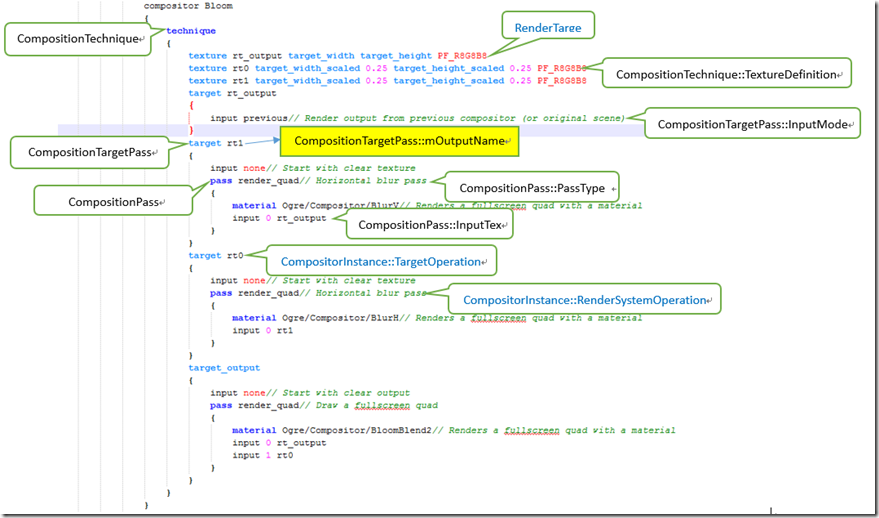
上面就是一个Composition资源.在解析时,主要是使用CompositionPass, CompositionTargetPass, CompositionTechnique, Compositor,而在渲染时,使用RenderSystemOperation, TargetOperation, CompositorInstance, CompositionChain.管理Composition用CompositionManage.
Compositor主要类型说明.
CompositionPass:
一次渲染环境设置,包含基本渲染设置,根据PassType不同,生成不同的RenderSystemOperation,主要有如下几种:RSClearOperation, RSStencilOperation, RSSetSchemeOperation, RSRestoreSchemeOperation, RSQuadOperation, RenderSystemOperation.下面以opengl的API举例.
当PassType为PT_CLEAR,对应RSClearOperation,用到的属性为mClearBuffers, mClearColour, mClearDepth, mClearStencil.在opengl中,对应操作FFP的API是glClear(color|depth,stencil).
enum PassType

        {

            PT_CLEAR,           /// Clear target to one colour

            PT_STENCIL,         /// Set stencil operation

            PT_RENDERSCENE,     /// Render the scene or part of it

            PT_RENDERQUAD,      /// Render a full screen quad

            PT_RENDERCUSTOM     /// Render a custom sequence

        };
PassType
当PassType为PT_RENDERSCENE时,用到属性mFirstRenderQueue,mLastRenderQueue
当PassType为PT_STENCIL,用到mStencilCheck, mStencilFunc, mStencilRefValue, mStencilMask, mStencilFailOp, mStencilDepthFailOp, mStencilPassOp, mStencilTwoSidedOperation, mStencilReadBackAsTexture,属性虽然多,但是对应Opengl里FFP的API就是void glStencilFunc (GLenum func, GLint ref, GLuint mask);void glStencilOp (GLenum fail, GLenum zfail, GLenum zpass),glStencilMask,前面二个函数还有一个区别正反面的版本,上面的属性就是对这几个函数的封装.
上面的几种一般不用,下面这种是很常用的.
当PassType为PT_RENDERQUAD时,用到属性mMaterial, mInputs, mQuadLeft, Top, Right, Bottom.不同于上面一般对应的是FFP(固定管线功能),这个操作主要是取出mMaterial里的VP,FP,根据自己编写的VP与FP来渲染,其中mInput是VP与FP要用到的纹理.输出到CompositionTargetPass对应的mOutputName.
CompositionTargetPass:
对应上面的图,一个CompositionTargetPass包含一些基本设置与一个或多个CompositionPass,对应生成CompositorInstance::TargetOperation.如果说CompositionPass是渲染的环境参数设置,而CompositionTargetPass就是在一个或多个CompositionPass渲染前的特定渲染环境参数设置.
CompositionTargetPass与CompositionPass在资源文件里,都有一个input,但是他们之间的含义是不同的,在CompositionPass里的input是对应的纹理里的着色器代码要用到的纹理编号,而在CompositionTargetPass里input表示一个CompositionTargetPass::InputMode枚举.
InputMode枚举只有二个值,一个是IM_NONE,一个是IM_PREVIOUS,对应上图第一个target就是IM_PREVIOUS,后面的都是IM_NONE.其中IM_PREVIOUS表示当前窗口内容,而IM_NONE表示清空当前窗口.
enum InputMode

        {

            IM_NONE,        /// No input

            IM_PREVIOUS     /// Output of previous Composition in chain

        };
InputMode
其中mOutputName对应CompositionTechnique里的mTextureDefinitions里的纹理,CompositionTargetPass包含的CompositionPass最后渲染的内容就保存在这个纹理中.CompositionTargetPass所对应的RenderTarget也是这个纹理.
CompositionTechnique:
对应上面的图,一个CompositionTechnique包含多个CompositionTargetPass,在CompositionTargetPass前,我们可以看到一些纹理说明与设置,这里的纹理与一般的不同纹理不同,我们后面可以看到,在这里CompositionTechnique::TextureDefinition生成的纹理都指定了TextureUsage为TU_RENDERTARGET,指定这个是说明这是一个每桢更新的纹理,同时会附带一个RenderTexture(RenderTarget的派生类)对象,就是说,每定义一个TextureDefinition,就生成一个RenderTarget,如果TextureDefinition对应有多个PixelFormat,那么对应的RenderTexture为MultiRenderTarget.
CompositionTechnique保存多个或一个CompositionTargetPass和一个mOutputTarget(也为CompositionTargetPass类型),也就是上图中最后一个CompositionTargetPass,针对这个处理后面会看到有些不同.
class TextureDefinition : public CompositorInstAlloc

        {

        public:

            String name;

            //Texture definition being a reference is determined by these two fields not being empty.

            String refCompName; //If a reference, the name of the compositor being referenced

            String refTexName;  //If a reference, the name of the texture in the compositor being referenced

            size_t width;       // 0 means adapt to target width

            size_t height;      // 0 means adapt to target height

            float widthFactor;  // multiple of target width to use (if width = 0)

            float heightFactor; // multiple of target height to use (if height = 0)

            PixelFormatList formatList; // more than one means MRT

            bool fsaa;          // FSAA enabled; true = determine from main target (if render_scene), false = disable

            bool hwGammaWrite;  // Do sRGB gamma correction on write (only 8-bit per channel formats)

            uint16 depthBufferId;//Depth Buffer's pool ID. (unrelated to "pool" variable below)

            bool pooled;        // whether to use pooled textures for this one

            TextureScope scope; // Which scope has access to this texture

            TextureDefinition() :width(), height(), widthFactor(1.0f), heightFactor(1.0f),

                fsaa(true), hwGammaWrite(false), depthBufferId(), pooled(false), scope(TS_LOCAL) {}

        };
TextureDefinition
Compositor:
CompositionTechnique列表.对应CompositorInstance,分别处理资源与渲染.
其中mGlobalTextures与mGlobalMRTs分别是CompositionTechnique里的TextureDefinition列表集合,TextureDefinition如果PixelFormat只有一个,加入mGlobalTextures中,如果有多个,加入mGlobalMRTs中.
CompositorInstance:
Compositor的操纵类,Compositor对应资源文件里相应结构.而CompositorInstance是对Compositor数据渲染化.CompositorInstance用对应Compositor最合适的CompositionTechnique进行处理.
TargetOperation定义在此类中,用于设置可视化mask,lod bias level, shadow enable, material scheme等.
class TargetOperation

        {

        public:

            TargetOperation()

            {

            }

            TargetOperation(RenderTarget *inTarget):

                target(inTarget), currentQueueGroupID(), visibilityMask(0xFFFFFFFF),

                lodBias(1.0f),

                onlyInitial(false), hasBeenRendered(false), findVisibleObjects(false),

                materialScheme(MaterialManager::DEFAULT_SCHEME_NAME), shadowsEnabled(true)

            {

            }

            /// Target

            RenderTarget *target;

            /// Current group ID

            int currentQueueGroupID;

            /// RenderSystem operations to queue into the scene manager, by

            /// uint8

            RenderSystemOpPairs renderSystemOperations;

            /// Scene visibility mask

            /// If this is 0, the scene is not rendered at all

            uint32 visibilityMask;

            /// LOD offset. This is multiplied with the camera LOD offset

            /// 1.0 is default, lower means lower detail, higher means higher detail

            float lodBias;

            /** A set of render queues to either include or exclude certain render queues.

            */

            typedef std::bitset<RENDER_QUEUE_COUNT> RenderQueueBitSet;

            /// Which renderqueues to render from scene

            RenderQueueBitSet renderQueues;

            /** @see CompositionTargetPass::mOnlyInitial

            */

            bool onlyInitial;

            /** "Has been rendered" flag; used in combination with

                onlyInitial to determine whether to skip this target operation.

            */

            bool hasBeenRendered;

            /** Whether this op needs to find visible scene objects or not

            */

            bool findVisibleObjects;

            /** Which material scheme this op will use */

            String materialScheme;

            /** Whether shadows will be enabled */

            bool shadowsEnabled;

        };
TargetOperation
RenderSystemOperation类也定义在这个类中,不同RenderSystemOperation的子类对应不同的渲染API或参数设置,如glClear, glStencilFunc这些.
class _OgreExport RenderSystemOperation : public CompositorInstAlloc

        {

        public:

            virtual ~RenderSystemOperation();

            /// Set state to SceneManager and RenderSystem

            virtual void execute(SceneManager *sm, RenderSystem *rs) = ;

        };
RenderSystemOperation
CompositorInstance负责Composition操作,主要包含把CompositionTargetPass转化成TargetOperation,把CompositionPass转化成RenderSystemOperation.
CompositorChain:
CompositorChain实现接口RenderTargetListener,Viewport::Listener,这样就可以监听Viewport与RenderTarget,在CompositionChain初始化时,CompositorChain会增加对应Viewport与对应Viewport的RenderTarget的监视.
这样,在Root更新RenderTarget(一般和主视图关联)时,RenderTarget更新前会先通知CompositorChain, CompositorChain生成的RenderTarget最终替换前RenderTarget(一般和主视图关联).
CompositorChain对应一个Viewport对应,通过addCompositor注册compositor到viewport对应的CompositorChain,在第一个compositor注册到Viewport时,生成CompositorChain,注册CompositorChain到对应Viewport与Viewport的RenderTarget.
CompositorChain负责渲染.其中定义了RQListener,注册当前CompositionChain到当前场景.截获场景更新.
class _OgreExport RQListener: public RenderQueueListener

        {

        public:

            RQListener() : mOperation(), mSceneManager(), mRenderSystem(), mViewport() {}

            /** @copydoc RenderQueueListener::renderQueueStarted

            */

            virtual void renderQueueStarted(uint8 queueGroupId, const String& invocation, bool& skipThisInvocation);

            /** @copydoc RenderQueueListener::renderQueueEnded

            */

            virtual void renderQueueEnded(uint8 queueGroupId, const String& invocation, bool& repeatThisInvocation);

            /** Set current operation and target. */

            void setOperation(CompositorInstance::TargetOperation *op,SceneManager *sm,RenderSystem *rs);

            /** Notify current destination viewport. */

            void notifyViewport(Viewport* vp) { mViewport = vp; }

            /** Flush remaining render system operations. */

            void flushUpTo(uint8 id);

        private:

            CompositorInstance::TargetOperation *mOperation;

            SceneManager *mSceneManager;

            RenderSystem *mRenderSystem;

            Viewport* mViewport;

            CompositorInstance::RenderSystemOpPairs::iterator currentOp, lastOp;

        };
RQListener
注意每个CompositionTechnique一般第一个是InputMode为IM_PREVIOUS的CompositionTargetPass,在CompositionChain中,就是上一个CompositionTechnique最后一个为mOutputTarget(上图最后一个为target_out)的CompositionTargetPass.这样通过CompositionChain就可以把每个CompositionTechnique的渲染组合起来.
Compositor渲染流程
上面是各个Compositor类的说明,我们从下面来看下,Ogre如何组织这些类进行渲染.
1.资源文件解析.当ResourceGroupManager::initialiseResourceGroup后,对文件解析,解析成多个结点,对Compositor节点解析.具体参照CompositorTranslator, CompositionTechniqueTranslator, CompositionTargetPassTranslator, CompositionPassTranslator.解析完后Compositor内部数据Technique,TargetPass,Pass已经生成.
    class _OgreExport CompositorTranslator : public ScriptTranslator

    {

    protected:

        Compositor *mCompositor;

    public:

        CompositorTranslator();

        void translate(ScriptCompiler *compiler, const AbstractNodePtr &node);

    };

    class _OgreExport CompositionTechniqueTranslator : public ScriptTranslator

    {

    protected:

        CompositionTechnique *mTechnique;

    public:

        CompositionTechniqueTranslator();

        void translate(ScriptCompiler *compiler, const AbstractNodePtr &node);

    };

    class _OgreExport CompositionTargetPassTranslator : public ScriptTranslator

    {

    protected:

        CompositionTargetPass *mTarget;

    public:

        CompositionTargetPassTranslator();

        void translate(ScriptCompiler *compiler, const AbstractNodePtr &node);

    };

    class _OgreExport CompositionPassTranslator : public ScriptTranslator

    {

    protected:

        CompositionPass *mPass;

    public:

        CompositionPassTranslator();

        void translate(ScriptCompiler *compiler, const AbstractNodePtr &node);

    };
Compositor Translator
2.在用户创建场景时,调用CompositorManage注册Compositor到对应Viewport中,首先得到与一个与Viewport对应的CompositorChain对象(有则返回,无则新增),并且添加对Viewport与此对应Viewport的RenderTarget的监听.并对CompositorChain对象进行相关初始化,以及根据传入的Compositor生成一一对应的CompositorInstance对象.
CompositorChain::CompositorChain(Viewport *vp):

    mViewport(vp),

    mOriginalScene(),

    mDirty(true),

    mAnyCompositorsEnabled(false)

{

    assert(vp);

    mOldClearEveryFrameBuffers = vp->getClearBuffers();

    vp->addListener(this);

    createOriginalScene();

    vp->getTarget()->addListener(this);

}
CompositorChain Init
3.当我们通过CompositorManage设置某个Compositor启用后,对应的OgreCompositorInstance调用createResources,根据Compositor里的Technique得到mTextureDefinitions,也就是第一张图上面的三个Texture定义,填充对应mLocalTextures与mLocalMRTs数据,这些Textur创建如前面指出过,都是TU_RENDERTARGET用途,附加一个对应RenderTexture.
在这里,大家可以参看一下RTT相关,在OpenGL中,相关实现方法有很多,PBuffer,FBO,Copy.在这里,根据大家选择RTT模式,在后台生成RenderTexture不同子类如GLPBRenderTexture,GLFBORenderTexture,GLCopyingRenderTexture.如果硬件允许,尽量选择FBO.其中FBO具体用法可以参看WebGL 利用FBO完成立方体贴图。 初试PyOpenGL三 (Python+OpenGL)GPGPU基本运算与乒乓技术.
假定使用opengl,FBO渲染,可以看下GLFBORenderTexture相关接口.大家可以看下opengl API如glFramebufferTexture,glBindFramebufferEXT的使用.
class _OgreGLExport GLFBORenderTexture: public GLRenderTexture

    {

    public:

        GLFBORenderTexture(GLFBOManager *manager, const String &name, const GLSurfaceDesc &target, bool writeGamma, uint fsaa);

        virtual void getCustomAttribute(const String& name, void* pData);

        /// Override needed to deal with multisample buffers

        virtual void swapBuffers();

        /// Override so we can attach the depth buffer to the FBO

        virtual bool attachDepthBuffer( DepthBuffer *depthBuffer );

        virtual void detachDepthBuffer();

        virtual void _detachDepthBuffer();

    protected:

        GLFrameBufferObject mFB;

    };
GLFBORenderTexture
4.Root更新RenderTarget时,对应RenderTarget在更新前,查找监听本RenderTarget的CompositorChain对象,第一次重构CompositorChain时会首先调用_complie完成对之上所有CompositorInstance对象按顺序链接成链表,并把对应链表从前按后调用CompositorInstance::_compileTargetOperations填充到CompositorChain里的TargetOperation列表对象mCompiledState中.其中最后一个CompositorInstance中的OutputTargetPass(特殊的CompositionTargetPass)没放入上面,而是单独保存在mOutputOperation.
其中CompositorInstance里Technique每个CompositionTargetPass生成一个对应的TargetOperation对象,根据CompositionTargetPass的outputName传入TargetOperation的RenderTarget,还需要注意你生成第一个CompositionTargetPass(上图第一个CompositionTargetPass,InputMode为IM_PREVIOUS),会引发链接上一个CompositorInstance调用_compileOutputOperation到TargetOperation中.
这个过程比较容易理解,一个CompositorInstance,一般一个Pass要求是当前桢缓冲内容,后面是Pass合成,最后是输出Pass,那么在CompositorInstance链接表,后一个Pass要求的输出就是前一个Pass的最后输出.
TargetOperation对应一个CompositionTargetPass,包含方案,是否生成阴影等,其中CompositionTargetPass下的CompositionPass包含当前渲染环境设置,包含清空缓冲区,设置模板缓冲,或者对应上面最常用的PT_RENDERQUAD里针对着色器设置正确的纹理,所以在TargetOperation生成后,还需要针对CompositionTargetPass里的CompositionPass生成对应的RenderSystemOperation,如同CompositionPass类的说明,相应过程参照CompositorInstance::collectPasses.
void CompositorInstance::_compileTargetOperations(CompiledState &compiledState)

{

    /// Collect targets of previous state

    if(mPreviousInstance)

        mPreviousInstance->_compileTargetOperations(compiledState);

    /// Texture targets

    CompositionTechnique::TargetPassIterator it = mTechnique->getTargetPassIterator();

    while(it.hasMoreElements())

    {

        CompositionTargetPass *target = it.getNext();

        TargetOperation ts(getTargetForTex(target->getOutputName()));

        /// Set "only initial" flag, visibilityMask and lodBias according to CompositionTargetPass.

        ts.onlyInitial = target->getOnlyInitial();

        ts.visibilityMask = target->getVisibilityMask();

        ts.lodBias = target->getLodBias();

        ts.shadowsEnabled = target->getShadowsEnabled();

        ts.materialScheme = target->getMaterialScheme();

        /// Check for input mode previous

        if(target->getInputMode() == CompositionTargetPass::IM_PREVIOUS)

        {

            /// Collect target state for previous compositor

            /// The TargetOperation for the final target is collected separately as it is merged

            /// with later operations

            mPreviousInstance->_compileOutputOperation(ts);

        }

        /// Collect passes of our own target

        collectPasses(ts, target);

        compiledState.push_back(ts);

    }

}
_compileTargetOperations
5.在主视图中的RenderTarget开始调用preRenderTargetUpdate,检测到CompositorChain,针对mCompiledState里的所有TargetOperation中的RenderTarget更新开始,
在这过程中,注意CompositorChain::RQListener这个对象,在TargetOperation中的RenderTarget更新之前,会把当前场景与TargetOperation中的RenderSystemOperation都关联到CompositorChain::RQListener中,并把CompositorChain::RQListener注册到当前场景(SceneManager::addRenderQueueListener).记住这步,后面会转到这个地方.
void CompositorChain::preTargetOperation(CompositorInstance::TargetOperation &op, Viewport *vp, Camera *cam)

{

    if (cam)

    {

        SceneManager *sm = cam->getSceneManager();

        /// Set up render target listener

        mOurListener.setOperation(&op, sm, sm->getDestinationRenderSystem());

        mOurListener.notifyViewport(vp);

        /// Register it

        sm->addRenderQueueListener(&mOurListener);

        /// Set whether we find visibles

        mOldFindVisibleObjects = sm->getFindVisibleObjects();

        sm->setFindVisibleObjects(op.findVisibleObjects);

        /// Set LOD bias level

        mOldLodBias = cam->getLodBias();

        cam->setLodBias(cam->getLodBias() * op.lodBias);

    }

    // Set the visibility mask

    mOldVisibilityMask = vp->getVisibilityMask();

    vp->setVisibilityMask(op.visibilityMask);

    /// Set material scheme

    mOldMaterialScheme = vp->getMaterialScheme();

    vp->setMaterialScheme(op.materialScheme);

    /// Set shadows enabled

    mOldShadowsEnabled = vp->getShadowsEnabled();

    vp->setShadowsEnabled(op.shadowsEnabled);

    /// XXX TODO

    //vp->setClearEveryFrame( true );

    //vp->setOverlaysEnabled( false );

    //vp->setBackgroundColour( op.clearColour );

}
preTargetOperation
6.在第五步中,针对mCompiledState的每个TargetOperation中的RenderTarget渲染都会对SceneManager注册通道监听事件,那么在每次RenderTarget更新中的通道事件中,到第五步的RQListener开始调用renderQueueStarted方法,在这方法里,调用flushUpTo,这个方法里,根据TargetOperation里的RenderSystemOperation列表,针对当前场景与RenderSystem(gl,dx,gles)进行渲染设置.具体设置可以看RenderSystemOperation子类的execute方法.在这里,我们假设使用opengl,FBO渲染,那么TargetOperation里的RenderTarget.Update最终会指向glBindFramebufferEXT(前面初始化RenderTarget时会调用glFramebufferTexture).是不是很熟悉了.
感觉有必要单独说下CompositorChain::RQListener::flushUpTo,参数id表示当前的RenderQueueGroupID,ogre从小到大渲染,意思在渲染所有通道组时,每次进通道组,也就是进flushUpTo中,id是从小到大的,在方法里,我们检查RenderSystemOperation 的最小渲染通道是否小于或等于当前的RenderQueueGroupID,如果是才执行.其中pass render_scene这种如果没有设置material_scheme,则只会改变当前TargetOperation 的currentQueueGroupID为pass->getLastRenderQueue() + 1与renderQueues (当前TargetOperation影响的RenderQueueGroupID),否则不仅改变currentQueueGroupID与renderQueues,还会添加一个RSSetSchemeOperation,一个RSRestoreSchemeOperation. 注意pass render_custom与pass render_scene一样,currentQueueGroupID受本身pass影响,而pass clear,render_quad,stencil不会改变currentQueueGroupID.
void CompositorChain::RQListener::flushUpTo(uint8 id)

{

    /// Process all RenderSystemOperations up to and including render queue id.

    /// Including, because the operations for RenderQueueGroup x should be executed

    /// at the beginning of the RenderQueueGroup render for x.

    while(currentOp != lastOp && currentOp->first <= id)

    {

        currentOp->second->execute(mSceneManager, mRenderSystem);

        ++currentOp;

    }

}
flushUpTo
7.当mCompiledState中的TargetOperation渲染完成后,然后到了主视图的RenderTarget中的preViewportUpdate更新mOutputOperation,前面说过,这也是一个TargetOperation,但是不会在RenderTarget中的preRenderTargetUpdate那里调用更新,mOutputOperation本身的RenderTarget为空,而和主视图RenderTarget共用一个viewport.这个效果就是mOutputOperation的更新就是主视图的RenderTarget更新(设置viewport,会把viewport中的RenderTarget 放入渲染中,详见RenderSystem::_setRenderTarget ).
如上CompositorChain最后的渲染效果会放入到主视图的RenderTarget,我们看到的就是经过CompositorChain后的效果.
如果上面流程不清楚,请看Ogre 监听类与渲染流程.
Ogre Compositor解析的更多相关文章
- Ogre 监听类与渲染流程
Ogre中有许多监听类,我们可以简单理解成C#中的事件,这些类作用都不小,说大点可能改变流程,说小点修改参数等,下面列举一些常用的监听类. FrameListener:由Ogre中的Root负责维护, ...
- Ogre参考手册(五)3.2 合成器
3.2 合成器Compositor 合成器框架是Ogre用于全屏后处理的API.你可以通过脚本而不是API定义合成器.你可以很容易为视口实例化合成器. 合成器基础 无论是要替换还是要与主渲染窗口混合, ...
- Code::Blocks
Code::Blocks 是一个开放源码的全功能的跨平台C/C++集成开发环境. Code::Blocks是开放源码软件.Code::Blocks由纯粹的C++语言开发完成,它使用了著名的图形界面库w ...
- 跨平台C/C++集成开发环境-Code::Blocks-内置GCC
Code::Blocks 是一个开放源码的全功能的跨平台C/C++集成开发环境. 相比于基于Delphi的Dev-C++共享C++IDE,Code::Blocks是开放源码软件.Code::Block ...
- 转:Ogre源代码浅析——脚本及其解析(一)
Ogre的许多外部资源数据都有着相应的脚本格式,现例举如下: Material(材质):Ogre使用的是“大材质”的概念.狭义的“材质”概念往往是与“贴图”等概念区分开的,比如在Lambert光照模型 ...
- OGRE启动过程详解(OGRE HelloWorld程序原理解析)
本文介绍 OGRE 3D 1.9 程序的启动过程,即从程序启动到3D图形呈现,背后有哪些OGRE相关的代码被执行.会涉及的OGRE类包括: Root RenderSystem RenderWindow ...
- Ogre RTSS组件解析
我们为什么要用RTSS. Ogre如计算物体位置,纹理,光照都有固定API如(glMatrixFrustumEXT, glLoadmatrix, glTexture, glLight ),使用这些AP ...
- Ogre 渲染目标解析与多文本合并渲染
实现目标 因为需求,想找一个在Ogre中好用的文本显示,经过查找和一些比对.有三种方案 一利用Overlay的2D显示来达到效果. http://www.ogre3d.org/tikiwiki/tik ...
- Axiom3D:Ogre地形组件代码解析
大致流程. 这里简单介绍下,Axiom中采用的Ogre的地形组件的一些概念与如何生成地形. 先说下大致流程,然后大家再往下看.(只说如何生成地形与LOD,除高度纹理图外别的纹理暂时不管.) 1.生成T ...
随机推荐
- Angularjs学习笔记5_scope和$rootScope
$rootScope $rootScope 是最顶级的scope,它对应着含有 ng-app 指令属性的那个DOM元素. app.run(function($rootScope) { ...
- Socket网络编程--FTP客户端(2)(Windows)
上一篇FTP客户端讲到如果制作一个简单的FTP客户端,功能实现了,但是后面我们发现了问题,就是FTP是使用明文进行操作的.对于普通情况来说就无所谓了.但有时候要安全的一点的话,就应该使用FTP的安全版 ...
- RenderTexture动态创建纹理
CCRenderTexture,它允许你来动态创建纹理,并且可以在游戏中重用这些纹理. 使用 CCRenderTexture非常简单 – 你只需要做以下5步就行了: 创建一个新的CCRenderTex ...
- 关于angular的$resource中的isArray属性问题
在之前的文章中讲到了在使用$resource的时候,有一个isArray属性. 这个属性在两个地方有提到: 1. angular学习笔记(二十八)-$http(6)-使用ngResource模块构建R ...
- Android 编程下 Managing Your App's Memory
Managing Your App's Memory Random-access memory (RAM) 在任何软件开发环境中都是宝贵的资源,它在物理内存有限的移动操作系统中更为宝贵.虽然 Andr ...
- android category
本章节翻译自<Beginning-Android-4-Application-Development>,如有翻译不当的地方,敬请指出. 原书购买地址http://www.amazon.co ...
- 【Android】LayoutInflater
LayoutInflater的作用 LayoutInflater的作用类似于findViewById(). 不同点是: LayoutInflater是用来找res/layout/下的xml布局文件,并 ...
- 【Linux技术】Windows与Linux系统下的库·初探
库的定义 库文件是一些预先编译好的函数的集合,那些函数都是按照可再使用的原则编写的.它们通常由一组互相关联的用来完成某项常见工作的函数构成,从本质上来说库是一种可执行代码的二进制形式,可以被操作系统 ...
- Java套接字Socket编程--TCP参数
在Java的Socket中,主要包含了以下可设置的TCP参数. 属性 说明 默认值 SO_TIMEOUT 对ServerSocket来说表示等待连接的最长空等待时间; 对Socket来说表示读数据最长 ...
- Python实现二叉树的左中右序遍历
#!/usr/bin/env python # -*- coding: utf-8 -*- # @Time : 2018/3/18 12:31 # @Author : baoshan # @Site ...