
Provider Pattern for Beginners in .net
Introduction
Provider pattern allows the developers to create pluggable components. It was first introduced in framework 2.0 and it has lot of features like "Membership Provider", "Roles Provider" etc. and instantiates using configuration file.
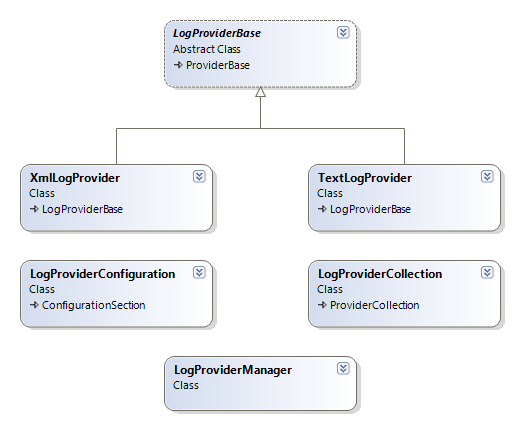
This article provides guidelines to create logging component using provider pattern. The sample project contains two providers "TextLogProvider" and "XmlLogProvider" You can set one of them default in configuration file.
Base Data Provider Class
First of all you need to define abstract representation of all your methods. Create your data provider base class and your class must inherit from System.Configuration.Provider.ProviderBase base class.
Hide Copy Code
public

						abstract

								class LogProviderBase : ProviderBase
{
.
					public

							abstract

									void WriteLog(LogType logType, string message);
.
}
As you see LogProviderBase is an abstract class and it has abstract method WriteLog(..). In this example we have only one abstract method. But we can have more than one as per requirement.
Data Provider Class
After creating your base provider class, now you can create your concrete provider classes. In this sample I will create two providers for logging one for text and second for xml. Derive concrete provider class from LogProviderBase class and implement the abstract methods.
Hide Shrink  Copy Code
public

						class TextLogProvider : LogProviderBase
{
#region Data Members
					private

							string _filePath = "";
#endregion
#region Overrided Methods
					public

							override

									void SetParameters(System.Collections.Specialized.NameValueCollection config)
{
_filePath = config["fileLocation"];
}
					public

							override

									void WriteLog(LogType logType, string message)
{
var dir = Path.GetDirectoryName(_filePath);
if (!Directory.Exists(dir))
Directory.CreateDirectory(dir);
using (var sw = new StreamWriter(_filePath, true))
{
string s = string.Format("{0}, {1}, {2}", DateTime.Now, logType.ToString(), message);
sw.WriteLine(s);
}
}
#endregion
}
Write the logging logic according to your provider type by implementing WriteLog(…). In TextLogProviderclass i am saving CVS line in text file.
Provider Collection & Configuration Section
For taking care of the provider configuration, you must write your own provider collection class derived from System.Configuration.ProviderCollection class. ProviderCollection class exposes properties and methods to work with the list of various data providers declared in your configuration file.
Hide Copy Code
public

						class LogProviderCollection : ProviderCollection
{
					new

							public LogProviderBase this[string name]
{
get { return (LogProviderBase)base[name]; }
}
}
Provider pattern reads the concrete providers from the configuration file, for this purpose you need one more class which will read all the provider collections from the configuration file. Create ProviderConfiguration class derived from the System.Configuration.ConfigurationSection file.
Hide Copy Code
public

						class LogProviderConfiguration : ConfigurationSection
{
[ConfigurationProperty("providers")]
public ProviderSettingsCollection Providers
{
get
{
return (ProviderSettingsCollection)base["providers"];
}
}
[ConfigurationProperty("default", DefaultValue = "XmlProvider")]
					public

							string DefaultProviderName
{
get
{
					return

							base["default"] as

													string;
}
}
}
In this class you can add as many properties based on the different parameters that you need to extract from the configuration sections. All the properties must be decorated with the ConfigurationProperty attribute.
Configuration
For configuring the provider model, we need to define our provider configuration section in <configsections>. Here we can add a <section> element with the name of the provider model configuration section element and the type of our data provider configuration class.
After configuring section (we configured LogProviders as section name). Now we need to add our all available providers in it and set one default provider from them.
Hide Copy Code
<configSections>
					<section

								name="LogProviders"
type="ProviderPatternLogTest.LogProvider.LogProviderConfiguration, ProviderPatternLogTest"/>
</configSections>
<LogProviders

							default="XmlProvider">
<providers>
					<add

								name="XmlProvider"
type="ProviderPatternLogTest.LogProvider.Providers.XmlLogProvider, ProviderPatternLogTest"
fileLocation="c:\temp\log.xml"/>
					<add

								name="TextProvider"
type="ProviderPatternLogTest.LogProvider.Providers.TextLogProvider, ProviderPatternLogTest"
fileLocation="c:\temp\log.txt"/>
</providers>
</LogProviders>
Use Provider Model in Code
It is very easy to use provider model in your code, simply get the default property of Provider Manager Class and then call your concrete methods
Hide Copy Code
LogProviderManager.Default.WriteLog(logType, txtMessage.Text);
Get Other Information
You can also easily get other useful information of your concrete provider. Simply get ProviderSetting using LogProviderManager.
Hide Copy Code
var setting = LogProviderManager.ProviderSettings[defaultName];
var setStr = GetSetting(setting);
MessageBox.Show(setStr);
GetSetting(...) method only parse all the parameters and returns concatenated string message.
Hide Copy Code
private

						string GetSetting(ProviderSettings setting)
{
StringBuilder str = new StringBuilder();
str.AppendLine(string.Format("Default Provider name: {0}", setting.Name));
str.AppendLine(string.Format("Default Provider type: {0}", setting.Type));
str.AppendLine("------------------Parameters--------------------");
foreach (String s in setting.Parameters)
{
str.AppendLine(string.Format("Parameter: {0} -> {1}", s, setting.Parameters.Get(s)));
}
str.AppendLine("---------------------------------------");
str.AppendLine("");
return str.ToString();
}
From: https://www.codeproject.com/Articles/550495/Provider-Pattern-for-Beginners
Provider Pattern for Beginners in .net的更多相关文章
- 二十四种设计模式:提供者模式(Provider Pattern)
提供者模式(Provider Pattern) 介绍为一个API进行定义和实现的分离.示例有一个Message实体类,对它的操作有Insert()和Get()方法,持久化数据在SqlServer数据库 ...
- Provider Pattern提供者模式和策略模式
http://www.codeproject.com/Articles/18222/Provider-Pattern Introduction Provider pattern is one of t ...
- 乐在其中设计模式(C#) - 提供者模式(Provider Pattern)
原文:乐在其中设计模式(C#) - 提供者模式(Provider Pattern) [索引页][源码下载] 乐在其中设计模式(C#) - 提供者模式(Provider Pattern) 作者:weba ...
- 打造属于你的提供者(Provider = Strategy + Factory Method) 设计模式 - Provider Pattern(提供者模式)
打造属于你的提供者(Provider = Strategy + Factory Method) 1.1.1 摘要 在日常系统设计中,我们也许听说过提供者模式,甚至几乎每天都在使用它,在.NET F ...
- Membership三步曲之进阶篇 - 深入剖析Provider Model
Membership 三步曲之进阶篇 - 深入剖析Provider Model 本文的目标是让每一个人都知道Provider Model 是什么,并且能灵活的在自己的项目中使用它. Membershi ...
- 深入剖析Provider Model
Membership三步曲之进阶篇 - 深入剖析Provider Model Membership 三步曲之进阶篇 - 深入剖析Provider Model 本文的目标是让每一个人都知道Provide ...
- [React] Implement a React Context Provider
If you have state that needs to exist throughout your application, then you may find yourself passin ...
- Code Project精彩系列(转)
Code Project精彩系列(转) Code Project精彩系列(转) Applications Crafting a C# forms Editor From scratch htt ...
- 抽象工厂在ADO.Net中的应用
https://msdn.microsoft.com/zh-cn/library/ms971499.aspx http://www.c-sharpcorner.com/UploadFile/moses ...
随机推荐
- HDU 4436 str2int (后缀自动机SAM,多串建立)
str2int Time Limit: 6000/3000 MS (Java/Others) Memory Limit: 131072/131072 K (Java/Others)Total S ...
- 用sourceTree提交代码时遇到的问题
xcuserstate 每次并没有改什么东西,只是随便点了几下就会出现的未暂存文件,可以对其停止追踪! 右键,停止追踪,提交,推送.以后就不会再有这个讨厌的文件出现了! 还没有提交就拉代码的囧境 有的 ...
- WebLogic使用总结(六)——WebLogic创建虚拟主机和修改启动端口号
一.在WebLogic中创建一个虚拟主机 找到虚拟主机面板,如下图所示:
- 从Web Service和Remoting Service引出WCF服务
本篇先通过Web Service和Remoting Service创建服务,抛砖引玉,再体验WCF服务.首先一些基本面: 什么是WCF? Windows Communication Foundatio ...
- SpringBoot中Mybatis打印sql
原文:https://www.cnblogs.com/expiator/p/8664977.html 如果使用的是application.properties文件,加入如下配置: logging.le ...
- Android ormlite like() function is not working
//http://stackoverflow.com/questions/7642161/android-ormlite-like-function-is-not-working try { Quer ...
- FAQ:什么情况下使用 struct ?
问: 什么情况下使用 struct ? 答: 使用 struct 有几个前提(必须全部满足): 容忍 struct 本身的限制,如:不能继承. 值语义. 足够小(<=16字节). 如果 stru ...
- Java 打包下载服务器上选中的文件或目录(带进度条提示)
http://www.cnblogs.com/interdrp/p/6702482.html 由于此次文件管理系统的升级确实给我们带来了很多方便且在性能上有很大提升,经过这段时间的使用 也发现了些问题 ...
- 浴血黑帮第一季/全集Peaky Blinders迅雷下载
本季第一季Peaky Blinders Season 1 (2013)看点:<浴血黑帮>Peaky Blinders是从战后伯明翰地区走出的一个传奇黑帮家族,时间要追溯到1919年,家族成 ...
- 暴君第一季/全集Tyrant迅雷下载
本季第一季 Tyrant Season 1 (2014)看点:虽然李安退出了FX系列剧<暴君>(Tyrant),称不想耽误了剧集的制作,但显然FX对这部剧的重视程度非比寻常,因为他们找来的 ...