
【第三十六章】 metrics(4)- metrics-graphite
将metrics report给graphite(carbon-relay)
一、代码
1、pom.xml
         <!-- metrics-graphite -->
         <dependency>
             <groupId>io.dropwizard.metrics</groupId>
             <artifactId>metrics-graphite</artifactId>
         </dependency>
依托于springboot1.3.0,版本号还是3.1.2
2、controller
package com.xxx.secondboot.web;

import java.time.LocalDateTime;
import java.util.LinkedList;
import java.util.Queue;
import java.util.concurrent.TimeUnit;

import org.springframework.web.bind.annotation.RequestMapping;
import org.springframework.web.bind.annotation.RequestMethod;
import org.springframework.web.bind.annotation.RestController;

import com.codahale.metrics.Gauge;
import com.codahale.metrics.MetricFilter;
import com.codahale.metrics.MetricRegistry;
import com.codahale.metrics.graphite.Graphite;
import com.codahale.metrics.graphite.GraphiteReporter;
import com.xxx.secondboot.metrics.TestGraphiteReporter;

import io.swagger.annotations.Api;

@Api("测试metrics")
@RestController
@RequestMapping("/metrics")
public class MetricsController {
    public static Queue<String> queue = new LinkedList<>();//队列

    @RequestMapping(value = "/test1", method = RequestMethod.GET)
    public String test1() {
        final MetricRegistry registry = new MetricRegistry();
        final Graphite graphite = new Graphite("10.0.0.1", 2013);//carbon-relay地址端口
        final GraphiteReporter reporter = GraphiteReporter.forRegistry(registry)
                                         .convertRatesTo(TimeUnit.SECONDS)
                                         .convertDurationsTo(TimeUnit.MILLISECONDS)
                                         .filter(MetricFilter.ALL)
                                         .prefixedWith("reporter.graphite")
                                         .build(graphite);
        reporter.start(1, TimeUnit.SECONDS);

        registry.register(MetricRegistry.name(TestGraphiteReporter.class, "queue", "size"), new Gauge<Integer>() {
            public Integer getValue() {
                return queue.size();
            }
        });

        while (true) {
            try {
                Thread.sleep(1000);
                queue.add("job - " + LocalDateTime.now());
            } catch (InterruptedException e) {
                e.printStackTrace();
            }
        }
    }
}
注意:
这里的carbon-relay的ip写你真正要发给的relay,该relay的监听接口的IP最好设置为0.0.0.0(carbon.conf),用来监听所有连接它的服务器。这里采用了text协议(TCP协议),也可以使用pickle协议(批量发送--量是可配置的),还可以是UDP协议。
final PickledGraphite graphitePickle = new PickledGraphite("10.0.40.63", 2013);//pickle协议
final GraphiteUDP graphiteUDP = new GraphiteUDP("10.0.40.63", 2013);//UDP
二、测试
启动swagger进行测试,查看relay的listen日志。
- 04/10/2016 14:21:37 :: MetricLineReceiver connection with ip:56769 established(调用controller方法的时候出现)
- 04/10/2016 14:24:38 :: MetricLineReceiver connection with ip:56769 closed cleanly(停止该方法的时候出现)
查看graphite-web中左侧的metric name有没有更新
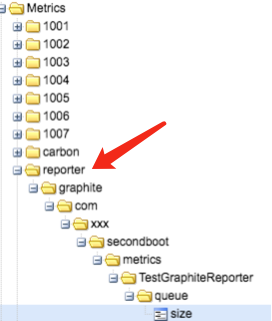
参考:http://metrics.dropwizard.io/3.1.0/manual/graphite/
【第三十六章】 metrics(4)- metrics-graphite的更多相关文章
- Gradle 1.12用户指南翻译——第三十六章. Sonar Runner 插件
本文由CSDN博客万一博主翻译,其他章节的翻译请参见: http://blog.csdn.net/column/details/gradle-translation.html 翻译项目请关注Githu ...
- “全栈2019”Java第三十六章:类
难度 初级 学习时间 10分钟 适合人群 零基础 开发语言 Java 开发环境 JDK v11 IntelliJ IDEA v2018.3 文章原文链接 "全栈2019"Java第 ...
- 第三十六章 metrics(4)- metrics-graphite
将metrics report给graphite(carbon-relay) 一.代码 1.pom.xml <!-- metrics-graphite --> <dependency ...
- “全栈2019”Java多线程第三十六章:如何设置线程的等待截止时间
难度 初级 学习时间 10分钟 适合人群 零基础 开发语言 Java 开发环境 JDK v11 IntelliJ IDEA v2018.3 文章原文链接 下一章 "全栈2019"J ...
- 【WPF学习】第三十六章 样式基础
前面三章介绍了WPF资源系统,使用资源可在一个地方定义对象而在整个标记中重用他们.尽管可使用资源存储各种对象,但使用资源最常见的原因之一是通过他们的保存样式. 样式是可应用于元素的属性值集合.WPF样 ...
- 第三十六章 Linux常用性能检测的指令
作为一个Linux运维人员,介绍下常用的性能检测指令! 一.uptime 命令返回的信息: 19:08:17 //系统当前时间 up 127 days, 3:00 ...
- SpringBoot | 第三十六章:集成多CacheManager
前言 今天有网友咨询了一个问题:如何在一个工程中使用多种缓存进行差异化缓存,即实现多个cacheManager灵活切换.原来没有遇见这种场景,今天下班抽空试了下,以下就把如何实现的简单记录下. 一点知 ...
- 第三十六章、PyQt输入部件:QAbstractSpinBox派生类QSpinBox、 QDoubleSpinBox、QDateTimeEdit、QDateEdit和QTimeEdit
专栏:Python基础教程目录 专栏:使用PyQt开发图形界面Python应用 专栏:PyQt入门学习 老猿Python博文目录 老猿学5G博文目录 一.概述 Designer输入部件中的Spin B ...
- 程序员编程艺术第三十六~三十七章、搜索智能提示suggestion,附近点搜索
第三十六~三十七章.搜索智能提示suggestion,附近地点搜索 作者:July.致谢:caopengcs.胡果果.时间:二零一三年九月七日. 题记 写博的近三年,整理了太多太多的笔试面试题,如微软 ...
随机推荐
- 使用QT设计师-信号和槽signal-slot(第一弹)
自定义信号和槽的步骤: 1.定义信号---signal1 = pyqtSignal() 2.定义槽信号---def setSlot(self): 3.连接信号和槽函数---signal1.connec ...
- linux删除指定行&删除行首空格&替换字符
打印并删除2~1000行 nl /etc/passwd | sed '2,1000d' |more 删除行首空格 sed -i 's/^[][ ]*//g' file 替换分隔符 说明:文件中数据是由 ...
- requests库的get请求(加上head,加上get参数请求)
#coding:utf-8 # 导入requests import requests # 构建url url = 'http://www.baidu.com' # 发送请求,获取响应 # respon ...
- kettle中源和目标表结构不一致的情况处理
创建数据仓库的过程中,往往会遇到这样的问题,例如:源表由于业务原因新增了字段,而ETL程序中是按照之前的源表结构进行抽取的,那么如果不重新构建ETL程序,新的指标就不会流入DW,问题如下图所示 创建了 ...
- JAVA包装类介绍(一)(包装类、基本类型数据)
1. 包装类把基本类型数据转换为对象 1.1每个基本类型在java.lang包中都有一个相应的包装类 2.包装类有何作用 2.1 提供了一系列实用的方法 2.2集合不允许存放基本数据类型 ...
- XtraBackup完整备份与增量备份的原理
MySQL数据库实现备份的操作包括完整备份和增量备份等,本文我们主要介绍一下增量备份和完整备份的原理,接下来我们就一起来了解一下这部分内容. 完整备份的原理: 对于InnoDB,XtraBackup基 ...
- abap开发中update module 的创建和使用
一.update module 的创建和使用 最近遇到这样一个需求,需要先删除(delete)表中的数据,再将传递过来的新数据添加(modify)到表中. 但是如果下面modify的时候出现错误,使用 ...
- Spark2.x学习笔记:Spark SQL的SQL
Spark SQL所支持的SQL语法 select [distinct] [column names]|[wildcard] from tableName [join clause tableName ...
- 十四、springboot全局处理异常(@ControllerAdvice + @ExceptionHandler)
1.@ControllerAdvice 1.场景一 在构建RestFul的今天,我们一般会限定好返回数据的格式比如: { "code": 0, "data": ...
- 机器学习 python库 介绍
开源机器学习库介绍 MLlib in Apache Spark:Spark下的分布式机器学习库.官网 scikit-learn:基于SciPy的机器学习模块.官网 LibRec:一个专注于推荐算法的j ...