
Centos6.5 (或Linux) 安装Elasticsearch
一、可以在网上下载对饮的版本:https://github.com/elastic/elasticsearch,本次安装的是5.5.3。
首先保证虚拟机上安装了jdk,jdk的版本只是是1.7或以上
查看本地虚拟机是否已经安装了jdk:yum list installed java*; (yum list install java* 查看库中可以安装的软件),然后用yum 命令安装 yum install java-1.8.0-openjdk* ,用yum命令安装的好处就是不用配置path。感兴趣的可以用安装包安装。
 [root@localhost elasticsearch]# ls

 elasticsearch-5.5.3         elasticsearch-analysis-ik-5.5.

 elasticsearch-5.5..tar.gz  elasticsearch-analysis-ik-5.5..zip
二、将下载的.tar.gz解压,然后进入elasticsearch-5.5.3/config/目录下配置elasticsearch.yml。
三、因为我先暂时配的是单节点,所有就采用默认的方式,如果想自定义,将#号去掉就行。
 # ---------------------------------- Cluster -----------------------------------

 #

 # Use a descriptive name for your cluster:

 #

 #cluster.name: my-application

 #

 # ------------------------------------ Node ------------------------------------

 #

 # Use a descriptive name for the node:

 #

 #node.name: node-1

 #

 # Add custom attributes to the node:
如果elasticsearch启动报错,这里需要修改,具体问后面再贴出
 #bootstrap.memory_lock: true

 bootstrap.memory_lock: false

 3 bootstrap.system_call_filter: false

 #

 # Make sure that the heap size is set to about half the memory available

 # on the system and that the owner of the process is allowed to use this

 # limit.

 #

 # Elasticsearch performs poorly when the system is swapping the memory.

 #

 # ---------------------------------- Network -----------------------------------

 #

 # Set the bind address to a specific IP (IPv4 or IPv6):

 #

 #network.host: 192.168.0.1

 network.host: 0.0.0.0
注意如果不修network.host,默认使用的是localhost,如http://localhost:9200,9200是elasticsearch的默认端口,如果想通过外网访问,则需要将network.host 设置成 0.0.0.0或者部署该elasticsearch服务器的ip地址。
 # Set a custom port for HTTP:

 #

 #http.port: 9200
4 #transport.tcp.port:9301
这个跟集群节点布置有关系,如果同一台服务器布置了多个节点,则需要修改 http.port,如 http.port:9201, transport.tcp.port:9301。
四、启动 elasticsearch.
 [hoojjack@localhost elasticsearch-5.5.3]$ bin/elasticsearch

 [2017-09-29T10:48:15,620][INFO ][o.e.n.Node               ] [] initializing ...

 ......
五、出现的问题:
1、
bin/elasticsearch-plugin install x-pack
7、
ERROR: bootstrap checks failed。system call filters failed to install; check the logs and fix your configuration or disable system call filters at your own risk
解决:
在elasticsearch.yml中配置bootstrap.system_call_filter为false,注意要在Memory下面:
bootstrap.memory_lock: false
bootstrap.system_call_filter: false
8、
head主控页面是可以显示的,但是显示连接失败,或者在url无法外网访问。在elasticsearch 中的elasticsearch.yml中添加以下属性。
Cross-origin resource sharing (CORS) is a mechanism that allows restricted resources ,即跨域访问。这个字段默认为false,在Elasticsearch安装集群之外的一台机上用Sense、Head等监控插件访问Elasticsearch是不允许的。这个字段最早可以追溯到1.4.x版本,而非5.x特有。具体这个http.cors.x字段还有哪些用途和用法:
http.cors.enabled --------- (是否支持跨域,默认为false 。一般设置这两个参数就可以实现跨域:http.cors.enabled : true, http.cors.allow-origin : " *" )
http.cors.allow-origin --------- (当设置允许跨域,默认为*,表示支持所有域名,如果我们只是允许某些网站能访问,那么可以使用正则表达式。比如只允许本地地址。 /https?:\/\/localhost(:[0-9]+)?/)
http.cors.max-age --------- (浏览器发送一个“预检”OPTIONS请求,以确定CORS设置。最大年龄定义多久的结果应该缓存。默认为1728000(20天))
http.cors.allow-methods --------- (允许跨域的请求方式,默认OPTIONS,HEAD,GET,POST,PUT,DELETE)
http.cors.allow-headers --------- (跨域允许设置的头信息,默认为X-Requested-With,Content-Type,Content-Length)
http.cors.allow-credentials --------- (是否返回设置的跨域Access-Control-Allow-Credentials头,如果设置为true,那么会返回给客户端)
六、Elasticsearch 安装插件:
1、head插件安装:
进入 /ES_HOME/elasticsearch/ 路径,在2.0版本以前用一下命令:
 [root@localhost bin]# ./plugin install mobz/elasticsearch-head

 -> Installing mobz/elasticsearch-head...

 Trying https://github.com/mobz/elasticsearch-head/archive/master.zip...

 Downloading ...................................................................................................................................................................................................................................................................................................................................................................................................................................................................................................................................................................................................................................DONE

 Installed mobz/elasticsearch-head into /opt/elasticsearch-1.4.2/plugins/head
2.0以上版本安装:
首先 安装nodejs,npm环境。(安装es-head依赖node npm)
 yum -y install nodejs npm

 node -v

 npm -v
如果yum命令不能安装,则下载nodejs编译后的源码安装。如v5.10版:
https://nodejs.org/dist/v5.10.1/
红色部分是编译好的源码,直接解压就行
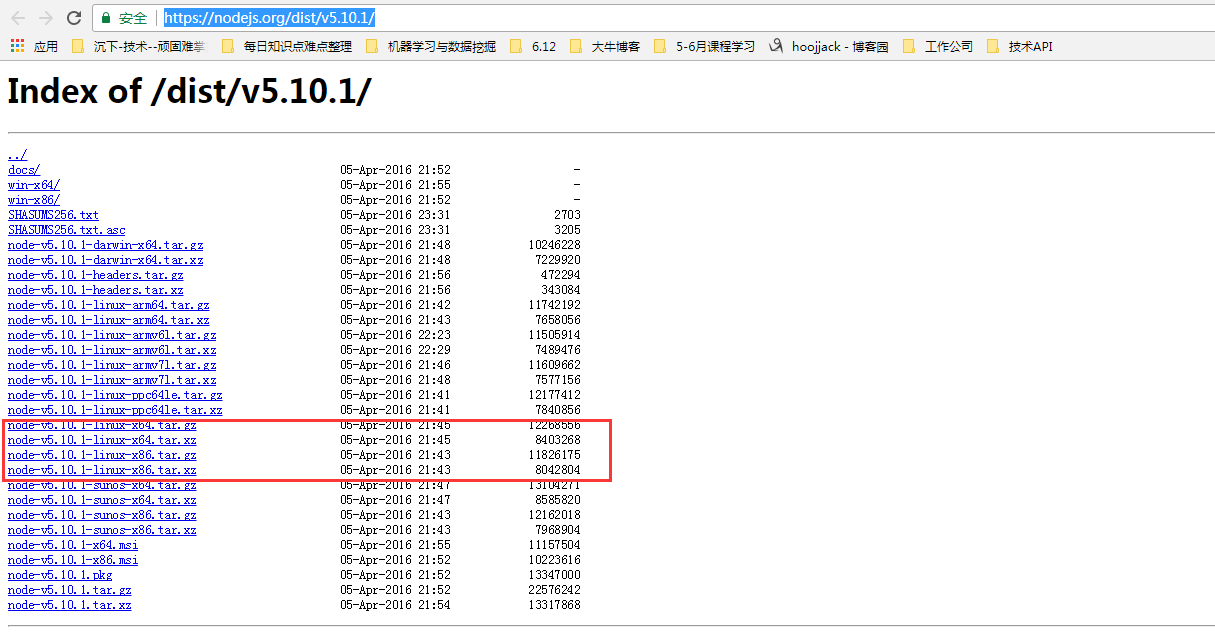
 tar  -xzvf node-v5.10.1-linux-x64.tar.gz -C /opt/hoojjack/

 cd /opt/hoojjack/

 mv node-v5.10.1-linux-x64/ nodejs

4 ln -s /opt/hoojjack/nodejs/bin/node /usr/local/bin

5 ln -s /opt/hoojjack/nodejs/bin/npm /usr/local/bin
简单说就是解压后,在bin文件夹中已经存在node以及npm,如果你进入到对应文件的中执行命令行一点问题都没有,不过不是全局的,所以通过建立软链接的方式将这个设置为全局就好了
然后,就是下在elasticsearch-head
 git clone git://github.com/mobz/elasticsearch-head.git

 cd elasticsearch-head

 npm install

 npm run start
最后,在url中输入:http://localhost:9100/ 就可以看到界面了。
[Reference] https://github.com/mobz/elasticsearch-head
5.0以上的版本,head作为独立服务安装
for Elasticsearch 5.x: site plugins are not supported. Run as a standalone server
安装成功后可以查看效果:
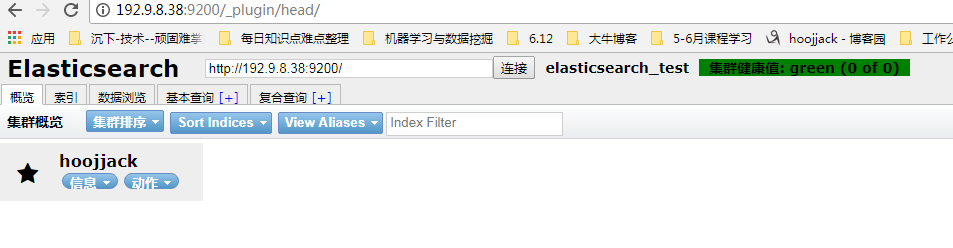
2、ik分词安装:
下一节有专门讲述
【Reference】
[1] http://blog.csdn.net/sinat_28224453/article/details/51134978
[2] http://www.dajiangtai.com/community/18136.do?origin=csdn-geek&dt=1214
[3] http://www.cnblogs.com/ShawnYuki/p/6818677.html
Centos6.5 (或Linux) 安装Elasticsearch的更多相关文章
- Linux安装ElasticSearch启动报错的解决方法
Linux安装ElasticSearch后,ElasticSearch是不能用root用户启动的,以root用户启动会报错Refer to the log for complete error det ...
- Linux 安装elasticsearch、node.js、elasticsearch-head
前提:下载es的安装包 官网可以下载 es官网 安装elasticsearch 1 新建两个文件夹 一个存放安装文件,一个存放解压后的文件 mkdir -p /export/software //存放 ...
- Linux安装Elasticsearch
本文介绍Linux环境如何安装Elasticsearch. 本文环境是在腾讯云服务器CentOS7.2搭建的,JDK1.8,elasticsearch-5.4.2. 1 安装JDK 网上教程很多,也可 ...
- linux安装elasticsearch及遇到的各种问题
1.获取elasticsearch https://www.elastic.co/downloads/elasticsearch 终端输入赋值的下载链接进行下载 wget https://artifa ...
- linux 安装elasticsearch 可能遇到的问题
1.can not run elasticsearch as root 切换到非root用户 因为安全问题elasticsearch 不让用root用户直接运行,所以要创建新用户 第一步:liunx创 ...
- Linux安装ElasticSearch与MongoDB分布式集群环境下数据同步
ElasticSearch有一个叫做river的插件式模块,可以将外部数据源中的数据导入elasticsearch并在上面建立索引.River在集群上是单例模式的,它被自动分配到一个节点上,当这个节点 ...
- linux 安装 elasticsearch
安装 Java 8 当你提前在使用 Elasticsearch,你开始寻找更好的 Java 性能和兼容性时,您可以选择安装 Oracle 的专有 Java (Oracle JDK 8). 将 Orac ...
- linux 安装elasticsearch
一.检测是否已经安装的elasticsearch ps aux|grep elasticsearch. 二.下载elasticsearch.tar.gz并上传至服务器usr/local/文件夹下 三. ...
- linux安装Elasticsearch详细步骤
坑都已经踩好了 照着步骤一次成功 不多废话 走起 # ## 安装java运行环境 elasticsearch是用Java实现的 跑elasticsearch必须要有jre支持 所以必须先安装jre ...
- linux 安装 elasticsearch 步骤及问题解决方案
1.下载安装包并上传至服务器 2.解压至当前文件夹 tar -xzvf xxx.tar.gz 3.配置JDK 如果服务器上已经配置了JDK,则在解压后的elasticsearch 文件夹的bin 目录 ...
随机推荐
- mysql触发器应用和创建表错误代码: 1118 Row size too large. 解决
1.针对数据库查询问题的方便,可以建立重要表的log备份记录表,在主表的添加,修改,删除添加触发器,修改触发器增加触发字段的点,限制条件. 数据库log表查问题比从线上多台服务器上下载日志文件相对方便 ...
- iOS开发 frame 与 bounds 的区别与关系 转自隔叶黄莺
frame和bounds是UIView中的两个属性(property). frame指的是:该view在父view坐标系统中的位置和大小.(参照点是父亲的坐标系统) bounds指的是:该view在本 ...
- C mysql (C API Commands out of sync; you can't run this command now)
错误出现在当一个用户使用查询,另一个用户再使用此sql连接进行查询的时候: 原因是因为上一次使用此sql连接进行查询时没有将所有的结果集给释放掉,在所有使用此sql连接进行查询的地方将所有的结果集给释 ...
- Python easyGUI 猜数字
import easygui as g import random d=random.randint(0,10) while 1: g.msgbox("现在开始猜数字小游戏:") ...
- Jackson(ObjectMapper)的简单使用(可转xml)
参考文章:http://www.cnblogs.com/hoojo/archive/2011/04/22/2024628.html (原文章更详细哦,且有介绍xml与java对象的互转) 参考文章作 ...
- 【MacOS】brew-python3
mkdir homebrew && curl -L https://github.com/Homebrew/brew/tarball/master | tar xz --strip 1 ...
- Spark-scala-API
1.sc.version2.集群对象:SparkContext:获得Spark集群的SparkContext对象,是构造Spark应用的第一步!SparkContext对象代表 整个 Spark集群, ...
- ClamAV病毒软件的安装和使用
ClamAV 杀毒是Linux平台最受欢迎的杀毒软件,ClamAV属于免费开源产品,支持多种平台,如:Linux/Unix.MAC OS X.Windows.OpenVMS.ClamAV是基于病毒扫描 ...
- [Windows] 解决 COM Surrogate 错误提示
运行环境:Windows 8.1 (64bits) 异常描述:打开 "Windows 照片查看器",试图放大或缩小窗体,弹出 "COM Surrogate” 错误. 解决 ...
- pom.xml文件错误
刚创建的maven项目,马上pom.xml的第一行就报错这是第一行:<project xmlns="http://maven.apache.org/POM/4.0.0" xm ...