原文地址:https://www.wipfli.com/insights/blogs/connect-microsoft-dynamics-365-blog/160810-calling-custom-actions-from-javascript
Overview
Actions in processes are a way to create custom messages in CRM for an entity. For example, let’s say you have an entity record that needs escalation or approval. You could create a custom action that performs the steps needed for this process. Then you could add a button to the form that the user clicks to initiate the process. Out of the box for most entities, you have Create, Update, Delete, Assign, and SetState messages and you have the option of writing custom business logic in the form of Plugins or Workflows on these. With custom actions, you have the ability to create whatever message you need to fulfil your requirements. Then you can attach plugin code to that message and perform any operations you need without restrictions. In this post, I am going to explain how to create a custom action, pass input and output parameters, and call that action from JavaScript. With these basic building blocks, you can create whatever you need.
Overall Process
The example I am going to document here will involve a button on the ribbon that, when clicked, will display a notification on the form, call the custom action, will run a plugin, will call a web service to get the temperature for the account's zip code, will return that information, and will display it in a notification on the form. In this case, we are going to have a plugin that will do all the real work. There will be JavaScript that will handle the form notifications and calling the action.
The result will look like this:
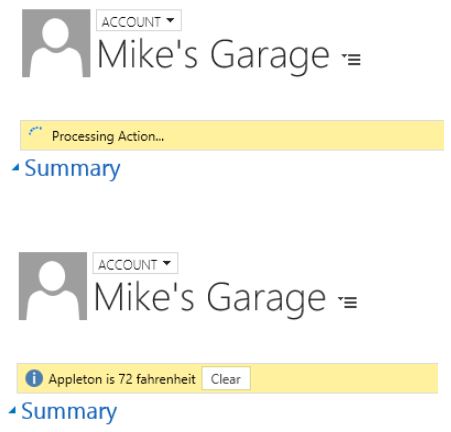
To make all this happen, I will be using a couple of JavaScript libraries that make working with custom Actions and Notifications much easier. The first one is called Notify.js and can be found
here. This library makes it easy to display form notifications and adds some functionality to the standard CRM notifications. The second one is called Process.js and can be found
here. This library simplifies calling custom actions from JavaScript. Calling custom actions involves creating rather lengthy XML Http Requests and this library simplifies that down to a function call with a couple of parameters. It also provides callbacks for success and errors.
The process looks something like this.

The components needed for this are:
- A Custom Action
- JavaScript Web Resource (to call the custom action)
- Custom Ribbon button (to call the JavaScript)
- Plugin to call the weather web service
- Notify.js library
- Process.js library
Components
The Custom Action
In this example, the custom action is fairly simple. We just need a couple of parameters. The custom action gives us a way to pass the parameters to and from the plugin. It also allows us to register the plugin step against the custom action message.
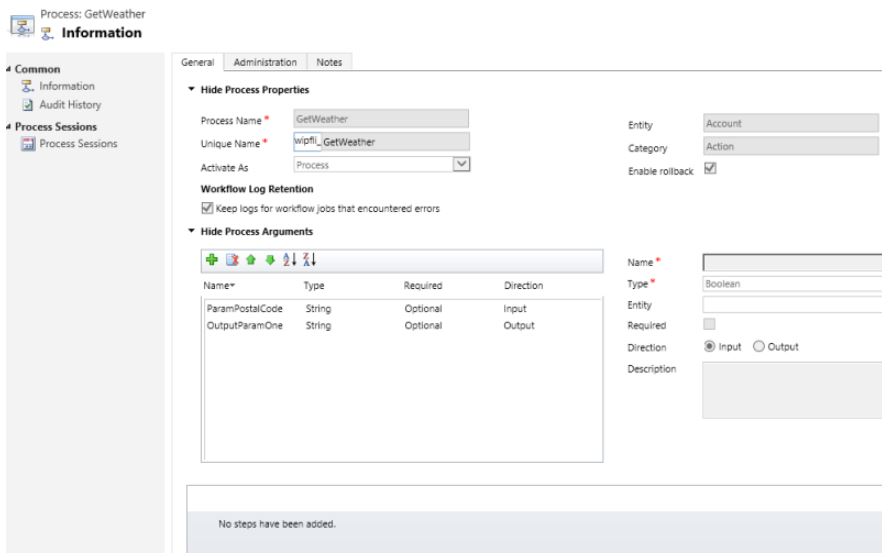
JavaScript Web Resource
The JavaScript manages the notifications and calling the custom action. It will validate that we have a Zip Code, load the input parameters, and then call the custom action. When the action completes, it will call the success callback and display the information on the form as a notification. While the action is working, there will be a notification on the form letting the user know that something is happening.
function CallAction() {
//Verify that we have a Zip Code
if (Xrm.Page.getAttribute("address1_postalcode").getValue() == null) {
Notify.add("Zip code is missing", "ERROR", "nozip", null, 5);
}
else {
//Display the notification that we are working on something
Notify.add("Processing Action...", "LOADING", "myProcessing");
//Load the input parameters
var inputParams = [
{ key: "ParamPostalCode", type: Process.Type.String, value: Xrm.Page.getAttribute("address1_postalcode").getValue() },
{ key: "Target", type: Process.Type.EntityReference, value: new Process.EntityReference(Xrm.Page.data.entity.getEntityName(), Xrm.Page.data.entity.getId()) }
];
//Call the custom action
Process.callAction("wipfli_GetWeather", inputParams, successCallback, errorCallback);
}
}
function successCallback(params) {
//Get the result from the plugin and display the information in a notification
var outputParamOne = params["OutputParamOne"];
Notify.add(outputParamOne, "INFO", "mySuccess", [{ type: "button", text: "Clear", callback: function () { Notify.remove("mySuccess"); } }]);
Notify.remove("myProcessing");
}
function errorCallback(error, trace) {
Notify.remove("myProcessing");
Notify.add("Error: " + error, "ERROR", "myError");
}
Custom Ribbon Button
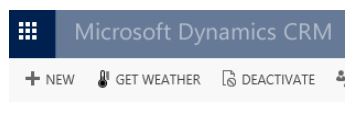
The ribbon button just has to call the "CallAction" function from the above JavaScript. Use the Ribbon Workbench for CRM to create a custom button that points to a web resource and calls the CallAction function.
Plugin
The plugin will read the input parameters and then call the weather web service. Using the response from the web service, it will format the output information and then return it in the output parameter. Don’t forget to register the plugin using the Plugin Registration Tool in the CRM SDK. Then register a step on the GetWeather message.
protected override void ExecuteCrmPlugin(LocalPluginContext localContext)
{
if (localContext == null)
{
throw new ArgumentNullException("localContext");
}
//Get the parameters from the Action call
EntityReference accountRef = (EntityReference)localContext.PluginExecutionContext.InputParameters["Target"];
string paramPostalCode = (string)localContext.PluginExecutionContext.InputParameters["ParamPostalCode"];
string webAddress = @"http://api.openweathermap.org/data/2.5/weather?zip=" + paramPostalCode + ",us&mode=xml&units=imperial&appid={your specific APPID}";
string output = "";
try
{
using (WebClient client = new WebClient())
{
Byte[] responseBytes = client.DownloadData(webAddress);
String response = Encoding.UTF8.GetString(responseBytes);
localContext.TracingService.Trace("Response is: " + response);
XmlDocument xmlDoc = new XmlDocument();
xmlDoc.LoadXml(response);
XmlNodeList current = xmlDoc.SelectNodes("/current");
foreach (XmlNode xn in current)
{
output = xn["city"].Attributes["name"].Value + " is " + Math.Round(Double.Parse(xn["temperature"].Attributes["value"].Value), 0) + " " + xn["temperature"].Attributes["unit"].Value;
}
localContext.TracingService.Trace("OUTPUT IS: " + output);
}
}
catch (WebException exception)
{
string str = string.Empty;
if (exception.Response != null)
{
using (StreamReader reader =
new StreamReader(exception.Response.GetResponseStream()))
{
str = reader.ReadToEnd();
}
exception.Response.Close();
}
if (exception.Status == WebExceptionStatus.Timeout)
{
throw new InvalidPluginExecutionException(
"The timeout elapsed while attempting to issue the request.", exception);
}
throw new InvalidPluginExecutionException(String.Format(CultureInfo.InvariantCulture,
"A Web exception occurred while attempting to issue the request. {0}: {1}",
exception.Message, str), exception);
}
localContext.PluginExecutionContext.OutputParameters["OutputParamOne"] = output;
}
Additional Libraries
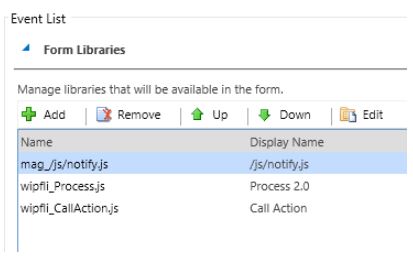
The Notifiy.js and Process.js libraries will need to be loaded on the form. To do this, include them as form libraries in the Form Properties.
Conclusion
With all the components in place, clicking the button should produce the weather notification. While this example may not be very useful in the real world, the purpose was to demonstrate some of the basic concepts of custom actions. It shows you how to call a custom action from JavaScript and pass input and output parameters. It also demonstrates triggering a Plugin from a custom action.
- Installation Phases and In-Script Execution for Custom Actions in Windows Installer
用 InstallShield 依照 Custom Action Wizard 创建 Custom Action 时,会遇到下面的几个选项: In-Script Execution Install U ...
- custom event in javascript and jquery
javascript: // add a eventListener document.addEventListener("abc", function(){alert('this ...
- [转]UIWebView的Javascript运行时对象
An alternative, that may get you rejected from the app store, is to use WebScriptObject. These APIs ...
- WIX Custom Action (immediate, deffered, rollback)
Following content is directly reprinted from From MSI to WiX, Part 19 - The Art of Custom Action, Pa ...
- I Take It All Back: Using Windows Installer (MSI) Rollback Actions
Original Link: http://blogs.flexerasoftware.com/installtalk/2011/10/i-take-it-all-back-using-windows ...
- Default Custom Action Locations and IDs
Default Custom Action Locations and IDs SharePoint 2013 The following ta ...
- Wix打包系列(三)自定义Action(Custom Action)
原文:Wix打包系列(三)自定义Action(Custom Action) 3.1 关于Action 我们已经知道如何生成具有标准安装界面的安装程序了,Windows Installer按照我们的界面 ...
- How To Add Custom Build Steps and Commands To setup.py
转自:https://jichu4n.com/posts/how-to-add-custom-build-steps-and-commands-to-setuppy/ A setup.py scrip ...
- 所有selenium相关的库
通过爬虫 获取 官方文档库 如果想获取 相应的库 修改对应配置即可 代码如下 from urllib.parse import urljoin import requests from lxml im ...
随机推荐
- prefixspan python
from:https://github.com/chuanconggao/PrefixSpan-py API Usage Alternatively, you can use the algorith ...
- 【问题】用ant编译时,提示编码utf为不可映射字符
分析:eclipse默认的编码为gbk,而ant里的build.xml文件里定义的为utf-8格式.两者格式不统一. 建议:将工程的编码改成utf-8的格式,一般java工程也建议为utf-8格式.
- vue项目中多个组件之间传递数据
//父组件<template> <div> <div style="float: left"> <input-data :city=&qu ...
- Linux下如何查看tomcat是否安装、启动、文件路径、进程ID
Linux下如何查看tomcat是否安装.启动.文件路径.进程ID 在Linux系统下,Tomcat使用命令的操作! 检测是否有安装了Tomcat: rpm -qa|grep tomcat 查看Tom ...
- Android开发 ---实现ListView的A-Z字母排序和过滤搜索功能
效果图: 1.activity.xml 描述: 线性布局中一个层叠布局 <?xml version="1.0" encoding="utf-8"?> ...
- Apache Flume 学习笔记
# 从http://flume.apache.org/download.html 下载flume ############################################# # 概述: ...
- Collection集合的三种初始化方法
(一) java容器可以分为两大类 1)Collection其中包括List,Set,Queue 2)Map (二) Arrays.asList()方法:接受一个数组或一个逗号分隔的元素列表,并将其转 ...
- 【oracle入门】数据完整性约束
数据的完整性约束是对数据描述的某种约束条件,关系型数据模型中可以有三类完整性约束:实体完整性.参照完整性和用户定义的完整性. 实体完整性Entity Integrity 一个基本关系通过对应显示世界的 ...
- 关于使用JPA中@Query注解传递表名/视图名参数的问题
因碰到需要动态查询不同视图的结果,自己尝试使用@Query注解中传递视图名称参数: @Query("select * from ?1") List<Object> ge ...
- RN用蓝牙接入热敏打印机和智能电子秤(转载)
最近要为app用蓝牙接入便携热敏打印机和读蓝牙电子秤.作为一名前端,能涉及到硬件的开发让我觉得兴奋不已,所以我立刻着手开始相应的预研.并把遇到的知识点和问题记录下来. btw,大部分知识点未深入可能有 ...
