
整合Spring框架和MyBatis框架
------------------------siwuxie095
整合 Spring 框架和 MyBatis 框架
1、导入相关
jar 包(共 22 个)
(1)导入
Spring 的核心 jar 包和日志相关的 jar 包(6 个)

Commons Logging
下载链接:
http://commons.apache.org/proper/commons-logging/download_logging.cgi
LOG4J 下载链接:
https://www.apache.org/dist/logging/log4j/
(2)导入
Spring 的 AOP 开发的 jar 包(4 个)

AOP Alliance
下载链接:
http://mvnrepository.com/artifact/aopalliance/aopalliance
AspectJ Weaver
下载链接:
http://mvnrepository.com/artifact/org.aspectj/aspectjweaver
(3)导入
Spring 的
JDBC 开发的 jar 包(2 个)

(4)导入
Spring 整合 Web 项目的 jar 包(1 个)

(5)导入
MyBatis 的 jar 包(1 个)

(6)导入
MyBatis 所需的日志相关的 jar 包(2 个)

「MyBatis 也需要 LOG4J,但前面 Spring 已导入,不再重复导入」
(7)导入
MyBatis 分页相关的 jar 包(2 个)
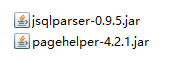
PageHelper 下载链接:
http://repo1.maven.org/maven2/com/github/pagehelper/pagehelper/
JSqlParser 下载链接:
http://repo1.maven.org/maven2/com/github/jsqlparser/jsqlparser/0.9.5/
(8)导入
MySQL 的 JDBC 驱动的 jar 包(1 个)

MySQL Connector/J
下载链接:
https://dev.mysql.com/downloads/connector/j/
(9)导入
Spring 整合 MyBatis 的 jar 包(1 个)

MyBatis-Spring 下载链接:
https://github.com/mybatis/spring/releases
(10)导入
BoneCP 的 jar 包和其依赖的 Guava 的 jar 包(2 个)

BoneCP 下载链接:
http://repo1.maven.org/maven2/com/jolbox/bonecp/
Guava 下载链接:
http://repo1.maven.org/maven2/com/google/guava/guava/
2、创建数据库和表
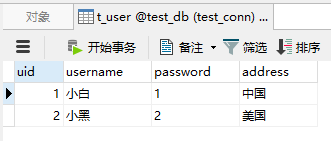
创建数据库
test_db, 再创建表 t_user,并插入若干数据,
其中:uid 为主键,且为自动增长
3、测试
(1)编写一个实体类
User.java:
|
package com.siwuxie095.entity; // 实体类 public class User {
private Integer uid; private String username; private String password; private String address;
public Integer getUid() { return uid; } public this.uid = uid; }
public String getUsername() { return username; } public this.username = username; }
public String getPassword() { return password; } public this.password = password; }
public String getAddress() { return address; } public this.address = address; }
@Override public String toString() { return ", password=" + password + ", address=" + address + "]"; }
} |
(2)编写一个映射器接口
UserMapper.java:
|
package com.siwuxie095.mapper; import org.apache.ibatis.annotations.Param; import com.siwuxie095.entity.User; // 映射器接口 public interface UserMapper { User getUser(@Param("uid") Integer uid);
} |
(3)在
MyBatis 映射配置文件中进行配置
|
<?xml <!DOCTYPE mapper PUBLIC "-//mybatis.org//DTD Mapper 3.0//EN" "http://mybatis.org/dtd/mybatis-3-mapper.dtd">
<mapper <select select * from t_user where uid = #{uid} </select>
</mapper> |
(4)在
MyBatis 核心配置文件中进行配置
|
<?xml <!DOCTYPE configuration PUBLIC "-//mybatis.org//DTD Config 3.0//EN" "http://mybatis.org/dtd/mybatis-3-config.dtd"> <configuration>
<settings> <!-- 开启自动驼峰命名规则映射 --> <setting </settings>
<!-- 配置类型别名 --> <typeAliases> <typeAlias </typeAliases>
<!-- 引入映射配置文件 --> <mappers> <package </mappers> </configuration> |
(5)在数据库连接信息的属性文件中进行配置
jdbc.properties:
|
jdbc.driverClassName=com.mysql.jdbc.Driver jdbc.url=jdbc:mysql:///test_db jdbc.username=root |
其中:
jdbc:mysql:///test_db 是 jdbc:mysql://localhost:3306/test_db 的简写
(6)在
Spring 核心配置文件中进行配置
applicationContext.xml:
|
<?xml <beans xmlns:xsi="http://www.w3.org/2001/XMLSchema-instance" xmlns:aop="http://www.springframework.org/schema/aop" xmlns:context="http://www.springframework.org/schema/context" xmlns:tx="http://www.springframework.org/schema/tx" xsi:schemaLocation=" http://www.springframework.org/schema/beans http://www.springframework.org/schema/beans/spring-beans.xsd http://www.springframework.org/schema/aop http://www.springframework.org/schema/aop/spring-aop.xsd http://www.springframework.org/schema/context http://www.springframework.org/schema/context/spring-context.xsd http://www.springframework.org/schema/tx http://www.springframework.org/schema/tx/spring-tx.xsd">
<!-- 使用spring自带的占位符替换功能 --> <bean
<!-- 允许JVM参数覆盖 --> <property
<!-- 忽略没有找到的资源文件 --> <property
<!-- 配置资源文件(也称 <property <list> <value>classpath:jdbc.properties</value> </list> </property>
</bean>
<!-- 配置 BoneCP 连接池 --> <bean
<!-- 数据库驱动 --> <property
<!-- 相应驱动的jdbcUrl --> <property
<!-- 数据库的用户名 --> <property
<!-- 数据库的密码 --> <property
,如果要取消则设置为0 --> <property
,如果要永远存活设置为0 --> <property
<!-- 每个分区最大的连接数 --> <property
<!-- 每个分区最小的连接数 --> <property
</bean>
<!-- 将 SqlSessionFactory 对象的创建交给 Spring 进行管理 --> <bean <!-- 指定数据源 --> <property <!-- 指定 MyBatis 核心配置文件的位置(路径) --> <property </bean>
<!-- 配置映射器接口(Mapper 接口)的扫描包 --> <bean <!-- 如有多个包,以逗号 <property </bean>
<!-- 配置映射器接口(以下方法二选一即可,这里选择法二):
法一:逐个配置:配置映射器接口(Mapper 接口)的对象
<bean id="userMapper" class="org.mybatis.spring.mapper.MapperFactoryBean"> <property name="mapperInterface" value="com.siwuxie095.mapper.UserMapper"/> <property name="sqlSessionFactory" ref="sqlSessionFactory"/> </bean>
法二:统一配置:配置映射器接口(Mapper 接口)的扫描包
<bean class="org.mybatis.spring.mapper.MapperScannerConfigurer"> <property name="basePackage" value="com.siwuxie095.mapper"/> </bean>
--> </beans> |
(7)编写一个单元测试类
UserMapperTest.java:
|
package com.siwuxie095.test; import org.junit.Test; import org.springframework.context.ApplicationContext; import org.springframework.context.support.ClassPathXmlApplicationContext; import com.siwuxie095.entity.User; import com.siwuxie095.mapper.UserMapper; public class UserMapperTest {
/** * 手动加上 @Test 以进行单元测试(将自动导入 JUnit 4 的 jar 包) * * 选中方法名,右键->Run As->JUint Test */ @Test public ApplicationContext applicationContext = new ClassPathXmlApplicationContext("applicationContext.xml");
UserMapper userMapper = (UserMapper) applicationContext.getBean(UserMapper.class);
User user = userMapper.getUser(1); System.out.println(user); }
} |
【made by siwuxie095】
整合Spring框架和MyBatis框架的更多相关文章
- Spring Boot从入门到精通(九)整合Spring Data JPA应用框架
JPA是什么? JPA全称Java Persistence API,是Sun官方提出的Java持久化规范.是JDK 5.0注解或XML描述对象-关系表的映射关系,并将运行期的实体对象持久化到数据库中. ...
- IDEA下创建Maven项目,并整合使用Spring、Spring MVC、Mybatis框架
项目创建 本项目使用的是IDEA 2016创建. 首先电脑安装Maven,接着打开IDEA新建一个project,选择Maven,选择图中所选项,下一步. 填写好GroupId和ArtifactId, ...
- spring、spring mvc、mybatis框架整合基本知识
学习了一个多月的框架知识了,这两天很想将它整合一下.网上看了很多整合案例,基本都是基于Eclipse的,但现在外面公司基本都在用Intellij IDEA了,所以结合所学知识,自己做了个总结,有不足之 ...
- spring boot集成mybatis框架
概述 中文官网:http://www.mybatis.cn 参考教程:https://www.w3cschool.cn/mybatis MyBatis Plus:http://mp.baomidou. ...
- Java框架之MyBatis框架(一)
一.框架介绍: MyBatis是一个优秀的持久层框架,它对jdbc的操作数据库的过程进行封装,使开发者只需要关注 SQL 本身,而不需要花费精力去处理例如注册驱动.创建connection.创建sta ...
- SSM框架-初学Mybatis框架
SSM(Spring+SpringMVC+Mybatis)是目前项目开发比较流行的一套组合框架,而Mybatis是负责数据库操作的那部分框架,具体 我也说不上来 传统的JDBC操作比较冗长而繁琐,而用 ...
- Hibernate框架与Mybatis框架的对比
学习了Hibernate和Mybatis,但是一直不太清楚他们两者的区别的联系,今天在网上翻了翻,就做了一下总结,希望对大家有帮助! 原文:http://blog.csdn.net/firejuly/ ...
- 整合spring,springmvc和mybatis
我创建的是maven项目,使用到的依赖架包有下面这些: <dependencies> <dependency> <groupId>org.springframewo ...
- Java框架之MyBatis框架(二)
Mybatis框架是相对于优化dao层的框架,其有效的减少了频繁的连接数据库(在配置文件xml中进行配置),将sql语句与java代码进行分离(写在XXXXmapper.xml文件中,一个表对应一个x ...
随机推荐
- activiti学习第二天
今天我们来发布一个流程,然后查看数据库中都发生了什么变化. 下面我们使用activiti designer设计一个流程.如图 流程很简单,我们先简单后增加难度. 创建流程图的顺序,新建一个文件夹(di ...
- BEAM188和LINK180简单实例
简介 一开始想做一个绳索单元悬挂重物的仿真,其实想法很简单,但是在实现过程中却出现了很大的问题,纠结了很久,初步归结为:绳索单元在垂直其单元方向上受力,会导致其产生很大的变形,从而导致其不收敛.因此专 ...
- JDBC执行SQL语句以及Date对象和字符串之间的相互转换(关键是那张标准表)
只要能分隔数字就行,老外没有11月这个概念 以前看见被人这么写,你觉得可以写成yyYY这样吗,可以mm这样吗,可以mM这样吗,不要有这种想法 都是大神们都写好了,只需要参考手册,然后调用API就行了 ...
- List进行排序
使用Java中提供的对集合进行操作的工具类Collections,其中的sort方法,重写比较方法 /** * 根据序号对列席人进行排序 * @param lxrUser * @return */ p ...
- System Generator 生成IP核在Vivado中进行调用
System Generator 生成IP核在Vivado中进行调用 1.首先在Simulink中搭建硬件模型 2.查看仿真结果 3.资源分析与时序分析 4.启动vivado,关联生成的IP核 5.调 ...
- Delphi XE5 Android 调用手机震动
uses Androidapi.JNI.Os, Androidapi.JNIBridge; function GetVibratorArray(const AIntArr: array of Int6 ...
- DataTable.Select 处理关联表数据
DataSet.Clone 会拷贝表结构,关联关系也会拷贝, 用Select 筛选后ImportRow 导入新的DataTable,然后处理关联DataTable DataSet ds2 = dsS ...
- centos7-软件安装-jdk1.8
JDK1.8下载地址: http://www.oracle.com/technetwork/java/javase/downloads/jdk8-downloads-2133151.html 安装目录 ...
- python开发计算器
1 业务需求 1.1 用户输入 1 - 2 * ( (60-30 +(-40/5) * (9-2*5/3 + 7 /3*99/4*2998 +10 * 568/14 )) - (-4*3)/ (16- ...
- 常量&字符编码
day1 name='Nod Chen' name2=name print('My name is ',name,name2) name='Luna zhou' print(name,name2) _ ...