
pandas之时间序列
Pandas中提供了许多用来处理时间格式文本的方法,包括按不同方法生成一个时间序列,修改时间的格式,重采样等等。
按不同的方法生成时间序列
In [7]: import pandas as pd

# 按起始和终止日期以及步长生成时间序列

In [8]: pd.date_range(start="20171212",end="20180101",freq="D")

Out[8]:

DatetimeIndex(['2017-12-12', '2017-12-13', '2017-12-14', '2017-12-15',

               '2017-12-16', '2017-12-17', '2017-12-18', '2017-12-19',

               '2017-12-20', '2017-12-21', '2017-12-22', '2017-12-23',

               '2017-12-24', '2017-12-25', '2017-12-26', '2017-12-27',

               '2017-12-28', '2017-12-29', '2017-12-30', '2017-12-31',

               '2018-01-01'],

              dtype='datetime64[ns]', freq='D')

In [9]: pd.date_range(start="20171212",end="20180101",freq="10D")

Out[9]: DatetimeIndex(['2017-12-12', '2017-12-22', '2018-01-01'], dtype='datetime64[ns]', freq='10D')

# 按起始日期,数量和步长生成时间序列

In [10]: pd.date_range(start="20171212",periods=10,freq="10D")

Out[10]:

DatetimeIndex(['2017-12-12', '2017-12-22', '2018-01-01', '2018-01-11',

               '2018-01-21', '2018-01-31', '2018-02-10', '2018-02-20',

               '2018-03-02', '2018-03-12'],

              dtype='datetime64[ns]', freq='10D')

In [11]: pd.date_range(start="20171212",periods=10,freq="M")

Out[11]:

DatetimeIndex(['2017-12-31', '2018-01-31', '2018-02-28', '2018-03-31',

               '2018-04-30', '2018-05-31', '2018-06-30', '2018-07-31',

               '2018-08-31', '2018-09-30'],

              dtype='datetime64[ns]', freq='M')

# 如果取不到最后一天,这个时间序列就会停止在前一个生成的日期处

In [12]: pd.date_range(start="20171212",end="20180105",freq="10D")

Out[12]: DatetimeIndex(['2017-12-12', '2017-12-22', '2018-01-01'], dtype='datetime64[ns]', freq='10D')
案例
假如我们现在有美国2015年12月到2017年9月的911求救电话信息。(数据来源:Emergency - 911 Calls)假如我们需要统计并绘制每个月的各类求救电话的变化情况,应该怎么做呢?
# coding=utf-8

import pandas as pd

from matplotlib import pyplot as plt

from matplotlib import font_manager

filepath = "./911.csv"

df = pd.read_csv(filepath)

font = font_manager.FontProperties(fname="C:\Windows\Fonts\msyh.ttc")

df["timeStamp"] = pd.to_datetime(df["timeStamp"])

df.set_index("timeStamp", inplace=True)

temp_list = df["title"].str.split(":")

cate_list = [i[0] for i in temp_list]

df["cate"] = cate_list

plt.figure(figsize=(20, 8), dpi=80)

# 分组

for group_name, group_data in df.groupby(by="cate"):

    # 对不同分类进行绘图

    count_by_month = group_data.resample("M").count()["title"]

    _x = count_by_month.index

    _y = count_by_month.values

    plt.plot(range(len(_x)), _y, label=group_name)

_x = _x.strftime("%Y-%m")

plt.xticks(range(len(_x)), _x, rotation=45)

plt.legend(loc="best")

plt.show()
结果如图: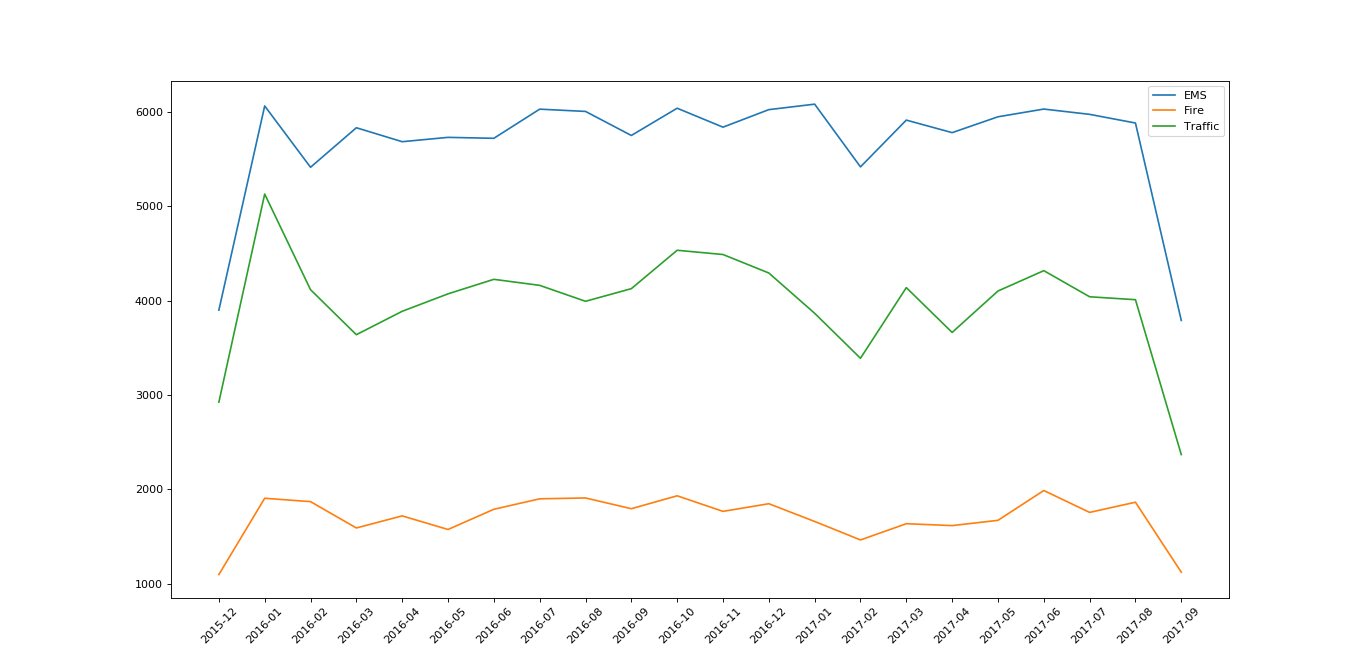
pandas之时间序列的更多相关文章
- pandas处理时间序列(4): 移动窗口函数
六.移动窗口函数 移动窗口和指数加权函数类别如↓: rolling_mean 移动窗口的均值 pandas.rolling_mean(arg, window, min_periods=None, fr ...
- pandas处理时间序列(3):重采样与频率转换
五.重采样与频率转换 1. resample方法 rng = pd.date_range('1/3/2019',periods=1000,freq='D') rng 2. 降采样 (1)resampl ...
- 03. Pandas 2| 时间序列
1.时间模块:datetime datetime模块,主要掌握:datetime.date(), datetime.datetime(), datetime.timedelta() 日期解析方法:pa ...
- pandas处理时间序列(2):DatetimeIndex、索引和选择、含有重复索引的时间序列、日期范围与频率和移位、时间区间和区间算术
一.时间序列基础 1. 时间戳索引DatetimeIndex 生成20个DatetimeIndex from datetime import datetime dates = pd.date_rang ...
- pandas处理时间序列(1):pd.Timestamp()、pd.Timedelta()、pd.datetime( )、 pd.Period()、pd.to_timestamp()、datetime.strftime()、pd.to_datetime( )、pd.to_period()
Pandas库是处理时间序列的利器,pandas有着强大的日期数据处理功能,可以按日期筛选数据.按日期显示数据.按日期统计数据. pandas的实际类型主要分为: timestamp(时间戳) ...
- pandas 之 时间序列索引
import numpy as np import pandas as pd 引入 A basic kind of time series object in pandas is a Series i ...
- pandas之时间序列(data_range)、重采样(resample)、重组时间序列(PeriodIndex)
1.data_range生成时间范围 a) pd.date_range(start=None, end=None, periods=None, freq='D') start和end以及freq配合能 ...
- pandas之时间序列笔记
时间戳tiimestamp:固定的时刻->pd.Timestamp 固定时期period:比如2016年3月份,再如2015年销售额->pd.Period 时间间隔interval:由起始 ...
- 笔记 | pandas之时间序列学习随笔1
1. 时间序列自动生成 ts = pd.Series(np.arange(1, 901), index=pd.date_range('2010-1-1', periods=900)) 最终生成了从20 ...
随机推荐
- python简述
python男神:龟叔 三,python基础初识. 1,运行python代码. 在d盘下创建一个t1.py文件内容是: print('hello world') 打开windows命令行输入cmd,确 ...
- SVN版本管理系统的使用(CentOS+Subversion+Apache+Jsvnadmin+TortoiseSVN)
1.服务器: 192.168.4.221root 用 户操作安装 装 apache# yum install httpd httpd-devel# service httpd start# chkco ...
- 关于Intel漏洞的学习
这几天报道了Intel的漏洞,这里学习一下并做个记录. 报告:https://spectreattack.com/spectre.pdf #include <stdio.h> #inclu ...
- Java 递归获取一个路径下的所有文件,文件夹名称
package com.readfile; import java.io.File; public class GetAllFiles { public static void main(String ...
- centOs6.5配置启动ssh
.非root用户则执行su或su - 或su root或su - root切换为root用户 2.查看SSH是否安装(检查是否装了SSH包) 输入命令:rpm -qa | grep ssh 注:若没安 ...
- Gym 102028C - Supreme Command - [思维题][2018-2019 ACM-ICPC Asia Jiaozuo Regional Contest Problem C]
题目链接:https://codeforces.com/gym/102028/problem/C Lewis likes playing chess. Now he has n rooks on th ...
- css 子盒子上下居中 文字溢出省略号
<!DOCTYPE html> <html lang="en"> <head> <meta charset="UTF-8&quo ...
- nodejs构建mock数据
Nodejs构建mock数据并通过rest api风格调用接口访问数据 如果我们只有json格式的数据文件,我们想通过访问url方式调用居然数据 确保电脑安装node环境 如果你没有安装好node环境 ...
- 从光盘安装ubuntu系统
参考博客: https://www.jianshu.com/p/7929e4911206
- DjangoMTV模型之model层——ORM操作数据库(基本增删改查)
Django的数据库相关操作 对象关系映射(英语:(Object Relational Mapping,简称ORM),是一种程序技术,用于实现面向对象编程语言里不同类型系统的数据之间的转换.从效果上说 ...